Memory Leak Help!

Windows7Chicago

New member
Local time
4:50 AM
Messages
4
Hi Everyone,

I am having an issue that started about a month and a half ago.

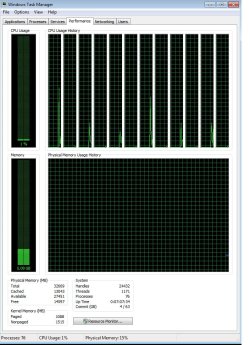
When i first boot Windows, I have over 25k "free memory" and Windows performs great.

After a few hours, the free memory is down to 10k and performance is slow.


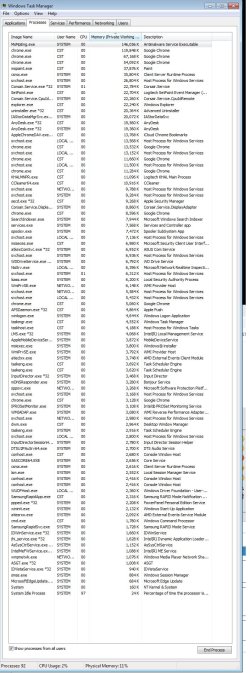
I've attached a screen shot of the task manager from when it's first booted.


I have super antispyware, microsoft security essentials, and Ccleaner.


I will post screenshots of when memory goes down in a few hours.

Thank you!
 

Attachments
  • taskmanager.jpg
    taskmanager.jpg
    221.8 KB · Views: 0
  • processes.jpg
    processes.jpg
    518.6 KB · Views: 5

My Computer

Computer type
PC/Desktop
Computer Manufacturer/Model Number
Custom Build
OS
IL
CPU
Intel i7-5930K @ 3.5 GHz
Motherboard
Asus
Memory
32 GB
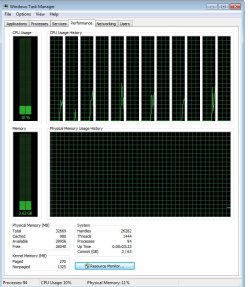
Here is an update. Memory gone down to 14k
 

Attachments

  • taskmanager.jpg
    taskmanager.jpg
    269.5 KB · Views: 0

My Computer

Computer type
PC/Desktop
Computer Manufacturer/Model Number
Custom Build
OS
IL
CPU
Intel i7-5930K @ 3.5 GHz
Motherboard
Asus
Memory
32 GB
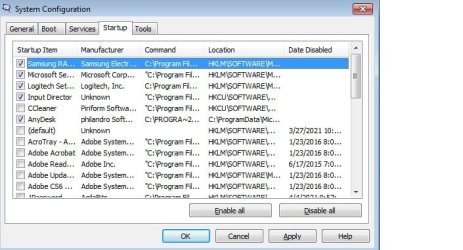
Startup items.

Memory leaking without running or using computer in the last 7 hours. Just idling and memory leaks...
 

Attachments

  • startup.jpg
    startup.jpg
    106.9 KB · Views: 12

My Computer

Computer type
PC/Desktop
Computer Manufacturer/Model Number
Custom Build
OS
IL
CPU
Intel i7-5930K @ 3.5 GHz
Motherboard
Asus
Memory
32 GB
The Free memory number is of little value. Personally I think Task Manager should not be showing this number so prominently. You really need to have a good understanding of how memory management works in a modern OS to make any sense of the Free memory value. Windows 10 Task Manager does not show this number and that is as it should be.

Actually a low value for Free memory is a good thing. It means the OS is using your memory for something that is potentially useful instead of letting it go to waste. Free memory is the ultimate in wasted memory. The optimum value for Free memory would be zero at all times. But we are not there yet.

In many cases I have seen a very low value for Free memory, in some cases even zero, and have good performance. The OS was designed to work that way. The value of Free memory is lower in the second screenshot but that is completely normal. In any event that number is by most standards huge.

The value that is important is Available memory and you have plenty of that, in the second screenshot it is 85%.

I see nothing in the screenshots that is unusual or cause for concern. Memory management in a modern OS is vastly more complex than most people imagine.

Whatever might be causing your performance issues, memory is clearly not it.
 

My Computer

Computer type
PC/Desktop
Computer Manufacturer/Model Number
HP
OS
Windows 7 Pro 64 bit
CPU
Xeon W3520
Memory
8 GB
Graphics Card(s)
Nvidia Geforce 210
Thanks for your response. I noticed my computer performance severely slow down after leaving computer on standby for a few hours. The free memory "going lower" without me using the computer was what had me questioning. Not sure what is going on either. Maybe a virus or bug but i have searched with malware, super antispywhere, and microsoft security essentials and nothing...
 

My Computer

Computer type
PC/Desktop
Computer Manufacturer/Model Number
Custom Build
OS
IL
CPU
Intel i7-5930K @ 3.5 GHz
Motherboard
Asus
Memory
32 GB
Back
Top