
Memory Not Matching Up.....

kneel

New member
Member
Local time
5:10 PM
Messages
41
Location
0h10
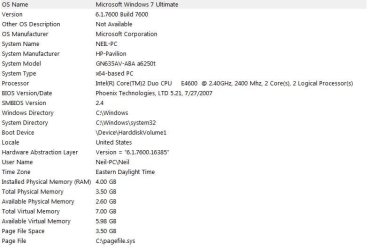
I just installed Windows 7 64 bit. I have 4 Gig's of Ram installed and it's telling me I have 4 installed, but only 3.5 usable.

Why? How can I fix that? My graphics card is a Nvidia geforce 9500 with 1024 of deicated memory with a gig of ram. It's got a DVI, VGA, & HDMI out's on it.

Can anyone help me understand why that 1/2 gig of Ram isn't showing up?

I'm going to attach a screen shot so you can see.....

Thanks for any help you can give, even if that's the way it's supposed to be!!!
 

Attachments
  • ramcapturepic.JPG
    ramcapturepic.JPG
    47.8 KB · Views: 14

My Computer

Computer Manufacturer/Model Number
HP Tower (x2), HP Netbook
OS
Windows 7 Ultimate x64, 7 Premium, & XP
CPU
Intel Core 2 Duo E4600 @ 2.40GHz
Motherboard
ASUSTek (stock)
Memory
4.0GB Dual-Channel DDR2 @ 333MHz
Graphics Card(s)
NVidia geForce9500 1 Gig
Sound Card
Realtek Something 7.1
Monitor(s) Displays
(2) HP w2207's (22" Display)
Screen Resolution
1680x1050 x2 60hz
Hard Drives
Stock, 300 Gig
Case
stock
Cooling
Never enough! :-)
Keyboard
HP
Mouse
Logitech Optical
Internet Speed
Never Fast Enough
Other Info
Owner/Administrator of:
www.tunemytoyota.com

My Computer

Computer type
PC/Desktop
Computer Manufacturer/Model Number
Dell XPS 420
OS
Windows 10, Home Clean Install
CPU
Intel Core2 processsor Q8200(2.33Ghz 1333FSB) Quad Core Tech
Motherboard
Dell
Memory
6 gb
Graphics Card(s)
ATI Radeon 256MB HD3650
Sound Card
Intergrated 7.1 Channel Audio
Monitor(s) Displays
Dell SP2009W 20"
Hard Drives
640 GB Serial ATA Hard drive
Cooling
Fan
Keyboard
Dell USB Keyboard
Mouse
Dell Premium Optical USB
Internet Speed
DSL 2.85
thanks for the link....

In your opinion, do you think I should try and update my BIOS and get that other 1/2 gig of ram to show/run?
 

My Computer

Computer Manufacturer/Model Number
HP Tower (x2), HP Netbook
OS
Windows 7 Ultimate x64, 7 Premium, & XP
CPU
Intel Core 2 Duo E4600 @ 2.40GHz
Motherboard
ASUSTek (stock)
Memory
4.0GB Dual-Channel DDR2 @ 333MHz
Graphics Card(s)
NVidia geForce9500 1 Gig
Sound Card
Realtek Something 7.1
Monitor(s) Displays
(2) HP w2207's (22" Display)
Screen Resolution
1680x1050 x2 60hz
Hard Drives
Stock, 300 Gig
Case
stock
Cooling
Never enough! :-)
Keyboard
HP
Mouse
Logitech Optical
Internet Speed
Never Fast Enough
Other Info
Owner/Administrator of:
www.tunemytoyota.com
Ill talk to you in the way that I think will offer the best help. If you are not experienced with the Bios, you should not do anything, you could cause permanent damage to your computer. I do not think that it is a problem, as I said.
 

My Computer

Computer type
PC/Desktop
Computer Manufacturer/Model Number
Dell XPS 420
OS
Windows 10, Home Clean Install
CPU
Intel Core2 processsor Q8200(2.33Ghz 1333FSB) Quad Core Tech
Motherboard
Dell
Memory
6 gb
Graphics Card(s)
ATI Radeon 256MB HD3650
Sound Card
Intergrated 7.1 Channel Audio
Monitor(s) Displays
Dell SP2009W 20"
Hard Drives
640 GB Serial ATA Hard drive
Cooling
Fan
Keyboard
Dell USB Keyboard
Mouse
Dell Premium Optical USB
Internet Speed
DSL 2.85
Ill talk to you in the way that I think will offer the best help. If you are not experienced with the Bios, you should not do anything, you could cause permanent damage to your computer. I do not think that it is a problem, as I said.

I thank you for your help.


I'm a forum guy, I own/admin/code 3 of my own.....BUT....I have access to a PC guru, which is why I'm wonderin if I should have him take a look at it. (Family member + PC/MAC genius).

Thank you tho Rich, 'preciate it! :geek:
 

My Computer

Computer Manufacturer/Model Number
HP Tower (x2), HP Netbook
OS
Windows 7 Ultimate x64, 7 Premium, & XP
CPU
Intel Core 2 Duo E4600 @ 2.40GHz
Motherboard
ASUSTek (stock)
Memory
4.0GB Dual-Channel DDR2 @ 333MHz
Graphics Card(s)
NVidia geForce9500 1 Gig
Sound Card
Realtek Something 7.1
Monitor(s) Displays
(2) HP w2207's (22" Display)
Screen Resolution
1680x1050 x2 60hz
Hard Drives
Stock, 300 Gig
Case
stock
Cooling
Never enough! :-)
Keyboard
HP
Mouse
Logitech Optical
Internet Speed
Never Fast Enough
Other Info
Owner/Administrator of:
www.tunemytoyota.com
Back
Top