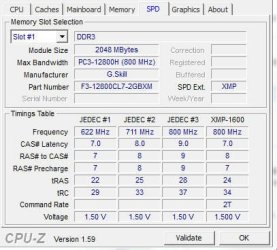
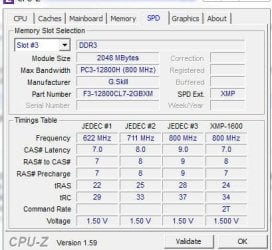
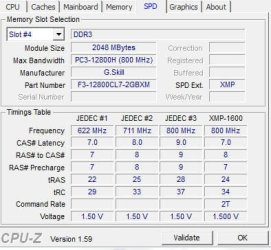
Did you get your RAM at the same time and from the same store?
One kit or two kits?
No I didn't get the last 2 sticks at the same time but I got them at the same store, newegg.com, I got the first 2 in March and the second in July or somewhere around there.
Your MemDiag test is showing errors.
Yes but it's not showing errors now
Asus forum said to bump it up to 1.55.
I was able to open those .wer files in notepad
Code:
first test
Version=1
EventType=MemDiagV1
EventTime=129665490090145812
Consent=1
UploadTime=129665490090301813
ReportIdentifier=c21d6194-1606-11e1-b6aa-bcaec576ecdb
Response.BucketId=2591664676
Response.BucketTable=5
Response.type=4
Sig[0].Name=Range of memory size
Sig[0].Value=4097
Sig[1].Name=Launch type
Sig[1].Value=Manual
Sig[2].Name=Schedule type
Sig[2].Value=Immediate
[COLOR=red]Sig[3].Name=Completion type[/COLOR]
[COLOR=red]Sig[3].Value=Fail[/COLOR]
Sig[4].Name=Test type
Sig[4].Value=Standard
[COLOR=red]Sig[5].Name=Failed tests[/COLOR]
[COLOR=red]Sig[5].Value=31[/COLOR]
[COLOR=red]Sig[6].Name=Number of bad pages[/COLOR]
[COLOR=red]Sig[6].Value=60[/COLOR]
Sig[7].Name=Test duration in seconds
Sig[7].Value=300
DynamicSig[1].Name=OS Version
DynamicSig[1].Value=6.1.7601.2.1.0.768.3
DynamicSig[2].Name=Locale ID
DynamicSig[2].Value=1033
State[0].Key=Transport.DoneStage1
State[0].Value=1
State[1].Key=DataRequest
State[1].Value=Bucket=-1703302620/nBucketTable=5/nResponse=1/n
FriendlyEventName=Memory test results reported
ConsentKey=MemDiagV1
AppName=Windows Memory Diagnostic
AppPath=C:\Windows\System32\RelPost.exe
ReportDescription=The results of running the Windows Memory Diagnostic were submitted to Microsoft for analysis and product improvement
[B]second test[/B]
[B]Version=1[/B]
[B]EventType=MemDiagV1[/B]
[B]EventTime=129665503502645179[/B]
[B]Consent=1[/B]
[B]UploadTime=129665503502645179[/B]
[B]ReportIdentifier=e18fe13b-1609-11e1-b064-bcaec576ecdb[/B]
[B]Response.BucketId=2591704860[/B]
[B]Response.BucketTable=5[/B]
[B]Response.type=4[/B]
[B]Sig[0].Name=Range of memory size[/B]
[B]Sig[0].Value=4097[/B]
[B]Sig[1].Name=Launch type[/B]
[B]Sig[1].Value=Manual[/B]
[B]Sig[2].Name=Schedule type[/B]
[B]Sig[2].Value=Immediate[/B]
[B][COLOR=red]Sig[3].Name=Completion type[/COLOR][/B]
[B][COLOR=red]Sig[3].Value=Fail[/COLOR][/B]
[B]Sig[4].Name=Test type[/B]
[B]Sig[4].Value=Standard[/B]
[B][COLOR=red]Sig[5].Name=Failed tests[/COLOR][/B]
[B][COLOR=red]Sig[5].Value=91[/COLOR][/B]
[B][COLOR=red]Sig[6].Name=Number of bad pages[/COLOR][/B]
[B][COLOR=red]Sig[6].Value=80[/COLOR][/B]
[B]Sig[7].Name=Test duration in seconds[/B]
[B]Sig[7].Value=330[/B]
[B]DynamicSig[1].Name=OS Version[/B]
[B]DynamicSig[1].Value=6.1.7601.2.1.0.768.3[/B]
[B]DynamicSig[2].Name=Locale ID[/B]
[B]DynamicSig[2].Value=1033[/B]
[B]State[0].Key=Transport.DoneStage1[/B]
[B]State[0].Value=1[/B]
[B]State[1].Key=DataRequest[/B]
[B]State[1].Value=Bucket=-1703262436/nBucketTable=5/nResponse=1/n[/B]
[B]FriendlyEventName=Memory test results reported[/B]
[B]ConsentKey=MemDiagV1[/B]
[B]AppName=Windows Memory Diagnostic[/B]
[B]AppPath=C:\Windows\System32\RelPost.exe[/B]
[B]ReportDescription=The results of running the Windows Memory Diagnostic were submitted to Microsoft for analysis and product improvement[/B]
[B][U]third test[/U][/B]
Version=1
EventType=MemDiagV1
EventTime=129665533004604948
Consent=1
UploadTime=129665533004760948
ReportIdentifier=c0040f94-1610-11e1-b60e-bcaec576ecdb
Response.BucketId=79261410
Response.BucketTable=5
Response.type=4
Sig[0].Name=Range of memory size
Sig[0].Value=4097
Sig[1].Name=Launch type
Sig[1].Value=Manual
Sig[2].Name=Schedule type
Sig[2].Value=Immediate
[COLOR=blue]Sig[3].Name=Completion type[/COLOR]
[COLOR=blue]Sig[3].Value=Pass[/COLOR]
Sig[4].Name=Test type
Sig[4].Value=Standard
[COLOR=blue]Sig[5].Name=Failed tests[/COLOR]
[COLOR=blue]Sig[5].Value=0[/COLOR]
[COLOR=blue]Sig[6].Name=Number of bad pages[/COLOR]
[COLOR=blue]Sig[6].Value=0[/COLOR]
Sig[7].Name=Test duration in seconds
Sig[7].Value=300
DynamicSig[1].Name=OS Version
DynamicSig[1].Value=6.1.7601.2.1.0.768.3
DynamicSig[2].Name=Locale ID
DynamicSig[2].Value=1033
State[0].Key=Transport.DoneStage1
State[0].Value=1
FriendlyEventName=Memory test results reported
ConsentKey=MemDiagV1
AppName=Windows Memory Diagnostic
AppPath=C:\Windows\System32\RelPost.exe
ReportDescription=The results of running the Windows Memory Diagnostic were submitted to Microsoft for analysis and product improvement
Run Memtest86+, it is a much better RAM test.
When you run memtest86+ you are looking for bad RAM cards, bad motherboard slots, so you need to follow the testing procedure in the tutorial.
Run the first memtest86+ test with all four RAM cards installed, if you get errors stop the test and then follow the procedure in the tutorial.
Sometimes errors from these tests can be corrected by adjusting the settings.
If you get any errors on any set of tests, you can stop the test and move to the next step.
I ran memtest for 6 passes and no errors
RAM - Test with Memtest86+
Have you been checking your temperatures?
I always keep track of temps, runs at 34 C or 35C
Use
Real Temp , to check the CPU temps when at idle, under load and/or testing.
Let us know the minimum and maximum temps you get.
This is very important, with four RAM cards or 4GB RAM or more you may need to bump the integrated memory controller voltage.
My cpu voltage is 1.30, Ram 1.55, but I didn't see a cpu integrated memory controller or is that the RAM one? I did bump the cpu and ram to these temps listed here.
Go to your BIOS and tell us what the CPU and the CPU integrated memory controller voltages are.