Memory - Set Maximum Amount Used by Windows

How to Set Maximum Memory to be Used by Windows 7 and Windows 8


   Information
This will show you how to specify the maximum amount of physical memory (RAM) to be used by Windows to simulate a low memory configuration by using less RAM, or to make sure that you are using all of your installed RAM.

Windows uses all of your installed RAM memory by default.

You must be logged in as an administrator to be able to do this tutorial.

   Note
32-bit (x86) Windows 7/8 Maximum RAM Limit
  • All editions: 4GB
64-bit (x64) Windows 7 Maximum RAM Limit per Edition
  • Home Basic: 8GB
  • Home Premium: 16GB
  • Professional: 192GB
  • Enterprise: 192GB
  • Ultimate: 192GB
64-bit (x64) Windows 8 and 8.1 Maximum RAM Limit per Edition

  • (core): 128GB
  • Pro: 512GB
  • Enterprise: 512GB
   Warning

  • If you have a integrated/onboard graphics chip on your motherboard and are using a graphics card instead, then double check your BIOS settings to make sure that you do not have any memory allocated to the integrated/onboard graphics chip (ex:hardware reserved) so that it will be used by Windows instead.
  • If you are using a integrated/onboard graphics chip on your motherboard to display your monitor from, then part of your memory (RAM) will be allocated to it as set in the BIOS.
  • Double check to see if you have a memory mapping option in your BIOS settings. If you do, enable it.

CONTENTS:

  • Option One: Set Maximum Memory for Windows in System Configuration (msconfig)
  • Option Two: Set Maximum Memory for Windows in Command Prompt in Windows
  • Option Three: Set Maximum Memory for Windows in Command Prompt at Boot


OPTION ONE

Set Maximum Memory for Windows in System Configuration (msconfig)

1. Press the Windows + R keys to open the Run dialog, type msconfig, and click/tap on OK.

2. If prompted by UAC, then click/tap on Yes.

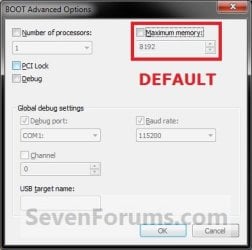
3. Under the Boot tab in System Configuration, click/tap on the Advanced options button, and do step 4 or step 5 below for what you would like to do. (see screenshot below)Step1.jpg4. To Have Windows Use All Installed Memory
NOTE: This is the default setting.A) Uncheck the Maximum memory box, click/tap on OK, and go to step 6 below. (see screenshot below)
NOTE: If the box is not checked, then it does not matter what the selected number is since Windows will use all available RAM by default and ignore whatever value is in the box underneath.Default.jpg5. To Have Windows Use a Specified Maximum Amount of Memory
NOTE: Only when the box is checked, can you specify how much installed RAM you want to allow Windows to be able to use in the drop down box. A) Check the Maximum memory box, then type in how many MB of your installed Memory that you want Windows to only be able to use up to, click/tap on OK, and go to step 6 below. (see screenshot below)
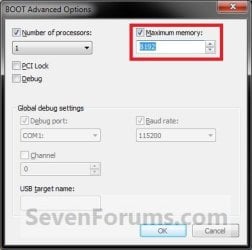
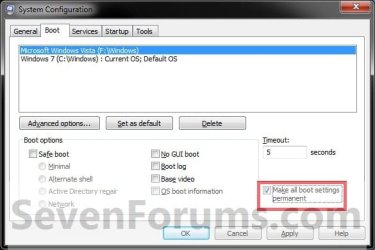
Set_Max_Memory.jpg6. Check the Make all boot settings permanent box, and click/tap on OK. (see screenshot below)
NOTE: You will still be able to come back and make changes again if you like.Step3.jpg
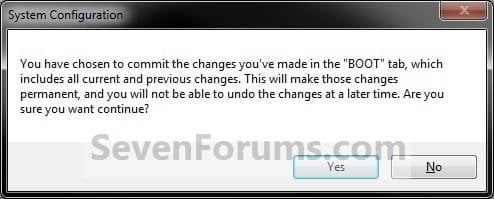
7. Click/tap on Yes. (see screenshot below)
NOTE: You will still be able to come back and make changes again if you like.Step4.jpg
8. Click/tap on the Restart button. (see screenshot below)
WARNING: This will restart the computer immediately. Make sure you save and close anything open that you do not want to lose first.

   Tip
If you checked the Don't show this message again box and would like to restore this Restart box to display again, then see: How to Restore the System Configuration Restart Prompt in Vista or Windows 7
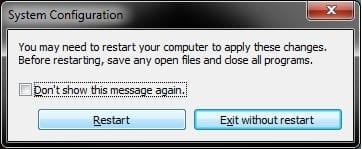
Step5.jpg
9. When Windows is finished restarting, it will now be using only the maximum amount of memory that you specified.
NOTE: You can look in Task Manager (CTRL+SHIFT+ESC) to confirm this amount of memory.Task_Manager.jpg


OPTION TWO

Set Maximum Memory for Windows in Command Prompt in Windows


1. Open an elevated command prompt in Windows 7 or Windows 8.

2. Do step 3 or step 4 below for what you would like to do.

3. To Have Windows Use a Specified Maximum Amount of MemoryA) In the elevated command prompt, type the command below, press Enter, and go to step 5 below. (see screenshot below) bcdedit /set {current} truncatememory bytes
   Note
Substitute bytes in the command above with how many actual bytes of maximum memory you want Windows to be able to use.

1073741824 bytes = 1 GB

(1073741824 x GB = bytes you type in command)


For example: If I wanted to set Windows to use 2 GB of maximum memory, then 1073741824 bytes x 2 GB = 2147483648. I would type this command below exactly.

bcdedit /set {current} truncatememory 2147483648
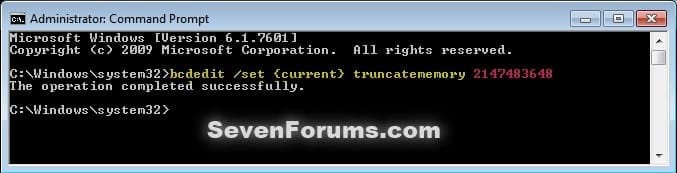


bcedit_truncatememory.jpg4. To Have Windows Use All Installed Memory
NOTE: This is the default setting.A) In the elevated command prompt, copy and paste the command below, press Enter, and go to step 5 below. (see screenshot below)

bcdedit /deletevalue {current} truncatememory
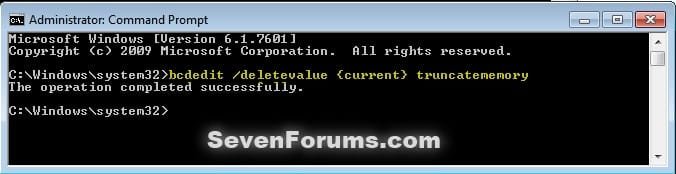

bcedit_deletevalue_truncatememory.jpg5. Restart the computer to apply.


OPTION THREE

Set Maximum Memory for Windows in Command Prompt at Boot


1. Open a command prompt at boot for Windows 7 or Windows 8.

2. Do step 3 or step 4 below for what you would like to do.

3. To Have Windows Use a Specified Maximum Amount of MemoryA) In the command prompt, type the command below, press Enter, and go to step 5 below. (see screenshot below)

bcdedit /set {default} truncatememory bytes


   Note
Substitute bytes in the command above with how many actual bytes of maximum memory you want Windows to be able to use.

1073741824 bytes = 1 GB

(1073741824 x GB = bytes you type in command)


For example: If I wanted to set Windows to use 2 GB of maximum memory, then 1073741824 bytes x 2 GB = 2147483648. I would type this command below exactly.

bcdedit /set {default} truncatememory 2147483648
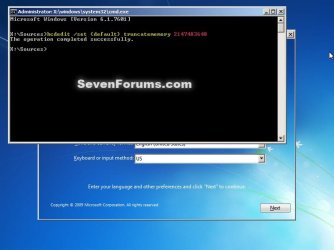


boot_bcedit_truncatememory.jpg
4. To Have Windows Use All Installed Memory
NOTE: This is the default setting.A) In the command prompt, type the command below, press Enter, and go to step 5 below. (see screenshot below)

bcdedit /deletevalue {default} truncatememory
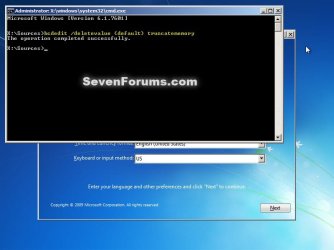

boot_bcedit_deletevalue_truncatememory.jpg
5. Restart the computer to apply.


That's it,
Shawn


Last edited:
No i dont have a virtual machine, i have my own video card and i dont know how to overclock my ram :/ OH and my board doesnt have integrated graphics.

i am still quite new to this so i dont know much about the bios if it would help i have a sabertooth990fx motherboard.

Ben,

As a test, check the Maximum memory box, select 16384 in the menu for 16 GB, and click OK to see how that setting may work.
 
Last edited:

My Computer

Computer type
PC/Desktop
Computer Manufacturer/Model Number
Self built custom
OS
64-bit Windows 11 Pro for Workstations
CPU
Intel i7-8700K OC'd to 5 GHz
Motherboard
ASUS ROG Maximus XI Formula Z390
Memory
64 GB (4x16GB) G.SKILL TridentZ RGB DDR4 3600 MHz
Graphics Card(s)
ASUS ROG-STRIX-GTX1080TI-O11G-GAMING
Sound Card
Integrated
Monitor(s) Displays
2 x Samsung Odyssey G7 27"
Screen Resolution
2560x1440
Hard Drives
1TB Samsung 990 PRO M.2,
4TB Samsung 990 PRO PRO M.2,
TerraMaster F8 SSD Plus NAS
PSU
Seasonic Prime Titanium 850W
Case
Thermaltake Core P3
Cooling
Corsair Hydro H115i
Keyboard
Logitech wireless K800
Mouse
Logitech MX Master 4
Internet Speed
2 Gb/s Download and 100 Mb/s Upload
Antivirus
Malwarebyte Anti-Malware Premium
Browser
Google Chrome
Other Info
Logitech Z625 speaker system,
Logitech BRIO 4K Pro webcam,
HP Color LaserJet Pro MFP M477fdn,
APC SMART-UPS RT 1000 XL - SURT1000XLI,
Galaxy S23 Plus phone
That did not work unfortunately
 

My Computer

Computer type
PC/Desktop
OS
Arkansas

My Computer

Computer type
PC/Desktop
Computer Manufacturer/Model Number
Self built custom
OS
64-bit Windows 11 Pro for Workstations
CPU
Intel i7-8700K OC'd to 5 GHz
Motherboard
ASUS ROG Maximus XI Formula Z390
Memory
64 GB (4x16GB) G.SKILL TridentZ RGB DDR4 3600 MHz
Graphics Card(s)
ASUS ROG-STRIX-GTX1080TI-O11G-GAMING
Sound Card
Integrated
Monitor(s) Displays
2 x Samsung Odyssey G7 27"
Screen Resolution
2560x1440
Hard Drives
1TB Samsung 990 PRO M.2,
4TB Samsung 990 PRO PRO M.2,
TerraMaster F8 SSD Plus NAS
PSU
Seasonic Prime Titanium 850W
Case
Thermaltake Core P3
Cooling
Corsair Hydro H115i
Keyboard
Logitech wireless K800
Mouse
Logitech MX Master 4
Internet Speed
2 Gb/s Download and 100 Mb/s Upload
Antivirus
Malwarebyte Anti-Malware Premium
Browser
Google Chrome
Other Info
Logitech Z625 speaker system,
Logitech BRIO 4K Pro webcam,
HP Color LaserJet Pro MFP M477fdn,
APC SMART-UPS RT 1000 XL - SURT1000XLI,
Galaxy S23 Plus phone
I have 64-Bit Windows 7 Home premium, and its still shows that i have 7.95 gb available but 16 total. Btw this just happened this month i was able to use all 16 before. The answer to both your questions were in my Pictures i provided.
 

My Computer

Computer type
PC/Desktop
OS
Arkansas
Did you try updating your WEI?

In addition, please post back with the "view and print details" of the WEI to see if anything in it may help ID the issue.
 

My Computer

Computer type
PC/Desktop
Computer Manufacturer/Model Number
Self built custom
OS
64-bit Windows 11 Pro for Workstations
CPU
Intel i7-8700K OC'd to 5 GHz
Motherboard
ASUS ROG Maximus XI Formula Z390
Memory
64 GB (4x16GB) G.SKILL TridentZ RGB DDR4 3600 MHz
Graphics Card(s)
ASUS ROG-STRIX-GTX1080TI-O11G-GAMING
Sound Card
Integrated
Monitor(s) Displays
2 x Samsung Odyssey G7 27"
Screen Resolution
2560x1440
Hard Drives
1TB Samsung 990 PRO M.2,
4TB Samsung 990 PRO PRO M.2,
TerraMaster F8 SSD Plus NAS
PSU
Seasonic Prime Titanium 850W
Case
Thermaltake Core P3
Cooling
Corsair Hydro H115i
Keyboard
Logitech wireless K800
Mouse
Logitech MX Master 4
Internet Speed
2 Gb/s Download and 100 Mb/s Upload
Antivirus
Malwarebyte Anti-Malware Premium
Browser
Google Chrome
Other Info
Logitech Z625 speaker system,
Logitech BRIO 4K Pro webcam,
HP Color LaserJet Pro MFP M477fdn,
APC SMART-UPS RT 1000 XL - SURT1000XLI,
Galaxy S23 Plus phone
What should i set mine at?

im not sure what to set mine at

Os-Windows 8 64-bit (6.2,build 9200)
Model-Asus
Nvidia Geforce gtx 670mx Aprrox total memory 14970
hard drive-Hdd
memory-24576 mb.24.0 gig
Proccessor-intel(r) core(tm)i7-3630qm cpu @ 2.40Ghz
page file 6256mb used 21600mb Available

when i click the box it says

max memory 24576
 

My Computer

Computer type
Laptop
Computer Manufacturer/Model Number
Asus
OS
Windows 8 64-bit (6.2,build 9200)
CPU
Proccessor-intel(r) core(tm)i7-3630qm cpu @ 2.40Ghz
Motherboard
not sure how to check
Memory
24576 mb
Graphics Card(s)
Nvidia Geforce gtx 670mx Aprrox total memory 14970
Hard Drives
Hdd
Antivirus
Avast Internet security,Malwerebytes
Hello Visored, and welcome to Seven Forums.

You should keep the Maximum memory box unchecked. You would only want to check the box and select a size for testing purposes. :)
 

My Computer

Computer type
PC/Desktop
Computer Manufacturer/Model Number
Self built custom
OS
64-bit Windows 11 Pro for Workstations
CPU
Intel i7-8700K OC'd to 5 GHz
Motherboard
ASUS ROG Maximus XI Formula Z390
Memory
64 GB (4x16GB) G.SKILL TridentZ RGB DDR4 3600 MHz
Graphics Card(s)
ASUS ROG-STRIX-GTX1080TI-O11G-GAMING
Sound Card
Integrated
Monitor(s) Displays
2 x Samsung Odyssey G7 27"
Screen Resolution
2560x1440
Hard Drives
1TB Samsung 990 PRO M.2,
4TB Samsung 990 PRO PRO M.2,
TerraMaster F8 SSD Plus NAS
PSU
Seasonic Prime Titanium 850W
Case
Thermaltake Core P3
Cooling
Corsair Hydro H115i
Keyboard
Logitech wireless K800
Mouse
Logitech MX Master 4
Internet Speed
2 Gb/s Download and 100 Mb/s Upload
Antivirus
Malwarebyte Anti-Malware Premium
Browser
Google Chrome
Other Info
Logitech Z625 speaker system,
Logitech BRIO 4K Pro webcam,
HP Color LaserJet Pro MFP M477fdn,
APC SMART-UPS RT 1000 XL - SURT1000XLI,
Galaxy S23 Plus phone
wouldn't that be letting all the ram go to waste?
 

My Computer

Computer type
Laptop
Computer Manufacturer/Model Number
Asus
OS
Windows 8 64-bit (6.2,build 9200)
CPU
Proccessor-intel(r) core(tm)i7-3630qm cpu @ 2.40Ghz
Motherboard
not sure how to check
Memory
24576 mb
Graphics Card(s)
Nvidia Geforce gtx 670mx Aprrox total memory 14970
Hard Drives
Hdd
Antivirus
Avast Internet security,Malwerebytes
No. By default, Windows will always use all available RAM. :)
 

My Computer

Computer type
PC/Desktop
Computer Manufacturer/Model Number
Self built custom
OS
64-bit Windows 11 Pro for Workstations
CPU
Intel i7-8700K OC'd to 5 GHz
Motherboard
ASUS ROG Maximus XI Formula Z390
Memory
64 GB (4x16GB) G.SKILL TridentZ RGB DDR4 3600 MHz
Graphics Card(s)
ASUS ROG-STRIX-GTX1080TI-O11G-GAMING
Sound Card
Integrated
Monitor(s) Displays
2 x Samsung Odyssey G7 27"
Screen Resolution
2560x1440
Hard Drives
1TB Samsung 990 PRO M.2,
4TB Samsung 990 PRO PRO M.2,
TerraMaster F8 SSD Plus NAS
PSU
Seasonic Prime Titanium 850W
Case
Thermaltake Core P3
Cooling
Corsair Hydro H115i
Keyboard
Logitech wireless K800
Mouse
Logitech MX Master 4
Internet Speed
2 Gb/s Download and 100 Mb/s Upload
Antivirus
Malwarebyte Anti-Malware Premium
Browser
Google Chrome
Other Info
Logitech Z625 speaker system,
Logitech BRIO 4K Pro webcam,
HP Color LaserJet Pro MFP M477fdn,
APC SMART-UPS RT 1000 XL - SURT1000XLI,
Galaxy S23 Plus phone
Ben,

Did you notice if this happened after anything specific? (ex: new drivers, BIOS, etc...)
 

My Computer

Computer type
PC/Desktop
Computer Manufacturer/Model Number
Self built custom
OS
64-bit Windows 11 Pro for Workstations
CPU
Intel i7-8700K OC'd to 5 GHz
Motherboard
ASUS ROG Maximus XI Formula Z390
Memory
64 GB (4x16GB) G.SKILL TridentZ RGB DDR4 3600 MHz
Graphics Card(s)
ASUS ROG-STRIX-GTX1080TI-O11G-GAMING
Sound Card
Integrated
Monitor(s) Displays
2 x Samsung Odyssey G7 27"
Screen Resolution
2560x1440
Hard Drives
1TB Samsung 990 PRO M.2,
4TB Samsung 990 PRO PRO M.2,
TerraMaster F8 SSD Plus NAS
PSU
Seasonic Prime Titanium 850W
Case
Thermaltake Core P3
Cooling
Corsair Hydro H115i
Keyboard
Logitech wireless K800
Mouse
Logitech MX Master 4
Internet Speed
2 Gb/s Download and 100 Mb/s Upload
Antivirus
Malwarebyte Anti-Malware Premium
Browser
Google Chrome
Other Info
Logitech Z625 speaker system,
Logitech BRIO 4K Pro webcam,
HP Color LaserJet Pro MFP M477fdn,
APC SMART-UPS RT 1000 XL - SURT1000XLI,
Galaxy S23 Plus phone
No nothing was changed it just happened one day and i have no clue why. so as you can see im utterly confused
 

My Computer

Computer type
PC/Desktop
OS
Arkansas
Ben,

As a test, remove all of your RAM sticks except one, and test to see how much RAM is available. Repeat adding another stick and test again until all RAM sticks are installed or the issue shows up.

If the issue doesn't show up with 1 stick, but shows up after adding other sticks, then remove the stick it happens with and test with another one to see if it happens with it as well to help rule out an issue with that stick it happened with.

Are the specs of your memory sticks identical?
 

My Computer

Computer type
PC/Desktop
Computer Manufacturer/Model Number
Self built custom
OS
64-bit Windows 11 Pro for Workstations
CPU
Intel i7-8700K OC'd to 5 GHz
Motherboard
ASUS ROG Maximus XI Formula Z390
Memory
64 GB (4x16GB) G.SKILL TridentZ RGB DDR4 3600 MHz
Graphics Card(s)
ASUS ROG-STRIX-GTX1080TI-O11G-GAMING
Sound Card
Integrated
Monitor(s) Displays
2 x Samsung Odyssey G7 27"
Screen Resolution
2560x1440
Hard Drives
1TB Samsung 990 PRO M.2,
4TB Samsung 990 PRO PRO M.2,
TerraMaster F8 SSD Plus NAS
PSU
Seasonic Prime Titanium 850W
Case
Thermaltake Core P3
Cooling
Corsair Hydro H115i
Keyboard
Logitech wireless K800
Mouse
Logitech MX Master 4
Internet Speed
2 Gb/s Download and 100 Mb/s Upload
Antivirus
Malwarebyte Anti-Malware Premium
Browser
Google Chrome
Other Info
Logitech Z625 speaker system,
Logitech BRIO 4K Pro webcam,
HP Color LaserJet Pro MFP M477fdn,
APC SMART-UPS RT 1000 XL - SURT1000XLI,
Galaxy S23 Plus phone
i have done that, and all that sticks work. and yes they are all identical.
 

My Computer

Computer type
PC/Desktop
OS
Arkansas
That's fine, but is all RAM available when you only have 1 stick, or does it still do this no matter with 1, 2, or all sticks?
 

My Computer

Computer type
PC/Desktop
Computer Manufacturer/Model Number
Self built custom
OS
64-bit Windows 11 Pro for Workstations
CPU
Intel i7-8700K OC'd to 5 GHz
Motherboard
ASUS ROG Maximus XI Formula Z390
Memory
64 GB (4x16GB) G.SKILL TridentZ RGB DDR4 3600 MHz
Graphics Card(s)
ASUS ROG-STRIX-GTX1080TI-O11G-GAMING
Sound Card
Integrated
Monitor(s) Displays
2 x Samsung Odyssey G7 27"
Screen Resolution
2560x1440
Hard Drives
1TB Samsung 990 PRO M.2,
4TB Samsung 990 PRO PRO M.2,
TerraMaster F8 SSD Plus NAS
PSU
Seasonic Prime Titanium 850W
Case
Thermaltake Core P3
Cooling
Corsair Hydro H115i
Keyboard
Logitech wireless K800
Mouse
Logitech MX Master 4
Internet Speed
2 Gb/s Download and 100 Mb/s Upload
Antivirus
Malwarebyte Anti-Malware Premium
Browser
Google Chrome
Other Info
Logitech Z625 speaker system,
Logitech BRIO 4K Pro webcam,
HP Color LaserJet Pro MFP M477fdn,
APC SMART-UPS RT 1000 XL - SURT1000XLI,
Galaxy S23 Plus phone
OH yes it will allow me to go to 8GB but after that everything else goes to hardware reserve, come to think of it i should have opened with that :P
 

My Computer

Computer type
PC/Desktop
OS
Arkansas
Ben,

What are the specs for your RAM? I'm assuming 4 x 4GB sticks?

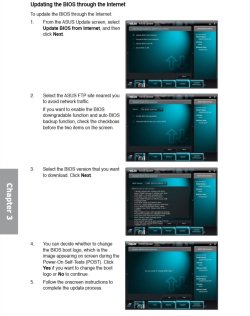
Check to see what BIOS version you have for your SABERTOOTH 990FX motherboard. At Asus's website below, it shows the latest version is 1604. If you have an older version number, then you might consider updating your BIOS to the latest 1604. Page 3-32 in your manual shows an easy way to update your BIOS through the internet from within you BIOS settings.

Motherboards - SABERTOOTH 990FX
BIOS.jpg

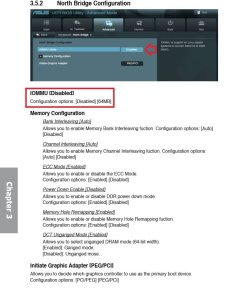
Looking at your motherboard's manual (3-16). Check your BIOS to make sure that you have the IOMMU setting disabled like below in Advanced -> North Bridge Configuration.
IOMMU.jpg
 

My Computer

Computer type
PC/Desktop
Computer Manufacturer/Model Number
Self built custom
OS
64-bit Windows 11 Pro for Workstations
CPU
Intel i7-8700K OC'd to 5 GHz
Motherboard
ASUS ROG Maximus XI Formula Z390
Memory
64 GB (4x16GB) G.SKILL TridentZ RGB DDR4 3600 MHz
Graphics Card(s)
ASUS ROG-STRIX-GTX1080TI-O11G-GAMING
Sound Card
Integrated
Monitor(s) Displays
2 x Samsung Odyssey G7 27"
Screen Resolution
2560x1440
Hard Drives
1TB Samsung 990 PRO M.2,
4TB Samsung 990 PRO PRO M.2,
TerraMaster F8 SSD Plus NAS
PSU
Seasonic Prime Titanium 850W
Case
Thermaltake Core P3
Cooling
Corsair Hydro H115i
Keyboard
Logitech wireless K800
Mouse
Logitech MX Master 4
Internet Speed
2 Gb/s Download and 100 Mb/s Upload
Antivirus
Malwarebyte Anti-Malware Premium
Browser
Google Chrome
Other Info
Logitech Z625 speaker system,
Logitech BRIO 4K Pro webcam,
HP Color LaserJet Pro MFP M477fdn,
APC SMART-UPS RT 1000 XL - SURT1000XLI,
Galaxy S23 Plus phone
yes it is 4 X 4GB, yes my bios is 1604 and IOMMU setting is disabled
 

My Computer

Computer type
PC/Desktop
OS
Arkansas
In that case, you might see if clearing CMOS to reset you BIOS settings to default may help.
 

My Computer

Computer type
PC/Desktop
Computer Manufacturer/Model Number
Self built custom
OS
64-bit Windows 11 Pro for Workstations
CPU
Intel i7-8700K OC'd to 5 GHz
Motherboard
ASUS ROG Maximus XI Formula Z390
Memory
64 GB (4x16GB) G.SKILL TridentZ RGB DDR4 3600 MHz
Graphics Card(s)
ASUS ROG-STRIX-GTX1080TI-O11G-GAMING
Sound Card
Integrated
Monitor(s) Displays
2 x Samsung Odyssey G7 27"
Screen Resolution
2560x1440
Hard Drives
1TB Samsung 990 PRO M.2,
4TB Samsung 990 PRO PRO M.2,
TerraMaster F8 SSD Plus NAS
PSU
Seasonic Prime Titanium 850W
Case
Thermaltake Core P3
Cooling
Corsair Hydro H115i
Keyboard
Logitech wireless K800
Mouse
Logitech MX Master 4
Internet Speed
2 Gb/s Download and 100 Mb/s Upload
Antivirus
Malwarebyte Anti-Malware Premium
Browser
Google Chrome
Other Info
Logitech Z625 speaker system,
Logitech BRIO 4K Pro webcam,
HP Color LaserJet Pro MFP M477fdn,
APC SMART-UPS RT 1000 XL - SURT1000XLI,
Galaxy S23 Plus phone
Does tutorial essentially give you MORE User Memory and restricts SYSTEM from eating up RAM and limits how much it eats?
 

My Computer

Computer Manufacturer/Model Number
Mac Book Pro | Thinkpads T61 X61T W510
OS
WinXP/ Win7x64/ Mac OSX Snow Leopard - Multi Boot
Back
Top