Memory usage maxes out 100% during file transfer, computer freezes

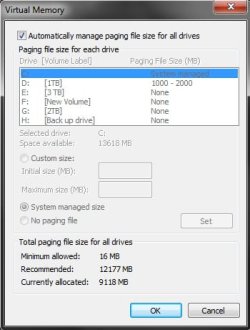
Hi logicearth. Thanks for stopping by. I ran a search on my C drive. No results came back for a pagefile.
 

My Computer My Computer

OS
Windows 7 Professional 64bit

My Computer My Computer

Computer type
PC/Desktop
Computer Manufacturer/Model Number
Alienware Aurora ALX R4
OS
Windows 10 Pro (x64)
CPU
Intel Core i7-3930K (3.2GHz - 4.5GHz)
Motherboard
Alienware Aurora-R4 x79
Memory
4x Samsung 4GB PC3-12800 DDR3 (16GB 1600MHz)
Graphics Card(s)
Nvidia Geforce GTX 690
Sound Card
SteelSeries Siberia Elite
Monitor(s) Displays
Dell UltraSharp U3011
Screen Resolution
2560x1600
Hard Drives
Samsung 850 Pro 256 GB, Seagate 1TB Desktop Hybrid HDD, 2x Western Digital 4TB Green HDD
PSU
875W Some Dell PSU <.<
Case
Alienware Aurora ALX
Cooling
Custom Liquid Cooling (EK CPU & GPU blocks) dual EK 480RAD
Keyboard
Logitech G710+ Mechanical
Mouse
Logitech G700s
Internet Speed
Verizon Fios (50 mbps average)
Other Info
Server: Intel NUC D54250WYK: i5-4250U, 16GB, 256 GB mSATA, Windows Server 2012 R2
After looking at the trace, I'm wondering if this isn't one of the nascent dynamic cache issues that still exist in Win7/2008R2... David, can you download/run rammap after copying a large file (if you can use the same file copy scenario you used to create the xperf traces, that'd be fantastic) and post a screenshot of the rammap window? I want to see if metafile (pink) on the left-hand graph is consuming the system's RAM or not...
 

My Computer My Computer

Computer type
PC/Desktop
Computer Manufacturer/Model Number
Custom
OS
Windows 10 Pro x64
CPU
Intel Core i7 4790K @ 4.5GHz
Motherboard
Asus Maximus Hero VII
Memory
32GB DDR3
Graphics Card(s)
Nvidia GeForce GTX970
Sound Card
Realtek HD Audio
Screen Resolution
1920x1200
Hard Drives
1x Samsung 250GB SSD
4x WD RE 2TB (RAIDZ)
PSU
Corsair AX760i
Case
Fractal Design Define R4
Cooling
Noctua NH-D15
Hello, sorry for the delay. I didn't see an email alert that this thread had been posted to. I'll follow the new instructions and post results.
 

My Computer My Computer

OS
Windows 7 Professional 64bit
Regarding the possibility of it being nascent dynamic cache issue, I'm not sure of this as this drive worked fine until it was uninstalled and reinstalled. It was only after reinstallation that the problem started.

I'll update on my test results soon.

Thanks again!
 

My Computer My Computer

OS
Windows 7 Professional 64bit

Attachments

  • pagefile.jpg
    pagefile.jpg
    43.2 KB · Views: 21

My Computer My Computer

OS
Windows 7 Professional 64bit
Hello,

I am experiencing the same problem with large file (50GB+, bluray disc converted to iso file) copy action towards my 3TB drive (Hitachi HDS5C3030ALA630). Copying from the 3TB drive towards other drives ( 2GB, 3TB (2x 1.5TB in Raid0)) works fine.

I think I could Zip or Rar or Split the big file into smaller parts (multi volume) which will fit into memory (I have 8GB RAM) and copy the smaller parts to the big 3TB drive, but that would be cumbersome. I don't really want to do that every time.

So I experience the same issue while copying towards the 3TB drive, Windows Task Manager shows my RAM usage is going towards 99% and then everything is slow, though mouse cursor movement is working fine, Task Manager shows very little CPU usage, but every click on any window is slowed down or not even working. I have tried fixed pagefile size, automatic, it all doesn't seem to help.

The only thing that is different is that my 3TB drive is a GPT volume. I have no knowledge if that could affect the copy behaviour though.

 

My Computer My Computer

OS
Windows Ultimate 7 x64 SP1
Found Another forum thread about Windows Server 2008 R2, which mentions also Windows 7 with memory usage problems with file copy actions.

2008R2 memory caching

The DynCache application mentioned there I have tried, but somehow it fails to install on Windows 7 following the installation document, which could mean it is not intended for Windows 7 as the article already mentioned.

To be able to adjust the maximum cache used in RAM for File IO transfer would be nice, but still I think the larger than 2TB volumes are raising the problem.
 

My Computer My Computer

OS
Windows Ultimate 7 x64 SP1
Back
Top