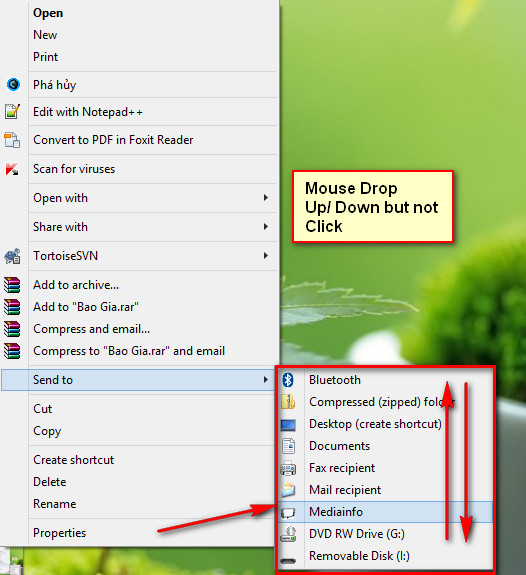
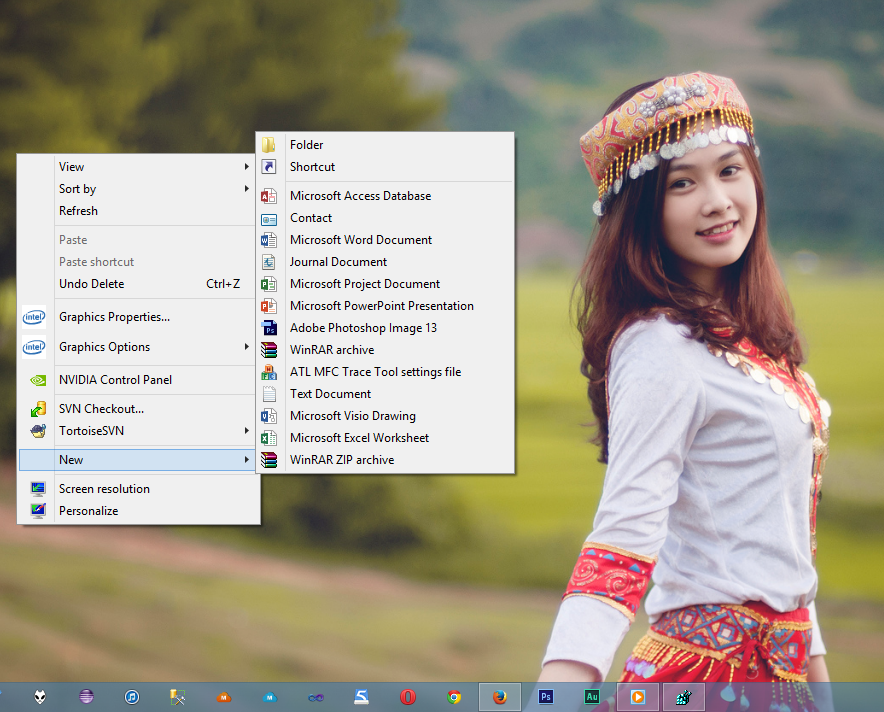
menu send to seems dim

conchuotduy

New member
Local time
2:45 AM
Messages
17
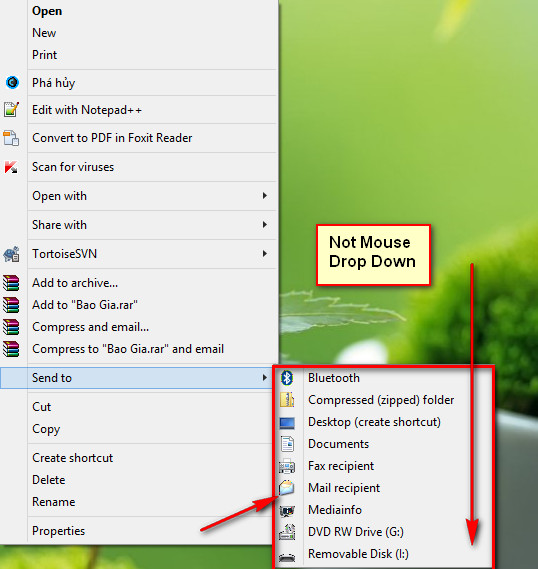
@Brink: I updated win 8 pro to 8.1 pro, but menu send to seems dim, but i drop mouse down/up on menu, menu not dim
yJLYX2o.jpg


j2kxU7P.jpg
 
Last edited by a moderator:

My Computer

Computer type
Laptop
Computer Manufacturer/Model Number
5420 Audi
OS
Win 8.1
CPU
i5
Motherboard
dell
Memory
8gb
Graphics Card(s)
hd4000
Antivirus
KIS
Hello Conchuotduy,

You might see if restarting the PC may help if it's just a glitch.

If it doesn't help, then you might see if updating you video driver or using a different version may help.

Hope this helps for now, :)
Shawn
 

My Computer

Computer type
PC/Desktop
Computer Manufacturer/Model Number
Self built custom
OS
64-bit Windows 11 Pro for Workstations
CPU
Intel i7-8700K OC'd to 5 GHz
Motherboard
ASUS ROG Maximus XI Formula Z390
Memory
64 GB (4x16GB) G.SKILL TridentZ RGB DDR4 3600 MHz
Graphics Card(s)
ASUS ROG-STRIX-GTX1080TI-O11G-GAMING
Sound Card
Integrated
Monitor(s) Displays
2 x Samsung Odyssey G7 27"
Screen Resolution
2560x1440
Hard Drives
1TB Samsung 990 PRO M.2,
4TB Samsung 990 PRO PRO M.2,
TerraMaster F8 SSD Plus NAS
PSU
Seasonic Prime Titanium 850W
Case
Thermaltake Core P3
Cooling
Corsair Hydro H115i
Keyboard
Logitech wireless K800
Mouse
Logitech MX Master 4
Internet Speed
2 Gb/s Download and 100 Mb/s Upload
Antivirus
Malwarebyte Anti-Malware Premium
Browser
Google Chrome
Other Info
Logitech Z625 speaker system,
Logitech BRIO 4K Pro webcam,
HP Color LaserJet Pro MFP M477fdn,
APC SMART-UPS RT 1000 XL - SURT1000XLI,
Galaxy S23 Plus phone
Hello Conchuotduy,

You might see if restarting the PC may help if it's just a glitch.

If it doesn't help, then you might see if updating you video driver or using a different version may help.

Hope this helps for now, :)
Shawn

I'm use driver from Dell. OEM. Everything was normal except menu "send to" :confused:

4qbMcHX.png
 

My Computer

Computer type
Laptop
Computer Manufacturer/Model Number
5420 Audi
OS
Win 8.1
CPU
i5
Motherboard
dell
Memory
8gb
Graphics Card(s)
hd4000
Antivirus
KIS
It is doing this with any other menu, or just the Send to menu?

Just to make sure, when you move the mouse pointer over an item in the "Send to" context menu, it doesn't highlight, clicking on it doesn't work, or both?
 

My Computer

Computer type
PC/Desktop
Computer Manufacturer/Model Number
Self built custom
OS
64-bit Windows 11 Pro for Workstations
CPU
Intel i7-8700K OC'd to 5 GHz
Motherboard
ASUS ROG Maximus XI Formula Z390
Memory
64 GB (4x16GB) G.SKILL TridentZ RGB DDR4 3600 MHz
Graphics Card(s)
ASUS ROG-STRIX-GTX1080TI-O11G-GAMING
Sound Card
Integrated
Monitor(s) Displays
2 x Samsung Odyssey G7 27"
Screen Resolution
2560x1440
Hard Drives
1TB Samsung 990 PRO M.2,
4TB Samsung 990 PRO PRO M.2,
TerraMaster F8 SSD Plus NAS
PSU
Seasonic Prime Titanium 850W
Case
Thermaltake Core P3
Cooling
Corsair Hydro H115i
Keyboard
Logitech wireless K800
Mouse
Logitech MX Master 4
Internet Speed
2 Gb/s Download and 100 Mb/s Upload
Antivirus
Malwarebyte Anti-Malware Premium
Browser
Google Chrome
Other Info
Logitech Z625 speaker system,
Logitech BRIO 4K Pro webcam,
HP Color LaserJet Pro MFP M477fdn,
APC SMART-UPS RT 1000 XL - SURT1000XLI,
Galaxy S23 Plus phone
It is doing this with any other menu, or just the Send to menu?

Just to make sure, when you move the mouse pointer over an item in the "Send to" context menu, it doesn't highlight, clicking on it doesn't work, or both?

Everything was normal except menu "send to". Just the "Send to" menu :confused:

I move the mouse pointer over an item in the "Send to" context menu, if click on it work fine. Just item (icon blur)
 

My Computer

Computer type
Laptop
Computer Manufacturer/Model Number
5420 Audi
OS
Win 8.1
CPU
i5
Motherboard
dell
Memory
8gb
Graphics Card(s)
hd4000
Antivirus
KIS
I must admit that I'm not sure why it's only not highlighting in your "Send to" context menu, and all other menus work fine.

How does it work when you press and hold the Shift key, right click on the file, release Shift, and click on Sent to?
 

My Computer

Computer type
PC/Desktop
Computer Manufacturer/Model Number
Self built custom
OS
64-bit Windows 11 Pro for Workstations
CPU
Intel i7-8700K OC'd to 5 GHz
Motherboard
ASUS ROG Maximus XI Formula Z390
Memory
64 GB (4x16GB) G.SKILL TridentZ RGB DDR4 3600 MHz
Graphics Card(s)
ASUS ROG-STRIX-GTX1080TI-O11G-GAMING
Sound Card
Integrated
Monitor(s) Displays
2 x Samsung Odyssey G7 27"
Screen Resolution
2560x1440
Hard Drives
1TB Samsung 990 PRO M.2,
4TB Samsung 990 PRO PRO M.2,
TerraMaster F8 SSD Plus NAS
PSU
Seasonic Prime Titanium 850W
Case
Thermaltake Core P3
Cooling
Corsair Hydro H115i
Keyboard
Logitech wireless K800
Mouse
Logitech MX Master 4
Internet Speed
2 Gb/s Download and 100 Mb/s Upload
Antivirus
Malwarebyte Anti-Malware Premium
Browser
Google Chrome
Other Info
Logitech Z625 speaker system,
Logitech BRIO 4K Pro webcam,
HP Color LaserJet Pro MFP M477fdn,
APC SMART-UPS RT 1000 XL - SURT1000XLI,
Galaxy S23 Plus phone
I must admit that I'm not sure why it's only not highlighting in your "Send to" context menu, and all other menus work fine.

How does it work when you press and hold the Shift key, right click on the file, release Shift, and click on Sent to?

OK, thank for help :D
Menu work fine but i don't like icon blur, i move up/down (don't click left, right, mid button mouse) seem icon highlinging.
 

My Computer

Computer type
Laptop
Computer Manufacturer/Model Number
5420 Audi
OS
Win 8.1
CPU
i5
Motherboard
dell
Memory
8gb
Graphics Card(s)
hd4000
Antivirus
KIS
Code:
[LocalizedFileNames]
Compressed (zipped) Folder.ZFSendToTarget=[B]@zipfldr.dll[/B],-10148
Desktop (create shortcut).DeskLink=[B]@sendmail.dll[/B],-21
Documents.mydocs=[B]@shell32.dll[/B],-34575
Fax Recipient.lnk=@%SystemRoot%\system32\[B]FXSRESM.dll[/B],-120
Mail Recipient.MAPIMail=[B]@sendmail.dll[/B],-4

I thing, repair *.dll ???

So, how to repair *.dll from *.ISO or *.wim from source *.iso? I thing icon thump error during i upgrade win 8 pro to 8.1 pro from store!
 

My Computer

Computer type
Laptop
Computer Manufacturer/Model Number
5420 Audi
OS
Win 8.1
CPU
i5
Motherboard
dell
Memory
8gb
Graphics Card(s)
hd4000
Antivirus
KIS
So you're saying that the only issue is that the icons in the Send to menu are a bit blurry, and nothing else??

You could try using the ClearType Text Tuner to see if it may help to sharpen it up some, but from looking at your screenshots, I don't see anything wrong.

If you like, it wouldn't hurt to run a sfc /scannow command to repair any possible corrupted system files.
 

My Computer

Computer type
PC/Desktop
Computer Manufacturer/Model Number
Self built custom
OS
64-bit Windows 11 Pro for Workstations
CPU
Intel i7-8700K OC'd to 5 GHz
Motherboard
ASUS ROG Maximus XI Formula Z390
Memory
64 GB (4x16GB) G.SKILL TridentZ RGB DDR4 3600 MHz
Graphics Card(s)
ASUS ROG-STRIX-GTX1080TI-O11G-GAMING
Sound Card
Integrated
Monitor(s) Displays
2 x Samsung Odyssey G7 27"
Screen Resolution
2560x1440
Hard Drives
1TB Samsung 990 PRO M.2,
4TB Samsung 990 PRO PRO M.2,
TerraMaster F8 SSD Plus NAS
PSU
Seasonic Prime Titanium 850W
Case
Thermaltake Core P3
Cooling
Corsair Hydro H115i
Keyboard
Logitech wireless K800
Mouse
Logitech MX Master 4
Internet Speed
2 Gb/s Download and 100 Mb/s Upload
Antivirus
Malwarebyte Anti-Malware Premium
Browser
Google Chrome
Other Info
Logitech Z625 speaker system,
Logitech BRIO 4K Pro webcam,
HP Color LaserJet Pro MFP M477fdn,
APC SMART-UPS RT 1000 XL - SURT1000XLI,
Galaxy S23 Plus phone
So you're saying that the only issue is that the icons in the Send to menu are a bit blurry, and nothing else??

You could try using the ClearType Text Tuner to see if it may help to sharpen it up some, but from looking at your screenshots, I don't see anything wrong.

If you like, it wouldn't hurt to run a sfc /scannow command to repair any possible corrupted system files.

1. So you're saying that the only issue is that the icons in the Send to menu are a bit blurry, and nothing else?? >>>> Exactly

2. You could try using the ClearType Text Tuner to see if it may help to sharpen it up some, but from looking at your screenshots, I don't see anything wrong. >>>> I try but not work

3. If you like, it wouldn't hurt to run a sfc /scannow command to repair any possible corrupted system files. >>>> Not error
 

My Computer

Computer type
Laptop
Computer Manufacturer/Model Number
5420 Audi
OS
Win 8.1
CPU
i5
Motherboard
dell
Memory
8gb
Graphics Card(s)
hd4000
Antivirus
KIS
I don't see anything wrong or blurry with your icons in your screenshots other than the different icon for Mediainfo.

Did you add Mediainfo, or was it add by an installed program? If my program, then you might see if reinstalling the program may help.

For now, you might see if rebuilding the icon cache may help with the Mediainfo icon if it may be corrupted.
 

My Computer

Computer type
PC/Desktop
Computer Manufacturer/Model Number
Self built custom
OS
64-bit Windows 11 Pro for Workstations
CPU
Intel i7-8700K OC'd to 5 GHz
Motherboard
ASUS ROG Maximus XI Formula Z390
Memory
64 GB (4x16GB) G.SKILL TridentZ RGB DDR4 3600 MHz
Graphics Card(s)
ASUS ROG-STRIX-GTX1080TI-O11G-GAMING
Sound Card
Integrated
Monitor(s) Displays
2 x Samsung Odyssey G7 27"
Screen Resolution
2560x1440
Hard Drives
1TB Samsung 990 PRO M.2,
4TB Samsung 990 PRO PRO M.2,
TerraMaster F8 SSD Plus NAS
PSU
Seasonic Prime Titanium 850W
Case
Thermaltake Core P3
Cooling
Corsair Hydro H115i
Keyboard
Logitech wireless K800
Mouse
Logitech MX Master 4
Internet Speed
2 Gb/s Download and 100 Mb/s Upload
Antivirus
Malwarebyte Anti-Malware Premium
Browser
Google Chrome
Other Info
Logitech Z625 speaker system,
Logitech BRIO 4K Pro webcam,
HP Color LaserJet Pro MFP M477fdn,
APC SMART-UPS RT 1000 XL - SURT1000XLI,
Galaxy S23 Plus phone
I don't see anything wrong or blurry with your icons in your screenshots other than the different icon for Mediainfo.

Did you add Mediainfo, or was it add by an installed program? If my program, then you might see if reinstalling the program may help.

For now, you might see if rebuilding the icon cache may help with the Mediainfo icon if it may be corrupted.

1. I don't see anything wrong or blurry with your icons in your screenshots other than the different icon for Mediainfo. >>>> Seems my icon border or blurry, if i move cursor up/down "menu content" child, icon normal

2. Did you add Mediainfo, or was it add by an installed program? If my program, then you might see if reinstalling the program may help. >>>> I added Mediainfo to menu, but original, not icon "Mediainfo" is it blurry

3. For now, you might see if rebuilding the icon cache may help with the Mediainfo icon if it may be corrupted. >>>> i downloaded and restart but nothing changes
 

My Computer

Computer type
Laptop
Computer Manufacturer/Model Number
5420 Audi
OS
Win 8.1
CPU
i5
Motherboard
dell
Memory
8gb
Graphics Card(s)
hd4000
Antivirus
KIS
I'm afraid I don't know what else to suggest since I don't see it in your screenshots. :(
 

My Computer

Computer type
PC/Desktop
Computer Manufacturer/Model Number
Self built custom
OS
64-bit Windows 11 Pro for Workstations
CPU
Intel i7-8700K OC'd to 5 GHz
Motherboard
ASUS ROG Maximus XI Formula Z390
Memory
64 GB (4x16GB) G.SKILL TridentZ RGB DDR4 3600 MHz
Graphics Card(s)
ASUS ROG-STRIX-GTX1080TI-O11G-GAMING
Sound Card
Integrated
Monitor(s) Displays
2 x Samsung Odyssey G7 27"
Screen Resolution
2560x1440
Hard Drives
1TB Samsung 990 PRO M.2,
4TB Samsung 990 PRO PRO M.2,
TerraMaster F8 SSD Plus NAS
PSU
Seasonic Prime Titanium 850W
Case
Thermaltake Core P3
Cooling
Corsair Hydro H115i
Keyboard
Logitech wireless K800
Mouse
Logitech MX Master 4
Internet Speed
2 Gb/s Download and 100 Mb/s Upload
Antivirus
Malwarebyte Anti-Malware Premium
Browser
Google Chrome
Other Info
Logitech Z625 speaker system,
Logitech BRIO 4K Pro webcam,
HP Color LaserJet Pro MFP M477fdn,
APC SMART-UPS RT 1000 XL - SURT1000XLI,
Galaxy S23 Plus phone
I'm afraid I don't know what else to suggest since I don't see it in your screenshots. :(

U don't see it??? :cry:

Just icon have border if dont move cursor up/down. When cursor move up/down over icon >>> border
evanesce
 

My Computer

Computer type
Laptop
Computer Manufacturer/Model Number
5420 Audi
OS
Win 8.1
CPU
i5
Motherboard
dell
Memory
8gb
Graphics Card(s)
hd4000
Antivirus
KIS
U can upload file "shell32.dll" in your local win 8.1?

C:\Windows\System32
 

My Computer

Computer type
Laptop
Computer Manufacturer/Model Number
5420 Audi
OS
Win 8.1
CPU
i5
Motherboard
dell
Memory
8gb
Graphics Card(s)
hd4000
Antivirus
KIS
To repair a system file, you could just run sfc /scannow instead. That way your file version and hash will match. :)
 

My Computer

Computer type
PC/Desktop
Computer Manufacturer/Model Number
Self built custom
OS
64-bit Windows 11 Pro for Workstations
CPU
Intel i7-8700K OC'd to 5 GHz
Motherboard
ASUS ROG Maximus XI Formula Z390
Memory
64 GB (4x16GB) G.SKILL TridentZ RGB DDR4 3600 MHz
Graphics Card(s)
ASUS ROG-STRIX-GTX1080TI-O11G-GAMING
Sound Card
Integrated
Monitor(s) Displays
2 x Samsung Odyssey G7 27"
Screen Resolution
2560x1440
Hard Drives
1TB Samsung 990 PRO M.2,
4TB Samsung 990 PRO PRO M.2,
TerraMaster F8 SSD Plus NAS
PSU
Seasonic Prime Titanium 850W
Case
Thermaltake Core P3
Cooling
Corsair Hydro H115i
Keyboard
Logitech wireless K800
Mouse
Logitech MX Master 4
Internet Speed
2 Gb/s Download and 100 Mb/s Upload
Antivirus
Malwarebyte Anti-Malware Premium
Browser
Google Chrome
Other Info
Logitech Z625 speaker system,
Logitech BRIO 4K Pro webcam,
HP Color LaserJet Pro MFP M477fdn,
APC SMART-UPS RT 1000 XL - SURT1000XLI,
Galaxy S23 Plus phone

My Computer

Computer type
Laptop
Computer Manufacturer/Model Number
5420 Audi
OS
Win 8.1
CPU
i5
Motherboard
dell
Memory
8gb
Graphics Card(s)
hd4000
Antivirus
KIS
What's the full error message?

From the looks of your log, it shows that SFC was able to repair them.

Restart the PC, and run SFC again like in the blue Note box at the end of step 6 in Option One to see if SFC doesn't find anything else afterwards. :)

(for Windows 8/8.1)
SFC /SCANNOW Command - Run in Windows 8
 
Last edited:

My Computer

Computer type
PC/Desktop
Computer Manufacturer/Model Number
Self built custom
OS
64-bit Windows 11 Pro for Workstations
CPU
Intel i7-8700K OC'd to 5 GHz
Motherboard
ASUS ROG Maximus XI Formula Z390
Memory
64 GB (4x16GB) G.SKILL TridentZ RGB DDR4 3600 MHz
Graphics Card(s)
ASUS ROG-STRIX-GTX1080TI-O11G-GAMING
Sound Card
Integrated
Monitor(s) Displays
2 x Samsung Odyssey G7 27"
Screen Resolution
2560x1440
Hard Drives
1TB Samsung 990 PRO M.2,
4TB Samsung 990 PRO PRO M.2,
TerraMaster F8 SSD Plus NAS
PSU
Seasonic Prime Titanium 850W
Case
Thermaltake Core P3
Cooling
Corsair Hydro H115i
Keyboard
Logitech wireless K800
Mouse
Logitech MX Master 4
Internet Speed
2 Gb/s Download and 100 Mb/s Upload
Antivirus
Malwarebyte Anti-Malware Premium
Browser
Google Chrome
Other Info
Logitech Z625 speaker system,
Logitech BRIO 4K Pro webcam,
HP Color LaserJet Pro MFP M477fdn,
APC SMART-UPS RT 1000 XL - SURT1000XLI,
Galaxy S23 Plus phone
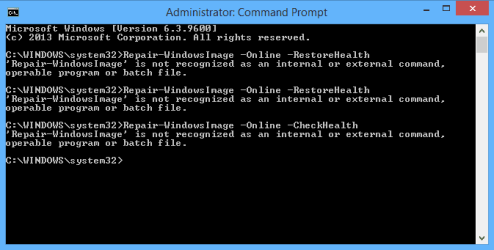
:confused: Scaned but not fix :(

I can't run Repair-WindowsImage -Online -RestoreHealth

P/s: i'll try tomorrow,
I'm in the zone GMT +7, so now is 1:14 AM :(

I have to sleep
 

Attachments

  • 2013-10-24_010652.png
    2013-10-24_010652.png
    4 KB · Views: 12

My Computer

Computer type
Laptop
Computer Manufacturer/Model Number
5420 Audi
OS
Win 8.1
CPU
i5
Motherboard
dell
Memory
8gb
Graphics Card(s)
hd4000
Antivirus
KIS
I'm not sure what you are trying to do since that's not what I posted above??? :huh:
 

My Computer

Computer type
PC/Desktop
Computer Manufacturer/Model Number
Self built custom
OS
64-bit Windows 11 Pro for Workstations
CPU
Intel i7-8700K OC'd to 5 GHz
Motherboard
ASUS ROG Maximus XI Formula Z390
Memory
64 GB (4x16GB) G.SKILL TridentZ RGB DDR4 3600 MHz
Graphics Card(s)
ASUS ROG-STRIX-GTX1080TI-O11G-GAMING
Sound Card
Integrated
Monitor(s) Displays
2 x Samsung Odyssey G7 27"
Screen Resolution
2560x1440
Hard Drives
1TB Samsung 990 PRO M.2,
4TB Samsung 990 PRO PRO M.2,
TerraMaster F8 SSD Plus NAS
PSU
Seasonic Prime Titanium 850W
Case
Thermaltake Core P3
Cooling
Corsair Hydro H115i
Keyboard
Logitech wireless K800
Mouse
Logitech MX Master 4
Internet Speed
2 Gb/s Download and 100 Mb/s Upload
Antivirus
Malwarebyte Anti-Malware Premium
Browser
Google Chrome
Other Info
Logitech Z625 speaker system,
Logitech BRIO 4K Pro webcam,
HP Color LaserJet Pro MFP M477fdn,
APC SMART-UPS RT 1000 XL - SURT1000XLI,
Galaxy S23 Plus phone
Back
Top