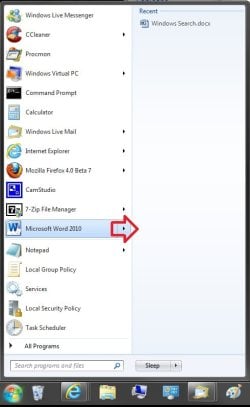
Menu Show Delay Time

How to Speed up Menu Show Delay Time in XP, Vista, Windows 7, and Windows 8


   Information
This will show you how to change the amount of time it takes for a menu to pop, fade, or slide open when you hover the mouse pointer over it in XP, Vista, Windows 7, and Windows 8.

This setting will only affect the user account that you are currently logged on to.

   Tip
The Fade or slide menus into view and Fade out menu items after clicking Visual Effects options will also affect how fast menus open and close. Unchecking these options will help speed it up in addition to doing the steps in this tutorial below.

   Warning
If you set the MouseHoverTime setting, then it may override the MenuShowDelay setting in this tutorial.


OPTION ONE

To Change the Menu Show Delay Time using a REG File


1. Do step 2 or 3 below for what you would like to do.

2. To Have a Fast Menu Show Time
NOTE: This changes the menu show delay time to 20 milliseconds.
A) Click on the Download button below to download the file below, and go to step 4 below.
Fast_MenuShowDelay.reg


Download


3. To Restore the Default Menu Show Time
NOTE: This changes the menu show delay time back to 400 milliseconds.
A) Click on the Download button below to download the file below, and go to step 4 below.
Default_MenuShowDelay.reg

Download


4. Save the .reg file to your desktop.

5. Double click/tap on the downloaded .reg file to merge it.

5. If prompted, click/tap on Run, Yes (UAC-Windows 7/8) or Continue (UAC-Vista_, Yes, and OK to approve the merge.

6. Log off and log on, or restart the computer to apply the changes.

7. When finished, you can delete the downloaded .reg file if you like.


OPTION TWO

To Change the Menu Show Delay Time in Registry Editor


1. Press the Windows + R keys to open the Run dialog, type regedit, and press Enter.

2. In Registry Editor, navigate to the location below. (see screenshot below)
HKEY_CURRENT_USER\Control Panel\Desktop
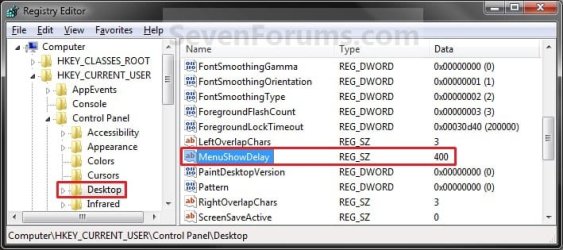
Reg1.jpg
3. In the right pane of the Desktop key, double click/tap on the MenuShowDelay string value to modify it. (see screenshot above)

4. Type in a number between 0 to 4000 (400 is default) for how many milliseconds you want the Menu to wait before it opens. (see screenshot below)
NOTE: The lower the number, the faster the response time. If you use an entry of 0, there is no menu display delay. However it is not recommended to use 0 though since the menus may be hard to navigate through at that speed. 20 is a good number to use.
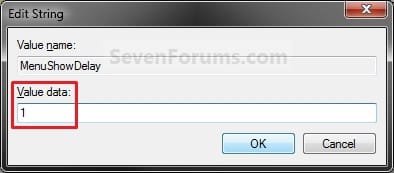
Modify.jpg
5. Click/tap on OK to apply. (See screenshot above)

6. Close regedit.

7. Log off and log on, or restart the computer to apply the changes.


That's it,
Shawn


Attachments

Last edited:
Hello Emibel, and welcome to Seven Forums.

Thank you for posting back with your results. :)
 

My Computer

Computer type
PC/Desktop
Computer Manufacturer/Model Number
Self built custom
OS
64-bit Windows 11 Pro for Workstations
CPU
Intel i7-8700K OC'd to 5 GHz
Motherboard
ASUS ROG Maximus XI Formula Z390
Memory
64 GB (4x16GB) G.SKILL TridentZ RGB DDR4 3600 MHz
Graphics Card(s)
ASUS ROG-STRIX-GTX1080TI-O11G-GAMING
Sound Card
Integrated
Monitor(s) Displays
2 x Samsung Odyssey G7 27"
Screen Resolution
2560x1440
Hard Drives
1TB Samsung 990 PRO M.2,
4TB Samsung 990 PRO PRO M.2,
TerraMaster F8 SSD Plus NAS
PSU
Seasonic Prime Titanium 850W
Case
Thermaltake Core P3
Cooling
Corsair Hydro H115i
Keyboard
Logitech wireless K800
Mouse
Logitech MX Master 4
Internet Speed
2 Gb/s Download and 100 Mb/s Upload
Antivirus
Malwarebyte Anti-Malware Premium
Browser
Google Chrome
Other Info
Logitech Z625 speaker system,
Logitech BRIO 4K Pro webcam,
HP Color LaserJet Pro MFP M477fdn,
APC SMART-UPS RT 1000 XL - SURT1000XLI,
Galaxy S23 Plus phone
it doesn't do that for me, the recent programs doesn't open up faster.
 

My Computer

OS
Windows 7 64 bit
CPU
i5-3570K
Motherboard
Gigabyte Z77-DS3H
Memory
8Gb 1333MHz DDR3
Graphics Card(s)
ASUS DCII 7850 2Gb
Monitor(s) Displays
22" 1920x1080 LED
Screen Resolution
1920x1080
Hard Drives
1Tb 7200RPM
Internet Speed
25MB/s
Zijin,

If you mean this below, then it affected it's speed as well for me. Did you restart the computer afterwards?

Start_menu.jpg
 

My Computer

Computer type
PC/Desktop
Computer Manufacturer/Model Number
Self built custom
OS
64-bit Windows 11 Pro for Workstations
CPU
Intel i7-8700K OC'd to 5 GHz
Motherboard
ASUS ROG Maximus XI Formula Z390
Memory
64 GB (4x16GB) G.SKILL TridentZ RGB DDR4 3600 MHz
Graphics Card(s)
ASUS ROG-STRIX-GTX1080TI-O11G-GAMING
Sound Card
Integrated
Monitor(s) Displays
2 x Samsung Odyssey G7 27"
Screen Resolution
2560x1440
Hard Drives
1TB Samsung 990 PRO M.2,
4TB Samsung 990 PRO PRO M.2,
TerraMaster F8 SSD Plus NAS
PSU
Seasonic Prime Titanium 850W
Case
Thermaltake Core P3
Cooling
Corsair Hydro H115i
Keyboard
Logitech wireless K800
Mouse
Logitech MX Master 4
Internet Speed
2 Gb/s Download and 100 Mb/s Upload
Antivirus
Malwarebyte Anti-Malware Premium
Browser
Google Chrome
Other Info
Logitech Z625 speaker system,
Logitech BRIO 4K Pro webcam,
HP Color LaserJet Pro MFP M477fdn,
APC SMART-UPS RT 1000 XL - SURT1000XLI,
Galaxy S23 Plus phone
hey brink, that's exactly what i mean, yeah menus pop up faster (eg in internet explorer files, edit, favourites, tools) but not the thing you have in that picture.

thanks for the reply tho
 

My Computer

OS
Windows 7 64 bit
CPU
i5-3570K
Motherboard
Gigabyte Z77-DS3H
Memory
8Gb 1333MHz DDR3
Graphics Card(s)
ASUS DCII 7850 2Gb
Monitor(s) Displays
22" 1920x1080 LED
Screen Resolution
1920x1080
Hard Drives
1Tb 7200RPM
Internet Speed
25MB/s
As a test, you might create a new administrator account and test out how it works while logged in that account to see if it behaves the same.
 

My Computer

Computer type
PC/Desktop
Computer Manufacturer/Model Number
Self built custom
OS
64-bit Windows 11 Pro for Workstations
CPU
Intel i7-8700K OC'd to 5 GHz
Motherboard
ASUS ROG Maximus XI Formula Z390
Memory
64 GB (4x16GB) G.SKILL TridentZ RGB DDR4 3600 MHz
Graphics Card(s)
ASUS ROG-STRIX-GTX1080TI-O11G-GAMING
Sound Card
Integrated
Monitor(s) Displays
2 x Samsung Odyssey G7 27"
Screen Resolution
2560x1440
Hard Drives
1TB Samsung 990 PRO M.2,
4TB Samsung 990 PRO PRO M.2,
TerraMaster F8 SSD Plus NAS
PSU
Seasonic Prime Titanium 850W
Case
Thermaltake Core P3
Cooling
Corsair Hydro H115i
Keyboard
Logitech wireless K800
Mouse
Logitech MX Master 4
Internet Speed
2 Gb/s Download and 100 Mb/s Upload
Antivirus
Malwarebyte Anti-Malware Premium
Browser
Google Chrome
Other Info
Logitech Z625 speaker system,
Logitech BRIO 4K Pro webcam,
HP Color LaserJet Pro MFP M477fdn,
APC SMART-UPS RT 1000 XL - SURT1000XLI,
Galaxy S23 Plus phone
Just a warning about setting the delay to -1, as I suggested above, for not allowing the sub-menu to pop up until you click it. I found that it crashes Visual Basic 2010 Express whenever you click on any of the menu items. Accordingly I've now set it to a large positive value (20000 for a 20-second delay) and that avoids the problem.
 

My Computer

OS
Windows 7 Professional x64
CPU
Intel core i7 870
Memory
8 GB
Graphics Card(s)
Nvidia 210
Monitor(s) Displays
Asus 22 inch
Screen Resolution
1920x1080
it still doesn't work :(
 

My Computer

OS
Windows 7 64 bit
CPU
i5-3570K
Motherboard
Gigabyte Z77-DS3H
Memory
8Gb 1333MHz DDR3
Graphics Card(s)
ASUS DCII 7850 2Gb
Monitor(s) Displays
22" 1920x1080 LED
Screen Resolution
1920x1080
Hard Drives
1Tb 7200RPM
Internet Speed
25MB/s
Zijincheng, I'm afraid that I'm stomped as well. :(
 

My Computer

Computer type
PC/Desktop
Computer Manufacturer/Model Number
Self built custom
OS
64-bit Windows 11 Pro for Workstations
CPU
Intel i7-8700K OC'd to 5 GHz
Motherboard
ASUS ROG Maximus XI Formula Z390
Memory
64 GB (4x16GB) G.SKILL TridentZ RGB DDR4 3600 MHz
Graphics Card(s)
ASUS ROG-STRIX-GTX1080TI-O11G-GAMING
Sound Card
Integrated
Monitor(s) Displays
2 x Samsung Odyssey G7 27"
Screen Resolution
2560x1440
Hard Drives
1TB Samsung 990 PRO M.2,
4TB Samsung 990 PRO PRO M.2,
TerraMaster F8 SSD Plus NAS
PSU
Seasonic Prime Titanium 850W
Case
Thermaltake Core P3
Cooling
Corsair Hydro H115i
Keyboard
Logitech wireless K800
Mouse
Logitech MX Master 4
Internet Speed
2 Gb/s Download and 100 Mb/s Upload
Antivirus
Malwarebyte Anti-Malware Premium
Browser
Google Chrome
Other Info
Logitech Z625 speaker system,
Logitech BRIO 4K Pro webcam,
HP Color LaserJet Pro MFP M477fdn,
APC SMART-UPS RT 1000 XL - SURT1000XLI,
Galaxy S23 Plus phone
hey brink, does your start menu thing that i'm having problems with, does it pop up as fast as the menus in other programs or slower?
 

My Computer

OS
Windows 7 64 bit
CPU
i5-3570K
Motherboard
Gigabyte Z77-DS3H
Memory
8Gb 1333MHz DDR3
Graphics Card(s)
ASUS DCII 7850 2Gb
Monitor(s) Displays
22" 1920x1080 LED
Screen Resolution
1920x1080
Hard Drives
1Tb 7200RPM
Internet Speed
25MB/s
Just a touch slower.
 

My Computer

Computer type
PC/Desktop
Computer Manufacturer/Model Number
Self built custom
OS
64-bit Windows 11 Pro for Workstations
CPU
Intel i7-8700K OC'd to 5 GHz
Motherboard
ASUS ROG Maximus XI Formula Z390
Memory
64 GB (4x16GB) G.SKILL TridentZ RGB DDR4 3600 MHz
Graphics Card(s)
ASUS ROG-STRIX-GTX1080TI-O11G-GAMING
Sound Card
Integrated
Monitor(s) Displays
2 x Samsung Odyssey G7 27"
Screen Resolution
2560x1440
Hard Drives
1TB Samsung 990 PRO M.2,
4TB Samsung 990 PRO PRO M.2,
TerraMaster F8 SSD Plus NAS
PSU
Seasonic Prime Titanium 850W
Case
Thermaltake Core P3
Cooling
Corsair Hydro H115i
Keyboard
Logitech wireless K800
Mouse
Logitech MX Master 4
Internet Speed
2 Gb/s Download and 100 Mb/s Upload
Antivirus
Malwarebyte Anti-Malware Premium
Browser
Google Chrome
Other Info
Logitech Z625 speaker system,
Logitech BRIO 4K Pro webcam,
HP Color LaserJet Pro MFP M477fdn,
APC SMART-UPS RT 1000 XL - SURT1000XLI,
Galaxy S23 Plus phone
The registry entry MenuShowDelay works very strangely under the MFC Feature Pack. The value is used for menu closure delay:
We saw on some machines where our application is installed (obviously using Feature Pack) that sub menus are not closing. let's say in a drop down I have 2 entries which are sub menus (S1 and S2) and 10 other (lead menus (M1, M2... M10). When I opened the drop down and the cursor was placed on S1 , the corresponding sub menu is displayed. Now I moved the cursor to a leaf menu (M1..M10) and the sub menu is no closed. When I moved to S2, the submenu display is changed accordingly. But again, moving to a leaf leaves the sub menu open
We saw that this behavior occurs when the MenuShowDelay registry key (at HKEY_CURRENT_USER\Control Panel\Desktop) value is zero.
I am not sure how the value got the value. In any case, the value should be used for menu showing delay and not for menu hiding delay. So it seems Feature Pack hooked on a registry key used for something else.

Any ideas?
Thanks in advance! blapath
 

My Computer

OS
Windows 7 Ultimate
Hello Blapath, and welcome to Seven Foirums.

That is a strange issue. How does it behave if you change the MenuShowDelay value to say 3, or back to the default of 400?
 

My Computer

Computer type
PC/Desktop
Computer Manufacturer/Model Number
Self built custom
OS
64-bit Windows 11 Pro for Workstations
CPU
Intel i7-8700K OC'd to 5 GHz
Motherboard
ASUS ROG Maximus XI Formula Z390
Memory
64 GB (4x16GB) G.SKILL TridentZ RGB DDR4 3600 MHz
Graphics Card(s)
ASUS ROG-STRIX-GTX1080TI-O11G-GAMING
Sound Card
Integrated
Monitor(s) Displays
2 x Samsung Odyssey G7 27"
Screen Resolution
2560x1440
Hard Drives
1TB Samsung 990 PRO M.2,
4TB Samsung 990 PRO PRO M.2,
TerraMaster F8 SSD Plus NAS
PSU
Seasonic Prime Titanium 850W
Case
Thermaltake Core P3
Cooling
Corsair Hydro H115i
Keyboard
Logitech wireless K800
Mouse
Logitech MX Master 4
Internet Speed
2 Gb/s Download and 100 Mb/s Upload
Antivirus
Malwarebyte Anti-Malware Premium
Browser
Google Chrome
Other Info
Logitech Z625 speaker system,
Logitech BRIO 4K Pro webcam,
HP Color LaserJet Pro MFP M477fdn,
APC SMART-UPS RT 1000 XL - SURT1000XLI,
Galaxy S23 Plus phone
In general the registry key value is 400 and menu opening/hiding works normally. The problem occurs when the value is zero. In this case a sub menu opened correctly and immediately, but when i move the cursor to a leaf menu entry, the previously opened (and displayed) sub menu remains to be open. If cursor moves to another sub menu, than the new one is opened. Of course at this point this last sub menu remains open when I move to leaf entry. This opened sub menu remains open, as far as the cursor moves to other leaf entries.
I just tested the case with other values. Here is what I see: when value is small (1 or 10), sub menu appears immediately and closes immediately when cursor moves to a leaf. When value is big (5000), sub menu opens after the defined time and also closes after delay: cursor moved to a sub menu entry; wait 5 sec until sub menu opens; move to another sub menu, then the opened sub menu remains displayed and only after 5 sec the new one is displayed; move to a leaf entry then the opened sub menu remains open 5 sec before it is closed.
I think the delay is sub menu closing is a bug; at least the registry key name indicates only 'opening delay' - but at least it is consistent: the same amount of time waited for opening and for closing. In any case, it seems value zero is handled as a special case, as in this case opening is not delayed, and closing is delayed indefinitely.
I emphases: the problem occurs only for application developed with the MFC Feature Pack. I use Windows 7, the registry key currently is set to 5000 (I didn't reset my host) and menus open and close normally. I opened iTunes, SQL Server Management Studio, Notepad++, FileZilla Client - all of them behaves normally, without any delay in sub menu opening or closing. So it seems Win7 in general doesn't even look at the registry key, but Feature Pack does it (even without restarting the host).
 

My Computer

OS
Windows 7 Ultimate
Just a warning about setting the delay to -1, as I suggested above, for not allowing the sub-menu to pop up until you click it. I found that it crashes Visual Basic 2010 Express whenever you click on any of the menu items. Accordingly I've now set it to a large positive value (20000 for a 20-second delay) and that avoids the problem.

Thanks for this tip emibel! This was really irritating me. I don't know whether I am a clutz or its my mouse but I can't keep the cursor on the right menu when it auto-opens sub-menus. So making it open faster was even worse. Its probably the fact that I use the mouse on my bed but your tip helped wonderfully.

Thanks again.
 

My Computer

Computer Manufacturer/Model Number
HP Pavillion DV2000 Notebook
OS
Windows 7/ Ubuntu
CPU
AMD Turion X2 1.6ghz
Motherboard
Wistron 30B5
Memory
1.5Gb
Graphics Card(s)
Nvidia Geforce Go 6150
Sound Card
Conexant HD/ Creative Xmod USB
Monitor(s) Displays
Laptop Built in
Hard Drives
Fujitsu 120Gb
Cooling
GPU Runs Hot! Using NHC to cycle down cpu and keep cool.
While reading this:

"Tip

The Fade or slide menus into view and Fade out menu items after clicking Visual Effects optiond will also affect how fast menus open and close. Unchecking these options will help speed it up in addition to doing the steps in this tutorial below."
 

My Computer

Computer type
PC/Desktop
Computer Manufacturer/Model Number
Novatech iRush Pro
OS
Windows 7 Ultimate SP1 - 64 Bit
CPU
Intel Core i5 2500k
Motherboard
Foxconn H67M-S/H67M-V/H67
Memory
2x4GB DDR3 1333Hz
Graphics Card(s)
Ati Radeon 6770
Sound Card
None
Monitor(s) Displays
Samsung S22B150
Screen Resolution
1920x1080
Hard Drives
2x500GB
PSU
500W
Cooling
Fan
Keyboard
HP KU0316
Mouse
Wireless Logitech M185
Internet Speed
20MB/s
Antivirus
Avast Free
Browser
Google Chrome
Other Info
Logitech M185 Mouse
KU-M316 Keyboard
Oops, corrected. Thank you. :)
 

My Computer

Computer type
PC/Desktop
Computer Manufacturer/Model Number
Self built custom
OS
64-bit Windows 11 Pro for Workstations
CPU
Intel i7-8700K OC'd to 5 GHz
Motherboard
ASUS ROG Maximus XI Formula Z390
Memory
64 GB (4x16GB) G.SKILL TridentZ RGB DDR4 3600 MHz
Graphics Card(s)
ASUS ROG-STRIX-GTX1080TI-O11G-GAMING
Sound Card
Integrated
Monitor(s) Displays
2 x Samsung Odyssey G7 27"
Screen Resolution
2560x1440
Hard Drives
1TB Samsung 990 PRO M.2,
4TB Samsung 990 PRO PRO M.2,
TerraMaster F8 SSD Plus NAS
PSU
Seasonic Prime Titanium 850W
Case
Thermaltake Core P3
Cooling
Corsair Hydro H115i
Keyboard
Logitech wireless K800
Mouse
Logitech MX Master 4
Internet Speed
2 Gb/s Download and 100 Mb/s Upload
Antivirus
Malwarebyte Anti-Malware Premium
Browser
Google Chrome
Other Info
Logitech Z625 speaker system,
Logitech BRIO 4K Pro webcam,
HP Color LaserJet Pro MFP M477fdn,
APC SMART-UPS RT 1000 XL - SURT1000XLI,
Galaxy S23 Plus phone
Hi, what is the different between this and Mouse Hover Time?

I want to slow things like help pop up so i need more time hovering before it pops up.

But i don't want it to slow things like drag and dropping into another background window.
i.e. dragging a Photoshop file from the explorer into THE Photoshop window
 

My Computer

Computer type
PC/Desktop
OS
Windows 7 Professional x64
CPU
Intel i5 2500k @4.6GHz
Motherboard
Asus P6P67 Pro (B3 revision)
Memory
2x4GB Corsair Vengeance 8C
Graphics Card(s)
MSI GTX 760 TF
Sound Card
X-Fi Fatal1ty
Monitor(s) Displays
Viewsonic XV-2245
Screen Resolution
1680 x 1050
Hard Drives
Primary: WDC 320GB
PSU
Corsair AX750
Case
Thermaltake Element-S VK6000
Cooling
Hydro H60
Keyboard
MX3200
Mouse
Performance MX
Antivirus
Microsoft Security Essentials
Hello Valmighty,

Mouser hover time is the delay time, in milliseconds, that the mouse pointer has to stay hovered on a item before tooltip popups display.

http://www.sevenforums.com/tutorials/1884-mouse-hover-time-change.html

Menu show delay time is the amount of time it takes for a menu to pop, fade, or slide open when you hover the mouse pointer over it.

Hope this helps, :)
Shawn
 

My Computer

Computer type
PC/Desktop
Computer Manufacturer/Model Number
Self built custom
OS
64-bit Windows 11 Pro for Workstations
CPU
Intel i7-8700K OC'd to 5 GHz
Motherboard
ASUS ROG Maximus XI Formula Z390
Memory
64 GB (4x16GB) G.SKILL TridentZ RGB DDR4 3600 MHz
Graphics Card(s)
ASUS ROG-STRIX-GTX1080TI-O11G-GAMING
Sound Card
Integrated
Monitor(s) Displays
2 x Samsung Odyssey G7 27"
Screen Resolution
2560x1440
Hard Drives
1TB Samsung 990 PRO M.2,
4TB Samsung 990 PRO PRO M.2,
TerraMaster F8 SSD Plus NAS
PSU
Seasonic Prime Titanium 850W
Case
Thermaltake Core P3
Cooling
Corsair Hydro H115i
Keyboard
Logitech wireless K800
Mouse
Logitech MX Master 4
Internet Speed
2 Gb/s Download and 100 Mb/s Upload
Antivirus
Malwarebyte Anti-Malware Premium
Browser
Google Chrome
Other Info
Logitech Z625 speaker system,
Logitech BRIO 4K Pro webcam,
HP Color LaserJet Pro MFP M477fdn,
APC SMART-UPS RT 1000 XL - SURT1000XLI,
Galaxy S23 Plus phone
This works on Windows 10 too. There should be login sharing between 7, 8 and 10 forums. =/
 

My Computer

Computer type
PC/Desktop
Computer Manufacturer/Model Number
Custom
OS
Windows 10 Enterprise x64
CPU
AMD FX-8230
Motherboard
Gigabyte GA-970A-D3P
Memory
8GB
Graphics Card(s)
Radeon HD 5450 (for now...)
Hard Drives
64gb SSD
1tb Spinny
Antivirus
Windows Defender
Browser
Firefox
This works on Windows 10 too. There should be login sharing between 7, 8 and 10 forums. =/

Thank you for confirming.

I'm afraid that since they are separate sites, they require separate registration. :(
 

My Computer

Computer type
PC/Desktop
Computer Manufacturer/Model Number
Self built custom
OS
64-bit Windows 11 Pro for Workstations
CPU
Intel i7-8700K OC'd to 5 GHz
Motherboard
ASUS ROG Maximus XI Formula Z390
Memory
64 GB (4x16GB) G.SKILL TridentZ RGB DDR4 3600 MHz
Graphics Card(s)
ASUS ROG-STRIX-GTX1080TI-O11G-GAMING
Sound Card
Integrated
Monitor(s) Displays
2 x Samsung Odyssey G7 27"
Screen Resolution
2560x1440
Hard Drives
1TB Samsung 990 PRO M.2,
4TB Samsung 990 PRO PRO M.2,
TerraMaster F8 SSD Plus NAS
PSU
Seasonic Prime Titanium 850W
Case
Thermaltake Core P3
Cooling
Corsair Hydro H115i
Keyboard
Logitech wireless K800
Mouse
Logitech MX Master 4
Internet Speed
2 Gb/s Download and 100 Mb/s Upload
Antivirus
Malwarebyte Anti-Malware Premium
Browser
Google Chrome
Other Info
Logitech Z625 speaker system,
Logitech BRIO 4K Pro webcam,
HP Color LaserJet Pro MFP M477fdn,
APC SMART-UPS RT 1000 XL - SURT1000XLI,
Galaxy S23 Plus phone
Back
Top