Slow boot time (~90 seconds) - Plug and Play delay

vlada903

New member
Local time
1:47 AM
Messages
4
I have recently installed Windows 7 over Windows 10 (I didn't really like it) and I have a boot-time problem now. Windows always gets stuck on "Starting Windows" screen and it takes up to 90 seconds to load the login screen. I looked it up in the event viewer and found out that there is a delay of 75 seconds between two events on the list.

(1) Information 24.7.2016 23:45:15 Service Control Manager 7036 None
(2) Information 24.7.2016 23:44:00 Kernel-Processor-Power 26 (4)

The first one (1) says:
The Plug and Play service entered the running state.

And the second (2) one:
Processor 3 in group 0 exposes the following:
2 idle state(s)
5 performance state(s)
0 throttle state(s)


(detailed info at the end)


All the drivers are from the original CD/Website and are up-to-date. I had no such problems when I was running Windows 10 or any other operating system.
The laptop is Lenovo Z50-75 --- AMD A10 7300, 8GB RAM, 5400rpm 500GB+8GB SSHD and Dual-Graphics AMD Radeon R6 and M255.


____________________________________________________________________________________

DETAILS:

Code:
Log Name:      System
Source:        Service Control Manager
[B]Date:          24.7.2016 23:45:15[/B]
Event ID:      7036
Task Category: None
Level:         Information
Keywords:      Classic
User:          N/A
Computer:      Vladimir-PC
Description:
[B]The Plug and Play service entered the running state.[/B]
Event Xml:
<Event xmlns="http://schemas.microsoft.com/win/2004/08/events/event">
  <System>
    <Provider Name="Service Control Manager" Guid="{555908d1-a6d7-4695-8e1e-26931d2012f4}" EventSourceName="Service Control Manager" />
    <EventID Qualifiers="16384">7036</EventID>
    <Version>0</Version>
    <Level>4</Level>
    <Task>0</Task>
    <Opcode>0</Opcode>
    <Keywords>0x8080000000000000</Keywords>
    <TimeCreated SystemTime="2016-07-24T21:45:15.771347000Z" />
    <EventRecordID>4616</EventRecordID>
    <Correlation />
    <Execution ProcessID="664" ThreadID="804" />
    <Channel>System</Channel>
    <Computer>Vladimir-PC</Computer>
    <Security />
  </System>
  <EventData>
    <Data Name="param1">Plug and Play</Data>
    <Data Name="param2">running</Data>
    <Binary>50006C007500670050006C00610079002F0034000000</Binary>
  </EventData>
</Event>

Log Name:      System
Source:        Microsoft-Windows-Kernel-Processor-Power
[B]Date:          24.7.2016 23:44:00[/B]
Event ID:      26
Task Category: (4)
Level:         Information
Keywords:      
User:          SYSTEM
Computer:      Vladimir-PC
Description:
[B]Processor 3 in group 0 exposes the following:

2 idle state(s)
5 performance state(s)
0 throttle state(s)[/B]
Event Xml:
<Event xmlns="http://schemas.microsoft.com/win/2004/08/events/event">
  <System>
    <Provider Name="Microsoft-Windows-Kernel-Processor-Power" Guid="{0F67E49F-FE51-4E9F-B490-6F2948CC6027}" />
    <EventID>26</EventID>
    <Version>0</Version>
    <Level>4</Level>
    <Task>4</Task>
    <Opcode>0</Opcode>
    <Keywords>0x8000000000000000</Keywords>
    <TimeCreated SystemTime="2016-07-24T21:44:00.298415400Z" />
    <EventRecordID>4615</EventRecordID>
    <Correlation />
    <Execution ProcessID="4" ThreadID="44" />
    <Channel>System</Channel>
    <Computer>Vladimir-PC</Computer>
    <Security UserID="S-1-5-18" />
  </System>
  <EventData>
    <Data Name="Group">0</Data>
    <Data Name="Number">3</Data>
    <Data Name="IdleStateCount">2</Data>
    <Data Name="PerfStateCount">5</Data>
    <Data Name="ThrottleStateCount">0</Data>
    <ComplexData Name="IdleState">0102</ComplexData>
    <ComplexData Name="PerfState">6C07000064000000080700005E000000DC0500004E000000B00400003F0000004C04000039000000</ComplexData>
  </EventData>
</Event>


What can be the problem?
 

My Computer My Computer

Computer type
Laptop
Computer Manufacturer/Model Number
Lenovo
OS
Windows 7 Ultimate x64
CPU
AMD A10-7300
Memory
8GB 1600MHz DDR3L
Graphics Card(s)
AMD Radeon M255
Screen Resolution
1920x1080
Hard Drives
500GB 5400rpm + 8GB SSHD
Internet Speed
10/1 Mb/s
Antivirus
None
Browser
Google Chrome
My computer give me >120 second in order for me to start using.

Startup usually may check and confirm many type of setting, etc.

For example, if you desktop is empty, it will take 10 second and you can start using.

All items on the desktop are to be verified as true, otherwise it may try to find the link.

When you insert any USB device into the USB port, the system usually take every 5 second to check if there is any change.
Hence, within 5 second, the USB device will be detected.
Then it have to check if that device did connected to USB port-2 before, it can be used immediately.
If it check as the device is never connected to the USB port-2, it then have to find the USB driver to install and saved, remembered.

Then again, for 90 seconds, it may not matter much, as just turn on the computer before, say, to take a bath first.
 

My Computer My Computer

Computer type
Laptop
Computer Manufacturer/Model Number
Toshiba L630 and L735
OS
Windows 7 x64
Hard Drives
240 GB SSD
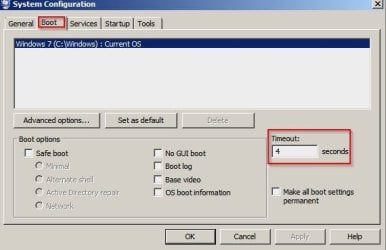
How is you setting as shown here:

System Configuration.jpg

Start> Run

type

msconfig

Also read this to get a better idea of how to actually use event viewer:

Use Windows 7 Event Viewer to track down issues that cause slower boot times - TechRepublic

Add both custom views that are mentioned.

See section "Creating a Custom View" and don't skip the last part under Figure C.

You'll now repeat these steps and create another Custom View, and this time, you'll type 101-110 in the Includes/Excludes Event IDs box and name it Boot Degradation.

Then check all Event ID's mentioned for clues. You are not looking for "time between events" - you are looking for problem software, services or drivers that take a long time to load.
 

My Computer My Computer

Computer type
Laptop
Computer Manufacturer/Model Number
ASUS
OS
Microsoft Windows 7 Home Premium 64-bit 7601 Multiprocessor Free Service Pack 1
CPU
AMD C-60 APU with Radeon(tm) HD Graphics
Motherboard
ASUSTeK COMPUTER INC. X501U
Memory
4.00 GB
Graphics Card(s)
AMD Radeon HD 6290 Graphics
Sound Card
(1) AMD High Definition Audio Device (2) Realtek High Defi
Screen Resolution
1366 x 768 x 32 bits (4294967296 colors) @ 60 Hz
Hard Drives
Hitachi HTS545050A7E380 SATA Disk Device
Antivirus
Comodo CIS & FW, SecureAplus App Whitelisting, Threatfire
Browser
Cyberfox 64bit, Opera 64bit, Airfox
Other Info
Spy-The-Spy, HitmanPro.Alert, Norton Connect Safe, MJRegWatcher, BitDefender TrafficLight, Voodoo Shield, Zemana AntiMalware
How is you setting as shown here:


Start> Run

type

msconfig

Also read this to get a better idea of how to actually use event viewer:

Use Windows 7 Event Viewer to track down issues that cause slower boot times - TechRepublic

Add both custom views that are mentioned.

See section "Creating a Custom View" and don't skip the last part under Figure C.

You'll now repeat these steps and create another Custom View, and this time, you'll type 101-110 in the Includes/Excludes Event IDs box and name it Boot Degradation.

Then check all Event ID's mentioned for clues. You are not looking for "time between events" - you are looking for problem software, services or drivers that take a long time to load.


I checked Boot Time events and I noticed that every one of them is an error. I noticed that every boot took more than 100 seconds. The more important thing I noticed is that every one of them has IsDegradation set to false while on the website you sent me it is set to true. Could that be the problem? I read that hardware can cause this problem. I'll mention that I have updated all of my drivers to their latest versions.

Capture.png
 

My Computer My Computer

Computer type
Laptop
Computer Manufacturer/Model Number
Lenovo
OS
Windows 7 Ultimate x64
CPU
AMD A10-7300
Memory
8GB 1600MHz DDR3L
Graphics Card(s)
AMD Radeon M255
Screen Resolution
1920x1080
Hard Drives
500GB 5400rpm + 8GB SSHD
Internet Speed
10/1 Mb/s
Antivirus
None
Browser
Google Chrome
My computer give me >120 second in order for me to start using.

Startup usually may check and confirm many type of setting, etc.

For example, if you desktop is empty, it will take 10 second and you can start using.

All items on the desktop are to be verified as true, otherwise it may try to find the link.

When you insert any USB device into the USB port, the system usually take every 5 second to check if there is any change.
Hence, within 5 second, the USB device will be detected.
Then it have to check if that device did connected to USB port-2 before, it can be used immediately.
If it check as the device is never connected to the USB port-2, it then have to find the USB driver to install and saved, remembered.

Then again, for 90 seconds, it may not matter much, as just turn on the computer before, say, to take a bath first.


The point is that Windows logo screen takes 90-130 seconds, and then when login screen shows up, it takes 5-15 seconds for me to start using my computer so the login time isn't the problem, just the boot time.
 

My Computer My Computer

Computer type
Laptop
Computer Manufacturer/Model Number
Lenovo
OS
Windows 7 Ultimate x64
CPU
AMD A10-7300
Memory
8GB 1600MHz DDR3L
Graphics Card(s)
AMD Radeon M255
Screen Resolution
1920x1080
Hard Drives
500GB 5400rpm + 8GB SSHD
Internet Speed
10/1 Mb/s
Antivirus
None
Browser
Google Chrome
I checked Boot Time events and I noticed that every one of them is an error. I noticed that every boot took more than 100 seconds. The more important thing I noticed is that every one of them has IsDegradation set to false while on the website you sent me it is set to true. Could that be the problem?

IsDegradation=False means no problem. IsDegradation=True means possible problem.

I read that hardware can cause this problem. I'll mention that I have updated all of my drivers to their latest versions.

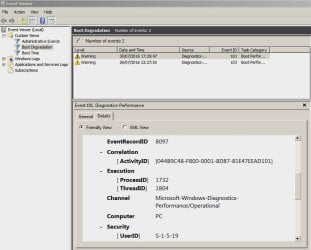
If you updated drivers check all Event ID 102 instances and try to find out if a driver took a long time to load.

Sorry I do not have an example screenshot as everything is working okay on my machine and I only have Event ID 100 errors. Nothing to worry about as it relates to a disabled scheduled task.

Why update drivers unless there was a problem? I've made that mistake in the past. If a driver works - leave it alone unless the new one contains some "must have" new feature or fix for a known issue. I ope you backed up the previous drivers or made a system image backup first.

EDIT: Just for info here's a tutorial on this site:


Attachments

  • Event Viewer 1.jpg
    Event Viewer 1.jpg
    51.8 KB · Views: 0
  • Event Viewer 2.jpg
    Event Viewer 2.jpg
    70.9 KB · Views: 0
Last edited:

My Computer My Computer

Computer type
Laptop
Computer Manufacturer/Model Number
ASUS
OS
Microsoft Windows 7 Home Premium 64-bit 7601 Multiprocessor Free Service Pack 1
CPU
AMD C-60 APU with Radeon(tm) HD Graphics
Motherboard
ASUSTeK COMPUTER INC. X501U
Memory
4.00 GB
Graphics Card(s)
AMD Radeon HD 6290 Graphics
Sound Card
(1) AMD High Definition Audio Device (2) Realtek High Defi
Screen Resolution
1366 x 768 x 32 bits (4294967296 colors) @ 60 Hz
Hard Drives
Hitachi HTS545050A7E380 SATA Disk Device
Antivirus
Comodo CIS & FW, SecureAplus App Whitelisting, Threatfire
Browser
Cyberfox 64bit, Opera 64bit, Airfox
Other Info
Spy-The-Spy, HitmanPro.Alert, Norton Connect Safe, MJRegWatcher, BitDefender TrafficLight, Voodoo Shield, Zemana AntiMalware
Back
Top