Messed up user accounts

debgram1

New member
Member
Local time
4:24 PM
Messages
85
I had my pc rebuilt and when the techs installed win 7 for me I guess they didn't set up a password, cause every time I log off only the little photo with my name is there and all I have to do is click the picture.

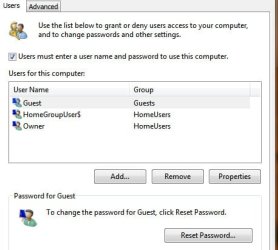
Well in all the hurry to find if they did use a password I somehow wound up with a guest login too which I don't want.

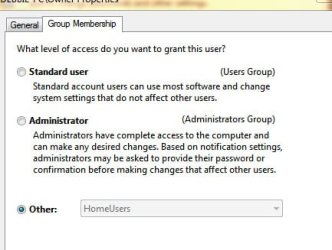
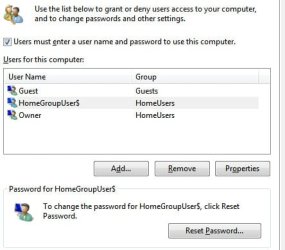
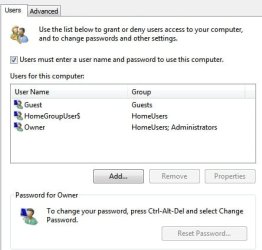
I have attached what the folders look like with I use control userpasswords2. By owner I was listed as homegroup/administrator, now it's just homegroup and that's when that additional login picture came up. Now it won't liet me change it back to administrator I get access denied.

HELP!
 

Attachments
  • guest.jpg
    guest.jpg
    24.5 KB · Views: 2
  • pass2.jpg
    pass2.jpg
    25.1 KB · Views: 4
  • pass3.jpg
    pass3.jpg
    25.3 KB · Views: 1
  • passwords.jpg
    passwords.jpg
    23.3 KB · Views: 1

My Computer

OS
Windows 7 Home Premium 64-bit
CPU
Intel Core i5-2500K Sandy Bridge 3.3GHz
Motherboard
Asus P8P67 deluxe
Memory
G.SKILL Ripjaws X Series 8GB (4 x 2GB) 240-Pin DDR3 SDRAM DD
Graphics Card(s)
Sapphire ATI Radeon 4800
Hard Drives
Western Digital Caviar Blue WD2500AAKS 250GB 7200 RPM SATA 3.0Gb/s 3.5" Internal Hard Drive, WDC WD5001AALS SCSI hard drive, SAMSUNG SP2504C SCSI hard drive
Cooling
ZALMAN CNPS9900 NT 120mm 2 Ball CPU Cooler
It sounds like there was no password set. The way to verify it would have been to go to User Accounts in Control Panel. Under your account it would say "Create Password" if there wasn't one set and "Change Password" if one was set. You need Administrator privileges to make a user an member of the administrators group. Now that you have removed yourself from that group you can not add your self back. You could try to enable the hidden Administrator account and use that to fix things.
http://www.sevenforums.com/tutorials/507-built-administrator-account-enable-disable.html?filter[2]=User Accounts
 

My Computer

Computer type
PC/Desktop
Computer Manufacturer/Model Number
Home Built
OS
Windows 10 Education 64 bit
CPU
AMD Phenom II X4 980 Black Edition Deneb 3.7GHz
Motherboard
Asus M4N68T-M V2 µATX Motherboard
Memory
8GB 4GBx2 Kingston PC10600 DDR3 1333 Memory
Graphics Card(s)
Zotac NVIDIA Geforce GT640 2 Gig DDR3 PCIe
Sound Card
VIA VT1708s High Definition Audio 8-channel Onboard
Monitor(s) Displays
22" LG E2242 1080p and 2 19" I-INC AG191D
Screen Resolution
1280x1024 - 1920x1080 - 1280x1024
Hard Drives
Crucial M100 256 GB SSD and 500 GB WD Blue SATA
PSU
Thermaltake TR 620
Case
Power Up Black ATX Mid-Tower Case
Cooling
Stock heatsink and fan
Keyboard
Logitech Wireless K350 Wave
Mouse
Logitech Wireless M570 Trackman Wheel
Internet Speed
80 Mbps Down 30 Mbps Up
Antivirus
Windows Defender
Browser
Internet Explorer 11
Other Info
HP DVD1040e Lightscribe - External USB2
It sounds like there was no password set. The way to verify it would have been to go to User Accounts in Control Panel. Under your account it would say "Create Password" if there wasn't one set and "Change Password" if one was set. You need Administrator privileges to make a user an member of the administrators group. Now that you have removed yourself from that group you can not add your self back. You could try to enable the hidden Administrator account and use that to fix things.
http://www.sevenforums.com/tutorials/507-built-administrator-account-enable-disable.html?filter[2]=User Accounts


I tried that and I get access denied. I can't even open my programs because I'm not the administrator, and there is no option in the menu to choose it from. User accounts won't let me change either, what can I do? I need to get my id as administrtor.
 

My Computer

OS
Windows 7 Home Premium 64-bit
CPU
Intel Core i5-2500K Sandy Bridge 3.3GHz
Motherboard
Asus P8P67 deluxe
Memory
G.SKILL Ripjaws X Series 8GB (4 x 2GB) 240-Pin DDR3 SDRAM DD
Graphics Card(s)
Sapphire ATI Radeon 4800
Hard Drives
Western Digital Caviar Blue WD2500AAKS 250GB 7200 RPM SATA 3.0Gb/s 3.5" Internal Hard Drive, WDC WD5001AALS SCSI hard drive, SAMSUNG SP2504C SCSI hard drive
Cooling
ZALMAN CNPS9900 NT 120mm 2 Ball CPU Cooler
Re-installing Windows would be one way. There are likely other ways but talking about them is likely going to get me in trouble as it borders on hacking a system. Talking about that is against forum rules.
 

My Computer

Computer type
PC/Desktop
Computer Manufacturer/Model Number
Home Built
OS
Windows 10 Education 64 bit
CPU
AMD Phenom II X4 980 Black Edition Deneb 3.7GHz
Motherboard
Asus M4N68T-M V2 µATX Motherboard
Memory
8GB 4GBx2 Kingston PC10600 DDR3 1333 Memory
Graphics Card(s)
Zotac NVIDIA Geforce GT640 2 Gig DDR3 PCIe
Sound Card
VIA VT1708s High Definition Audio 8-channel Onboard
Monitor(s) Displays
22" LG E2242 1080p and 2 19" I-INC AG191D
Screen Resolution
1280x1024 - 1920x1080 - 1280x1024
Hard Drives
Crucial M100 256 GB SSD and 500 GB WD Blue SATA
PSU
Thermaltake TR 620
Case
Power Up Black ATX Mid-Tower Case
Cooling
Stock heatsink and fan
Keyboard
Logitech Wireless K350 Wave
Mouse
Logitech Wireless M570 Trackman Wheel
Internet Speed
80 Mbps Down 30 Mbps Up
Antivirus
Windows Defender
Browser
Internet Explorer 11
Other Info
HP DVD1040e Lightscribe - External USB2
Back
Top