
Mic and headphones only partialy work since Realtek HD Audio install

BDani

New member
Member
VIP
Local time
2:27 AM
Messages
146
So I had this fresh Windows install. Everything was normal, I plugged my earbuds into the cable and the cable into the rear green and pink I/Os... As always!
Now, I was able to hear everyone, and everyone were able to hear me, its just that when I listen to music, and talk to friends on Skype, or play games while on Skype, my friends can hear everything I do and its annoying. So I figured I need to install realtek HD audio drivers. Once I did, I was able to hear them but they weren't able to hear me. My mic stopped working and the weird part is that they were able to hear my Windows sounds. All the sound tests I've done, they were able to hear it, but not my voice.
I uninstalled the driver and from their it was a total disaster. I disabled and enabled drivers, updated them through Windows updates and all of the sudden the mic works but I can't hear anything, then after another restart and changes, I can hear everything but the mic doesn't work.
I'm completely lost, and sick of doing system restarts all the time.

Currently, my mic seems to work but I can't hear anything. Why? And what should I do?
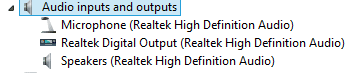
EDIT: I just uninstalled Nvidia HD Audio drivers and installed only realtek. Only mic doesn't work, but speakers and headphones do work...
 
Last edited:

My Computer My Computer

At a glance

Windows 8.1 Pro 64-BitIntel Core i5-4460 @ 3.20GHz8.00GB Dual-Channel DDR3 @ 799MHz (11-11-11-28)1023MB NVIDIA GeForce GTX 560 Ti (Gigabyte)
Computer type
PC/Desktop
OS
Windows 8.1 Pro 64-Bit
CPU
Intel Core i5-4460 @ 3.20GHz
Motherboard
Gigabyte Technology Co., Ltd. H97-D3H-CF (SOCKET 0)
Memory
8.00GB Dual-Channel DDR3 @ 799MHz (11-11-11-28)
Graphics Card(s)
1023MB NVIDIA GeForce GTX 560 Ti (Gigabyte)
Monitor(s) Displays
SyncMaster (1920x1080@59Hz)
Screen Resolution
1980 X 1080
Hard Drives
488GB Western Digital WDC WD5000AAKS-00M9A0 ATA Device (IDE)
The RealTek needs to be set as the default audio playback device. The NVIDIA HD is only for HDMI audio. If there is an HDMI cable plugged in, Windows will automatically set the NVIDIA as the default playback device and the Realtek will not work. If there is no HDMI cable plugged in, NVIDIA will not take over.

Stereo Mix needs to be set as the default recording device. Then whatever device you have plugged in, such as a microphone will work.

If you have front panel mic and headset connections, those would seem to be easier to access than the rear connections.
 

My Computer My Computer

At a glance

Windows 10 64 bitIntel i7 6700K16GB Corsair DominatorIntel CPU Graphics
Computer type
PC/Desktop
Computer Manufacturer/Model Number
My Own Build
OS
Windows 10 64 bit
CPU
Intel i7 6700K
Motherboard
ASUS ROG Maximus VIII Hero
Memory
16GB Corsair Dominator
Graphics Card(s)
Intel CPU Graphics
Sound Card
RealTek
Monitor(s) Displays
27" Dell S2719dgf
Screen Resolution
2560X1440
Hard Drives
1 TB Samsung 850 EVO SSD for Win 10 Pro
500GB Samsung 850 EVO SSD for Win 10 Insider
2 TB drive for backup
PSU
EVGA Supernova 750G2
Case
BeQuiet Silent Base 600
Cooling
Deepcool Captain 120EX
Keyboard
Microsoft Wireless 2000
Mouse
Microsoft wireless
Internet Speed
100 MB/sec (Cable)
Antivirus
Microsoft Defender and Malwarebytes
Browser
Edge/Firefox
Other Info
Cakewalk (Sonar) by BandLab and Studio One 4.1 Pro recording studio software. MOTU 896Mk3 Hybrid recording interface, Frontier Tranzport wireless control unit, Behringer X-Touch Control Surface.
Five USB connected optical drives for CD Audio production using Nero BurningROM
The RealTek needs to be set as the default audio playback device. The NVIDIA HD is only for HDMI audio. If there is an HDMI cable plugged in, Windows will automatically set the NVIDIA as the default playback device and the Realtek will not work. If there is no HDMI cable plugged in, NVIDIA will not take over.

Stereo Mix needs to be set as the default recording device. Then whatever device you have plugged in, such as a microphone will work.

If you have front panel mic and headset connections, those would seem to be easier to access than the rear connections.

the front ones aren't working for years :)
Anyway, I've set stereo mix as default and the mic still doesn't work
 

My Computer My Computer

At a glance

Windows 8.1 Pro 64-BitIntel Core i5-4460 @ 3.20GHz8.00GB Dual-Channel DDR3 @ 799MHz (11-11-11-28)1023MB NVIDIA GeForce GTX 560 Ti (Gigabyte)
Computer type
PC/Desktop
OS
Windows 8.1 Pro 64-Bit
CPU
Intel Core i5-4460 @ 3.20GHz
Motherboard
Gigabyte Technology Co., Ltd. H97-D3H-CF (SOCKET 0)
Memory
8.00GB Dual-Channel DDR3 @ 799MHz (11-11-11-28)
Graphics Card(s)
1023MB NVIDIA GeForce GTX 560 Ti (Gigabyte)
Monitor(s) Displays
SyncMaster (1920x1080@59Hz)
Screen Resolution
1980 X 1080
Hard Drives
488GB Western Digital WDC WD5000AAKS-00M9A0 ATA Device (IDE)
What kind of headset/mic do you have?
 

My Computer My Computer

At a glance

Windows 10 64 bitIntel i7 6700K16GB Corsair DominatorIntel CPU Graphics
Computer type
PC/Desktop
Computer Manufacturer/Model Number
My Own Build
OS
Windows 10 64 bit
CPU
Intel i7 6700K
Motherboard
ASUS ROG Maximus VIII Hero
Memory
16GB Corsair Dominator
Graphics Card(s)
Intel CPU Graphics
Sound Card
RealTek
Monitor(s) Displays
27" Dell S2719dgf
Screen Resolution
2560X1440
Hard Drives
1 TB Samsung 850 EVO SSD for Win 10 Pro
500GB Samsung 850 EVO SSD for Win 10 Insider
2 TB drive for backup
PSU
EVGA Supernova 750G2
Case
BeQuiet Silent Base 600
Cooling
Deepcool Captain 120EX
Keyboard
Microsoft Wireless 2000
Mouse
Microsoft wireless
Internet Speed
100 MB/sec (Cable)
Antivirus
Microsoft Defender and Malwarebytes
Browser
Edge/Firefox
Other Info
Cakewalk (Sonar) by BandLab and Studio One 4.1 Pro recording studio software. MOTU 896Mk3 Hybrid recording interface, Frontier Tranzport wireless control unit, Behringer X-Touch Control Surface.
Five USB connected optical drives for CD Audio production using Nero BurningROM

My Computer My Computer

At a glance

Windows 8.1 Pro 64-BitIntel Core i5-4460 @ 3.20GHz8.00GB Dual-Channel DDR3 @ 799MHz (11-11-11-28)1023MB NVIDIA GeForce GTX 560 Ti (Gigabyte)
Computer type
PC/Desktop
OS
Windows 8.1 Pro 64-Bit
CPU
Intel Core i5-4460 @ 3.20GHz
Motherboard
Gigabyte Technology Co., Ltd. H97-D3H-CF (SOCKET 0)
Memory
8.00GB Dual-Channel DDR3 @ 799MHz (11-11-11-28)
Graphics Card(s)
1023MB NVIDIA GeForce GTX 560 Ti (Gigabyte)
Monitor(s) Displays
SyncMaster (1920x1080@59Hz)
Screen Resolution
1980 X 1080
Hard Drives
488GB Western Digital WDC WD5000AAKS-00M9A0 ATA Device (IDE)
Check that adapter cable, make sure you have the right connections.

I realize you said it worked at one time, but do you have another PC you can test it on?
 

My Computer My Computer

At a glance

Windows 10 64 bitIntel i7 6700K16GB Corsair DominatorIntel CPU Graphics
Computer type
PC/Desktop
Computer Manufacturer/Model Number
My Own Build
OS
Windows 10 64 bit
CPU
Intel i7 6700K
Motherboard
ASUS ROG Maximus VIII Hero
Memory
16GB Corsair Dominator
Graphics Card(s)
Intel CPU Graphics
Sound Card
RealTek
Monitor(s) Displays
27" Dell S2719dgf
Screen Resolution
2560X1440
Hard Drives
1 TB Samsung 850 EVO SSD for Win 10 Pro
500GB Samsung 850 EVO SSD for Win 10 Insider
2 TB drive for backup
PSU
EVGA Supernova 750G2
Case
BeQuiet Silent Base 600
Cooling
Deepcool Captain 120EX
Keyboard
Microsoft Wireless 2000
Mouse
Microsoft wireless
Internet Speed
100 MB/sec (Cable)
Antivirus
Microsoft Defender and Malwarebytes
Browser
Edge/Firefox
Other Info
Cakewalk (Sonar) by BandLab and Studio One 4.1 Pro recording studio software. MOTU 896Mk3 Hybrid recording interface, Frontier Tranzport wireless control unit, Behringer X-Touch Control Surface.
Five USB connected optical drives for CD Audio production using Nero BurningROM
Check that adapter cable, make sure you have the right connections.

I realize you said it worked at one time, but do you have another PC you can test it on?

It works. It stopped working since I installed the audio drivers and then uninstalled them and started messing things up.
 

My Computer My Computer

At a glance

Windows 8.1 Pro 64-BitIntel Core i5-4460 @ 3.20GHz8.00GB Dual-Channel DDR3 @ 799MHz (11-11-11-28)1023MB NVIDIA GeForce GTX 560 Ti (Gigabyte)
Computer type
PC/Desktop
OS
Windows 8.1 Pro 64-Bit
CPU
Intel Core i5-4460 @ 3.20GHz
Motherboard
Gigabyte Technology Co., Ltd. H97-D3H-CF (SOCKET 0)
Memory
8.00GB Dual-Channel DDR3 @ 799MHz (11-11-11-28)
Graphics Card(s)
1023MB NVIDIA GeForce GTX 560 Ti (Gigabyte)
Monitor(s) Displays
SyncMaster (1920x1080@59Hz)
Screen Resolution
1980 X 1080
Hard Drives
488GB Western Digital WDC WD5000AAKS-00M9A0 ATA Device (IDE)
My Computer My Computer

At a glance

Windows 10 64 bitIntel i7 6700K16GB Corsair DominatorIntel CPU Graphics
Computer type
PC/Desktop
Computer Manufacturer/Model Number
My Own Build
OS
Windows 10 64 bit
CPU
Intel i7 6700K
Motherboard
ASUS ROG Maximus VIII Hero
Memory
16GB Corsair Dominator
Graphics Card(s)
Intel CPU Graphics
Sound Card
RealTek
Monitor(s) Displays
27" Dell S2719dgf
Screen Resolution
2560X1440
Hard Drives
1 TB Samsung 850 EVO SSD for Win 10 Pro
500GB Samsung 850 EVO SSD for Win 10 Insider
2 TB drive for backup
PSU
EVGA Supernova 750G2
Case
BeQuiet Silent Base 600
Cooling
Deepcool Captain 120EX
Keyboard
Microsoft Wireless 2000
Mouse
Microsoft wireless
Internet Speed
100 MB/sec (Cable)
Antivirus
Microsoft Defender and Malwarebytes
Browser
Edge/Firefox
Other Info
Cakewalk (Sonar) by BandLab and Studio One 4.1 Pro recording studio software. MOTU 896Mk3 Hybrid recording interface, Frontier Tranzport wireless control unit, Behringer X-Touch Control Surface.
Five USB connected optical drives for CD Audio production using Nero BurningROM

Attachments

  • Capture1.PNG
    Capture1.PNG
    3.1 KB · Views: 11
  • Capture2.PNG
    Capture2.PNG
    2.1 KB · Views: 11

My Computer My Computer

At a glance

Windows 8.1 Pro 64-BitIntel Core i5-4460 @ 3.20GHz8.00GB Dual-Channel DDR3 @ 799MHz (11-11-11-28)1023MB NVIDIA GeForce GTX 560 Ti (Gigabyte)
Computer type
PC/Desktop
OS
Windows 8.1 Pro 64-Bit
CPU
Intel Core i5-4460 @ 3.20GHz
Motherboard
Gigabyte Technology Co., Ltd. H97-D3H-CF (SOCKET 0)
Memory
8.00GB Dual-Channel DDR3 @ 799MHz (11-11-11-28)
Graphics Card(s)
1023MB NVIDIA GeForce GTX 560 Ti (Gigabyte)
Monitor(s) Displays
SyncMaster (1920x1080@59Hz)
Screen Resolution
1980 X 1080
Hard Drives
488GB Western Digital WDC WD5000AAKS-00M9A0 ATA Device (IDE)
Disable, in the device manager, all the High Definition Audio Devices and the NVIDIA Virtual Audio Device. See if that helps with the problem. I've also seen cameras interfere. If disabling what I suggested doesn't help, disable the LifeCam. and then try it.
 

My Computer My Computer

At a glance

Windows 10 64 bitIntel i7 6700K16GB Corsair DominatorIntel CPU Graphics
Computer type
PC/Desktop
Computer Manufacturer/Model Number
My Own Build
OS
Windows 10 64 bit
CPU
Intel i7 6700K
Motherboard
ASUS ROG Maximus VIII Hero
Memory
16GB Corsair Dominator
Graphics Card(s)
Intel CPU Graphics
Sound Card
RealTek
Monitor(s) Displays
27" Dell S2719dgf
Screen Resolution
2560X1440
Hard Drives
1 TB Samsung 850 EVO SSD for Win 10 Pro
500GB Samsung 850 EVO SSD for Win 10 Insider
2 TB drive for backup
PSU
EVGA Supernova 750G2
Case
BeQuiet Silent Base 600
Cooling
Deepcool Captain 120EX
Keyboard
Microsoft Wireless 2000
Mouse
Microsoft wireless
Internet Speed
100 MB/sec (Cable)
Antivirus
Microsoft Defender and Malwarebytes
Browser
Edge/Firefox
Other Info
Cakewalk (Sonar) by BandLab and Studio One 4.1 Pro recording studio software. MOTU 896Mk3 Hybrid recording interface, Frontier Tranzport wireless control unit, Behringer X-Touch Control Surface.
Five USB connected optical drives for CD Audio production using Nero BurningROM
Disable, in the device manager, all the High Definition Audio Devices and the NVIDIA Virtual Audio Device. See if that helps with the problem. I've also seen cameras interfere. If disabling what I suggested doesn't help, disable the LifeCam. and then try it.

still not working. disabled everything, including the lifecam.
 

My Computer My Computer

At a glance

Windows 8.1 Pro 64-BitIntel Core i5-4460 @ 3.20GHz8.00GB Dual-Channel DDR3 @ 799MHz (11-11-11-28)1023MB NVIDIA GeForce GTX 560 Ti (Gigabyte)
Computer type
PC/Desktop
OS
Windows 8.1 Pro 64-Bit
CPU
Intel Core i5-4460 @ 3.20GHz
Motherboard
Gigabyte Technology Co., Ltd. H97-D3H-CF (SOCKET 0)
Memory
8.00GB Dual-Channel DDR3 @ 799MHz (11-11-11-28)
Graphics Card(s)
1023MB NVIDIA GeForce GTX 560 Ti (Gigabyte)
Monitor(s) Displays
SyncMaster (1920x1080@59Hz)
Screen Resolution
1980 X 1080
Hard Drives
488GB Western Digital WDC WD5000AAKS-00M9A0 ATA Device (IDE)
Did you restart the PC after disabling? If not, give that a shot.

BTW, all those HD Audio Controller entries should be uninstalled.
 

My Computer My Computer

At a glance

Windows 10 64 bitIntel i7 6700K16GB Corsair DominatorIntel CPU Graphics
Computer type
PC/Desktop
Computer Manufacturer/Model Number
My Own Build
OS
Windows 10 64 bit
CPU
Intel i7 6700K
Motherboard
ASUS ROG Maximus VIII Hero
Memory
16GB Corsair Dominator
Graphics Card(s)
Intel CPU Graphics
Sound Card
RealTek
Monitor(s) Displays
27" Dell S2719dgf
Screen Resolution
2560X1440
Hard Drives
1 TB Samsung 850 EVO SSD for Win 10 Pro
500GB Samsung 850 EVO SSD for Win 10 Insider
2 TB drive for backup
PSU
EVGA Supernova 750G2
Case
BeQuiet Silent Base 600
Cooling
Deepcool Captain 120EX
Keyboard
Microsoft Wireless 2000
Mouse
Microsoft wireless
Internet Speed
100 MB/sec (Cable)
Antivirus
Microsoft Defender and Malwarebytes
Browser
Edge/Firefox
Other Info
Cakewalk (Sonar) by BandLab and Studio One 4.1 Pro recording studio software. MOTU 896Mk3 Hybrid recording interface, Frontier Tranzport wireless control unit, Behringer X-Touch Control Surface.
Five USB connected optical drives for CD Audio production using Nero BurningROM
Did you restart the PC after disabling? If not, give that a shot.

BTW, all those HD Audio Controller entries should be uninstalled.

Ofcourse I restarted. Still not working :(
 

My Computer My Computer

At a glance

Windows 8.1 Pro 64-BitIntel Core i5-4460 @ 3.20GHz8.00GB Dual-Channel DDR3 @ 799MHz (11-11-11-28)1023MB NVIDIA GeForce GTX 560 Ti (Gigabyte)
Computer type
PC/Desktop
OS
Windows 8.1 Pro 64-Bit
CPU
Intel Core i5-4460 @ 3.20GHz
Motherboard
Gigabyte Technology Co., Ltd. H97-D3H-CF (SOCKET 0)
Memory
8.00GB Dual-Channel DDR3 @ 799MHz (11-11-11-28)
Graphics Card(s)
1023MB NVIDIA GeForce GTX 560 Ti (Gigabyte)
Monitor(s) Displays
SyncMaster (1920x1080@59Hz)
Screen Resolution
1980 X 1080
Hard Drives
488GB Western Digital WDC WD5000AAKS-00M9A0 ATA Device (IDE)
Uninstall everything listed in the Sound section of the Device Manager (DO NOT uninstall drivers). Restart and see what happens.
 

My Computer My Computer

At a glance

Windows 10 64 bitIntel i7 6700K16GB Corsair DominatorIntel CPU Graphics
Computer type
PC/Desktop
Computer Manufacturer/Model Number
My Own Build
OS
Windows 10 64 bit
CPU
Intel i7 6700K
Motherboard
ASUS ROG Maximus VIII Hero
Memory
16GB Corsair Dominator
Graphics Card(s)
Intel CPU Graphics
Sound Card
RealTek
Monitor(s) Displays
27" Dell S2719dgf
Screen Resolution
2560X1440
Hard Drives
1 TB Samsung 850 EVO SSD for Win 10 Pro
500GB Samsung 850 EVO SSD for Win 10 Insider
2 TB drive for backup
PSU
EVGA Supernova 750G2
Case
BeQuiet Silent Base 600
Cooling
Deepcool Captain 120EX
Keyboard
Microsoft Wireless 2000
Mouse
Microsoft wireless
Internet Speed
100 MB/sec (Cable)
Antivirus
Microsoft Defender and Malwarebytes
Browser
Edge/Firefox
Other Info
Cakewalk (Sonar) by BandLab and Studio One 4.1 Pro recording studio software. MOTU 896Mk3 Hybrid recording interface, Frontier Tranzport wireless control unit, Behringer X-Touch Control Surface.
Five USB connected optical drives for CD Audio production using Nero BurningROM
still looking for an answer, if anyone is able to help, please
 

My Computer My Computer

At a glance

Windows 8.1 Pro 64-BitIntel Core i5-4460 @ 3.20GHz8.00GB Dual-Channel DDR3 @ 799MHz (11-11-11-28)1023MB NVIDIA GeForce GTX 560 Ti (Gigabyte)
Computer type
PC/Desktop
OS
Windows 8.1 Pro 64-Bit
CPU
Intel Core i5-4460 @ 3.20GHz
Motherboard
Gigabyte Technology Co., Ltd. H97-D3H-CF (SOCKET 0)
Memory
8.00GB Dual-Channel DDR3 @ 799MHz (11-11-11-28)
Graphics Card(s)
1023MB NVIDIA GeForce GTX 560 Ti (Gigabyte)
Monitor(s) Displays
SyncMaster (1920x1080@59Hz)
Screen Resolution
1980 X 1080
Hard Drives
488GB Western Digital WDC WD5000AAKS-00M9A0 ATA Device (IDE)
have you recieved an answer.

I have something to add, I think it has something to do with the LIFEcam HD audio drivers as mine was working till i installed them. whenever i change some settings on one of them it reflects on both of them.
Noise suppression and Volume both are good examples.

Somehow they have been mixed up.

I have tried unplugging the lifecam and uninstalling the drivers but it doesnt help, I have tried a hell of a lot of things all to no avail.

Only uninstalling the realtek audio codec works.
 

My Computer My Computer

At a glance

Windows 8.1 64biti7-4930 3.4ADATA 2400mhz2x 780gtx
Computer type
PC/Desktop
Computer Manufacturer/Model Number
custom
OS
Windows 8.1 64bit
CPU
i7-4930 3.4
Motherboard
x79a-gd45 plus MSI
Memory
ADATA 2400mhz
Graphics Card(s)
2x 780gtx
Hard Drives
Samsung 840EVO pro
Antivirus
windows Antivirus
Browser
Chrome
Back
Top