Microphone issue (Too quiet, even on max settings)

Grimhowl

New member
Local time
5:24 AM
Messages
54
Hello all.

I've previously come to this forum and found answers for other issues I have been having, but I was unable to find a prior resolution to my current problem.

My issue is that I am trying to record sound from my microphone (I can't test Ventrilo or Skype right now due to being stuck on a terrible, terrible Satellite connection) and while the sound quality is good, and everything gets picked up okay, the input is really quiet. I am using a Razer Carcharias (sp?) headset with Realtek HD Audio integrated into my EVGA x58 SLI LE motherboard. Even with the recording volume (in Windows and the Realtek configuration software both) maxed, and the Mic Boost at +30 db, the recorded audio is maybe a third the volume of any other sound I would normally hear on my computer at the same volume settings.

I've tried both the front and rear ports, I've tried disabling all the other Recording devices in Windows, my audio drivers are up to date (though I have to use the Realtek ones, rather than EVGA, as otherwise my system tends to randomly freeze sometimes when I'm on the audio settings screen, either directly or in a game), and I'm really stumped as to anything else I can do. Once I get a game (and voice-comms) worthy connection again, I know I can individually tweak the audio levels in Ventrilo to boost it more, which will hopefully help. But I also do video recording, and having all the input levels record really quietly kind of hampers that.

I tried it through Stereomix as well, and that didn't actually record my mic input that I could hear, just the sounds playing through my PC. Though it recorded those sounds as quietly as it records my microphone.

Oh, also, I'm running Windows 7 Ultimate 64-bit.

Any help or suggestions you kind folks could offer would be appreciated. Thanks in advance.
 

My Computer My Computer

Computer Manufacturer/Model Number
Custom Made
OS
Windows 7 Ultimate 64 Bit
CPU
Intel i7 920 Nehalem 2.66 GHz
Motherboard
EVGA x58 SLI LE
Memory
Corsair Dominator 1 GB x 6 DDR3
Graphics Card(s)
EVGA Superclocked Nvidia GeForce GTX 260
Sound Card
Realtek HD Audio (integrated)
Monitor(s) Displays
ASUS VH242H HDMI Full 1080p Widescreen LCD
Screen Resolution
1920x1080
Hard Drives
Western Digital Caviar 7200rpm 1 TB
PSU
Corsair 850W
Case
Cooler Master
Mouse
Razer DeathAdder
Internet Speed
Craptastic HughesNET Garbage
GH

did the mic work in previous OS'es?
 

My Computer My Computer

Computer Manufacturer/Model Number
HP Pavillion dv-7 1005 Tx
OS
Win 8 Release candidate 8400
CPU
[email protected]
Memory
4 gigs
Graphics Card(s)
Nvidia 9600M
Sound Card
HD built-in
Monitor(s) Displays
17" Wxga
Screen Resolution
1440x900
Cooling
none
Internet Speed
45Mb down 5Mb up
I actually don't know that, unfortunately. I picked up the new headset after I finished building the new rig, so I didn't actually test it out on another OS. I suppose I could test it on my netbook, which is still running XP.
 

My Computer My Computer

Computer Manufacturer/Model Number
Custom Made
OS
Windows 7 Ultimate 64 Bit
CPU
Intel i7 920 Nehalem 2.66 GHz
Motherboard
EVGA x58 SLI LE
Memory
Corsair Dominator 1 GB x 6 DDR3
Graphics Card(s)
EVGA Superclocked Nvidia GeForce GTX 260
Sound Card
Realtek HD Audio (integrated)
Monitor(s) Displays
ASUS VH242H HDMI Full 1080p Widescreen LCD
Screen Resolution
1920x1080
Hard Drives
Western Digital Caviar 7200rpm 1 TB
PSU
Corsair 850W
Case
Cooler Master
Mouse
Razer DeathAdder
Internet Speed
Craptastic HughesNET Garbage
I actually don't know that, unfortunately. I picked up the new headset after I finished building the new rig, so I didn't actually test it out on another OS. I suppose I could test it on my netbook, which is still running XP.

It might just be the wrong impedence. triple the resistance, and you have 1/3 the voltage. do you have a line in jack? oor just ths mic in?

ken
 

My Computer My Computer

Computer Manufacturer/Model Number
HP Pavillion dv-7 1005 Tx
OS
Win 8 Release candidate 8400
CPU
[email protected]
Memory
4 gigs
Graphics Card(s)
Nvidia 9600M
Sound Card
HD built-in
Monitor(s) Displays
17" Wxga
Screen Resolution
1440x900
Cooling
none
Internet Speed
45Mb down 5Mb up
I'm afraid I don't know quite what you mean. Audio isn't really my specialty, I'm afraid.

My front ports are just normal Mic and Headphones. That was simple enough, mic plug goes in the mic jack, headphones to the headphones jack. The rear panel has either 6 or 8 plugs, of which two were the traditional green and red plugs for headphones and microphone, so I used those. My Realtek software confirmed those were the correct ports, but if you think it would work better in another port (and not completely destroy my headset or audio card. =P), I'm willing to give it a shot.

The audio-out is just fine, by the way. No problems in volume or quality for music or games or anything, and I only run the speaker volume at about 45%.

I'm currently testing the microphone on my netbook, which unfortunately also uses Realtek audio (though it has a different version of the software). I can't find mic boost on my netbook anywhere but in Playback, under microphone. Which is really strange. As a recording device, it doesn't have that option. Though on max volume without mic boost, it's still a bit louder than on my Windows 7 machine with full volume and full mic boost. Not to mention I have my system audio out on my netbook way, way down (less than 10%) because otherwise it blows out my eardrums.
 

My Computer My Computer

Computer Manufacturer/Model Number
Custom Made
OS
Windows 7 Ultimate 64 Bit
CPU
Intel i7 920 Nehalem 2.66 GHz
Motherboard
EVGA x58 SLI LE
Memory
Corsair Dominator 1 GB x 6 DDR3
Graphics Card(s)
EVGA Superclocked Nvidia GeForce GTX 260
Sound Card
Realtek HD Audio (integrated)
Monitor(s) Displays
ASUS VH242H HDMI Full 1080p Widescreen LCD
Screen Resolution
1920x1080
Hard Drives
Western Digital Caviar 7200rpm 1 TB
PSU
Corsair 850W
Case
Cooler Master
Mouse
Razer DeathAdder
Internet Speed
Craptastic HughesNET Garbage
GH

Lets say your audio needs 12 volts to give full volume. if it gets 4 volts it gives much less volume. if it gets 24 too much volume. I suspect the mic isnt the correct one for the realtek audio and hence the lower volume. there may be an adjustment in the audio control panel. If you use the snipping tool built into win 7 to take a pic of the control panel and upload it to us we can tell you meor


hope this helps

Ken
 

My Computer My Computer

Computer Manufacturer/Model Number
HP Pavillion dv-7 1005 Tx
OS
Win 8 Release candidate 8400
CPU
[email protected]
Memory
4 gigs
Graphics Card(s)
Nvidia 9600M
Sound Card
HD built-in
Monitor(s) Displays
17" Wxga
Screen Resolution
1440x900
Cooling
none
Internet Speed
45Mb down 5Mb up
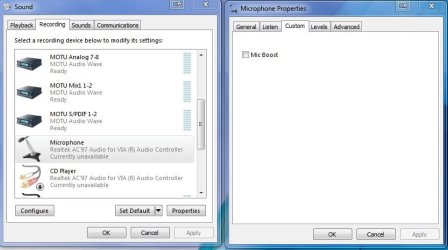
Most mic inputs have a box to check to raise the level. It's usually called mic boost on integrated hardware, in properties.
 

Attachments

  • Capture.JPG
    Capture.JPG
    49.8 KB · Views: 9,873

My Computer My Computer

Computer Manufacturer/Model Number
self built
OS
7600.20510 x86
CPU
P4 550 3.4 GHz HT running at 3.5 GHz
Motherboard
MSI PM8M3-V (MS-7211 v1.x) Micro-ATX mainboard
Memory
OCZ 2 GB(2x1GB) DDR400mHz running @ 414 mHz
Graphics Card(s)
HIS Radeon HD 3850 IceQ 3 Turbo HDMI Dual DL-DVI AGP
Sound Card
MOTU Traveler firewire studio interface 192 kHz 24 bit
Monitor(s) Displays
22" widescreen Acer X223W LCD, 17" Compaq P75 CRT
Screen Resolution
1680x1050 and 1280x1024
Hard Drives
SATA I x2 WD, 400 GB and 120 GB, SATA 2 WD Caviar Black 1 TB
PSU
350W generic
Case
Cybertronpc, it glows blue
Cooling
stock cpu fan, Ice-Q 3 gpu and system, many case fans
Keyboard
Logitch Classical Keyboard 200
Mouse
Logitech Mediaplay cordless
Internet Speed
1792/448 kbits/sec
Other Info
SATA II PCI fake RAID adapter, 1 GB Readyboost, original ATI Remote Wonder (even works with WMC perfectly), Logitech Rumblepad 2 game controller x2
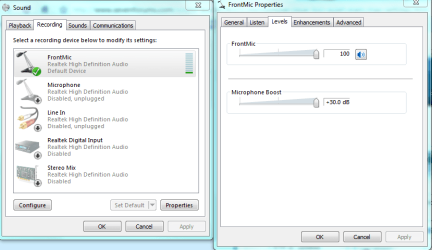
The mic boost in 7 is actually on, and Maxed at 30 DB. It's not a check box, it's a slider (I don't have that "Custom" tab) on my mic. This is through my front port, not my rear one.

I know for sure that I have it plugged into the correct port for Microphone in both cases (front and rear, when I tried rear). Are you suggesting that I shouldn't use the Microphone port, but perhaps another of the 6? If so, could you suggest which one?

Thanks.

The pic of my mic settings are attached. If this isn't the right screen you wanted to see, just let me know and I'll try and find the one you meant.

Thanks guys.
 

Attachments

  • Microphone Settings in 7.PNG
    Microphone Settings in 7.PNG
    27.3 KB · Views: 4,076

My Computer My Computer

Computer Manufacturer/Model Number
Custom Made
OS
Windows 7 Ultimate 64 Bit
CPU
Intel i7 920 Nehalem 2.66 GHz
Motherboard
EVGA x58 SLI LE
Memory
Corsair Dominator 1 GB x 6 DDR3
Graphics Card(s)
EVGA Superclocked Nvidia GeForce GTX 260
Sound Card
Realtek HD Audio (integrated)
Monitor(s) Displays
ASUS VH242H HDMI Full 1080p Widescreen LCD
Screen Resolution
1920x1080
Hard Drives
Western Digital Caviar 7200rpm 1 TB
PSU
Corsair 850W
Case
Cooler Master
Mouse
Razer DeathAdder
Internet Speed
Craptastic HughesNET Garbage
A minor addendum, while I was sitting here thinking about it.

Some of my initial recordings, I was using Stereomix, which as I mentioned, recorded the game audio (though not the mic for whatever reason). The game audio was reduced as much as my mic currently is, as far as playback volume in the recording.

That seems to imply that it wouldn't be a lack of power to the microphone, or even a faulty microphone as much as it seems like I missed a setting somewhere in my audio configurations, or it's just a bug in the drivers that's not fixed yet.

[EDIT] Tertiary thought: My speakers are actually set at 10%, because that's where music and game audio is comfortable at. Would Windows be basing it's recording or playback on 10% of the projected volume, thus lowering the actual input it receives (or records) by 90%? As I said, I really don't know that much about the audio aspect of computers.
 
Last edited:

My Computer My Computer

Computer Manufacturer/Model Number
Custom Made
OS
Windows 7 Ultimate 64 Bit
CPU
Intel i7 920 Nehalem 2.66 GHz
Motherboard
EVGA x58 SLI LE
Memory
Corsair Dominator 1 GB x 6 DDR3
Graphics Card(s)
EVGA Superclocked Nvidia GeForce GTX 260
Sound Card
Realtek HD Audio (integrated)
Monitor(s) Displays
ASUS VH242H HDMI Full 1080p Widescreen LCD
Screen Resolution
1920x1080
Hard Drives
Western Digital Caviar 7200rpm 1 TB
PSU
Corsair 850W
Case
Cooler Master
Mouse
Razer DeathAdder
Internet Speed
Craptastic HughesNET Garbage
Bigger update:

Due to having to RMA my motherboard (and PSU to be on the safe side, as I've narrowed the problems down to those two, and the system is already down without the mobo...), I've hooked up my old XP Pro system. While I have to use Mic boost to get a satisfactory volume level out of the mic, it actually comes through quite loud and clear, so much so I had to dial the volume back (but leave mic boost on).

Seems to me the quietness issue must just be the habitially craptastic Realtek 7 drivers.

Just figured I'd update in case anyone else out there is having the same problem with the same headset.
 

My Computer My Computer

Computer Manufacturer/Model Number
Custom Made
OS
Windows 7 Ultimate 64 Bit
CPU
Intel i7 920 Nehalem 2.66 GHz
Motherboard
EVGA x58 SLI LE
Memory
Corsair Dominator 1 GB x 6 DDR3
Graphics Card(s)
EVGA Superclocked Nvidia GeForce GTX 260
Sound Card
Realtek HD Audio (integrated)
Monitor(s) Displays
ASUS VH242H HDMI Full 1080p Widescreen LCD
Screen Resolution
1920x1080
Hard Drives
Western Digital Caviar 7200rpm 1 TB
PSU
Corsair 850W
Case
Cooler Master
Mouse
Razer DeathAdder
Internet Speed
Craptastic HughesNET Garbage
Hi Mr. Grimhowl...

I have virtually identical problem. I'm using a mic which recorded superbly under XP Pro on my old set-up.

It's now plugged in to my new PC (front mic) under Win 7, but even with input level full and boost at 30dB the recorded sound level is far too low (and the noise level far too high) to make any decent recordings.

I used to be able to play/sing comfortably 2-3 feet away from mic; now I have to be a couple of inches to get anything more than a whisper.

I tried various driver downloads, and using the rear mic socket but nothing has improved it yet.

My new PC is an AMD AthlonII X4 630 (with onboard sound I assume). And it looks as if I'm running VIA High Definition Audio software.

Any ideas please.... Recording is a significant part of my life...

Cheers, Dave T
 

My Computer My Computer

Computer Manufacturer/Model Number
AMD
OS
Windows 7 Version 6.1
CPU
Athlon IIx4 630
Memory
4.00Gb
Graphics Card(s)
NVIDIA GeForce 7025/NVIDIA nForce 630a
Same problem here. I guess there is no "cure" for this. I've tried all sorts of mics - same result. Apparently it just won't work well under Win 7 64 (and maybe 32). Honestly, I can't even make a decent skype call since I am forced to have (literally) my mic in my mouth so the other side can hear something. I think the problem lies within Realtek's driver for 64bit systems... or just Win7 alone... no idea. What i DO know is under vista 32 and XP my mic sounded great!
 

My Computer My Computer

Computer Manufacturer/Model Number
Personally Assembled
OS
Windows 7 Ultimate x64
CPU
Intel Core I7 920
Motherboard
Evga X58 SLI LE
Memory
12 GB Corsair DDR3-1600 PC3 12800
Graphics Card(s)
eVGA GeForce GTS 250 1 GB
Sound Card
Presonus Firebox/FS
Monitor(s) Displays
LG W2753 27"
Screen Resolution
1920x1080
Hard Drives
2x A-DATA SSD 64GB
1x WD VR 150GB 10K (Internal)
2x WD RE3 750 GB (32MB cache, 7200) (Internal)
5x Various WD (External)
PSU
CoolerMaster UCP 1100W
Case
Lian Li PC-50 Aluminum Tower
Cooling
CoolerMaster V10
Keyboard
Standard MS keyboard
Mouse
Standard MS mouse
Internet Speed
24/1 Mbit ADSL2+
I also have the same problem but it only started happening recently.

System specs are in profile I think...
Anyway, so far I've tried uninstalling my Creative X-FI Titanium fatality pro and enabling onboard from my mobo (Gigabyte P55A-UD4P) and it was exactly the same...

So I thought it might be my headphones?
Newegg.com, new headphones = SAME PROBLEM...

So, looking at the variables, it seems the WIN 7 INSTALL has somehow gone sour? It was ok originally, no new drivers have been installed. The only thing installed has been windows UPDATES... Could this be the culprit?

My next step (as much as I hate to) is to do an entire new install of Win7.

If that fails, I'll go BACK to XP and see if the problems still exists. Pain in the hiney but I seriously feel it's a Win7 issue and would like to prove it. It's an obvious issue with Win7....look how easy it is to find posts where people are having the same issue. LOTS of people.
 

My Computer My Computer

Computer Manufacturer/Model Number
ME
OS
Win7 ultimate 32bit
CPU
Intel i870
Motherboard
Gigabyte P55A-UD4P
Memory
ICZ3P1600LV2G (4gbytes total)
Graphics Card(s)
nvidia 280GTX
Sound Card
Creative X-Fi Fatility Pro
Monitor(s) Displays
24" hi-def
Screen Resolution
1920 x 1200
Hard Drives
1 Intel SSD (OS Drive)
1 Samsung Terabyte Sata II
1 Samsung 500gb
PSU
OCZ 750watt
Case
Home built
Cooling
Liquid cooling by Corsair
Keyboard
Saitek Eclipes, w/blue backlighting
Mouse
Microsoft Sidewinder gaming mouse.
Internet Speed
20+ Meg
Other Info
I've been tinkering with PC's for many years. I actually work for the company that makes the best CPU's currently available... (I'm NOT one of the rockstars though) :-D
I also have the same problem but it only started happening recently.


My next step (as much as I hate to) is to do an entire new install of Win7.

If that fails, I'll go BACK to XP and see if the problems still exists. Pain in the hiney but I seriously feel it's a Win7 issue and would like to prove it. It's an obvious issue with Win7....look how easy it is to find posts where people are having the same issue. LOTS of people.

FIXED!

Deleted all my sound devices in device manager, downloaded and installed the latest sound drivers for my Asus P7P55D MB and it will overdrive the mike input now. :geek:
 

My Computer My Computer

OS
Win 7 64 Ultimate
Umm.. i know its dead aleready Topic but i have same problem but unless like you guys.. i cant fix it.. so il post some pics and some info bout my problem

Klikk Computer Store Malta - Shop and buy for laptops, computers, related parts and consumables

This is the Headset i have.. (random googled link)

Idk why but i have latest realtek audio manager...[old pc had that so i got that on my new pc and windows also..so im not sure if i have right driver...]

But for some reason when i plugin my mic and headphones.. headphones work fine.. but microphone is extremly quiet.. and on/off buttom on headset.. for mic on/off i mean.. instead of muting the microphone.. every down i up/down switch it lowers volume a bit..

Anyways please help me.. i wanna rly get fixed...

UPDATE-
Things ive tried..
About Quiet Volume -
Checked if muted(which wasent muted)
Maxed Mic volume
Enable Boost.
Still too quiet unless i put it extremly close to mouth

About Button-
No Freaking idea whats the problem...

Some Pictured info.


[Direct Link - http://img828.imageshack.us/f/12943008.png/ ]
 

My Computer My Computer

Computer Manufacturer/Model Number
FUJITSU SIEMENS ESPRIMO P
OS
Windows 7 32bit Ultimate
CPU
Intel(R) Pentium(R) 4 CPU (2x 3.0ghz)
Motherboard
FUJITSU SIEMENS D2151-A1
Memory
Kingston 1gb 533mhz ddr2
Graphics Card(s)
Nvida 8400gs
Sound Card
installed realtek but not sure if its right one for my pc
Monitor(s) Displays
Samsung syncmaster 940n
Hard Drives
ST380811AS ATA Device

WDC WD5000AAKB-00H8A0 ATA Device
PSU
No idea what it is or how check... say please
Case
No idea what it is or how check... say please
Cooling
No idea what it is or how check... say please
Me too.

I have a Logitech headset that works fine on my old HP laptop running XP SP3 with SoundMAX drivers.

I bought a new Dell laptop running 7 SP1 with Realtek High Definition Audio drivers. The mic-in recording level is now very low. However the built-in mic recording level is OK. I've not tried to re-install the drivers yet, just relieved it is not just me with the problem and that there may be a fix.

I have a question though. In the Control Panel->Sound->Recording dialog box should I see 2 microphone entries (1 for built-in and 1 for mic-in)? I only ever see one entry. Which is not great as the 2 mics have such different characteristics, I would want to set them up differently.

Regards, rw
 

My Computer My Computer

OS
Windows 7 Professional x64
Low Mic at max Boost etc.

I have had this issue a while. Have tried everything.

I thought it must be an issue with my motherboard. So today decided to get a sound card. Picked one up Audigy SE. Plugged it in, disabled on board. Still low mic Volume. Googled and ended up here, which is cool as I use these forums a lot.

It has to be a Windows 7 issue. We need some fix that would allow us to slide that Mic Boost greater than 30db. 100db boost would be cool. I have no idea how to do that though.

Just googling a bit and found lots of people having this issue, but then I searched these forums.
This thread has been hit up 15k times on and this one http://www.sevenforums.com/sound-audio/16888-microphone-volume-too-low.html near 40,000 times. SO that makes it definitely not something we are doing wrong or faulty equipment but rather something is up with Windows 7, 64bit if not 32bit too. Yet they seem unaware of the issue. We need to start letting them know about it.
 
Last edited:

My Computer My Computer

Computer Manufacturer/Model Number
mypc4me
OS
Windows 7
CPU
i5 750
Motherboard
Asus p7p55D Evo
Memory
4TB GSkill
Graphics Card(s)
Ati 5850
Sound Card
Audigy SE
Monitor(s) Displays
24" Acer
Screen Resolution
1900x1200
Hard Drives
SSD & Hybrid SSD
PSU
Corsair 750
Case
CM
Cooling
fans
Keyboard
keys
Mouse
tailess
Internet Speed
MB
Other Info
Sausages
Is there any answer to this? I have updated drivers, max mic boost, etc. with no luck so far.

Dougal
 

My Computer My Computer

OS
Windows 7 home premium 32 bit
CPU
AMD Phenom 9750 Quad Core
Motherboard
ASUS M3A76-CM
Memory
2 GB
Graphics Card(s)
on board ATI
Sound Card
on board
Monitor(s) Displays
Samsung
Hard Drives
1 T Seagate
Hi, This is not just an issue with Windows 7, I have exactly the same problem when using Windows XP Pro, normal audio playback is perfect but unable to hear anything from Microphone unless I shout - even then all I hear is a whisper.

James
 

My Computer My Computer

OS
Windows XP Professional
CPU
Intel Core I5 - 2500K
Motherboard
ASUS P8P67
Memory
Corsair 4GB (2x2GB) DDR3 1600MHz/PC3-12800 XMS3
Graphics Card(s)
Radeon X1550
Sound Card
Onboard
Monitor(s) Displays
Dual Hanns.G 19" Monitors
Hard Drives
1 TB Samsung HD103SJ
PSU
550W ATX Silent Neon PSU
Case
Jet Turbine Fan Case
Cooling
Arctic Cooling Freezer 7 Pro rev 2
microphone

This may not be a problem with your Windows 7. This microphone works fine with Win XP for me. There are also thousands of searches for this topic, so there is a problem somewhere.
 

My Computer My Computer

OS
Windows 7 home premium 32 bit
CPU
AMD Phenom 9750 Quad Core
Motherboard
ASUS M3A76-CM
Memory
2 GB
Graphics Card(s)
on board ATI
Sound Card
on board
Monitor(s) Displays
Samsung
Hard Drives
1 T Seagate
Back
Top