
Microphone issue (Too quiet, even on max settings)

I don't know what exactly problem is but
I have problem like this but when I use my old microphone problem solved(Some systems can't work good with pro microphone cause some computers can't give microphone enough voltage)
today I check It again and I understand my old microphone works better than the others :D
 

My Computer My Computer

At a glance

Windows 7 Ultimate X64Core2Duo P8700 2.53GHz6 GB DDR2 800MHz SDRAMGeforce GTX260M 1GB GDDR
Computer Manufacturer/Model Number
ASUS G71GX Notebook
OS
Windows 7 Ultimate X64
CPU
Core2Duo P8700 2.53GHz
Memory
6 GB DDR2 800MHz SDRAM
Graphics Card(s)
Geforce GTX260M 1GB GDDR
Sound Card
Altec Lansing Built-In 4 Speakers
Monitor(s) Displays
17.1" WUXGA With 1440*900 Resolution
Hard Drives
500 GB Internal 5400rpm
1 TB External Toshiba Canvio
So the voltage is thing is related with the power supply in PC?
Because I bought a usb condenser mic and the USB is meant to power it with 48v phantom power..but the input/gain is really low, however if it was phantom power the mic wouldn't work at all. I also tried another operating system on an older computer and same problem..So I guess it is the microphone though as it is a common issue after some Googling..However there is a volume problem that lies within Windows 7 as you may have found in this section of the forum
 

My Computer My Computer

At a glance

Windows 7 Ultimate x64
OS
Windows 7 Ultimate x64
I have had this issue a while. Have tried everything.

I thought it must be an issue with my motherboard. So today decided to get a sound card. Picked one up Audigy SE. Plugged it in, disabled on board. Still low mic Volume. Googled and ended up here, which is cool as I use these forums a lot.

It has to be a Windows 7 issue. We need some fix that would allow us to slide that Mic Boost greater than 30db. 100db boost would be cool. I have no idea how to do that though.

Just googling a bit and found lots of people having this issue, but then I searched these forums.
This thread has been hit up 15k times on and this one http://www.sevenforums.com/sound-audio/16888-microphone-volume-too-low.html near 40,000 times. SO that makes it definitely not something we are doing wrong or faulty equipment but rather something is up with Windows 7, 64bit if not 32bit too. Yet they seem unaware of the issue. We need to start letting them know about it.[/QUOTE]

Why? When was the last time you ever heard of a company this big admit to fault or wrong doing?
 

My Computer My Computer

At a glance

Windows 7 64bitIntel Core i7-860 Lynnfield 2.8GHz LGA 1156 9...Sector 5 2000 mhz 8 gigsXFX and Diamond 5850 crossfired
OS
Windows 7 64bit
CPU
Intel Core i7-860 Lynnfield 2.8GHz LGA 1156 95W Quad-Core Pr
Motherboard
Intel BOXDP55KG LGA 1156 Intel P55 ATX Intel Motherboard
Memory
Sector 5 2000 mhz 8 gigs
Graphics Card(s)
XFX and Diamond 5850 crossfired
Sound Card
onboard Realtek
Monitor(s) Displays
Acer S243HLbmii Black 24"
Hard Drives
Seagate Barracuda 7200.11 ST31500341AS 1.5TB
PSU
CORSAIR CMPSU-750TX 750W ATX12V v2.2 SLI Certified CrossFire
Case
RAIDMAX SMILODON ATX-612WBP
First about Boosting I have to say more boost makes quality very bad(I recommend never use boost at all)
Windows 7 have problem but faulty equipment will make many problem too(I had problem like this My problem was from my equipment,my new microphone needed more voltage than my old microphone so I used old one)
please change you microphone too(Voltage is important)
notebooks needs microphone with lower voltage
 

My Computer My Computer

At a glance

Windows 7 Ultimate X64Core2Duo P8700 2.53GHz6 GB DDR2 800MHz SDRAMGeforce GTX260M 1GB GDDR
Computer Manufacturer/Model Number
ASUS G71GX Notebook
OS
Windows 7 Ultimate X64
CPU
Core2Duo P8700 2.53GHz
Memory
6 GB DDR2 800MHz SDRAM
Graphics Card(s)
Geforce GTX260M 1GB GDDR
Sound Card
Altec Lansing Built-In 4 Speakers
Monitor(s) Displays
17.1" WUXGA With 1440*900 Resolution
Hard Drives
500 GB Internal 5400rpm
1 TB External Toshiba Canvio
since this topic is still first hit for me in google, forgive me if i res with a new post
i had same problem on windows7 64-bit, Realtek integrated soundcard, Asus P8 motherboard
Asus dont have new driver for it, but from Realtek you can get a new 64-bit driver, what solved the problem, and got very loud mic
you can search it on the Realtek or try this link
Realtek
 

My Computer My Computer

At a glance

Windows 7
OS
Windows 7
Madar,

Thanks for the update. I just installed 2.67 release of the Realtek drivers, but it made no difference to my mic recording level.

rw
 

My Computer My Computer

At a glance

Windows 7 Professional x64
OS
Windows 7 Professional x64
This problem is occurring for me too and I want to stab myself in the eye because that sounds more appealing that formatting and giving up. This is NOT a settings option but most likely a inf or driver file that windows update replaced at some point that has the default setting for all input devices included within it but because it no longer is correlated to the audio settings due to a new reference point being used to store this information it cannot be changed. KABOOM
 

My Computer My Computer

At a glance

Win7RTM
OS
Win7RTM
I think one of the main problems with the Windoze 7 and microphones/ skyping is indeed Windoze 7 itself.

My main PC was running XP Pro for many years with even some of the same hardware, without any problems.

Cleanly installed w7 [chose 32bit as 64 bit is just dreadful for hardware] and now I too have audio troubles.
I have the Creative X-fi xtreme audio, which was a disaster to begin with , but after the third format and install of w7, now works. [no audio console though so bass management over my 5.1 is very heavy on bass, but the issue like others is the damn microphone. Using the front panel to connect the mic, I used the realtec then the HD audio link, which offer no difference. Mic boost is now fully on, but I have to nearly eat the mic to be heard. MS or Creative drivers make no difference.

The other daft thing is , I recently bought a Toshiba NB520 duel core netbook, which, yep runs W7 too. On the box it says 'designed to run SKYPE', however skype collapses under a call, and says the pc is running too slowely to make a call. DUH!
Mind you, no mic troubles with that, if only I couold use it.

So I'm going to buy another mic today, but I fail to see it make any difference at all.

Has anyone yet come up with a solution to this massively affecting problem or is it like typically MS software is , well still as usual INCOMPLETE and only compatible with HP's and Smells [sorry DELLS]
 

My Computer My Computer

At a glance

Windows 7 Ultimate 32 bitAthlon 64 9394GB Transend pc2700Asus/ AMD Radeon HD 6700Series
Computer Manufacturer/Model Number
Me
OS
Windows 7 Ultimate 32 bit
CPU
Athlon 64 939
Motherboard
Foxconn 6150K8MA
Memory
4GB Transend pc2700
Graphics Card(s)
Asus/ AMD Radeon HD 6700Series
Sound Card
Creative X-fi extreme audio
Monitor(s) Displays
Samsung Syncmaster P2270
Hard Drives
Samsung SP1614N ATA.
PSU
ATRIX Extreme 80Plus
Case
err.. from Maplin
Cooling
yes
An answer at last

I know this is an old post but on the off chance some are still looking I found a work around of sorts.
First this is a Win 7 issue and MS are ignoring it in favor of Win 8. However I found a post that at least makes my mike loud enough for Dragon to hear which before was problematic at best. The recommendation is to download ASIO4ALL - Universal ASIO Driver For WDM Audio from ASIO4ALL - Universal ASIO Driver it's a driver that boosts input of USB devices and is inactive unless a USB audio in or out device is in use. The second part of it suggests installing the Kristal Audio Engine to use as a 'mixer' and explains how. I haven't done that as the driver itself seems to work without tweeking for me but you may want to to it. The full link to that post is
How can i get lightsnake to work with windows 7 - JustAnswer

Good luck!
:D
 

My Computer My Computer

At a glance

Windows 7 Home premium x64
OS
Windows 7 Home premium x64
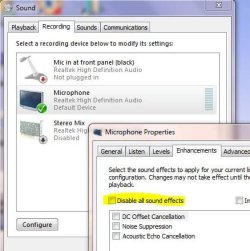
I fixed it by turning off Disable All Sound Effects

Hi fellow sufferers.

I also reinstalled RealTek HD drivers to no avail. By a process of elimination using Sound Recorder, I found that if you leave Disable All Sound Effects unticked, it brought back the levels, and if you deslect all the effects it reduced the distortion to a useable level. I have level on 100 with no boost. Windows speech recognition is now working fine on the built-in microphone (from two feet away) and also with a cheap (one pound) desk mic. With the effects on, it sounds like it was going through a phaser effect and very distorted. This sounds exactly like other users' descriptions.

My fix is to leave Disable All Sound Effects unticked on the mic properties enhancements tab:

disableallsoundeffects.JPG

This is not tested on another system so please get back to me if you can confirm it or need more information. Turning on any of the effects just distorts the sound so I am wondering if that is indeed a driver problem.

BTW If you can't see all your microphones, look for the setting Separate all input jacks as independent input devices under Device Advanced Settings at the top right of the RealTek HD Audio Manager in Control Panel, Hardware and Sound.

Hope this helps someone else.
 

My Computer My Computer

At a glance

Windows 7 Home Premium 64 bitIntel Core i3 M 380 2.53 GHz4GBIntel HD
Computer Manufacturer/Model Number
Toshiba C660-1D7
OS
Windows 7 Home Premium 64 bit
CPU
Intel Core i3 M 380 2.53 GHz
Motherboard
ACPI x64-based
Memory
4GB
Graphics Card(s)
Intel HD
Sound Card
RealTek HD
Monitor(s) Displays
Generic led backlit
Hard Drives
600GB
i have same problem. you're not to picky...i don't wanna use boost cause i can't stand hiss sound. this is something way to wrong with win7 on this issue. xp was perfect about this stuff. i'm really trying to change to win7 but i really hate stuff like this...xp is so better and many things. only memory managment in win7 is better!

anyone have solution to this problem?
 

My Computer My Computer

At a glance

Windows 7 Ultimate x64Intel i5 3350PKingston HyperX DDR3 1600MHz 4GB (x2)Asus, GeForce GTX 560Ti, DCUII 1024MB
Computer type
PC/Desktop
OS
Windows 7 Ultimate x64
CPU
Intel i5 3350P
Motherboard
Asus P8H77-V
Memory
Kingston HyperX DDR3 1600MHz 4GB (x2)
Graphics Card(s)
Asus, GeForce GTX 560Ti, DCUII 1024MB
So, here's the deal for me, since this thread was Google's first hit for me.

Using Windows 7 x64, I have 3 mics. All of them worked on my old XP machine.

One is in my webcam, one I put in the mic jack, and one is just a USB mic.

I have to shove all of them in my mouth to get any sound recorded at all, and even then it's just a faint whisper in the background.

Has anyone found a solution for this?
 

My Computer My Computer

At a glance

Windows 7 Ultimate x64
OS
Windows 7 Ultimate x64
I, too, am aware that this is an old thread but having searched for all sorts of things this thread comes up every time. I DID (eventually) find a solution that works for me. What I had to do was in the Realtek HD Audio Manager- I set the recording volume all the way to the left. Screenshot:
311VK.png


Suddenly my computer is able to magically pick up my microphone with perfect clarity and volume.

I'm also aware that this is kind of a dumb fix. But it works for me on my desktop AND on my laptop (Which had the same issue)
 

My Computer My Computer

At a glance

Windows 7 Ultimate x64
Computer type
PC/Desktop
Computer Manufacturer/Model Number
Custom Build
OS
Windows 7 Ultimate x64
It's time for a revival. Thanks Google.

So, have the same problem with my mic on a desktop. Pretty much described above- it's audible for about 5 seconds on Skype then drops out for good until reset. Thought it was just the mic dying, but other mics had the same issue. Going to update Realtek and do this ^. Also, four more years!
 

My Computer My Computer

At a glance

Windows 7 Ultimate x64
Computer type
PC/Desktop
Computer Manufacturer/Model Number
Toshiba
OS
Windows 7 Ultimate x64
I had the same problem, after viewing the posts in this thread, and many others from searching around, I think I found the solution.

I did everything from turning mic volume/boost up, to muting and unmuting, 3 different headsets, which didn't help any of them. This just started recently, so I'm not sure why this worked.

Going into my recording devices, I turned off the noise cancellation, and then went to the sounds tab, to the right of the recording section, and turned all sounds on (I had them turned off because the sounds got annoying).

After doing those 2 things, my mic(s) started working properly, I even had to turn the boost down (lol)
 

My Computer My Computer

At a glance

Vista 64bit
Computer type
Laptop
Computer Manufacturer/Model Number
HP
OS
Vista 64bit
I know this thread is old but I finally managed to fix it. I had the exact same problem as everybody else where I had to scream into my mic for it to barely even work.

https://www.youtube.com/watch?v=6oM74sze4E8&feature=youtu.be

The tutorial is on the video, it worked for me and a few others so far. Hopefully this helps everybody
 

My Computer My Computer

At a glance

windows 7 64bit
Computer type
PC/Desktop
OS
windows 7 64bit
None of the above worked for me.

In the system tray, right click on the speaker and select "Recording Devices".

Under the "Recording" tab, you probably see several MICROPHONE entries. Enable the entry that is currently greyed out. Then, disable the newly greyed out entry.

Note: After I enabled the second entry, my computer did not recognize my microphone. Only after I disabled the newly greyed out entry was I able to record audio. Please do both steps.
 

My Computer My Computer

At a glance

Windoes 7 Home x64i712GBGefore 560
Computer type
PC/Desktop
OS
Windoes 7 Home x64
CPU
i7
Motherboard
Rampage II Extreme
Memory
12GB
Graphics Card(s)
Gefore 560
Hard Drives
250GB SSD
Antivirus
Hah
Browser
Yes
Back
Top