Microphone No Audio Input Device Found

zeromisery00

New member
Local time
3:01 AM
Messages
8
Hi. I want to try using my microphone when I am playing some games and doing other things but I just noticed that the microphone device cannot be detected. Just so you know, I am using a Gaming headset that has a built-in microphone in it so I am pretty sure that the microphone's with it. Also, I'm quite sure that I have a sound driver installed since I am always using it whenever I do something on my computer. Just that I noticed recently that the mic is not working. It's on good condition since I just have bought it about 3 months ago and tried and tested the microphone on the place where I bought it. Please do tell me what to do because I can't pin point the problem exactly on my computer. I've followed the instructions on how to put my pc specs on the forums and everyone's help will be greatly appreciated.

I hope to hear from you guys soon, thanks a lot in advance. Thank you!
 

My Computer

Computer type
PC/Desktop
OS
Microsoft Windows 8 Release Preview 32-bit 8400 Multiprocessor Free
CPU
AMD Athlon(tm) II X2 260 Processor
Motherboard
Emaxx Technologies, Inc EMX-MCP61D3-iCafe
Memory
8.00 GB
Graphics Card(s)
NVIDIA GeForce 9600 GT
Sound Card
(1) Realtek High Definition Audio (2) NVIDIA Virtual Audio
Screen Resolution
0 x 0 x 0 bits (0 colors) @ 0 Hz
Hard Drives
ST500DM0 02-1BD142 SCSI Disk Device
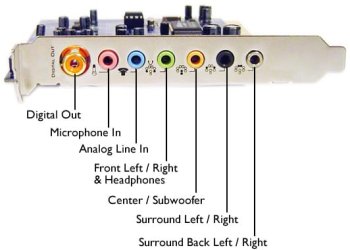
Do you have It plugged in correctly?
What program manages the sound on you PC, I.E mine is Realtek
 

Attachments

  • audio jakcs.jpg
    audio jakcs.jpg
    43.1 KB · Views: 15

My Computer

Computer type
PC/Desktop
Computer Manufacturer/Model Number
Custom Build
OS
Windows 7 Ultimate 64-bit
CPU
Intel G3420 3.2GHZ Dual Core
Motherboard
Gigabyte H87-HD3
Memory
Kingson 8GB 1600mhz
Graphics Card(s)
MSI R7970 TF 3GD5/OC BE
Monitor(s) Displays
21" LG & "19 Vertical Samsung
Hard Drives
120GB SSD - Boot
1TB WD
350GB External
2TB External (Wireless)
PSU
Corsair CX 500 modular
Case
Zalman Z11 Plus (modified)
Cooling
Corsair H55, 2x 120mm SP Corsair, 1x 140 Coolermaster
Keyboard
Corsair K50
Mouse
CSL Gaming
Internet Speed
164Mbps
Antivirus
Avast, Malwarebytes
Browser
Google Chrome, IE, Firefox
Do you have It plugged in correctly?
What program manages the sound on you PC, I.E mine is Realtek

Yes I do. If I'm not mistaken, my CPU has 3 plugins by default and I'm quite sure that I've inserted it correctly. If not, the audio wouldn't be available to hear. Also, Realtek is what I use.
 

My Computer

Computer type
PC/Desktop
OS
Microsoft Windows 8 Release Preview 32-bit 8400 Multiprocessor Free
CPU
AMD Athlon(tm) II X2 260 Processor
Motherboard
Emaxx Technologies, Inc EMX-MCP61D3-iCafe
Memory
8.00 GB
Graphics Card(s)
NVIDIA GeForce 9600 GT
Sound Card
(1) Realtek High Definition Audio (2) NVIDIA Virtual Audio
Screen Resolution
0 x 0 x 0 bits (0 colors) @ 0 Hz
Hard Drives
ST500DM0 02-1BD142 SCSI Disk Device
bump
 

My Computer

Computer type
PC/Desktop
OS
Microsoft Windows 8 Release Preview 32-bit 8400 Multiprocessor Free
CPU
AMD Athlon(tm) II X2 260 Processor
Motherboard
Emaxx Technologies, Inc EMX-MCP61D3-iCafe
Memory
8.00 GB
Graphics Card(s)
NVIDIA GeForce 9600 GT
Sound Card
(1) Realtek High Definition Audio (2) NVIDIA Virtual Audio
Screen Resolution
0 x 0 x 0 bits (0 colors) @ 0 Hz
Hard Drives
ST500DM0 02-1BD142 SCSI Disk Device
bump. please help me :(
 

My Computer

Computer type
PC/Desktop
OS
Microsoft Windows 8 Release Preview 32-bit 8400 Multiprocessor Free
CPU
AMD Athlon(tm) II X2 260 Processor
Motherboard
Emaxx Technologies, Inc EMX-MCP61D3-iCafe
Memory
8.00 GB
Graphics Card(s)
NVIDIA GeForce 9600 GT
Sound Card
(1) Realtek High Definition Audio (2) NVIDIA Virtual Audio
Screen Resolution
0 x 0 x 0 bits (0 colors) @ 0 Hz
Hard Drives
ST500DM0 02-1BD142 SCSI Disk Device
bump
 

My Computer

Computer type
PC/Desktop
OS
Microsoft Windows 8 Release Preview 32-bit 8400 Multiprocessor Free
CPU
AMD Athlon(tm) II X2 260 Processor
Motherboard
Emaxx Technologies, Inc EMX-MCP61D3-iCafe
Memory
8.00 GB
Graphics Card(s)
NVIDIA GeForce 9600 GT
Sound Card
(1) Realtek High Definition Audio (2) NVIDIA Virtual Audio
Screen Resolution
0 x 0 x 0 bits (0 colors) @ 0 Hz
Hard Drives
ST500DM0 02-1BD142 SCSI Disk Device
Please read forum rules. Bumping is not aloud.
Have you gone in into "Realtek", and set it up as a microphone?
 

My Computer

Computer type
PC/Desktop
Computer Manufacturer/Model Number
Custom Build
OS
Windows 7 Ultimate 64-bit
CPU
Intel G3420 3.2GHZ Dual Core
Motherboard
Gigabyte H87-HD3
Memory
Kingson 8GB 1600mhz
Graphics Card(s)
MSI R7970 TF 3GD5/OC BE
Monitor(s) Displays
21" LG & "19 Vertical Samsung
Hard Drives
120GB SSD - Boot
1TB WD
350GB External
2TB External (Wireless)
PSU
Corsair CX 500 modular
Case
Zalman Z11 Plus (modified)
Cooling
Corsair H55, 2x 120mm SP Corsair, 1x 140 Coolermaster
Keyboard
Corsair K50
Mouse
CSL Gaming
Internet Speed
164Mbps
Antivirus
Avast, Malwarebytes
Browser
Google Chrome, IE, Firefox
Please read forum rules. Bumping is not aloud.
Have you gone in into "Realtek", and set it up as a microphone?

Sorry. But I am really desperate to get this fixed. :(
Going back, where do I locate that?
 

My Computer

Computer type
PC/Desktop
OS
Microsoft Windows 8 Release Preview 32-bit 8400 Multiprocessor Free
CPU
AMD Athlon(tm) II X2 260 Processor
Motherboard
Emaxx Technologies, Inc EMX-MCP61D3-iCafe
Memory
8.00 GB
Graphics Card(s)
NVIDIA GeForce 9600 GT
Sound Card
(1) Realtek High Definition Audio (2) NVIDIA Virtual Audio
Screen Resolution
0 x 0 x 0 bits (0 colors) @ 0 Hz
Hard Drives
ST500DM0 02-1BD142 SCSI Disk Device
Go into device manager. Locate the audio device.
> Right click->Properties->Driver. If the Provider is Microsoft, you're using the Windows generic driver.

If that's the case, go to your computer or m/b support site. Download the device specific driver for your machine and version of Windows
 

My Computer

Computer type
PC/Desktop
Computer Manufacturer/Model Number
Dell Optiplex 360 and Optiplex 755
OS
Desk 1: Win 7 Pro x32; Desk 2: Windows 10 x64
Hard Drives
500GB Crucial SSD in both Desktops
Other Info
Buffalo 6TB NAS, Raid 1
Go into device manager. Locate the audio device.
> Right click->Properties->Driver. If the Provider is Microsoft, you're using the Windows generic driver.

If that's the case, go to your computer or m/b support site. Download the device specific driver for your machine and version of Windows

I have realtek. Does that mean I have to download that for my microphone to work? Okay.
 

My Computer

Computer type
PC/Desktop
OS
Microsoft Windows 8 Release Preview 32-bit 8400 Multiprocessor Free
CPU
AMD Athlon(tm) II X2 260 Processor
Motherboard
Emaxx Technologies, Inc EMX-MCP61D3-iCafe
Memory
8.00 GB
Graphics Card(s)
NVIDIA GeForce 9600 GT
Sound Card
(1) Realtek High Definition Audio (2) NVIDIA Virtual Audio
Screen Resolution
0 x 0 x 0 bits (0 colors) @ 0 Hz
Hard Drives
ST500DM0 02-1BD142 SCSI Disk Device
If you're saying that Device Properties shows Provider is Realtek, then you already have the driver installed. (The one driver is for the onboard audio speakers and microphone.

On the other hand, it wouldn't hurt to look in Program and Features look for Realtek and uninstall. Then download the driver from the support site and reinstall.

Otherwise, when you look at Control Panel->under Recording tab, do you see a mic listed? When you plug in the mic does it show detected? if not, it may the mic plug connection on the computer may have failed :(
 

My Computer

Computer type
PC/Desktop
Computer Manufacturer/Model Number
Dell Optiplex 360 and Optiplex 755
OS
Desk 1: Win 7 Pro x32; Desk 2: Windows 10 x64
Hard Drives
500GB Crucial SSD in both Desktops
Other Info
Buffalo 6TB NAS, Raid 1
I'll try reinstalling later if that's what causes the problem. On the Recording tab, it doesn't show the mic in the devices listed. I'm quite confused now because I've tried and tested that the mic works on the place where I bought it. Now it doesn't on my computer. Is it something external or does the pluggings are broken instead of the mic? Whenever I insert/remove something from it, it says that "you have plugged/unplugged a device from the audio jack". How do I fix that failed connection in the mic plug? Thanks.
 

My Computer

Computer type
PC/Desktop
OS
Microsoft Windows 8 Release Preview 32-bit 8400 Multiprocessor Free
CPU
AMD Athlon(tm) II X2 260 Processor
Motherboard
Emaxx Technologies, Inc EMX-MCP61D3-iCafe
Memory
8.00 GB
Graphics Card(s)
NVIDIA GeForce 9600 GT
Sound Card
(1) Realtek High Definition Audio (2) NVIDIA Virtual Audio
Screen Resolution
0 x 0 x 0 bits (0 colors) @ 0 Hz
Hard Drives
ST500DM0 02-1BD142 SCSI Disk Device
Back
Top