Solved Microphone Not Working

thinkbig

New member
Member
VIP
Local time
7:19 AM
Messages
118
Hi,

For some reason?? I can't get my microphone to pick up any sound.

It is a clip on mic that is plugged into the front 3.5mm jack on my computer.
I've also tried the jack in the back as well.

My sound is going through my monitor via HDMI but I also have the sound connected to the monitor through the speaker output. I tried disconnecting it but that wasn't the issue. I used to have speakers before this monitor with built in speakers. I have the sound output set to HDMI which is working fine. I need the mic to work when attending conferences on Zoom.

I also have a headset with a mic, tried that as well but no success.

I looked for a mic input on the monitor but there is none, just speakers and headset.
I've tried the headset with mic through the headset jack on the monitor.

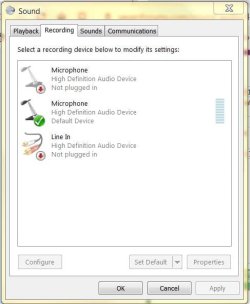
I can see the mic in the Recording Devices Window, the levels are set high.

Frustrated, not sure what to do from here??

Thanks in advance for your help!
 

My Computer

Computer type
PC/Desktop
Computer Manufacturer/Model Number
Dell Inspiron
OS
Microsoft Windows 7 Home Premium 64-bit
CPU
Intel(R) Core(TM)2 Duo CPU E7600 @ 3.06GHz
Motherboard
Dell Inc. 0K83V0
Memory
8.00 GB
Graphics Card(s)
(1) Intel(R) G45/G43 Express Chipset (2) Intel(R) G45/G43
Sound Card
(1) Realtek High Definition Audio (2) Intel(R) High Defini
Monitor(s) Displays
Phillips BDM4065UC
Hard Drives
Samsung SSD 860 EVO 500G
Browser
IE 10
In recording devices, is the mic set as default?

This is an input, not an output like speakers. I don't know why you are wanting to hear your mic through the monitor. If you want to, and once the mic is working you go into the mic settings and check off "Listen to this device."

Also, in recording devices, when you view the microphone, do you see the bar graph move while speaking?
 

My Computer

Computer type
PC/Desktop
OS
Windows 7 Ultimate x64
Thanks for your response.

Not trying to hear the mic through the monitor, thought it might be an input but you are correct, it is not.
I need to get it working to participate in Zoom Conferences.

I do not see the bars moving in recording devices.
The mic is recognized though, I've attached a screen shot.
 

Attachments

  • mic1.JPG
    mic1.JPG
    46.5 KB · Views: 8

My Computer

Computer type
PC/Desktop
Computer Manufacturer/Model Number
Dell Inspiron
OS
Microsoft Windows 7 Home Premium 64-bit
CPU
Intel(R) Core(TM)2 Duo CPU E7600 @ 3.06GHz
Motherboard
Dell Inc. 0K83V0
Memory
8.00 GB
Graphics Card(s)
(1) Intel(R) G45/G43 Express Chipset (2) Intel(R) G45/G43
Sound Card
(1) Realtek High Definition Audio (2) Intel(R) High Defini
Monitor(s) Displays
Phillips BDM4065UC
Hard Drives
Samsung SSD 860 EVO 500G
Browser
IE 10
The first microphone device. Can you right click that and set it as default? Try that and see if you get microphone input.
 

My Computer

Computer type
PC/Desktop
OS
Windows 7 Ultimate x64
It wont let me change it to default, it is for the rear jack which I have tried as well.

It may be the mic itself, the only other one I have is on a headset and I am not sure how to use it?
Should it go into the mic or headset jack and are the settings different for the headset than just the mic?

Thank you.
 

My Computer

Computer type
PC/Desktop
Computer Manufacturer/Model Number
Dell Inspiron
OS
Microsoft Windows 7 Home Premium 64-bit
CPU
Intel(R) Core(TM)2 Duo CPU E7600 @ 3.06GHz
Motherboard
Dell Inc. 0K83V0
Memory
8.00 GB
Graphics Card(s)
(1) Intel(R) G45/G43 Express Chipset (2) Intel(R) G45/G43
Sound Card
(1) Realtek High Definition Audio (2) Intel(R) High Defini
Monitor(s) Displays
Phillips BDM4065UC
Hard Drives
Samsung SSD 860 EVO 500G
Browser
IE 10
Perhaps the HDMI driver with your video card is interfering with microphone input. In order to confirm that you would have to uninstall your graphics driver in safe mode, reboot the computer and reinstall the graphics driver, but use the custom install option and don't install anything else except the driver. No fluff, no experience, etc. Just the driver.

It sounds like you already have speakers so the speakers in the monitor don't need to be used.

Another thought. I don't use audio through an HDMI cable, but perhaps there are settings for that in the video card settings. You should be able to right click the monitor and find those video card settings or look in the control panel.

From your specs you have two sound cards. Perhaps one is messing around with the other. Also, go into device manager and make sure you have no yellow exclamation marks for drivers.

In the BIOS of the computer may have an option for the audio CODEC. Make sure that's on. Consequently, if you are using two sound cards perhaps it needs to be off.

Your headset. What is the make and model? Is it Bluetooth or does it have a cable to plug into the mic input?

What is the exact make and model of the Dell you have?
 

My Computer

Computer type
PC/Desktop
OS
Windows 7 Ultimate x64
Updated the driver but that didn't do it.

I got a new mic with USB input and it is working fine.
The PC recognized it right away.

Not sure why the first one wouldn't work through the mic
jack (still could be the mic itself) but at this point it doesn't
matter. (-:

Thanks again for your help!
 

My Computer

Computer type
PC/Desktop
Computer Manufacturer/Model Number
Dell Inspiron
OS
Microsoft Windows 7 Home Premium 64-bit
CPU
Intel(R) Core(TM)2 Duo CPU E7600 @ 3.06GHz
Motherboard
Dell Inc. 0K83V0
Memory
8.00 GB
Graphics Card(s)
(1) Intel(R) G45/G43 Express Chipset (2) Intel(R) G45/G43
Sound Card
(1) Realtek High Definition Audio (2) Intel(R) High Defini
Monitor(s) Displays
Phillips BDM4065UC
Hard Drives
Samsung SSD 860 EVO 500G
Browser
IE 10
Glad you have a solution now.
 

My Computer

Computer type
PC/Desktop
OS
Windows 7 Ultimate x64
Maybe the input volume was down too low...
I have that issue when ever I update my HD Audio drivers by Realtek... lol
 

My Computers

System One System Two

  • Computer type
    PC/Desktop
    Computer Manufacturer/Model Number
    [Self-built](custom-build)(June 2020)
    OS
    Windows 11 Pro (x64)
    CPU
    AMD Ryzen 9 3900X 12-Core Processor
    Motherboard
    Asus PRIME X570-PRO
    Memory
    32GB, 2x G.Skill 16GB (PC3200)(DDR4-2137)
    Graphics Card(s)
    NVIDIA GeForce RTX 3070 Ti 8GB XC3 model by EVGA
    Sound Card
    Realtek® ALC1220A 8-Channel High Definition Audio CODEC
    Monitor(s) Displays
    24" DELL Gaming Monitor - G2422HS - DisplayPort used
    Screen Resolution
    1920x1080p at 165Hz (16:9 Aspect Ratio)
    Hard Drives
    1TB Samsung 980 Pro (NVMe)(SSD)
    2TB Samsung 980 Pro (NVMe)(SSD)
    2TB Samsung 870 EVO (SSD)

    NVMe 1TB
    -- OS(Win10 Pro x64),
    -- programs,
    -- programming(MS Visual Studios 2022 Community Ed.),
    -- music

    NV
    PSU
    Thermaltake TOUGHPOWER DPS G RGB Titanium Certified 1250Watt
    Case
    Corsair Graphite Series 780T Full Tower PC Case
    Cooling
    AMD Wraith cooler (stock) & 3x Corsair case fans
    Keyboard
    Alienware Low Profile RGB Mechanical USB Gaming Keyboard - A
    Mouse
    Redragon M602 RGB Wired USB Gaming mouse
    Internet Speed
    2100Mbps Download, 350Mbps Upload
    Antivirus
    n/a aka "ABOVE TOP SECRET!" lol ;)
    Browser
    Firefox & Google Chrome
  • Computer type
    Laptop
    System Manufacturer/Model Number
    DELL G15 Ryzen edition, model 5515
    OS
    Windows 11 Pro
    CPU
    AMD Ryzen 7 5800H
    Motherboard
    DELL G15 Ryzen edition
    Memory
    16GB DDR4
    Graphics Card(s)
    Ryzen 7 5800H integrated AMD Radeon Graphics and Nvidia GeForce 3060 6GB
    Sound Card
    Realtek ALC3254 with Nahimic 3D Audio for Gamers
    Monitor(s) Displays
    built-in
    Screen Resolution
    1920x1080
    Hard Drives
    500GB NVMe SSD
    PSU
    DELL power brick.
    Case
    laptop
    Cooling
    laptop cooling
    Keyboard
    built-in
    Mouse
    Microsoft basic optical scroll mouse
    Internet Speed
    1000Mbps download, 20Mbps upload
    Browser
    Firefox & Waterfox Classic
Back
Top