Microphone volume too low

01steven

New member
Local time
4:38 PM
Messages
16
Just installed the release candidate of Windows 7.
Was previously running Vista.
I use Skype a lot, and my microphone volume level is much lower now than it ever was.
People are telling me they can hardly hear me when I call them.
I have a Dell Inspiron 1525 laptop- the mic is built-in.
I've looked at all the obvious settings both within Skype and also within Windows, but not managed to fix this yet.
Any suggestions?
 

My Computer

OS
Windows 7
Hi Steven, welcome to the forums.

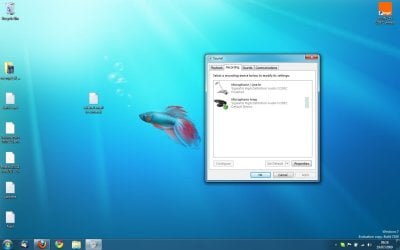
I have had the same issue with my laptop (e-system). You have to go to Control Panel -> Hardware and Sound, open the 'Sound' option. Click the 'Recording' tab and you may see 2 microphone devices, I had to 'disable' (right-click) the first device while changing the properties of the second one (volume levels + boost to +20)

Hope this helps :)


Jeff
 

My Computer

Computer Manufacturer/Model Number
Compaq Desktop
OS
Windows 7 Ultimate x64
CPU
AMD Sempron Dual Core
Memory
3GB
Graphics Card(s)
NVIDIA GeForce 6150SE nForce 430
Screen Resolution
1024x768
Hard Drives
150GB Sata
Hi Steven, welcome to the forums.

I have had the same issue with my laptop (e-system). You have to go to Control Panel -> Hardware and Sound, open the 'Sound' option. Click the 'Recording' tab and you may see 2 microphone devices, I had to 'disable' (right-click) the first device while changing the properties of the second one (volume levels + boost to +20)

Hope this helps :)


Jeff

Hi
Sorry I should have mentioned I had already tried this!
One is disabled and the other is at 100% volume.
Not sure what's going on with 2 microphone devices showing though. Can't see the difference between the 2 either. Wonder if there'd be any results by disabling the other one and altering the settings on the currently disabled one?
 

My Computer

OS
Windows 7
i think he was talking about something different. disable all the other ones, right click the one you want and click properties. go to the 'levels' tab and then you can boost your microphone from +40dB to +60dB
 

My Computer

OS
Windows 7
CPU
Intel D (2 x 3.0 GHZ)
Motherboard
ASRock Wolfdale 1333-D667 R2
Memory
2048 MB
Graphics Card(s)
GeForce 200 series
Sound Card
Realtek
Monitor(s) Displays
2 monitors, 22inch acer and 17inch HP running same time
Hard Drives
only 160gb
Case
custom made
Keyboard
flat lol
Internet Speed
FiOS 15Mbs
Hi
Sorry I should have mentioned I had already tried this!
One is disabled and the other is at 100% volume.
Not sure what's going on with 2 microphone devices showing though. Can't see the difference between the 2 either. Wonder if there'd be any results by disabling the other one and altering the settings on the currently disabled one?

Quite possible, it's worth a try ;)
 

My Computer

Computer Manufacturer/Model Number
Compaq Desktop
OS
Windows 7 Ultimate x64
CPU
AMD Sempron Dual Core
Memory
3GB
Graphics Card(s)
NVIDIA GeForce 6150SE nForce 430
Screen Resolution
1024x768
Hard Drives
150GB Sata
OK here's the latest.
There are 2 microphones showing in the system.
They were both called 'Microphone' so I've renamed them as 'Microphone1' and 'Microphone2' to distinguish between them.
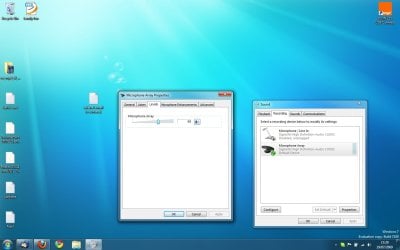
Microphone 2 has the option in properties>levels for me to add the +20DB
But this microphone when selected as the default in the system, won't work in Skype. It just tells me to plug a microphone in.
properties>levels for 'Microphone1' doesn't give me the option to boost the decibels. It's simply not there. It does work in Skype, but just far too faint.
 

My Computer

OS
Windows 7
maybe simply get a new mic. some might be s h i tty. they're not that expensive, get one on ebay
 

My Computer

OS
Windows 7
CPU
Intel D (2 x 3.0 GHZ)
Motherboard
ASRock Wolfdale 1333-D667 R2
Memory
2048 MB
Graphics Card(s)
GeForce 200 series
Sound Card
Realtek
Monitor(s) Displays
2 monitors, 22inch acer and 17inch HP running same time
Hard Drives
only 160gb
Case
custom made
Keyboard
flat lol
Internet Speed
FiOS 15Mbs
maybe simply get a new mic. some might be s h i tty. they're not that expensive, get one on ebay

nothing wrong with the mic
It is the built-in mic with my Dell laptop.
It worked absolutely fine on Vista
 

My Computer

OS
Windows 7
microphone prblems

Fresh build win 7 x64 RC asus M3N78-VM 2 gig ram amd atholonX64 dual core 6000+ on board sound "VIA" options suck but it will play speakers & mic.
only problem is on paradise chat on line,you can talk once but thats it APP. crash.admin at PCO seem to have narrowed it down to systems like thiers that dont run 32 bit or higher.Same problem with vista love the OS:Dbut sigh might have to wait until the rest of the crowd catches up hopefully soon:mad:
P.S Other than that everything is well.
 
Last edited:

My Computer

Computer Manufacturer/Model Number
home build
OS
windows 7 x64 rc
CPU
amd 64x2 dual core 6000+
Motherboard
asus M3N78-VM
Memory
corsair ddr2 800 mhz 2gigabytes
Graphics Card(s)
1 gig nvidia geforce 9400GT
Sound Card
on board ATI
Monitor(s) Displays
KDS X Flat
Hard Drives
seagate 500 gig 7200 rpm
PSU
Antec 450 watt
Case
Antec
Cooling
cpu, on board vidio fan, thermaltake case fan
im wondering if a sound driver install would make this go away
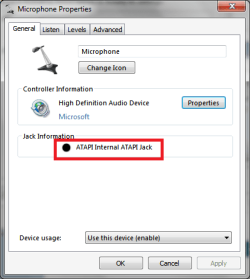
look at both and look at which one has this as the Jack info...
mic.PNG
that is your internal mic
you not being able to boost your mic (is this a stereo or mono mic?) should be more than enough for me to think that its a driver problem...
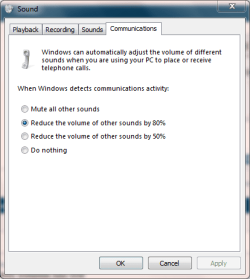
also have that mic as the default communication device...
 

My Computer

Computer Manufacturer/Model Number
Tx2500z Tablet Pc/Homemade Server
OS
Windows 7 Ult x64(x2), HomePrem x32(x4), Server 08 (+VM), 08 R2 (VM) , SuSe 11.2 (VM), XP 32 (VM)
CPU
Turion X2 ultra (oh well came with laptop)/P4 @3.2 (yes P4)
Motherboard
IDK HP Motherboard / Intel DG965SS
Memory
OCZ Dual Channel 4GB kit/ 1gb Dual Channel
Graphics Card(s)
HD 3200 graphics /GMA x3100 (yay for intergrated!!)
Sound Card
Realtek HD Audio(mic working, well sort of)/Siig IC-70012
Monitor(s) Displays
built-in Hp 12" laptop screen/ Acer 19"
Screen Resolution
1280x800 /1440x900
Cooling
All Air Cooled
Mouse
Logi MX Rev. /MS Wheel Optical 1.1A /Logitech Optical Mouse
Internet Speed
College baby but its still routed through vpn to 1536k...
Other Info
love my wacom pen and pressure sensitivity...
wished it worked in 7, SUSE for that matter though
im wondering if a sound driver install would make this go away
look at both and look at which one has this as the Jack info...
View attachment 18742
that is your internal mic
you not being able to boost your mic (is this a stereo or mono mic?) should be more than enough for me to think that its a driver problem...
also have that mic as the default communication device...

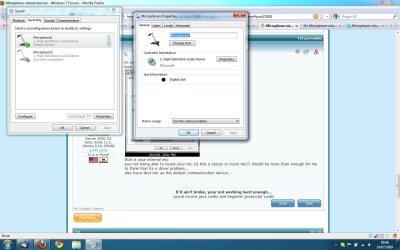
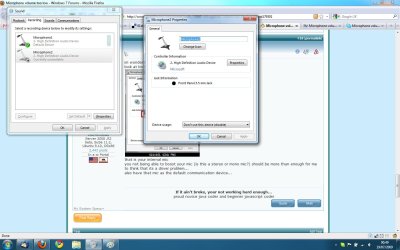
I have attached screenshots of the properties of both mics (not sure if the images will automatically load in the message or not- apologies if they don't, I'm not that familiar with this forum).

Mic 1 is described as a digital jack, mic 2 is described as front panel 3.5mm jack.
I assume from that that mic 1 is my internal jack (I have plugged external mics into the 3.5mm jack at the front of my laptop before, which must be mic 2).
If this is the case, how do I go about testing the drivers?
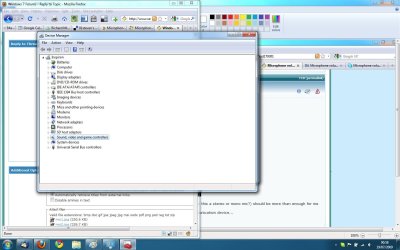
I have been in device manager and under sound, video and game controllers there are 2 options- both called 'high definition audio device' but I don't think either of these are my internal mic. It seems there's an automatic driver software update which I ran anyhow on both of these and it says the drivers are up to date.
I've attached a screenshot of my device manager if this is of any use.
Thanks
moz-screenshot.png
moz-screenshot-1.png
 

Attachments

  • mic1.jpg
    mic1.jpg
    114.9 KB · Views: 2,200
  • mic2.jpg
    mic2.jpg
    119.4 KB · Views: 1,518
  • device manager.jpg
    device manager.jpg
    119.9 KB · Views: 1,355

My Computer

OS
Windows 7
I downloaded new drivers from the Dell website.
Now my mic settings look like this.

Have just been testing the mic and it is working on normal volume but then pretty much fades to zero for a few seconds, before coming back to normal.

Not sure if this is the same issue as before, presumably still a Windows 7 bug?

By the way, will users of the release candidate get updates to Windows 7, or do all the updates appear in the paid-for version?
 

Attachments

  • new mic.jpg
    new mic.jpg
    69.7 KB · Views: 1,090

My Computer

OS
Windows 7
I downloaded new drivers from the Dell website.
Now my mic settings look like this.

Have just been testing the mic and it is working on normal volume but then pretty much fades to zero for a few seconds, before coming back to normal.

Not sure if this is the same issue as before, presumably still a Windows 7 bug?

By the way, will users of the release candidate get updates to Windows 7, or do all the updates appear in the paid-for version?

have you boosted the mic at all? (get to the properties of the array mic click on levels and then slide the mic boost to +20...
also there might be settings in the enhancements page which you can try that might help you...

by updates do you mean standard 2nd tuesday of month kind of patches?
most likely no since its a different OS build (I mean the RTM)
im certain that after the GA date (october 22 i believe) the RC string will be deleted from MS so no more updates for the RC (although it can happen sonner than that) ..;)
 

My Computer

Computer Manufacturer/Model Number
Tx2500z Tablet Pc/Homemade Server
OS
Windows 7 Ult x64(x2), HomePrem x32(x4), Server 08 (+VM), 08 R2 (VM) , SuSe 11.2 (VM), XP 32 (VM)
CPU
Turion X2 ultra (oh well came with laptop)/P4 @3.2 (yes P4)
Motherboard
IDK HP Motherboard / Intel DG965SS
Memory
OCZ Dual Channel 4GB kit/ 1gb Dual Channel
Graphics Card(s)
HD 3200 graphics /GMA x3100 (yay for intergrated!!)
Sound Card
Realtek HD Audio(mic working, well sort of)/Siig IC-70012
Monitor(s) Displays
built-in Hp 12" laptop screen/ Acer 19"
Screen Resolution
1280x800 /1440x900
Cooling
All Air Cooled
Mouse
Logi MX Rev. /MS Wheel Optical 1.1A /Logitech Optical Mouse
Internet Speed
College baby but its still routed through vpn to 1536k...
Other Info
love my wacom pen and pressure sensitivity...
wished it worked in 7, SUSE for that matter though
Have you checked the settings on this tab?
Capture.PNG
 

My Computer

Computer type
PC/Desktop
Computer Manufacturer/Model Number
Dwarf Dwf/11/2012 r09/2013
OS
Windows 8.1 Pro RTM x64
CPU
Intel Core-i5-3570K 4-core @ 3.4GHz (Ivy Bridge) (OC 4.4GHz)
Motherboard
ASRock Z77 Extreme4-M
Memory
4 x 4GB DDR3-1600 Corsair Vengeance CMZ8GX3M2A1600C9B (16GB)
Graphics Card(s)
MSI GeForce GTX770 Gaming OC 2GB
Sound Card
Realtek High Definition on board solution (ALC 898)
Monitor(s) Displays
ViewSonic VA1912w Widescreen (VGA)
Screen Resolution
1440x900
Hard Drives
OCZ Agility 3 SSD 120GB SATA III x2 (RAID 0)
Samsung HD501LJ 500GB SATA II x2
Hitachi HDS721010CLA332 1TB SATA II
Iomega 1.5TB Ext USB 2.0
WD 2.0TB Ext USB 3.0
PSU
XFX Pro Series 850W Semi-Modular
Case
Gigabyte IF233
Cooling
1 x 120mm Front Inlet 1 x 120mm Rear Exhaust
Keyboard
Microsoft Comfort Curve Keyboard 3000 (USB)
Mouse
Microsoft Comfort Mouse 3000 for Business (USB)
Internet Speed
NetGear DG834Gv3 ADSL Modem/Router (Ethernet) ~4.0 Mb/s (O2)
Antivirus
Avast! 8.0.1497
Browser
IE 11
Other Info
Optical Drive: HL-DT-ST BD-RE BH10LS30 SATA Bluray
Lexmark S305 Printer/Scanner/Copier (USB)
WEI Score: 8.1/8.1/8.5/8.5/8.25
Asus Eee PC 1011PX Netbook (Windows 7 x86 Starter)
Have you tried skype>tools>options>audio settings and untick automaticaly adjust microphone settings?
 

My Computer

OS
windows 7
have you boosted the mic at all? (get to the properties of the array mic click on levels and then slide the mic boost to +20...

I don't have the mic boost option on the levels tab
 

Attachments

  • levels.jpg
    levels.jpg
    82.4 KB · Views: 821

My Computer

OS
Windows 7
Sorry Steven i'm frash out of ideas :(

As i said before I had the same issue with Skype & solved it by just disabling 1 of the microphones :p

Hopefully someone can help, you may just need to give them a bit of time to read the post ;)


Jeff
 

My Computer

Computer Manufacturer/Model Number
Compaq Desktop
OS
Windows 7 Ultimate x64
CPU
AMD Sempron Dual Core
Memory
3GB
Graphics Card(s)
NVIDIA GeForce 6150SE nForce 430
Screen Resolution
1024x768
Hard Drives
150GB Sata
you not being able to boost your mic (is this a stereo or mono mic?) should be more than enough for me to think that its a driver problem.
That and the mic boost option is on the Custom tab (or at least it alwys has been for me),

micboost.png


which is missing from all the screen shots that Steven has posted.

Just had a look at what is available for an audio driver for his laptop, and Dell has a 32 bit Vista driver for it (BTW you running 32 0r 64 bit?). That being said time for some of the Sigmatel experts to weigh in here.
 

My Computer

Computer type
PC/Desktop
Computer Manufacturer/Model Number
Me
OS
Win 7 Ultimate x64
CPU
FX-8350 @ 4.6 GHz so far
Motherboard
Asus M5A97 EVO
Memory
ADATA XPG V1 Series Black 8GB DDR3 1600
Graphics Card(s)
Sapphire R9 270x Dual-X
Sound Card
Xonar DGX w/ Corsair Vengence 1300
Monitor(s) Displays
Acer S232HL Abid
Screen Resolution
1920x1080
Hard Drives
120 GB OCZ Vertex 3
500 GB Seagate 7200.12
PSU
Antec Earthwatts 650W Green
Case
Antec Three Hundred
Cooling
Cooler Master 212 EVO
Keyboard
Logitech G510
Mouse
Logitech G500s
Internet Speed
35000/3000
Back
Top