Microphone volume too low

BTW you running 32 0r 64 bit?

I'm running 32 bit.
Do you have a link for the other driver you mentioned?
As you said, my properties dialog box doesn't look like that- it doesn't give me the +20DB option.

Sigmatel experts - are you out there?
Is there perhaps another forum this should be copied to to get the right sort of attention?
 

My Computer

OS
Windows 7
I'm running 32 bit.


Sigmatel experts - are you out there?
Is there perhaps another forum this should be copied to to get the right sort of attention?

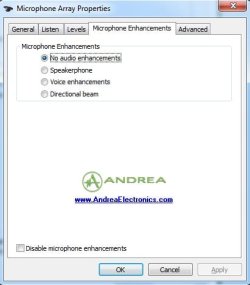
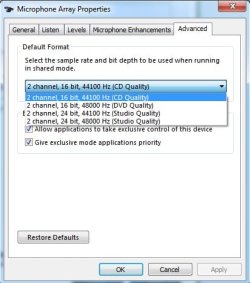
can you shows us screenshots of the Mic Enhancements and Advance tab?
i would have been an expert (or at least be familiar) except my onboard sigmatel died on my motherboard and replaced with a cheap but still good c-media sound card....:(
i had to fiddle with the default rate to get it just right (on the advance tab)...;)
 

My Computer

Computer Manufacturer/Model Number
Tx2500z Tablet Pc/Homemade Server
OS
Windows 7 Ult x64(x2), HomePrem x32(x4), Server 08 (+VM), 08 R2 (VM) , SuSe 11.2 (VM), XP 32 (VM)
CPU
Turion X2 ultra (oh well came with laptop)/P4 @3.2 (yes P4)
Motherboard
IDK HP Motherboard / Intel DG965SS
Memory
OCZ Dual Channel 4GB kit/ 1gb Dual Channel
Graphics Card(s)
HD 3200 graphics /GMA x3100 (yay for intergrated!!)
Sound Card
Realtek HD Audio(mic working, well sort of)/Siig IC-70012
Monitor(s) Displays
built-in Hp 12" laptop screen/ Acer 19"
Screen Resolution
1280x800 /1440x900
Cooling
All Air Cooled
Mouse
Logi MX Rev. /MS Wheel Optical 1.1A /Logitech Optical Mouse
Internet Speed
College baby but its still routed through vpn to 1536k...
Other Info
love my wacom pen and pressure sensitivity...
wished it worked in 7, SUSE for that matter though
over to you!
 

Attachments

  • enhancements.jpg
    enhancements.jpg
    21.5 KB · Views: 272
  • advanced.jpg
    advanced.jpg
    29.6 KB · Views: 288

My Computer

OS
Windows 7
Is this the end of the road?
Doomed to microphone hell for eternity?

:cry:
 

My Computer

OS
Windows 7
Bumping this up again, in the vain hope that somebody (please, somebody!) can offer any help....
 

My Computer

OS
Windows 7
Hi,

I fixed the problem. I am using windows 7 x64 on lenovo thinkpad and my microphone sound was too low when i use skype. This is what i did to fix the problem.

1)Right click on the sound icon on the taskbar and select recording devices or sounds
2)On the sound menu click on the 'recording' tab
3)I had two devices so i delete one (Note: I kept the one which shows the 'front panel jack' when you go to the properties of the device and disable the other device)
4) select the properties of the microphone(recording device) and go to 'levels' tab
5)Keep the microphone and microphone boost to maximum that is 100 and +40.0dB
6)Click apply and then ok

Hope this helps
5)
 

My Computer

OS
windows 7
I have fixed same issue on HP Compaq 6000 Pro with Realtek HD audio card with Windows 7 Pro 64-bit using Skype everyday having microphone volume fading out or very low volume. I had even bought a 2nd headset to try but both microphones acted the same.

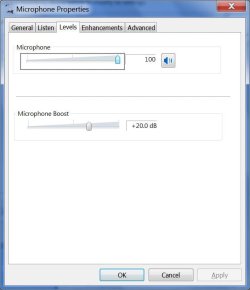
So, to fix this; you need to go to Control Panel>Sound>Recording Tab>Microphone and click Properties. Then you will get Microphone properties, here click on Enhancement tab and REMOVE check mark from Acoustic Echo Cancellation and might be also need to remove check mark Beam Forming, then hit Apply and OK. Then try testing MIC using Windows Sound Recorder or make Skype test call. If you have background noise, select Noise Suppression. If you have echo while you are speaking in the mic, try decreasing the Microphone boost to +20db that you might have put to max when trying to fix this issue. Please see attached screen shots.

You may also want to make sure about Chipset driver, Audio card driver, all Windows updates and anything regarding Audio in Action Center (Flag icon in system tray) messages were installed if my above fix does not fit your scenario.

Goodluck!!! Thank you

LuvTech
 

Attachments

  • MicEnhance-7.jpg
    MicEnhance-7.jpg
    49.6 KB · Views: 1,717
  • MicLevel-7.jpg
    MicLevel-7.jpg
    30.7 KB · Views: 1,528

My Computer

OS
Windows XP
Mic volume low

Hi,

I am experiencing the same problem. The mic volume for recording is very low.

It used to work on my PC, I can't think of anything that has changed since the last time I used it to speak on Teamspeak 3. But even with the windows testing tool etc its still low.
The only thing I can think of that is new is my GFX card and I can't understand why that would affect it.

Things I have tried.

Installing new drivers for chip set, audio drivers and updating win 7
Tried installing old drivers from the CD that came with motherboard.
Bought a new mic
Tried a USB mic
Unplugged all speaker jacks and kept mic in
Mic boost and volume are set to full. ( I have the +30DB slider not a tick box)

I am using a desktop mic than can pick up sounds if I press my lips to the mic and talk. I have even tested this with mic boost off and the sound is even lower! (Suggesting mic boost is having some affect)

I have tried many various combinations of disabling other audio devices in windows, the one that has the affect when I disable it is the Sound mixer. When I disable this the mic will not register any sounds.

Hope I have covered everything. Any questions please ask.
 

My Computer

OS
Win 7 x64
Update

Seems I have figured something out. Pretty simple.

I have just decided to give Teamspeak 3 a go and it seems I can be heard loud and clear. Better than previously I have been told.

I was previously testing my mic using windows recorder, the sensor dial thing on windows recording devices and the sensor device on the audio drivers config tool.

I can only conclude that these sensors are lying and do not show the true volume being detected by the microphone.

Figures.

Hope this sheds some light on others if they do the same as I have.
 

My Computer

OS
Win 7 x64
I'm having the same issue...
I do online gaming and I've had Win7 installed for a while. Initially I did NOT have this issue.

I use TeamSpeak 3 to communicate with the members of our gaming group and separately there is an 'in-game' communication that we use. I've had no issues until recently. I can't figure out what would have changed but now, I can't be heard "in-game".

1st thing I tried was to exit game and go into windows (win7 ultimate 32bit) and try to use the Sound recorder program (Start/All Programs/Accessories/Sound Recorder) and it was NOT picking up my voice. TS 3 was working fine, but Win7 wasn't detecting my voice unless I Spoke really loudly and very close to my mic.

I thought it might be my headset, ordered new one...it arrived and SAME ISSUE.
I thought it might be my soundcard...Creative X-FI Fatility pro gamer I updated drivers...SAME ISSUE
I thought it might be my soundcard...REMOVED IT and used onboard sound (Mobo is Gigabyte P55A-UD4P) SAME ISSUE

The only variable that hasn't been eliminated is WIN7 ITSELF...and with all the posts/topics I see on this subject I'd say we're on to something. There's DEFINITELY a sound/mic issue with Win7.

I'm out of things to try except a new install. However, if sound issue is a result of a fairly recent Windows update then it'll probably just resurface. Perhaps I'll go back to XP using same hardware to verify that it's not a hardware issue?

Out of things to try...
 

My Computer

Computer Manufacturer/Model Number
ME
OS
Win7 ultimate 32bit
CPU
Intel i870
Motherboard
Gigabyte P55A-UD4P
Memory
ICZ3P1600LV2G (4gbytes total)
Graphics Card(s)
nvidia 280GTX
Sound Card
Creative X-Fi Fatility Pro
Monitor(s) Displays
24" hi-def
Screen Resolution
1920 x 1200
Hard Drives
1 Intel SSD (OS Drive)
1 Samsung Terabyte Sata II
1 Samsung 500gb
PSU
OCZ 750watt
Case
Home built
Cooling
Liquid cooling by Corsair
Keyboard
Saitek Eclipes, w/blue backlighting
Mouse
Microsoft Sidewinder gaming mouse.
Internet Speed
20+ Meg
Other Info
I've been tinkering with PC's for many years. I actually work for the company that makes the best CPU's currently available... (I'm NOT one of the rockstars though) :-D
Problem with Realtek HD Audio

I just bought a new computer and have the same problem, very low volume in Skype. Then I could solve the problem with chaging setting as follows.

Control panel> sound> playback> speaker > property> Realtek HD Audio Output> Property>Level>Balance

When you click balance, you see L and R. If you just change either of the levels to 0, the volume will be set to normal (e.g. L:100, R:0).
 
Last edited:

My Computer

OS
windows 7
Just saw this problem - maybe I have solution

Hi,

It's a long time but I just encountered this problem and maybe my solution will help others.
I have the same symptoms as Steven describes.
In the "recording" tab there are 2 microphones, but only one of them allows to set DB levels on its properties (mic #1) -- but Skype only works with the other mic (mic #2).
The solution is to raise the DB level in mic #1, and also do some "disable/enable tries" on the 2 microphones, so the change "propagates" from mic #1 to mic #2. It appears that although mic #2 doesn't support DB level, changing it on mic #1 does effect mic #2. Go figure. Anyway now it works.
 

My Computer

OS
Windows 7 Home Premium 32bit
a big THANKS to Steven for this thread etc

my "Skype microphone volume" was very low

i got Windows 7 Home Premium 64-bit using a Toshiba T110-11U

here's the solution i found just now...

Control Panel > Sound > Recording > Microphone > Advanced > Signal Enhancements.....then.....

...uncheck "Enable audio enhancements"

and THAT'S IT !!

hope it works for you - and that you say good things through the aforementioned microphone - haha

have a good day, TC :)
 

My Computer

OS
Windows 7 Home Premium 64bit
Low mic volume in Skype - Solution that worked for me

Hi,

After upgrading the OS of my Acer Aspire 2920 from Vista to Windows 7, the volume of my built-in microphone also became unacceptably low in Skype... Funny thing is it was still working perfectly in Messenger...

Just now, I managed to fix the problem by installing the latest Windows 7 x32 Realtek Audio driver from:
Realtek

Now my microphone works perfectly in Skype!
Hope this will help!

Cheers
 

My Computer

OS
Windows 7 Ultimate x32
i actualy have a similair problem and this post hasn't really been much help as my realtek options always say not plugged in even when i switch the mic into different plugs and my microphone doesn't have the DB option which is a bother, anyone got any suggestions?
 

My Computer

OS
64Bit Windows 7 home premium
a big THANKS to Steven for this thread etc

my "Skype microphone volume" was very low

i got Windows 7 Home Premium 64-bit using a Toshiba T110-11U

here's the solution i found just now...

Control Panel > Sound > Recording > Microphone > Advanced > Signal Enhancements.....then.....

...uncheck "Enable audio enhancements"

and THAT'S IT !!

hope it works for you - and that you say good things through the aforementioned microphone - haha

have a good day, TC :)


My mic was really low, didn't hear anything when i recorded my self. But to unenable audio enhancements work'd perfectly! Thanks mate!
 

My Computer

OS
Windows 7 Ultimate x64
Windows 7: Microphone volume too low

Try Listening to this device:

Control Panel\Hardware and Sound\Sound then the Recording tab
Right click on microphone and properties.

On the listen tab select listen to this device then apply.
On the custom tab select microphone boost.
on the levels tab max that up to 100% it can always be reduced.

If these don't fix you either need re-install or more in-depth tech support.

Our website link is below most work is free.
You can contact us from the contact us section of our website.

Home - Computers_R_Us
 

My Computer

Computer type
PC/Desktop
Computer Manufacturer/Model Number
HP
OS
Windows 8 32bit (64bit capable)
CPU
Intel(R) Pentium(R) D CPU 3.4GHz - 3.4GHz
Motherboard
Socket 775 LGA
Memory
2GB DDR2
Graphics Card(s)
Q965 - Q963 Express Chipset Family (Microsoft Cooperation)
Sound Card
Standart Onboard
Monitor(s) Displays
1
Screen Resolution
1280 x 960
Hard Drives
1 x 500GB
1 x 80GB
PSU
500w
Case
Microtower
Cooling
2 x Fans
Keyboard
Acer
Mouse
HP PS2 Opticle
Internet Speed
16mbps
Antivirus
Macafee
Browser
Chrome
Back
Top