Solved Microsoft ACPI Compliant Control Method Battery is MISSING

zanycris

New member
Local time
5:53 AM
Messages
15
As the title says , Microsoft ACPI Compliant Control Method Battery is missing.. I can't find it in the device manager... i tried restarting my laptop a couple of times but nothing changed... this just happened a while ago ... i tried searching for the driver over the internet .. but I can't find one....The battery/icon is not showing in the taskbar...can you please provide a download link for the driver ? or a solution perhaps ? :| i really need your help ASAP... :|

Thank You
 

My Computer

OS
Windows 7 Ultimate 64 bit
Hello there. Can u install Everest,and go to Computer -> Summary and then from the menu Report->Quick Report-Summary and Plain Text. Then copy the text to Debug - PCI.
 

My Computer

Computer type
PC/Desktop
Computer Manufacturer/Model Number
Custom Build
OS
Windows 10 Pro x64
CPU
Intel Core i5 4440 @Stock
Motherboard
Gigabyte Z97 D3H
Memory
4 x 4GB HyperX Fury DDR3
Graphics Card(s)
Gigabyte GTX 1050Ti O4G
Sound Card
Integrated
Monitor(s) Displays
Dell P2417H
Screen Resolution
1920 x 1080
Hard Drives
Samsung EVO 850 120GB / Toshiba DT01ACA050 1TB 7200prm 32MB
PSU
Riotoro Onyx 750W
Case
NZXT H500 Black-Red
Cooling
Stock CPU + NZXT 120mm + 2x120mm red fans
Keyboard
Modecom Volcano Lanparty
Mouse
Asus ROG Gladius / DeepCool E-Pad Plus
Internet Speed
DOCSIS 50/3 Mbit
Browser
Google Chrome
Other Info
Asus K55VJ(i5 3210M, GT635M / 2GB, 8GB DDR3, 500GB HDD)
Hello there. Can u install Everest,and go to Computer -> Summary and then from the menu Report->Quick Report-Summary and Plain Text. Then copy the text to Debug - PCI.


hello , where can i find the DEBUG-PCI ? thanks
 

My Computer

OS
Windows 7 Ultimate 64 bit
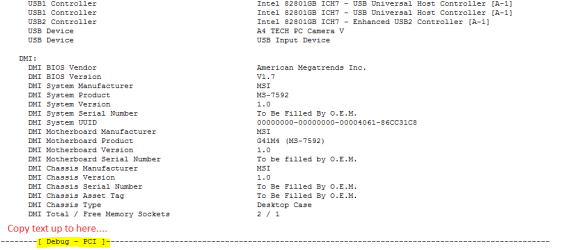
Scroll down,and you'll see something similar to this
Capture.PNG
 

My Computer

Computer type
PC/Desktop
Computer Manufacturer/Model Number
Custom Build
OS
Windows 10 Pro x64
CPU
Intel Core i5 4440 @Stock
Motherboard
Gigabyte Z97 D3H
Memory
4 x 4GB HyperX Fury DDR3
Graphics Card(s)
Gigabyte GTX 1050Ti O4G
Sound Card
Integrated
Monitor(s) Displays
Dell P2417H
Screen Resolution
1920 x 1080
Hard Drives
Samsung EVO 850 120GB / Toshiba DT01ACA050 1TB 7200prm 32MB
PSU
Riotoro Onyx 750W
Case
NZXT H500 Black-Red
Cooling
Stock CPU + NZXT 120mm + 2x120mm red fans
Keyboard
Modecom Volcano Lanparty
Mouse
Asus ROG Gladius / DeepCool E-Pad Plus
Internet Speed
DOCSIS 50/3 Mbit
Browser
Google Chrome
Other Info
Asus K55VJ(i5 3210M, GT635M / 2GB, 8GB DDR3, 500GB HDD)
what will i do next ? sir stalker :)
 

My Computer

OS
Windows 7 Ultimate 64 bit
In upper menu, go Report>Quick Report-Summary
Save it in text file, and paste it here. In the text don't include anything that is under the line Debug - PCI
 

My Computer

Computer type
PC/Desktop
Computer Manufacturer/Model Number
Custom Build
OS
Windows 10 Pro x64
CPU
Intel Core i5 4440 @Stock
Motherboard
Gigabyte Z97 D3H
Memory
4 x 4GB HyperX Fury DDR3
Graphics Card(s)
Gigabyte GTX 1050Ti O4G
Sound Card
Integrated
Monitor(s) Displays
Dell P2417H
Screen Resolution
1920 x 1080
Hard Drives
Samsung EVO 850 120GB / Toshiba DT01ACA050 1TB 7200prm 32MB
PSU
Riotoro Onyx 750W
Case
NZXT H500 Black-Red
Cooling
Stock CPU + NZXT 120mm + 2x120mm red fans
Keyboard
Modecom Volcano Lanparty
Mouse
Asus ROG Gladius / DeepCool E-Pad Plus
Internet Speed
DOCSIS 50/3 Mbit
Browser
Google Chrome
Other Info
Asus K55VJ(i5 3210M, GT635M / 2GB, 8GB DDR3, 500GB HDD)
PROBLEM SOLVED

Microsoft ACPI Compliant Control Method Battery was hidden ...

it's okay now .. the power icon is now in the taskbar...

Thanks ~
 

My Computer

OS
Windows 7 Ultimate 64 bit
other advice

you can also check if there is an unknown drivers under other drivers. uninstall it and reboot computer. works for me.
 

My Computer

OS
windows7homepremium 64bit
Microsoft ACPI Compliant Control Method Battery is missing

here you go

Hello,

I have the same problem... Microsoft ACPI Compliant Control Method Battery is missing and my laptop works only when it's on AC power. I installed Everest and have a report but what should I do once I have the report?

Thank you very much,
Luiza
 

My Computer

Computer type
Laptop
Computer Manufacturer/Model Number
Sony Vaio
OS
Windows 7 Home Premium 64 bit
hello friends
i have same problom in my laptop zed air ilife threr is no have
Microsoft ACPI Compliant Control Method Battery
Driver i try to install but not and also my battery icone not showing please help me actually i update some driver after that came 2 probloms
No audio output device install
Battery icone hidden
 

My Computer

Computer type
Laptop
OS
Window 10 32 bit
Back
Top