Microsoft Firewall error/not working

bizzeb

Banned
Local time
2:50 PM
Messages
37
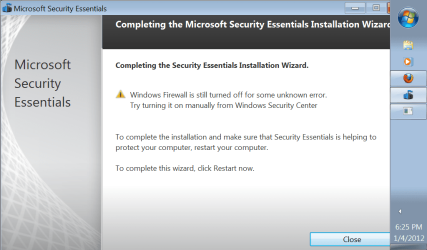
On to the new thread. I am having a problem getting firewall to start. There are 2 pic attachments. But after 21 restarts of the pc, there has been no change in the process of getting this program to run. Hope this is a little help. NO CLEAN INSTALL is going to be done. Anything else to hopefully work around. 2xg has been a real big help.
 

Attachments
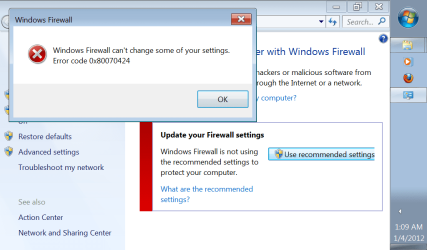
  • firewall.png
    firewall.png
    38.3 KB · Views: 34
  • microsoft security.png
    microsoft security.png
    62.1 KB · Views: 17

My Computer

Computer Manufacturer/Model Number
Gigabyte Tech. Co. Model-H55M-S2H
OS
Windows 7 Home Premium x64
CPU
Intel Core i3

My Computer

Computer type
PC/Desktop
Computer Manufacturer/Model Number
Custom
OS
Windows 7 Ultimate SP1 x64
CPU
Intel Core I5-3570K
Motherboard
Gigabyte Z77-D3H
Memory
16GB Corsair Vengeance DDR3 1600 MHz
Graphics Card(s)
Evga Geforce GTX 660
Sound Card
Integrated
Monitor(s) Displays
HP 2009m
Screen Resolution
1600x900
Hard Drives
2 Internal 500 GB
1 External 3TB
1 120GB SSD (OS)
PSU
750 Watt
Case
Thermaltake VM600M1W2Z Dokker Tower Case
Keyboard
Razer Deathstalker Ultimate
Mouse
Roccat Kova+
Antivirus
Kaspersky Antivirus 2013
Browser
Mozilla Firefox
Please post a link to the thread that you had help from 2xg.
We can then see what help has been offered thus far.

Why will a Clean Install NOT be considered if necessary?
 

My Computer

Computer Manufacturer/Model Number
LAPTOP. HP Pavilion dv7-4010TX .
OS
Win 7 Ultimate 64-bit. SP1.
CPU
Intel i7 -720QM.[1.6GHz Turbo Boost 2.8GHz. 6MB Cache.]
Memory
8 DDR 3 RAM. 1066MHZ
Graphics Card(s)
ATI 1024 MB. DDR3. Radeon HD5650
Monitor(s) Displays
17.3" High Definition Brightview LCD. LED Backlit.
Screen Resolution
1600 x 900.
Hard Drives
640GB
Case
Laptop / notebook.
Mouse
Logitech Anywhere mouse. MX.
Internet Speed
ADSL [ but too slow ]
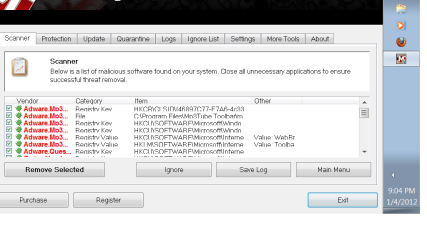
Attached is the link to my previous thread. As for the pics are from what i ran thru last time- first pics is before quarantine and deletion and second pic is for the second time i ran it after a restart. Should I still run a malware? I should say that a CLEAN INSTALL is only if necessary - as I do not want to go thru loosing everything if that is the case. Let me know if that would be the case. Thanks

http://www.sevenforums.com/network-...ireless-network-adapter-says-identifying.html
 

Attachments

  • blaines pc spyware.png
    blaines pc spyware.png
    56.1 KB · Views: 18
  • blaines 2nd pic.png
    blaines 2nd pic.png
    46.8 KB · Views: 8
  • firewall 2.png
    firewall 2.png
    24 KB · Views: 5

My Computer

Computer Manufacturer/Model Number
Gigabyte Tech. Co. Model-H55M-S2H
OS
Windows 7 Home Premium x64
CPU
Intel Core i3

My Computer

Computer Manufacturer/Model Number
LAPTOP. HP Pavilion dv7-4010TX .
OS
Win 7 Ultimate 64-bit. SP1.
CPU
Intel i7 -720QM.[1.6GHz Turbo Boost 2.8GHz. 6MB Cache.]
Memory
8 DDR 3 RAM. 1066MHZ
Graphics Card(s)
ATI 1024 MB. DDR3. Radeon HD5650
Monitor(s) Displays
17.3" High Definition Brightview LCD. LED Backlit.
Screen Resolution
1600 x 900.
Hard Drives
640GB
Case
Laptop / notebook.
Mouse
Logitech Anywhere mouse. MX.
Internet Speed
ADSL [ but too slow ]
However I do have Microsoft Security Essentials showing Computer Status - Protected. Is that enough to help for a short time until i can get this fixed.
 

My Computer

Computer Manufacturer/Model Number
Gigabyte Tech. Co. Model-H55M-S2H
OS
Windows 7 Home Premium x64
CPU
Intel Core i3
There is no Norton, McAfee, Zone Alarm or anything on here but Avast!, SUPERAntiVirus & Microsoft Security Essentials. I am working on the malware program now. Will let you know soon what it shows.
 

My Computer

Computer Manufacturer/Model Number
Gigabyte Tech. Co. Model-H55M-S2H
OS
Windows 7 Home Premium x64
CPU
Intel Core i3
So you are running MSE as well as Avast?

If so, our generic message is...

It is NOT a good idea to have two Anti Virus programs running on your Operating System at the same time.
Conflicting programs slow your computer & may create crashes, freezes etc
More is NOT best.

It would be advisable to remove one of them via the appropriate uninstall tool.

http://files.avast.com/files/eng/aswclear5.exe

How to manually uninstall Microsoft Security Essentials 1.0.1963 if you cannot uninstall it by using the Add or Remove Programs item
 

My Computer

Computer Manufacturer/Model Number
LAPTOP. HP Pavilion dv7-4010TX .
OS
Win 7 Ultimate 64-bit. SP1.
CPU
Intel i7 -720QM.[1.6GHz Turbo Boost 2.8GHz. 6MB Cache.]
Memory
8 DDR 3 RAM. 1066MHZ
Graphics Card(s)
ATI 1024 MB. DDR3. Radeon HD5650
Monitor(s) Displays
17.3" High Definition Brightview LCD. LED Backlit.
Screen Resolution
1600 x 900.
Hard Drives
640GB
Case
Laptop / notebook.
Mouse
Logitech Anywhere mouse. MX.
Internet Speed
ADSL [ but too slow ]
which one do you see best to keep and which one to uninstall being your personal preference??????
I also have SUPERAntivirus also don't forget.
 

My Computer

Computer Manufacturer/Model Number
Gigabyte Tech. Co. Model-H55M-S2H
OS
Windows 7 Home Premium x64
CPU
Intel Core i3
Hi bizzeb, sorry if it took me a little while to respond, not feeling so well tonight.

Anyway, can you see if you're able to Restore the Windows Firewall back to the default setting?
Any type of configurations that you have done will be lost.
Restore Windows Firewall settings

Also, is your Avast an Anti-Virus or a Security Software?
Let's uninstall Avast for now and leave MSE and SuperAntiSpyware, I agree that you're not suppose to have diff AV or Security Software running. Please use this Utility Tool to uninstall Avast completely.
 

My Computer

Computer Manufacturer/Model Number
Lenovo Desktop/Samsung Laptop
OS
Win7 & Win8 64bit
CPU
Intel i5
Internet Speed
Charter-20 Mbps
Antivirus
Avast
Browser
FF, IE9 and Chrome
Ok. I have already deleted Avast!. (Anti-Virus)
All I have now are MSE & SUPERAnti-Virus.
The restore default settings for firewall gives me the same message. I tried it yesterday when we chatting but forgot to put that. UMMM. Pictures of Malware are split for as many malware problems where on there. I could have got 2 more screenshots but i figured top and bottom of scroll bar was enough.

GOOD THING still is that with the several restarts the pc has done, internet ip is still working. Anything else you may be able to suggest to look into, you know I will!!!
 

Attachments

  • firewall.png
    firewall.png
    38.3 KB · Views: 6
  • malware clean 2.png
    malware clean 2.png
    47.8 KB · Views: 8
  • malware clean.png
    malware clean.png
    22.2 KB · Views: 10

My Computer

Computer Manufacturer/Model Number
Gigabyte Tech. Co. Model-H55M-S2H
OS
Windows 7 Home Premium x64
CPU
Intel Core i3
Hang in there bizzeb while I do some more research.

It will take some time.....:D
 
Last edited:

My Computer

Computer Manufacturer/Model Number
Lenovo Desktop/Samsung Laptop
OS
Win7 & Win8 64bit
CPU
Intel i5
Internet Speed
Charter-20 Mbps
Antivirus
Avast
Browser
FF, IE9 and Chrome
That's fine. Please take your time everyone. I do appreciate all the help given.
 

My Computer

Computer Manufacturer/Model Number
Gigabyte Tech. Co. Model-H55M-S2H
OS
Windows 7 Home Premium x64
CPU
Intel Core i3
Alrighty, back again....

Let's verify something:
Is your System Restore disabled or enabled?
Click on All Programs, Accessories, System Tools, and System Restore.

Is your Windows Updates turned on or off? If it's off, can you pls. try turning it on.
Control Panel\System and Security\Windows Update

Can you also try running Windows Update? If there are updates waiting, please go for it and install all of them.

Edit: In addition, please see this Microsoft Article regarding your Error Code, please read and follow all directions well.
 
Last edited:

My Computer

Computer Manufacturer/Model Number
Lenovo Desktop/Samsung Laptop
OS
Win7 & Win8 64bit
CPU
Intel i5
Internet Speed
Charter-20 Mbps
Antivirus
Avast
Browser
FF, IE9 and Chrome
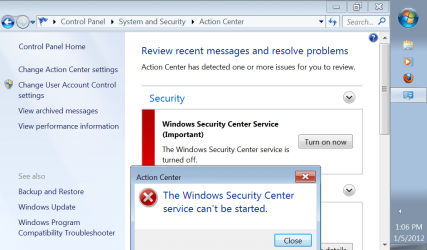
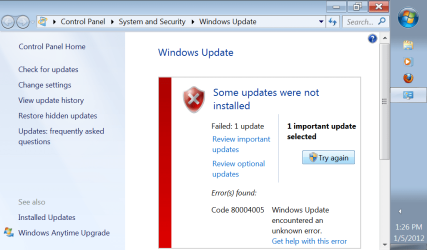
Here are 2 screenshots of some problems while messing around with other features trying to get things started. Same answers as you can see per the words they are saying. I am working on getting them started manually.
 

Attachments

  • security action center.png
    security action center.png
    54.1 KB · Views: 4
  • uuupdate fail.png
    uuupdate fail.png
    53.2 KB · Views: 4

My Computer

Computer Manufacturer/Model Number
Gigabyte Tech. Co. Model-H55M-S2H
OS
Windows 7 Home Premium x64
CPU
Intel Core i3
I think I know what's going on with your computer bec. I've done some extensive research last night.

Post# 14, please try all the suggested Items, specially the Microsoft Link, try not to miss out anything please.
 

My Computer

Computer Manufacturer/Model Number
Lenovo Desktop/Samsung Laptop
OS
Win7 & Win8 64bit
CPU
Intel i5
Internet Speed
Charter-20 Mbps
Antivirus
Avast
Browser
FF, IE9 and Chrome
The pc updates via ASUS went through and I have restated the pc again, once done I will go thru ALL the steps. Thanks
 

My Computer

Computer Manufacturer/Model Number
Gigabyte Tech. Co. Model-H55M-S2H
OS
Windows 7 Home Premium x64
CPU
Intel Core i3
Windows Updates went through? Were you able to enable the Windows Updates from Control Panel next to the Windows Firewall?
The pc updates via ASUS went through and I have restated the pc again, once done I will go thru ALL the steps. Thanks
When all the steps are done, please check all the Network Services again if they are now on Started Mode.
 

My Computer

Computer Manufacturer/Model Number
Lenovo Desktop/Samsung Laptop
OS
Win7 & Win8 64bit
CPU
Intel i5
Internet Speed
Charter-20 Mbps
Antivirus
Avast
Browser
FF, IE9 and Chrome
Not windows updates-this is still giving the screenshot error from above. Only the ASUS updates that appeared when I restarted the PC a few minutes ago. It installed and asked me to restart which it is doing now.
 

My Computer

Computer Manufacturer/Model Number
Gigabyte Tech. Co. Model-H55M-S2H
OS
Windows 7 Home Premium x64
CPU
Intel Core i3
You're doing great bizzeb, hang in there...We'll get these all sorted.
 

My Computer

Computer Manufacturer/Model Number
Lenovo Desktop/Samsung Laptop
OS
Win7 & Win8 64bit
CPU
Intel i5
Internet Speed
Charter-20 Mbps
Antivirus
Avast
Browser
FF, IE9 and Chrome
Back
Top