
How to Create a Portable Microsoft Fix it
Information
Microsoft Automated Troubleshooting Services (MATS) is the engine that drives Microsoft Fix it solutions. The online Microsoft Fix it Solution Center offers solutions to common issues; for most solutions you can simply press the green Run Now button and let MATS diagnose and repair the issue for you. Alternatively, you could download the MATS to run it offline; and many solutions provided a Let me fix it myself section.
In August of 2013, Microsoft made the entire MATS / Fix it catalog portable. This greatly simplifies troubleshooting issues where Internet connectivity is not available or a machine cannot connect to the Internet. The catalog and engine can be put on a Flash drive and carried with you when you help a client or a friend.
In August of 2013, Microsoft made the entire MATS / Fix it catalog portable. This greatly simplifies troubleshooting issues where Internet connectivity is not available or a machine cannot connect to the Internet. The catalog and engine can be put on a Flash drive and carried with you when you help a client or a friend.
Note
Available Microsoft Fix it categories
- Aero
- Audio Playback
- CD/DVD
- Codec
- Display Quality
- Exchange
- File Folder
- Firewall
- Games
- Internet Explorer Add-On
- Internet Explorer Performance
- Maintenance
- Malware Prevention
- Media Player Device
- Microsoft Installer (msi)
- MSN Client
- Performance
- Photo Slideshow
- Power
- Printer
- Search
- Security
- Sound Recording
- USB
- Windows Phone 7
- Zune
Here's how:
1. Download Microsoft Fix it portable edition, Click here and the download immediately begins.
(In a ZIP file)
Download
:note: Microsoft Fix it portable edition requires an Internet connection to download any requisite software.
a. Click on the Save button on the download bar to save the package in your Downloads folder.
For example: C:\Users\Dad\Downloads

2. Click on the Open folder button when the download complete bar is presented.
a. MicrosoftFixit-portable.exe should be selected/highlighted when the folder is opened.
b. Double click on MicrosoftFixit-portable.exe.
c. Click on Run if the Security Warning dialog is presented.


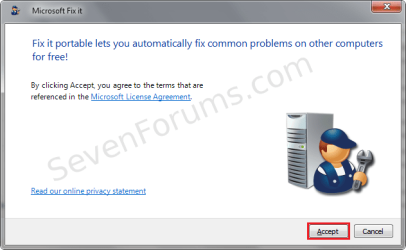
3. Click on the Accept button (agree to the terms of the License Agreement).
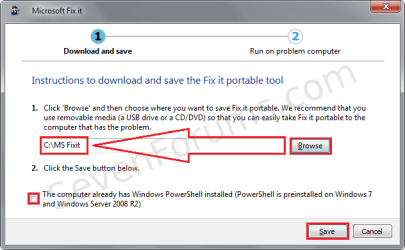
4. Browse to specify a save location (USB drive or Hard drive).
Note
The example in this tutorial saves the Microsoft Fix it portable edition to C:\MS Fixit on the hard drive, but the real power of this package is portability, a USB or Optical disc is more practical.
:tip: To put the Microsoft Fix it portable edition onto an optical disc, you must first save it to your hard drive and then burn the finished save location to a writable disc.
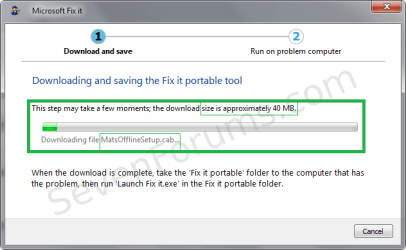
The package is small (~40 MB) enough to fit on a CD-R with plenty of room to spare.
:tip: To put the Microsoft Fix it portable edition onto an optical disc, you must first save it to your hard drive and then burn the finished save location to a writable disc.
The package is small (~40 MB) enough to fit on a CD-R with plenty of room to spare.
a. Leave the checkbox unticked for [...] This computer already has Windows PowerShell installed...
b. Click on the Save button.
5. Microsoft Fix it portable edition downloads additional components and Cabinet files.
6. Click on the Finish button.
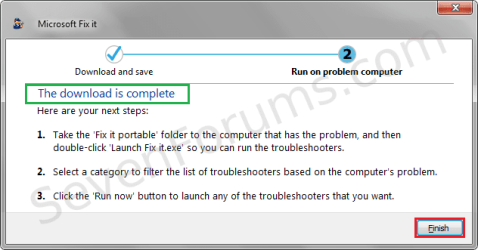
7. The folder, Fix it portable, now contains the entire Microsoft Fix it package.
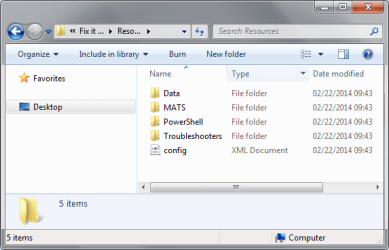
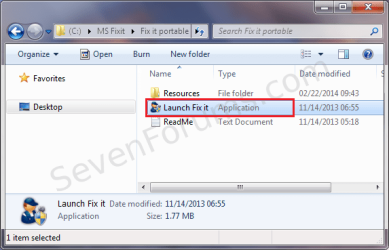
8. To run the Microsoft Fix it portable edition:
a. Open a Windows Explorer window.
b. Navigate to the folder Fix it portable.
c. Double click Launch Fix it to open the Microsoft Fix it portable edition.
Tip
You can create a shortcut by right clicking Launch Fix it and select Create shortcut from the alternate menu. Drag the shortcut to your desktop or start menu, a copy is placed in the destination.
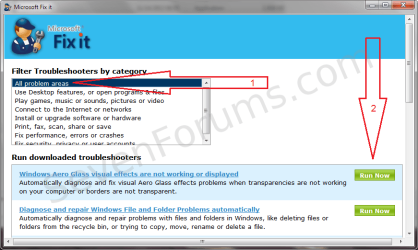
9. To run an individual Fix it Troubleshooter:
a. Select a category that best describe the area exhibiting the issue.
b. Scroll through the list of Troubleshooters to locate the one(s) that apply to the issue.
1. Click on the green Run Now button to run the Microsoft Automated Trouble Shooter (MATS) locally.
OR
2. Click on the Hyperlink text name of the MATS to run it from the Internet (most up-to-date MATS)
10. Viewing the Troubleshooter report file:
a. Click View report details in the lower left corner of the troubleshooter window.
1. View the report BEFORE running the Troubleshooter to see what it will attempt to fix
2. View the report AFTER running the Troubleshooter to see what it did or did not fix
b. Reports are written to Cabinet Files in a sub-folder of your Temp folder
For example: C:\Users\Dad\AppData\Local\Temp\MATS-Temp\Results\Windows USB Troubleshooter_result.cab
:tip: Every user account has environment variables defined. One of those is TEMP.
Use this variable to easily navigate in Windows Explorer to your Temp folder by typing %TEMP% in the address bar.
Attachments
Last edited by a moderator:


