Microsoft investigating battery problems

antt

New member
Power User
Local time
3:26 PM
Messages
209
Apparently Microsoft is investigating battery issues with Windows 7.

Cnet news is reporting that Microsoft is investigating an issue that arises where the OS will display a warning message to replace the battery, reporting it as faulty.


Microsoft says it is looking into a problem that is causing some Windows 7 users to get a warning that there is a problem with their battery when, in fact, there is not.
"We are investigating this issue in conjunction with our hardware partners, which appears to be related to system firmware," a Microsoft representative said in a statement on Tuesday.
The warning in question uses the computer's basic input output system (BIOS) to try to determine whether a battery needs replacement. For some reason, the signals are getting crossed and some users are getting the message even when they should not.


However, because this warning is new to Windows 7, users moving from Vista should not necessarily ignore the message if they see it. Instead, Microsoft suggests users contact their computer maker to see whether the warning is warranted or not.
Meanwhile, Microsoft says it and the PC makers are trying to figure out what is behind the glitch. "We are working with our partners to determine the root cause and will update the forum with information and guidance as it becomes available."


Has anyone seen this warning after upgrading to Windows 7?
 

My Computer

Computer Manufacturer/Model Number
Dell Inspiron 1545
OS
Windows 7 build 7100 x86
CPU
Intel Core 2 Duo 2.1GHz
Motherboard
GM45 chipset
Memory
3GB
Graphics Card(s)
Intel(TM) Graphics Media Accelerator X4500HD
Sound Card
Realtek HD
Monitor(s) Displays
15.6" WLED 720p
Screen Resolution
1366x768
Hard Drives
320GB 5400rpm hard drive
There is more on this topic in the Hardware section:
http://www.sevenforums.com/general-discussion/18312-consider-replacing-your-battery.html

This isn't just about a warning. It's about Windows 7 ruining the batteries of a lot of laptops. See additional links in the thread linked above to the hardware area. This issue has been given a lot of attention over the last few days because enough people have had their batteries permanently toasted that Microsoft issued a statement that they're "looking into it". It doesn't appear to affect all laptops, but enough of them that those of us with laptops need to beware. I wiped Win 7 off my new laptop and I'm using Linux on it now until this issue is resolved -- because Microsoft sure isn't gonna buy me new battery (unless the class-action lawsuit actually happens).
 

My Computer

Computer Manufacturer/Model Number
Acer Aspire One 532h
OS
Windows 7 Ultimate x86 and Ubuntu Linux 9.10
CPU
Intel Atom N450
Memory
2GB
Graphics Card(s)
GMA3150
Hard Drives
Western Digital Scorpio Blue 250GB
Well one thing I noticed with my Lenovo T61p laptop was that W7 had no provision for adjusting the battery charge parameters and that Lenovo firmware that was rather poorly integrated with W7 was required to have any control over that.
 

My Computer

Computer Manufacturer/Model Number
HP DV8t quad
OS
Windows 7 Ultimate x64 (Retail)
CPU
i7-Q 720
Motherboard
Motherboard Chipset Intel Ibex Peak-M PM55, Intel Lynnfield
Memory
6 GB
Graphics Card(s)
nVidia GeForce GT 230M (1GB)
Sound Card
IDT High Definition Audio CODEC
Monitor(s) Displays
18.4 inch HP Infinity FHD (Samsung 184HT03-001)
Screen Resolution
1920 x 1080
Hard Drives
Hitachi 500GB 7200 rpm (x2)
Seagate FreeAgent 1.5 TB External USB (x2)
Thermaltake BlacX eSATA/USB 2.0 3.5/2.5 HD dock
Cooling
Zalman NC-2000 notebook cooling pad
Keyboard
laptop
Mouse
Logitech VX Revolution
Other Info
Backup Unit: Lenovo T61p
Well, on an aspire 4810Tzg (5800mAh) it is supposed to be 8 hours runs on battery, and it's quite true 'cause in the Manual Battery Instruction they do told to discharge 3 times then load it again...Can you realize about a 24 hours running on battery, then around 2-1/2 hours to reload it each time!!

Acer did provide a useful power management system config, to switch the graphic card from 512mb to 256mb video memory and a beside power management ( Intel(R) GMA Driver for Mobile ) working close together with Windows7 and the processor.

I didn't notice at all Windows7 taking a lot of resources and even pop up a window telling the battery went discharge faster than usual...
Crossing fingers by now! And hope it helps some Acer small-notebooks users!

edit:
Before was using an HP DV5000 series and early 2009 decided to test the RC 7100 and i was already owned the HP laptop since three years. The batterry was just a little normal weaked, but with multi-boot XP sp3/ Win7, the Os Win7 have never interact with batterry issue...My Hp laptop leaved me just with a "reallocated sector count" Hdd problem!!

Guess some will have hairs falling their heads reading threads at this rumor (fake or not).

Still crossing fingers anyway!
 
Last edited:

My Computer

Computer type
PC/Desktop
Computer Manufacturer/Model Number
Custom Build
OS
Windows 7 Professional SP1 - x64 [Non-UEFI Boot]
CPU
Ivy Bridge Core i5 3570K (Delidded)
Motherboard
Asus P8Z77-V LE PLUS
Memory
G.Skill "Ares" DDR3 PC3-12800 - 1600MHz (16Gb)
Graphics Card(s)
Asus Dual-RX480-O4G
Sound Card
Creative Sound Blaster Z w/5.1 sound system
Monitor(s) Displays
Asus IPS 23"
Screen Resolution
16/9
Hard Drives
Internal:
500Go Sata 6Gb/s (x2)
500Go Sata 3Gb/s (x2)
SSD 60Go Sata 6Gb/s
PSU
In Win C 900W Series 80+ Platinum
Case
Thermaltake Chaser A71
Cooling
Custom Water Cooling Loop
Keyboard
Cooler Master QuickFire XTi
Mouse
Razer Imperator 2012 (4G)
Antivirus
MSE
Browser
IE 11.0.xxx Rtm
Other Info
"Raid0" with Intel Smart Response Technology (HDD/SSD)
Hmm...maybe this 'problem' killed my battery:huh:
But I'm not making conclusions, I just think it is weird my battery died after switching to Windows 7. My notebook is a Compal JHL90, if anyone cares:p.

Hopefully Microsoft will fix this issue:).
 

My Computer

OS
Windows 7

My Computer

Computer Manufacturer/Model Number
LAPTOP. HP Pavilion dv7-4010TX .
OS
Win 7 Ultimate 64-bit. SP1.
CPU
Intel i7 -720QM.[1.6GHz Turbo Boost 2.8GHz. 6MB Cache.]
Memory
8 DDR 3 RAM. 1066MHZ
Graphics Card(s)
ATI 1024 MB. DDR3. Radeon HD5650
Monitor(s) Displays
17.3" High Definition Brightview LCD. LED Backlit.
Screen Resolution
1600 x 900.
Hard Drives
640GB
Case
Laptop / notebook.
Mouse
Logitech Anywhere mouse. MX.
Internet Speed
ADSL [ but too slow ]
Hmm...maybe this 'problem' killed my battery:huh:
But I'm not making conclusions, I just think it is weird my battery died after switching to Windows 7. My notebook is a Compal JHL90, if anyone cares:p.

Hopefully Microsoft will fix this issue:).

I have a newly bought Gateway P-7908u. Designed capacity is 86580mWh. First week run capacity was 88050mWh. 1 week later, with win7 installed, it went down to 85037mWh. I also thought this is just wierd and I'm blaming the battery.

Currently (which is another 2 weeks later), it seems to stop charging at 82640mWh; says 97%, not charging. I'm not sure if it's supposed to be that since it used to always charge until 100%

Now that I've seen this article, I'm having some doubts. Not really making any conclusions though, too, even the slightest ones... :|

*Used CPUID Hardware Monitor to diagnose battery*
 

My Computer

Computer Manufacturer/Model Number
Asus G73SW-XN2
OS
Windows 2000 5.0 Build 2195
CPU
Intel Core i7-2630QM@2GHz(2.9GHz Turbo Boost) [Sandy Bridge]
Motherboard
Asus G73SW (Intel HM65 Chipset)
Memory
Kingston DDR3 1333 16GB (4GBx4)
Graphics Card(s)
nVidia GTX 460m 1.5GB
Sound Card
EAX Advanced HD 5.0, THX TruStudio
Monitor(s) Displays
17.3 in. primary & 23 in. secondary
Screen Resolution
1920x1080
Hard Drives
Seagate Momentus XT (SATA II) 500 GB @ 7200 RPM
Hitachi (SATA II) 500GB @ 7200 RPM

Non Raid because ASUS was crappy to choose an HM65 Chipset
Keyboard
Built-in 102-Key Backlit Keyboard
Other Info
It's a Laptop.
Not according to a lot of people on Microsoft Technet who've been looking into this issue for over 7 months. Do some real research before making a statement like that. And why would Microsoft feel the need to issue a statement about it if it had no basis in fact? And why is a class-action lawsuit being talked about? And why have most of the major computer reporting sites picked up on this? I'm talking about reputable sites that don't put up info unless it's been verified.

If you don't think that software can disable or damage hardware, well, you're not very computer-literate (ever heard of BIOS flashing?).

I actually like Windows 7 a lot and use it on my desktop... but until I hear more about the battery issue I won't use it on my laptop. Laptop batteries are expensive and there are too many reports of Windows 7 corrupting the EEPROMS in these batteries in a way that reduces their capacity to a tiny fraction of what it should be.
 

My Computer

Computer Manufacturer/Model Number
Acer Aspire One 532h
OS
Windows 7 Ultimate x86 and Ubuntu Linux 9.10
CPU
Intel Atom N450
Memory
2GB
Graphics Card(s)
GMA3150
Hard Drives
Western Digital Scorpio Blue 250GB
Not according to a lot of people on Microsoft Technet who've been looking into this issue for over 7 months. Do some real research before making a statement like that. And why would Microsoft feel the need to issue a statement about it if it had no basis in fact? And why is a class-action lawsuit being talked about? And why have most of the major computer reporting sites picked up on this? I'm talking about reputable sites that don't put up info unless it's been verified.

You didn't even read the statement about the problem did you?

Technet and News sites are not good places for conducting 'research' for facts about a problem unless you want information from people who don't have any technical expertise :sarc:

The only offical statement from anywhere is from Microsoft and they said quote: "Windows 7 users to get a warning that there is a problem with their battery when, in fact, there is not"

People are obviously worried about their batteries and its clear Microsoft wasn't very happy with the amount of FUD being spread via the news and other sites and decided a statement was necessary to clear up the confusion.

If you don't think that software can disable or damage hardware, well, you're not very computer-literate (ever heard of BIOS flashing?).
LOL, A failed BIOS flash doesn't ever permanently damage/disable the BIOS or hardware itself, It just prevents your motherboard from booting up and thus working again. Most BIOS's are removable for this reason, so the manufacturer or yourself can remove it and re-flash it using a special kit.

there are too many reports of Windows 7 corrupting the EEPROMS in these batteries in a way that reduces their capacity to a tiny fraction of what it should be.
Maybe you should read Microsoft's statement again ;)
 
What a lot of people reading this (and other) threads do not realize is this.

Hardware manufacturers (aka OEMs) like to customize their hardware to the point of lunacy, so that unless you're a technical savant, you're not going to be able to do much in the way of upgrading them / using better drivers as they come out. Case in point - Mobile GPUs are more often than not restricted to the drivers that they can use - you simply are not able to go out and install the latest nVidia Forceware / ATI Catalyst drivers for your system, at least not without a good bit of editing on your part.

The same will hold true for so-called SMART batteries, those that have circuitry built into them to report their conditioning to the BIOS. The idea here is that a lot of modern OEMs use such a technique to be able to easily gauge the battery (and many other hardware components as well) even if the installed OS is completely unbootable - as long as you can get to the battery, you can perform hardware diagnostics to test your hardware, like RAM, HD, and yes, battery.

For instance - I worked on several of one particular client's machines, and one of them was an older Compaq Armada laptop - whose battery did not work at all. The OS had been upgraded more than once from the default OEM installed OS, and some of the integration factors were missing - including the battery indicator and status messages, and as a result, I was told that the battery simply did not work. I went digging into the BIOS and found that Compaq included a battery conditioning application within the BIOS - and used that to resurrect what was supposedly a dead battery. Now, there is no way for the OS to have known about this, b/c back in the day, this particular feature was never ported over to the OS in question - XP - as the laptop was designed for 9x, and was running 2000 when I got it, and was running XP when the client got it back. (Yes, a legitimate copy, TYVM - I don't deal in piracy, so ixnay those thoughts). Anyhoo, after conditioning the battery, I was able to get it to last to just about what the original specs said it should last - almost 4 hours - on a laptop and battery that were almost 5 years old.

Now, a newer case - my own personal HP 2710p Tablet PC - which was bought in Aug 2008, and came with Vista business. I ran all of the Betas and the RC of Windows 7 on it, and at first there were no official drivers for such things like the Trusted Platform Module built into the laptop, nor were there some other key critical / important drivers, so I had to revert to using Vista drivers. I noticed that there was a drop in battery life (meaning I did not get my usual 3:45:00 from the battery anymore, more like 3:15:00), but I also realized that there were not official Windows 7 drivers for my machine from HP. As of November, a lot of drivers have been updated, but still not everything - not everything that was originally installed that utilizes the TPM (although if I dig deep I can find most of it now) and certainly nothing to do with the battery.

However, I also realize that that is my fault - I was using an OS not specifically approved for the machine yet. Furthermore, I was using drivers that were made for a previous OS - and although most of them will work in a pinch, they are still for a previous OS - meaning not certified for this OS. Now that 95% of the drivers are out for the machine for Windows 7, I am taking some time out soon to performing a clean install of 7 on the Tablet to make sure that no holdovers are from Vista and its idiotic inconceivable yet intrinsic incompatibilities with 7, and I'll use only HP approved drivers from HPs website.

Why? Because it is simple - M$ didn't make my hardware. HP did. For me, at this stage, t even consider a class-action lawsuit without having any facts in my hand, other than seeing numerous reports on the web about this happening, is ludicrous. No OS can operate without the OEM supplying hardware device drivers - and if they are not supplying the correct thing / supplying the incorrect ones (such as drivers written to Vista specifications as opposed to 7 specifications) then you can bet your bottom dollar that the egg will be on their faces, not on M$s.

So, before you go of half-cocked about a class action lawsuit, you better be damned sure you have your ducks in a row - and also be sure that you're not quoting just another poster with little to no experience in these matters than the rest of us.

Now, this thread can remain open, but only for objective complaints and stats - as in what manufacturer your hardware is, specific battery information (if possible) and what apps (if any) are in the BIOS for testing / conditioning your battery. Added to that would be whether you cleanly installed 7 on your machine, if it came pre-installed, or if you upgraded from Vista / XP (and if you used an upgrade disc but performed a custom install formatting the drive, that is a clean install - not an upgrade).

Finally - although it is possible that the OS is, in fact, destructively writing to the battery EEPROMs in a way that it farks them up, I guarantee that if it can be written to once, unless the EEPROM is actually hosed, it can be written to again - and again, your OEM should be handling that as they are the ones supplying you with the hardware, not M$. Therefore, look for solutions soon from your OS developer or else from your OEMs (and I am betting on your OEMs).
 

My Computers

System One System Two

  • Computer type
    PC/Desktop
    Computer Manufacturer/Model Number
    The Beast Model A (homebrew)
    OS
    Windows 11 21H2 Current build
    CPU
    AMD Ryzen 9 3950X
    Motherboard
    MSI MEG X570 GODLIKE
    Memory
    4 * 32 GB - Corsair Vengeance 3600 MHz
    Graphics Card(s)
    EVGA GeForce RTX 3080 Ti XC3 ULTRA GAMING (12G-P5-3955-KR)
    Sound Card
    Realtek® ALC1220 Codec
    Monitor(s) Displays
    2x Eve Spectrum ES07D03 4K Gaming Monitor (Matte) | Eve Spec
    Screen Resolution
    3x 3840 x 2160
    Hard Drives
    3x Samsung 980 Pro NVMe PCIe 4 M.2 2 TB SSD (MZ-V8P2T0B/AM) } 3x Sabrent Rocket NVMe 4.0 1 TB SSD
    PSU
    PC Power & Cooling’s Silencer Series 1050 Watt, 80 Plus Plat
    Case
    Fractal Design Define 7 XL Dark ATX Full Tower Case
    Cooling
    SteelSeries Apex Pro Wired Gaming Keyboard
    Keyboard
    SteelSeries Apex Pro
    Mouse
    Logitech MX Master 3S | MX Master 3 for business
    Internet Speed
    AT&T LightSpeed Gigabit Duplex Ftth
    Antivirus
    Windows Defender + MB 3
    Browser
    Nightly (default) + Firefox (stable),Chrome, Edge
  • Computer type
    PC/Desktop
    System Manufacturer/Model Number
    Dell Latitude E5470
    OS
    ChromeOS Flex Dev Channel (current)
    CPU
    Intel(R) Core(TM) i5-6300U CPU @ 2.40GHz, 2501 Mhz, 2 Core(s), 4 Logical Processor(s)
    Motherboard
    Dell
    Memory
    16 GB
    Graphics Card(s)
    Intel(R) HD Graphics 520
    Sound Card
    Intel(R) HD Graphics 520 + RealTek Audio
    Monitor(s) Displays
    Dell laptop display 15"
    Screen Resolution
    1920 * 1080
    Hard Drives
    Toshiba 128GB M.2 22300 drive
    INTEL Cherryville 520 Series SSDSC2CW180A 180 GB SATA III SSD
    PSU
    Dell
    Case
    Dell
    Cooling
    Dell
    Keyboard
    Dell
    Mouse
    Logitech MX Master 3S (shared w. Sys 1) | Dell TouchPad
    Internet Speed
    AT&T LightSpeed Gigabit Duplex Ftth
I'd changed my system's batteries when Windows 7 told me too?!
 

My Computer

Computer Manufacturer/Model Number
HP Pavilion dv6768se
OS
Windows 7 Ultimate
CPU
AMD Turion 64 x2 Mobile Technology TL - 60 2.00 Ghz
Memory
2 GB
Graphics Card(s)
NVIDIA GeForce 8400M GS
Screen Resolution
1200 x 800
Mouse
Longitech Performance Mouse MX
Not a lot of help there - system specs, age, etc and the other info I requested above would help - just saying that you changed the battery doesn't help a lot at all in trying to figure this problem out....
 

My Computers

System One System Two

  • Computer type
    PC/Desktop
    Computer Manufacturer/Model Number
    The Beast Model A (homebrew)
    OS
    Windows 11 21H2 Current build
    CPU
    AMD Ryzen 9 3950X
    Motherboard
    MSI MEG X570 GODLIKE
    Memory
    4 * 32 GB - Corsair Vengeance 3600 MHz
    Graphics Card(s)
    EVGA GeForce RTX 3080 Ti XC3 ULTRA GAMING (12G-P5-3955-KR)
    Sound Card
    Realtek® ALC1220 Codec
    Monitor(s) Displays
    2x Eve Spectrum ES07D03 4K Gaming Monitor (Matte) | Eve Spec
    Screen Resolution
    3x 3840 x 2160
    Hard Drives
    3x Samsung 980 Pro NVMe PCIe 4 M.2 2 TB SSD (MZ-V8P2T0B/AM) } 3x Sabrent Rocket NVMe 4.0 1 TB SSD
    PSU
    PC Power & Cooling’s Silencer Series 1050 Watt, 80 Plus Plat
    Case
    Fractal Design Define 7 XL Dark ATX Full Tower Case
    Cooling
    SteelSeries Apex Pro Wired Gaming Keyboard
    Keyboard
    SteelSeries Apex Pro
    Mouse
    Logitech MX Master 3S | MX Master 3 for business
    Internet Speed
    AT&T LightSpeed Gigabit Duplex Ftth
    Antivirus
    Windows Defender + MB 3
    Browser
    Nightly (default) + Firefox (stable),Chrome, Edge
  • Computer type
    PC/Desktop
    System Manufacturer/Model Number
    Dell Latitude E5470
    OS
    ChromeOS Flex Dev Channel (current)
    CPU
    Intel(R) Core(TM) i5-6300U CPU @ 2.40GHz, 2501 Mhz, 2 Core(s), 4 Logical Processor(s)
    Motherboard
    Dell
    Memory
    16 GB
    Graphics Card(s)
    Intel(R) HD Graphics 520
    Sound Card
    Intel(R) HD Graphics 520 + RealTek Audio
    Monitor(s) Displays
    Dell laptop display 15"
    Screen Resolution
    1920 * 1080
    Hard Drives
    Toshiba 128GB M.2 22300 drive
    INTEL Cherryville 520 Series SSDSC2CW180A 180 GB SATA III SSD
    PSU
    Dell
    Case
    Dell
    Cooling
    Dell
    Keyboard
    Dell
    Mouse
    Logitech MX Master 3S (shared w. Sys 1) | Dell TouchPad
    Internet Speed
    AT&T LightSpeed Gigabit Duplex Ftth
I have a newly bought Gateway P-7908u. Designed capacity is 86580mWh. First week run capacity was 88050mWh. 1 week later, with win7 installed, it went down to 85037mWh. I also thought this is just wierd and I'm blaming the battery.

Currently (which is another 2 weeks later), it seems to stop charging at 82640mWh; says 97%, not charging. I'm not sure if it's supposed to be that since it used to always charge until 100%

Now that I've seen this article, I'm having some doubts. Not really making any conclusions though, too, even the slightest ones... :|

*Used CPUID Hardware Monitor to diagnose battery*

My battery charges to 100% now. I'm going to my first assumption that windows doesn't always charge to 100% in order to prolong battery life. I'm blaming the sudden drorp of mWh to first-use degradation. :)

Looks like W7 didn't really do anything bad to me.
 

My Computer

Computer Manufacturer/Model Number
Asus G73SW-XN2
OS
Windows 2000 5.0 Build 2195
CPU
Intel Core i7-2630QM@2GHz(2.9GHz Turbo Boost) [Sandy Bridge]
Motherboard
Asus G73SW (Intel HM65 Chipset)
Memory
Kingston DDR3 1333 16GB (4GBx4)
Graphics Card(s)
nVidia GTX 460m 1.5GB
Sound Card
EAX Advanced HD 5.0, THX TruStudio
Monitor(s) Displays
17.3 in. primary & 23 in. secondary
Screen Resolution
1920x1080
Hard Drives
Seagate Momentus XT (SATA II) 500 GB @ 7200 RPM
Hitachi (SATA II) 500GB @ 7200 RPM

Non Raid because ASUS was crappy to choose an HM65 Chipset
Keyboard
Built-in 102-Key Backlit Keyboard
Other Info
It's a Laptop.

My Computer

Computer Manufacturer/Model Number
Zen Productions
OS
Windows 7 Ultimate x64
CPU
Intel i7-860
Motherboard
Gigabyte GA-P55A-UD4P
Memory
Corsair Dominator 1600Mhz, 8-8-8-24 1.65v 2x2GB
Graphics Card(s)
ATI Radeon 5770 HD
Sound Card
Intel High Definition Sound
Monitor(s) Displays
Samsung P2570HD
Screen Resolution
1920x1080
Hard Drives
Western Digital Caviar Black 500gb
PSU
Corsair CMPSU-750HX 750W
Case
Antec p183
Cooling
Corsair H50 Water Cooler
Keyboard
Logitech G110
Mouse
Logitech MX Revolution
Internet Speed
768 mb/s
I have a newly bought Gateway P-7908u. Designed capacity is 86580mWh. First week run capacity was 88050mWh. 1 week later, with win7 installed, it went down to 85037mWh. I also thought this is just wierd and I'm blaming the battery.

Currently (which is another 2 weeks later), it seems to stop charging at 82640mWh; says 97%, not charging. I'm not sure if it's supposed to be that since it used to always charge until 100%

Now that I've seen this article, I'm having some doubts. Not really making any conclusions though, too, even the slightest ones... :|

*Used CPUID Hardware Monitor to diagnose battery*

My battery charges to 100% now. I'm going to my first assumption that windows doesn't always charge to 100% in order to prolong battery life. I'm blaming the sudden drorp of mWh to first-use degradation. :)

Looks like W7 didn't really do anything bad to me.

Okay, I just checked my batter capacities and as of now, exactly a month after I bought this laptop brand new, my charge capacity has decreased from 86580 to 79354. That's around 7000 mWh lost! If it goes on at this rate, my battery should die completely 11 months from now.

I'm still thinking that this is a factory defect on my OEM's part. But I'm now also considering the possibilty that W7 might be doing something here. Either it's misreading my last full charge capacities and it's thinking that it can't charge anymore when it should be able to, or that it could overcharging my battery to loose its capacity faster.
 

My Computer

Computer Manufacturer/Model Number
Asus G73SW-XN2
OS
Windows 2000 5.0 Build 2195
CPU
Intel Core i7-2630QM@2GHz(2.9GHz Turbo Boost) [Sandy Bridge]
Motherboard
Asus G73SW (Intel HM65 Chipset)
Memory
Kingston DDR3 1333 16GB (4GBx4)
Graphics Card(s)
nVidia GTX 460m 1.5GB
Sound Card
EAX Advanced HD 5.0, THX TruStudio
Monitor(s) Displays
17.3 in. primary & 23 in. secondary
Screen Resolution
1920x1080
Hard Drives
Seagate Momentus XT (SATA II) 500 GB @ 7200 RPM
Hitachi (SATA II) 500GB @ 7200 RPM

Non Raid because ASUS was crappy to choose an HM65 Chipset
Keyboard
Built-in 102-Key Backlit Keyboard
Other Info
It's a Laptop.
What utility do you use to measure that?
 

My Computer

Computer Manufacturer/Model Number
Zen Productions
OS
Windows 7 Ultimate x64
CPU
Intel i7-860
Motherboard
Gigabyte GA-P55A-UD4P
Memory
Corsair Dominator 1600Mhz, 8-8-8-24 1.65v 2x2GB
Graphics Card(s)
ATI Radeon 5770 HD
Sound Card
Intel High Definition Sound
Monitor(s) Displays
Samsung P2570HD
Screen Resolution
1920x1080
Hard Drives
Western Digital Caviar Black 500gb
PSU
Corsair CMPSU-750HX 750W
Case
Antec p183
Cooling
Corsair H50 Water Cooler
Keyboard
Logitech G110
Mouse
Logitech MX Revolution
Internet Speed
768 mb/s
I'm still thinking that this is a factory defect on my OEM's part. But I'm now also considering the possibilty that W7 might be doing something here. Either it's misreading my last full charge capacities and it's thinking that it can't charge anymore when it should be able to, or that it could overcharging my battery to loose its capacity faster.

Windows does not control the battery in any respect. It is all done in the hardware, the battery monitors and handles itself. Windows merely reports what it is told by the hardware.
 

My Computer

Computer type
PC/Desktop
Computer Manufacturer/Model Number
Alienware Aurora ALX R4
OS
Windows 10 Pro (x64)
CPU
Intel Core i7-3930K (3.2GHz - 4.5GHz)
Motherboard
Alienware Aurora-R4 x79
Memory
4x Samsung 4GB PC3-12800 DDR3 (16GB 1600MHz)
Graphics Card(s)
Nvidia Geforce GTX 690
Sound Card
SteelSeries Siberia Elite
Monitor(s) Displays
Dell UltraSharp U3011
Screen Resolution
2560x1600
Hard Drives
Samsung 850 Pro 256 GB, Seagate 1TB Desktop Hybrid HDD, 2x Western Digital 4TB Green HDD
PSU
875W Some Dell PSU <.<
Case
Alienware Aurora ALX
Cooling
Custom Liquid Cooling (EK CPU & GPU blocks) dual EK 480RAD
Keyboard
Logitech G710+ Mechanical
Mouse
Logitech G700s
Internet Speed
Verizon Fios (50 mbps average)
Other Info
Server: Intel NUC D54250WYK: i5-4250U, 16GB, 256 GB mSATA, Windows Server 2012 R2
It not only give warning it actually shuts the laptop!!

It not only give warning it actually shuts the laptop!!!

Not according to a lot of people on Microsoft Technet who've been looking into this issue for over 7 months. Do some real research before making a statement like that. And why would Microsoft feel the need to issue a statement about it if it had no basis in fact? And why is a class-action lawsuit being talked about? And why have most of the major computer reporting sites picked up on this? I'm talking about reputable sites that don't put up info unless it's been verified.

You didn't even read the statement about the problem did you?

Technet and News sites are not good places for conducting 'research' for facts about a problem unless you want information from people who don't have any technical expertise :sarc:

The only offical statement from anywhere is from Microsoft and they said quote: "Windows 7 users to get a warning that there is a problem with their battery when, in fact, there is not"

People are obviously worried about their batteries and its clear Microsoft wasn't very happy with the amount of FUD being spread via the news and other sites and decided a statement was necessary to clear up the confusion.

If you don't think that software can disable or damage hardware, well, you're not very computer-literate (ever heard of BIOS flashing?).
LOL, A failed BIOS flash doesn't ever permanently damage/disable the BIOS or hardware itself, It just prevents your motherboard from booting up and thus working again. Most BIOS's are removable for this reason, so the manufacturer or yourself can remove it and re-flash it using a special kit.

there are too many reports of Windows 7 corrupting the EEPROMS in these batteries in a way that reduces their capacity to a tiny fraction of what it should be.
Maybe you should read Microsoft's statement again ;)
 

My Computer

Computer Manufacturer/Model Number
Toshiba
OS
Windows 7
It not only give warning it actually shuts the laptop!!!

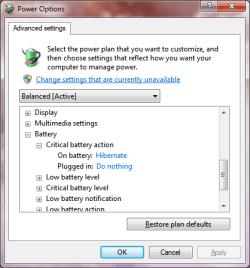
Because it is set to shut down/hibernate/sleep when the battery reaches a certain level. This is configurable in power settings.
 

Attachments

  • Untitled.png
    Untitled.png
    16.1 KB · Views: 8

My Computer

Computer type
PC/Desktop
Computer Manufacturer/Model Number
Alienware Aurora ALX R4
OS
Windows 10 Pro (x64)
CPU
Intel Core i7-3930K (3.2GHz - 4.5GHz)
Motherboard
Alienware Aurora-R4 x79
Memory
4x Samsung 4GB PC3-12800 DDR3 (16GB 1600MHz)
Graphics Card(s)
Nvidia Geforce GTX 690
Sound Card
SteelSeries Siberia Elite
Monitor(s) Displays
Dell UltraSharp U3011
Screen Resolution
2560x1600
Hard Drives
Samsung 850 Pro 256 GB, Seagate 1TB Desktop Hybrid HDD, 2x Western Digital 4TB Green HDD
PSU
875W Some Dell PSU <.<
Case
Alienware Aurora ALX
Cooling
Custom Liquid Cooling (EK CPU & GPU blocks) dual EK 480RAD
Keyboard
Logitech G710+ Mechanical
Mouse
Logitech G700s
Internet Speed
Verizon Fios (50 mbps average)
Other Info
Server: Intel NUC D54250WYK: i5-4250U, 16GB, 256 GB mSATA, Windows Server 2012 R2
Back
Top