Microsoft Outlook 2016 freezes up the system while opening

NerferMCGamer

Banned
Local time
4:47 AM
Messages
22
I am just trying to open Microsoft Outlook to see some emails, but It just freezes up the whole system.
It just stuck with the loading splash screen on outlook 2016.

Can you help me fix this? please?
 

My Computer My Computer

At a glance

Windows 8.1 32 bit with dual-boot (Windows 7 ...Intel Celeron 900 @2.19Ghz2 GB RAMNone
Computer type
Laptop
Computer Manufacturer/Model Number
eMachines eME528 2010
OS
Windows 8.1 32 bit with dual-boot (Windows 7 32bit)
CPU
Intel Celeron 900 @2.19Ghz
Motherboard
None
Memory
2 GB RAM
Graphics Card(s)
None
Sound Card
None
Monitor(s) Displays
Laptop screen/1 display
Screen Resolution
1366x768
Hard Drives
Hitachi 235GB
PSU
None
Case
None
Cooling
None
Keyboard
PS/2 Compatible
Mouse
PS/2 Compatible
Internet Speed
1mbps-4mbps
Antivirus
Panda Antivirus
Browser
Internet Explorer 11
Other Info
Low-end PC From 2010

My Computer My Computer

At a glance

Windows 7 Home Premium 64 bit sp1Intel i5 3570 3.4Ghz Ivy Bridge SKT 1155 quad...G-Skill Rip Jaws 16Gb (8x2) DDR3 -1600 PC3 12...Gigabyte NVIDIA GT610 1Gb DDR3 810/1200 PCI-E...
Computer type
PC/Desktop
Computer Manufacturer/Model Number
Self built using existing case
OS
Windows 7 Home Premium 64 bit sp1
CPU
Intel i5 3570 3.4Ghz Ivy Bridge SKT 1155 quad core
Motherboard
Gigabyte Z77-HD3 SKT 1155 2xSata 3, 4x USB 3.0
Memory
G-Skill Rip Jaws 16Gb (8x2) DDR3 -1600 PC3 12800 CL 10 red
Graphics Card(s)
Gigabyte NVIDIA GT610 1Gb DDR3 810/1200 PCI-E 2.0 Silent
Sound Card
NVIDIA High Definition & Realtech High Definition Audio
Monitor(s) Displays
2 x Philips 226V4L 16:9 aspect ratio
Screen Resolution
1920 x 1080 HD
Hard Drives
Samsung 840 Pro 256gb SSD, SATA 3.
Hitachi Touro Portable 1tb, USB 3.0 HDD used for image b/ups.
PSU
Corsair VS450
Case
Codeng
Cooling
PSU fan & CPU fan
Keyboard
Logitech
Mouse
Logitech Wireless trackball M570
Internet Speed
Wireless 3G. 3mg down & 550kb up.
Antivirus
Bitdefender Internet Security 2020
Browser
Opera (Current Version) & Firefox
Other Info
MS Office 2013 Pro. Davis weather station software. MGE Nova 600 avr UPS.

My Computer My Computer

At a glance

Windows 8.1 32 bit with dual-boot (Windows 7 ...Intel Celeron 900 @2.19Ghz2 GB RAMNone
Computer type
Laptop
Computer Manufacturer/Model Number
eMachines eME528 2010
OS
Windows 8.1 32 bit with dual-boot (Windows 7 32bit)
CPU
Intel Celeron 900 @2.19Ghz
Motherboard
None
Memory
2 GB RAM
Graphics Card(s)
None
Sound Card
None
Monitor(s) Displays
Laptop screen/1 display
Screen Resolution
1366x768
Hard Drives
Hitachi 235GB
PSU
None
Case
None
Cooling
None
Keyboard
PS/2 Compatible
Mouse
PS/2 Compatible
Internet Speed
1mbps-4mbps
Antivirus
Panda Antivirus
Browser
Internet Explorer 11
Other Info
Low-end PC From 2010
Are you saying Outlook works in Safe Mode?. If it does then there is a problem program or driver that is not loaded in Safe Mode, but is in normal mode, so you need to locate that.

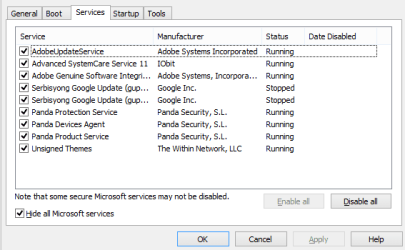
In normal mode, click on the Start Button & in the Search slot type msconfig, when that opens click on the Services Tab, then tick the box at the bottom that says "Hide all Microsoft Services". Then take a screen shot of that & post it back here for us to have a look at.

These Forum tutorials will help you with the screen shots.

Screenshot with Paint - Windows 7 Help Forums

Screenshots and Files - Upload and Post in Seven Forums - Windows 7 Help Forums
 

My Computer My Computer

At a glance

Windows 7 Home Premium 64 bit sp1Intel i5 3570 3.4Ghz Ivy Bridge SKT 1155 quad...G-Skill Rip Jaws 16Gb (8x2) DDR3 -1600 PC3 12...Gigabyte NVIDIA GT610 1Gb DDR3 810/1200 PCI-E...
Computer type
PC/Desktop
Computer Manufacturer/Model Number
Self built using existing case
OS
Windows 7 Home Premium 64 bit sp1
CPU
Intel i5 3570 3.4Ghz Ivy Bridge SKT 1155 quad core
Motherboard
Gigabyte Z77-HD3 SKT 1155 2xSata 3, 4x USB 3.0
Memory
G-Skill Rip Jaws 16Gb (8x2) DDR3 -1600 PC3 12800 CL 10 red
Graphics Card(s)
Gigabyte NVIDIA GT610 1Gb DDR3 810/1200 PCI-E 2.0 Silent
Sound Card
NVIDIA High Definition & Realtech High Definition Audio
Monitor(s) Displays
2 x Philips 226V4L 16:9 aspect ratio
Screen Resolution
1920 x 1080 HD
Hard Drives
Samsung 840 Pro 256gb SSD, SATA 3.
Hitachi Touro Portable 1tb, USB 3.0 HDD used for image b/ups.
PSU
Corsair VS450
Case
Codeng
Cooling
PSU fan & CPU fan
Keyboard
Logitech
Mouse
Logitech Wireless trackball M570
Internet Speed
Wireless 3G. 3mg down & 550kb up.
Antivirus
Bitdefender Internet Security 2020
Browser
Opera (Current Version) & Firefox
Other Info
MS Office 2013 Pro. Davis weather station software. MGE Nova 600 avr UPS.
Are you saying Outlook works in Safe Mode?. If it does then there is a problem program or driver that is not loaded in Safe Mode, but is in normal mode, so you need to locate that.

In normal mode, click on the Start Button & in the Search slot type msconfig, when that opens click on the Services Tab, then tick the box at the bottom that says "Hide all Microsoft Services". Then take a screen shot of that & post it back here for us to have a look at.

These Forum tutorials will help you with the screen shots.

Screenshot with Paint - Windows 7 Help Forums

Screenshots and Files - Upload and Post in Seven Forums - Windows 7 Help Forums

Now, Where should I post the picture? it needs a link.
 

My Computer My Computer

At a glance

Windows 8.1 32 bit with dual-boot (Windows 7 ...Intel Celeron 900 @2.19Ghz2 GB RAMNone
Computer type
Laptop
Computer Manufacturer/Model Number
eMachines eME528 2010
OS
Windows 8.1 32 bit with dual-boot (Windows 7 32bit)
CPU
Intel Celeron 900 @2.19Ghz
Motherboard
None
Memory
2 GB RAM
Graphics Card(s)
None
Sound Card
None
Monitor(s) Displays
Laptop screen/1 display
Screen Resolution
1366x768
Hard Drives
Hitachi 235GB
PSU
None
Case
None
Cooling
None
Keyboard
PS/2 Compatible
Mouse
PS/2 Compatible
Internet Speed
1mbps-4mbps
Antivirus
Panda Antivirus
Browser
Internet Explorer 11
Other Info
Low-end PC From 2010
Everything you need to do post the picture is explained in this Forum tutorial. Which I included in my Post #4. If you follow the tutorial is a fairly easy procedure.

Screenshots and Files - Upload and Post in Seven Forums - Windows 7 Help Forums

You could also post a screen shot of the same msconfig showing the Start Up tab. Follow the same procedure & you can include both in the same replying Post.
 

My Computer My Computer

At a glance

Windows 7 Home Premium 64 bit sp1Intel i5 3570 3.4Ghz Ivy Bridge SKT 1155 quad...G-Skill Rip Jaws 16Gb (8x2) DDR3 -1600 PC3 12...Gigabyte NVIDIA GT610 1Gb DDR3 810/1200 PCI-E...
Computer type
PC/Desktop
Computer Manufacturer/Model Number
Self built using existing case
OS
Windows 7 Home Premium 64 bit sp1
CPU
Intel i5 3570 3.4Ghz Ivy Bridge SKT 1155 quad core
Motherboard
Gigabyte Z77-HD3 SKT 1155 2xSata 3, 4x USB 3.0
Memory
G-Skill Rip Jaws 16Gb (8x2) DDR3 -1600 PC3 12800 CL 10 red
Graphics Card(s)
Gigabyte NVIDIA GT610 1Gb DDR3 810/1200 PCI-E 2.0 Silent
Sound Card
NVIDIA High Definition & Realtech High Definition Audio
Monitor(s) Displays
2 x Philips 226V4L 16:9 aspect ratio
Screen Resolution
1920 x 1080 HD
Hard Drives
Samsung 840 Pro 256gb SSD, SATA 3.
Hitachi Touro Portable 1tb, USB 3.0 HDD used for image b/ups.
PSU
Corsair VS450
Case
Codeng
Cooling
PSU fan & CPU fan
Keyboard
Logitech
Mouse
Logitech Wireless trackball M570
Internet Speed
Wireless 3G. 3mg down & 550kb up.
Antivirus
Bitdefender Internet Security 2020
Browser
Opera (Current Version) & Firefox
Other Info
MS Office 2013 Pro. Davis weather station software. MGE Nova 600 avr UPS.
Everything you need to do post the picture is explained in this Forum tutorial. Which I included in my Post #4. If you follow the tutorial is a fairly easy procedure.

Screenshots and Files - Upload and Post in Seven Forums - Windows 7 Help Forums

You could also post a screen shot of the same msconfig showing the Start Up tab. Follow the same procedure & you can include both in the same replying Post.

Here: But sorry, this was on Windows 8.1, I was banned on Eightforums as "Requested"

Screenshot (80).png
 

My Computer My Computer

At a glance

Windows 8.1 32 bit with dual-boot (Windows 7 ...Intel Celeron 900 @2.19Ghz2 GB RAMNone
Computer type
Laptop
Computer Manufacturer/Model Number
eMachines eME528 2010
OS
Windows 8.1 32 bit with dual-boot (Windows 7 32bit)
CPU
Intel Celeron 900 @2.19Ghz
Motherboard
None
Memory
2 GB RAM
Graphics Card(s)
None
Sound Card
None
Monitor(s) Displays
Laptop screen/1 display
Screen Resolution
1366x768
Hard Drives
Hitachi 235GB
PSU
None
Case
None
Cooling
None
Keyboard
PS/2 Compatible
Mouse
PS/2 Compatible
Internet Speed
1mbps-4mbps
Antivirus
Panda Antivirus
Browser
Internet Explorer 11
Other Info
Low-end PC From 2010
Back
Top