Solved Microsoft Security Essentials Problem

How is it going with MSE?

Is it still giving you the same problems as before?

If there is anything new, please be specific.

Thanks.
 

My Computer

Computer type
PC/Desktop
Computer Manufacturer/Model Number
An ol' eMachines
OS
Windows 7 Home Premium
Internet Speed
Fine for me...I'm retired!
MSE is still the same as in the beginning. The only difference is that now Windows Defender can be accessed from Control Panel.
 

My Computer

Computer type
Laptop
Computer Manufacturer/Model Number
SONY VAIO
OS
Windows 7 Home Premium x64
CPU
Intel i5
Memory
4GB
Hard Drives
TOSHIBA 500GB
Antivirus
MSE
Browser
Mozilla Firefox
Are you able to uninstall MSE from Control Panel > Programs and Features > Uninstall Programs?

It should be listed as Microsoft Security Essentials.
 

My Computer

Computer type
PC/Desktop
Computer Manufacturer/Model Number
An ol' eMachines
OS
Windows 7 Home Premium
Internet Speed
Fine for me...I'm retired!
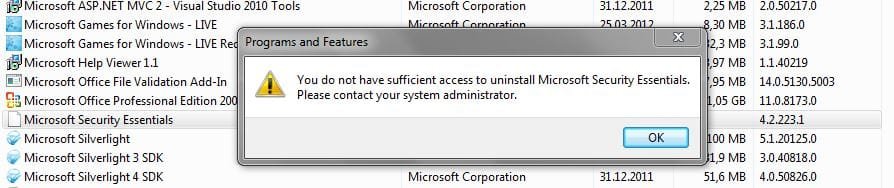
No, i cannot uninstall MSE from Control Panel, it keeps telling me the same message: 'You do not have sufficient access to uninstall Microsoft Security Essentials. Please contact your system administrator.' MSE's icon from Programs and Features looks blank as before.
Capture.JPG
 

My Computer

Computer type
Laptop
Computer Manufacturer/Model Number
SONY VAIO
OS
Windows 7 Home Premium x64
CPU
Intel i5
Memory
4GB
Hard Drives
TOSHIBA 500GB
Antivirus
MSE
Browser
Mozilla Firefox

My Computer

Computer type
PC/Desktop
Computer Manufacturer/Model Number
Bruce ... somewhere in his 40's
OS
Windows 7 Ultimate 32bit SP1
CPU
Intel(R) Core(TM)2 Quad CPU @ 2.40GHz, 2400 MHz
Motherboard
INTEL/D975XBX2
Memory
4 GB
Graphics Card(s)
ATI Radeon HD 2600 Pro
Monitor(s) Displays
Samsung SyncMaster 914v
Screen Resolution
1280 x 1024
Hard Drives
2/500GB each ... ST3500630AS ATA Device.
One is not connected
PSU
Rocketfish 700 W
Case
G.Skill Gigabyte Chassis
Keyboard
Standard PS/2 Keyboard
Mouse
Microsoft PS/2 Mouse
Internet Speed
DSL
Antivirus
Avira Internet Security
Browser
IE 11
Other Info
ATI HDMI Audio
brato92,

The ZeroAccess malware made significant damage to Microsoft Security Essentials.

Let's make an attempt to remove MSE, but, be aware that this process may not be successful.
In the event we cannot remove and install MSE anew, there are other free AntiVirus programs available that you can use, such as avast! Free, and Avira.

Now, let's scan the system with a special tool...

:info: Please download Junction
Save to the Desktop.
Unzip the program and place junction.exe in the Windows directory (C:\Windows\junction.exe).
Do not run it!

:info: Next, please run Notepad (Start > All Programs > Accessories > Notepad)
Copy/paste the text inside the code box into Notepad:

Code:
@ECHO OFF
dir /a/b c:\windows\junction.exe >c:\log.txt 2>&1
junction -s c:\>>c:\log.txt
echo.End of Scan >>c:\log.txt
notepad c:\log.txt

Go to the File menu at the top of the Notepad
Select: Save As...
In the prompt that appears, save in: Desktop
File name: look.bat
Save as type: All files
Click: Save
Close Notepad.

Locate look.bat on the Desktop.
Right-click and select: Run as Administrator
Wait until Notepad opens with a report.
Please provide the content of log.txt in your reply.

:warn: Note: There is information that we need to obtain before making any attempt to uninstall MSE!!
If there are reparse points on its files, there is no point in trying to uninstall!!

 

My Computer

Computer type
PC/Desktop
Computer Manufacturer/Model Number
An ol' eMachines
OS
Windows 7 Home Premium
Internet Speed
Fine for me...I'm retired!
cottonball, i've done your steps View attachment log.txt

If we cannot remove ZeroAccess, should i reinstall Windows to get rid of it permanently ?
Can you tell me please the best total-security antivirus i should install, not the free ones, because i'll pay if i have to.
 

My Computer

Computer type
Laptop
Computer Manufacturer/Model Number
SONY VAIO
OS
Windows 7 Home Premium x64
CPU
Intel i5
Memory
4GB
Hard Drives
TOSHIBA 500GB
Antivirus
MSE
Browser
Mozilla Firefox
brato92,

ZeroAccess was removed, What we are dealing with is the damage it has done to Microsoft Security Essentials.

Need to prepare repair instructions for you to use. We may be successful, or we may not.

MSE is not an easy program to repair, and as long as there are symbolic links present, we cannot force the issue, as we can damage the system or make it unbootable.


My Computer

Computer type
PC/Desktop
Computer Manufacturer/Model Number
An ol' eMachines
OS
Windows 7 Home Premium
Internet Speed
Fine for me...I'm retired!
ok man, i'm waiting for your reply.

i apreciate what you've done for helping me!
 

My Computer

Computer type
Laptop
Computer Manufacturer/Model Number
SONY VAIO
OS
Windows 7 Home Premium x64
CPU
Intel i5
Memory
4GB
Hard Drives
TOSHIBA 500GB
Antivirus
MSE
Browser
Mozilla Firefox
brato92,

Please do the following...

:info: Open Notepad (Start > All Programs > Accessories > Notepad)
Copy/paste all the contents of the quote box below to Notepad (do not copy the word 'Quote').
Save it on the Desktop as: fixlist.txt

start
DeleteJunctionsInDirectory: C:\Program Files\Microsoft Security Client
DeleteJunctionsInDirectory: C:\Program Files\Windows Defender
Unlock: c:\Program Files\Microsoft Security Client
Unlock: c:\Program Files (x86)\Microsoft Security Client
cmd: Dir /b /a:l "C:\Program Files" /s
End

WARNING: This script is written specifically for brato92, for use on this particular computer.
Running the script on another computer may cause damage to the Operating System!!

Run FRST again, but this time press the Fix button just once, and wait.

Please post Fixlog.txt in your reply.


:info: Next, manually uninstall Microsoft Security Essentials version 2 or later (Your probably had MSE v4.*)
Microsoft Fix It 50692:
How to manually uninstall Microsoft Security Essentials 2.0.1963 if you cannot uninstall it by using the Add or Remove Programs item
Go to: Fix it for me

When done, see if you can download and install Microsoft Security Essentials:
http://www.microsoft.com/en-us/download/details.aspx?id=5201
 
Last edited:

My Computer

Computer type
PC/Desktop
Computer Manufacturer/Model Number
An ol' eMachines
OS
Windows 7 Home Premium
Internet Speed
Fine for me...I'm retired!
brato92,

If you have not run the previous commands in FRST (contained in quote box), please note they were edited to add a couple of things.

If you already ran what was previously posted, that is OK also.
 

My Computer

Computer type
PC/Desktop
Computer Manufacturer/Model Number
An ol' eMachines
OS
Windows 7 Home Premium
Internet Speed
Fine for me...I'm retired!
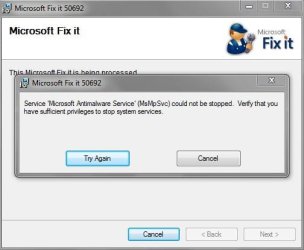
Hey, cottonball, i've done your steps View attachment Fixlog.txt, but Fix it for me tool didin't work.
Capture2.JPG

However, i removed MSE from Control Panel-Programs and features, this time it worked.

I've reinstalled MSE, now it works fine.
Thanks for all you've done for me, i appreciate!

One more question, could you recommend me a good total-security antivirus ?
 

My Computer

Computer type
Laptop
Computer Manufacturer/Model Number
SONY VAIO
OS
Windows 7 Home Premium x64
CPU
Intel i5
Memory
4GB
Hard Drives
TOSHIBA 500GB
Antivirus
MSE
Browser
Mozilla Firefox
Did you restart the PC after you ran the fixlist.txt
 

My Computer

Computer Manufacturer/Model Number
Custom Built
OS
Windows 7 Ultimate 32-Bit & Windows 7 Ultimate 64-Bit
CPU
Intel Core i7 CPU 950 @ 3.07GHz
Motherboard
ASUS P6T DELUXE V2
Memory
OCZ 6GB (3 x 2GB) 240-Pin DDR3 SDRAM DDR3 1600 OCZ3X1600R2
Graphics Card(s)
ATI Radeon HD 5700 Series
Sound Card
OnBoard
Hard Drives
WD6400AACS-00M3B0 (640GB SATA )
PSU
CORSAIR 850w
Case
NZXT LEXA
Cooling
Intel Stock Heatsink Fan
Keyboard
Microsoft Wireless Laser Keyboard 7000
Mouse
Microsoft Wireless Laser Mouse 7000
i didn't restart the system after fixlist.txt
 

My Computer

Computer type
Laptop
Computer Manufacturer/Model Number
SONY VAIO
OS
Windows 7 Home Premium x64
CPU
Intel i5
Memory
4GB
Hard Drives
TOSHIBA 500GB
Antivirus
MSE
Browser
Mozilla Firefox
From the Fixlog it says to restart the PC manually
 

My Computer

Computer Manufacturer/Model Number
Custom Built
OS
Windows 7 Ultimate 32-Bit & Windows 7 Ultimate 64-Bit
CPU
Intel Core i7 CPU 950 @ 3.07GHz
Motherboard
ASUS P6T DELUXE V2
Memory
OCZ 6GB (3 x 2GB) 240-Pin DDR3 SDRAM DDR3 1600 OCZ3X1600R2
Graphics Card(s)
ATI Radeon HD 5700 Series
Sound Card
OnBoard
Hard Drives
WD6400AACS-00M3B0 (640GB SATA )
PSU
CORSAIR 850w
Case
NZXT LEXA
Cooling
Intel Stock Heatsink Fan
Keyboard
Microsoft Wireless Laser Keyboard 7000
Mouse
Microsoft Wireless Laser Mouse 7000
i didn't pay attention...anyway, seems that MSE works fine now :)
 

My Computer

Computer type
Laptop
Computer Manufacturer/Model Number
SONY VAIO
OS
Windows 7 Home Premium x64
CPU
Intel i5
Memory
4GB
Hard Drives
TOSHIBA 500GB
Antivirus
MSE
Browser
Mozilla Firefox
Do a full scan with MSE
 

My Computer

Computer Manufacturer/Model Number
Custom Built
OS
Windows 7 Ultimate 32-Bit & Windows 7 Ultimate 64-Bit
CPU
Intel Core i7 CPU 950 @ 3.07GHz
Motherboard
ASUS P6T DELUXE V2
Memory
OCZ 6GB (3 x 2GB) 240-Pin DDR3 SDRAM DDR3 1600 OCZ3X1600R2
Graphics Card(s)
ATI Radeon HD 5700 Series
Sound Card
OnBoard
Hard Drives
WD6400AACS-00M3B0 (640GB SATA )
PSU
CORSAIR 850w
Case
NZXT LEXA
Cooling
Intel Stock Heatsink Fan
Keyboard
Microsoft Wireless Laser Keyboard 7000
Mouse
Microsoft Wireless Laser Mouse 7000
i did a quick scan right after MSE have been installed
 

My Computer

Computer type
Laptop
Computer Manufacturer/Model Number
SONY VAIO
OS
Windows 7 Home Premium x64
CPU
Intel i5
Memory
4GB
Hard Drives
TOSHIBA 500GB
Antivirus
MSE
Browser
Mozilla Firefox
Did it find anything ?
 

My Computer

Computer Manufacturer/Model Number
Custom Built
OS
Windows 7 Ultimate 32-Bit & Windows 7 Ultimate 64-Bit
CPU
Intel Core i7 CPU 950 @ 3.07GHz
Motherboard
ASUS P6T DELUXE V2
Memory
OCZ 6GB (3 x 2GB) 240-Pin DDR3 SDRAM DDR3 1600 OCZ3X1600R2
Graphics Card(s)
ATI Radeon HD 5700 Series
Sound Card
OnBoard
Hard Drives
WD6400AACS-00M3B0 (640GB SATA )
PSU
CORSAIR 850w
Case
NZXT LEXA
Cooling
Intel Stock Heatsink Fan
Keyboard
Microsoft Wireless Laser Keyboard 7000
Mouse
Microsoft Wireless Laser Mouse 7000
Back
Top