Microsoft Security Essentials ranked second last in AV-Test's

What most people seem to forget is that Security Software really isn't everything. Being secure requires awareness, self-responsibility, and occassionally a little boost from Security Software.

Besides, seeing how BitDefender is Number 1 on that list.. BitDefender really isn't for the average computer user. Its security is more for Business & Enterprise machines just like Microsofts ForeFront security is designed for Servers.

If someone honestly needs the highest amount of security available, they're either paranoid... or they're doing some things that the shouldn't be.
 

My Computer

Computer Manufacturer/Model Number
Toshiba® Satellite® [L755D-s5359]
OS
Windows® 7 Home Premium SP1 [x64]
CPU
AMD A6 APU [2.4GHz O/C]
Memory
G.Skill DDR3 So-Dimm [8GB]
Graphics Card(s)
ATI Radeon™ HD 6520g [512MB]
Sound Card
Conexant® SmartAudio HD
Screen Resolution
1366x768
Hard Drives
Western Digital 500GB [Internal]
Western Digital 1TB Passport [External]
Keyboard
Microsoft® Comfort Curve 2000
Mouse
Microsoft® Wireless Mobile Mouse 6000
Internet Speed
Comcast Xfinity 100MBPS
Other Info
Common Devices:: HTC Titan, Microsoft ZuneHD 32GB
What most people seem to forget is that Security Software really isn't everything. Being secure requires awareness, self-responsibility, and occassionally a little boost from Security Software.

Besides, seeing how BitDefender is Number 1 on that list.. BitDefender really isn't for the average computer user. Its security is more for Business & Enterprise machines just like Microsofts ForeFront security is designed for Servers.


I agree fully with your first paragraph. You have to be careful.

However, I have BitDefender and it is very easy for the average computer user to install, setup and operate. It gives you choices when setting it up for beginner to advanced level control. As an added bonus it was also the cheapest of the pay security software packages covering up to three machines for two years.
 

My Computer

Computer type
PC/Desktop
Computer Manufacturer/Model Number
Custom Build
OS
Windows 7 Home Premium 64 bit SP1
CPU
Intel i7 4790k
Motherboard
MSI Z97-G55 SLI
Memory
16 GB Corsair 2400 MHz DDR3
Graphics Card(s)
Visiontek Radeon R9 285
Sound Card
None
Monitor(s) Displays
Gateway FHX2402L
Screen Resolution
1920 X 1080
Hard Drives
Samsung 840 EVO 500GB
PSU
Corsair 750 TX
Case
Fractal Design
Cooling
Stock fans
Keyboard
Logitech K800
Mouse
Logitech M510
Internet Speed
60.88 Mbps download 10.47 Mbps upload (Speedtest.net)
Antivirus
Norton
Browser
Opera
Other Info
First Computer used: A Commodore Pet of course
Love using Manjaro KDE Linux 64 bit and Windows 7/10 64 bit
Question...
What do you do with a computer that has a virus on it that MSE can't find?
You re-install the OS.
What do you do with a bug that any other Security software finds?
You kill the bug.
So you find the best Security software possible!
Which is the hard part.

Those not to touch:
MSE
Avast
McAfee
Norton

Those to touch
NOD32
Kaspersky
Can't think of anymore...
 

My Computer

OS
Stools
Esetss 4

Any expert opinion for Eset Smart Security 4?
Good things?
Bad things?
 

My Computer

Computer Manufacturer/Model Number
Custom Built by me.
OS
Windows 7 Ultimate 64bit SP1
CPU
Intel Core 2 Quad Q6600
Motherboard
Gigabyte GA-X38-DS4
Memory
2X2GB DDR2 PC6400 800MHZ DUAL CHANNEL
Graphics Card(s)
XFX RADEON HD 6850 1GB GDDR5
Sound Card
2/4/5.1/7.1-channel Realtek High Definition
Monitor(s) Displays
Samsung LE40A656F1 1080p 100Hz LCD HD TV 50,000:1
Screen Resolution
1366x768 in Desktop,1920x1080p in gaming and video
Hard Drives
C:\WD VelociRaptor 150 GB,10,000 RPM
E:\WESTERN DIGITAL WD15EADS 1.5TB CAVIAR GREEN SATA2 F:\WESTERN DIGITAL WD15EADS 1.5TB CAVIAR GREEN SATA2
PSU
THERMALTAKE W0229 TOUGHPOWER XT 750W
Case
A-Case Twin Engine BB
Cooling
3 x thermaltake smart case fan II + 1 arctic cooling fan
Keyboard
Wireless Logitech LX710
Mouse
Logitech Wireless Gaming Mouse G700
Internet Speed
ADSL 12000 plus
Other Info
Mouse Logitech G700,with 13 buttons who needs keyboard in RPG?

D:\Sony high speed sata Dvd Rewriter
Logitech Cordless Rumblepad 2
I hear mostly good things about ESET. That said, a few years back when I tried to reinstall an older version on a friend's computer who had a subscription it was too buggy to run.

The opinions of the respected experts here who deal regularly with infection and it's cleanup are the ones you want. What I am reading is that they maintain a high regard for MSE and Avast with some caveats that it may not be sufficient for regularly visiting risky sites, or for those who cluelessly click on fake AV's.

The paid AV's which I hear the best reports on and which never seem to show up infected here are Kapersky, Eset Nod32, Bitdefender, and Malwarebytes which requires a subscription for more than on-demand scanner.


Others? Let's ask Jacee and Corrine who earned their MVP's fighting infection here.
 
Last edited:
Because I'm not a security expert I'm more likely to "blame the tool"
I use Norton NIS 2011 and haven't experienced any problem. So far I'd renew the subscription.
Saying don't touch Norton is a bit strong. Any solid reasons?
 

My Computer

Computer type
PC/Desktop
Computer Manufacturer/Model Number
Own build
OS
Windows 7x64 Home Premium SP1
CPU
Intel i7 2600k
Motherboard
ASUS P8Z68 Deluxe
Memory
G.Skill Ripjaws (DDR3-1600) 2x4GB
Graphics Card(s)
Nvidia GeForce GTS 450; Intel HD Graphics 3000(GT2+)
Monitor(s) Displays
Dell Ultrasharp IPS panel U2311H, Samsung SyncMaster P2350
Screen Resolution
1920x1080
Hard Drives
Samsung 850 Pro SSD 256GB, Samsung SSD 840 120GB, Seagates 1TB Barracuda ST31000528AS x2
PSU
Seasonic M12II 520W
Case
Lian Li Lancool PC-K60
Cooling
Case: 1x120mm, 3x140mm CPU: Hyper 212+
Keyboard
Logitech MK520 (wireless)
Mouse
Logitech MK520
Internet Speed
6-7 Mbps
Antivirus
Norton Security Premium, Malwarebytes on 2 (MSE on 3rd PC)
Browser
FireFox
Other Info
Audio: Logitech Z523 2.1
I hear mostly good things about ESET. That said, a few years back when I tried to reinstall an older version on a friend's computer who had a subscription it was too buggy to run.

The opinions of the respected experts here who deal regularly with infection and it's cleanup are the ones you want. What I am reading in this thread is that they maintain a high regard for MSE and Avast almost unanimously, with some caveats that it may not be sufficient for regularly visiting risky sites, or for those who cluelessly click on fake AV's.

The paid AV's which I hear the best reports on and which never seem to show up infected here are Kapersky, Eset Nod32, and Malwarebytes which requires a subscription for more than on-demand scanner.

Others? Let's ask Jacee and Corrine who earned their MVP's fighting infection here.

No matter what A/V a person uses, there is always the chance of infection and I would never suggest that any product would provide sufficient protection for visiting risky sites. In addition, any A/V can have a false/positive. Is there one magic antivirus solution for everyone? Absolutely not. As gregrocker indicated, he had a friend who had a problem with ESET, whereas, I've never had any issues with it.

As to the fake/rogue A/V's, many of the fake/rogue A/V infections are a result of drive-by installs from infected/poisoned advertisements, search results, etc. Having outdated, vulnerable third-party software (Java/Adobe) results in the computer being more susceptible to such infections.

BTW, if you should run across one of those pop-ups with a scareware window saying "Your computer might be infected. Click here to scan" or something similar, do NOT try to close by clicking the X, cancel, or by clicking anywhere on the pop-up window. Doing so installs it. Using Alt+F4 to forcibly close all open windows will generally keep the fake AV virus from installing.

Yes, ESET and Kaspersky have excellent reputations, as do other licensed A/V products. (Note: Malwarebytes is not an antivirus software. It is an anti-malware program with both a free version and a one-time-fee licensed version.)

The three "free for personal use" antivirus programs I recommend are avast!, Avira AntiVir, and Microsoft Security Essentials.

I have MSE on one computer and, because I participate in the beta program, I have ESET Smart Security on another.
 

My Computer

OS
Windows 7 & Windows Vista Ultimate
A lot of the results are test methodology. These tests tend to skew toward the "Suites", as they have many components beyond the actual AV part. Since almost all of us who use Avast (like me) or MSE, also have other layers of security, that in whole, make up our "Suites", then the comparison is truly apples to oranges.

I understand the testing is for programs, and not a collection of programs. I believe the AV part of my security (Avast), serves me well in conjunction with my firewall with HIPS, my active antispyware, antilogger, etc. If my complete "Suite" were tested as a whole, I'm sure it would fare very well against these all in one products. So I personally take these results with a grain of salt, as they do not tell the whole picture. A Guy
 

My Computer

Computer type
PC/Desktop
OS
Windows 10 Home x64
CPU
INTEL Core i5-750 Quad-Core 3.37GHz
Motherboard
ASUS P7P55D
Memory
HyperX Fury Black Series 8GB (2 x 4GB) 1866Mhz
Graphics Card(s)
EVGA GeForce GTX 750 Superclocked 1GB 128-Bit GDDR5
Monitor(s) Displays
LG 32MA68HY 32" IPS
Screen Resolution
1920 x 1080
Hard Drives
Samsung 840 Evo 120GB, SEAGATE 500GB Barracuda® 7200.12, SATA 3 Gb/s, 7200 RPM, 16MB cache
PSU
ANTEC TruePower New TP-550, 80 PLUS, 550W
Case
ANTEC Three Hundred Illusion
Cooling
COOLER MASTER Hyper 212 Plus, 4 x 120mm 1 x 140mm Noctua's
Internet Speed
85 + Mbps
Antivirus
Avast
Browser
Vivaldi
As said many, many times before ... there is no Antivirus product that will protect you from everything.

I've tried most all of them, except McAfee, and found some to be user unfriendly. By that, I mean too confusing to set up the way you want it.

A 'layered' protection is what we recommend. Get a good Hosts file:
HostsMan - abelhadigital.com
What it does ...
The Hosts file contains the mappings of IP addresses to host names. This file is loaded into memory (cache) at startup, then Windows checks the Hosts file before it queries any DNS servers, which enables it to override addresses in the DNS. This prevents access to the listed sites by redirecting any connection attempts back to the local (your) machine. Another feature of the HOSTS file is its ability to block other applications from connecting to the Internet, providing the entry exists

Prevent A 'drive-by' ActiveX from installing:
Spyware Blaster and Spyware Guard are excellent protection 'before' the attack, not after it's already been done:
SpywareBlaster tutorial: http://www.bleepingcomputer.com/tutorials/tutorial49.html
SpywareGuard tutorial: http://www.bleepingcomputer.com/tutorials/tutorial50.html

Keep your chosen Anti-virus up todate!!

Also make sure you have an active Firewall, along with your Router.
Understanding and Using Firewalls

Use common sense ... don't download what doesn't belong to you, unless you've paid for the program. Don't visit dodgy sites, don't click on links just because you know how to :p, and don't borrow possible trouble by using someone else's flash drive. It may be infected!
 

My Computer

Computer type
PC/Desktop
Computer Manufacturer/Model Number
Bruce ... somewhere in his 40's
OS
Windows 7 Ultimate 32bit SP1
CPU
Intel(R) Core(TM)2 Quad CPU @ 2.40GHz, 2400 MHz
Motherboard
INTEL/D975XBX2
Memory
4 GB
Graphics Card(s)
ATI Radeon HD 2600 Pro
Monitor(s) Displays
Samsung SyncMaster 914v
Screen Resolution
1280 x 1024
Hard Drives
2/500GB each ... ST3500630AS ATA Device.
One is not connected
PSU
Rocketfish 700 W
Case
G.Skill Gigabyte Chassis
Keyboard
Standard PS/2 Keyboard
Mouse
Microsoft PS/2 Mouse
Internet Speed
DSL
Antivirus
Avira Internet Security
Browser
IE 11
Other Info
ATI HDMI Audio
Jacee, I long ago stopped using Spyware Guard, as the last update was 2004. How effective can it be in these days of 0 day exploits. Do you still think it is a worthwhile addition?

A Guy
 

My Computer

Computer type
PC/Desktop
OS
Windows 10 Home x64
CPU
INTEL Core i5-750 Quad-Core 3.37GHz
Motherboard
ASUS P7P55D
Memory
HyperX Fury Black Series 8GB (2 x 4GB) 1866Mhz
Graphics Card(s)
EVGA GeForce GTX 750 Superclocked 1GB 128-Bit GDDR5
Monitor(s) Displays
LG 32MA68HY 32" IPS
Screen Resolution
1920 x 1080
Hard Drives
Samsung 840 Evo 120GB, SEAGATE 500GB Barracuda® 7200.12, SATA 3 Gb/s, 7200 RPM, 16MB cache
PSU
ANTEC TruePower New TP-550, 80 PLUS, 550W
Case
ANTEC Three Hundred Illusion
Cooling
COOLER MASTER Hyper 212 Plus, 4 x 120mm 1 x 140mm Noctua's
Internet Speed
85 + Mbps
Antivirus
Avast
Browser
Vivaldi
I personally dont think spywareguard or spywareblaster are needed anymore as most free a/v sollutions will do a better job at protecting you.:D
 

My Computer

OS
Win 7 64 premium
Other Info
7 fw, LUA, UAC on high, IE-9 w/ smartscreen on, SANDBOXIE
I personally dont think spywareguard or spywareblaster are needed anymore as most free a/v sollutions will do a better job at protecting you.:D
They are additions to the AV not a replacement.
Active X's can be installed many ways including Flash player. You Tube, Flash games even Flash advertisements can install them.
If you can see the Flash playing you are possibly getting an Active X installed. Some good or neutral and some bad.

Then we can talk JAVA which is full of internal security holes all by itself. :shock:

Of course the best Java security is not install it on your system. :D
 

My Computer

Computer Manufacturer/Model Number
Hopalong/ Godzilla
OS
Windows7 Pro 64bit SP-1; Windows XP Pro 32bit
CPU
Intel Core i7-870 Lynnfield 2.93GHz LGA 1156 95W Quad-Core
Motherboard
ASUS P7P55D-E PRO
Memory
8GB@1400MHz Crucial Ballistix DDR3-1600 4x2GB
Graphics Card(s)
ASUS ENGTX460 DirectCU/2DI/1GD5 1GB 256-bit GDDR5
Sound Card
VIA Onboard
Monitor(s) Displays
Asus VS248H-P 24"; Samsung SyncMaster 941BW 19"ws
Screen Resolution
1920x1080; 1440x900
Hard Drives
Samsung 830 120GB SSD
Intel 320 120GB SSD
Western Digital Caviar Black WD7501AALS 750GB 7200 RPM SATA 3.0Gb/s
Western Digital Caviar Black WD6401AALS 640GB 7200 RPM SATA 3.0Gb/s
PSU
COOLER MASTER Silent Pro RS850-AMBAJ3-US 850W Modular
Case
COOLER MASTER HAF 932 RC-932-KKN5-GP Black
Cooling
Scythe "Mugen-2 Rev.B" (2 ScytheKaze-Jyuni PWM fans)
Keyboard
Logitech K-320
Mouse
Kensington
Antivirus
Avast Inernet Suite
Browser
IE 9 ; Chrome
Jacee, I long ago stopped using Spyware Guard, as the last update was 2004. How effective can it be in these days of 0 day exploits. Do you still think it is a worthwhile addition?

A Guy
Spyware Guard still protects by...
Browser Hijacking Protection7 This component will alert you to any known methods of Browser Hijacking that are occurring on your computer. These entail software that adds Browser Helper Objects or changes to settings in your Internet Explorer. When this occurs an alert will appear notifying the user and giving the user a chance to accept the changes or revert back to what they were previously. It does pop up and ask if you want to change or keep the old value ;)
 

My Computer

Computer type
PC/Desktop
Computer Manufacturer/Model Number
Bruce ... somewhere in his 40's
OS
Windows 7 Ultimate 32bit SP1
CPU
Intel(R) Core(TM)2 Quad CPU @ 2.40GHz, 2400 MHz
Motherboard
INTEL/D975XBX2
Memory
4 GB
Graphics Card(s)
ATI Radeon HD 2600 Pro
Monitor(s) Displays
Samsung SyncMaster 914v
Screen Resolution
1280 x 1024
Hard Drives
2/500GB each ... ST3500630AS ATA Device.
One is not connected
PSU
Rocketfish 700 W
Case
G.Skill Gigabyte Chassis
Keyboard
Standard PS/2 Keyboard
Mouse
Microsoft PS/2 Mouse
Internet Speed
DSL
Antivirus
Avira Internet Security
Browser
IE 11
Other Info
ATI HDMI Audio
This is true, I guess if you don't get alerted to same by any other protection it is worthwhile. I do remember the popups from SG. A Guy
 

My Computer

Computer type
PC/Desktop
OS
Windows 10 Home x64
CPU
INTEL Core i5-750 Quad-Core 3.37GHz
Motherboard
ASUS P7P55D
Memory
HyperX Fury Black Series 8GB (2 x 4GB) 1866Mhz
Graphics Card(s)
EVGA GeForce GTX 750 Superclocked 1GB 128-Bit GDDR5
Monitor(s) Displays
LG 32MA68HY 32" IPS
Screen Resolution
1920 x 1080
Hard Drives
Samsung 840 Evo 120GB, SEAGATE 500GB Barracuda® 7200.12, SATA 3 Gb/s, 7200 RPM, 16MB cache
PSU
ANTEC TruePower New TP-550, 80 PLUS, 550W
Case
ANTEC Three Hundred Illusion
Cooling
COOLER MASTER Hyper 212 Plus, 4 x 120mm 1 x 140mm Noctua's
Internet Speed
85 + Mbps
Antivirus
Avast
Browser
Vivaldi
No matter what you install or are running, you have to realize it is physically impossible for any AV to catch everything all the time. Not only do viruses change their stripes with regularity, but there are new ones always being released. AV's can watch for certain behaviors, but this doesn't always guarantee they'll catch something if it's new.

A new virus is released into the wild on day 1. The virus must first be recognized for what it is and samples submitted to the AV companies for analysis. After analysis, they must write a definition to combat it. This can take anywhere from several hours to a couple days depending on the complexity of it. During this time, the new virus is spreading as fast as it can.

When the solution is found, it must be tested, streamlined to run on various systems and then deployed. This will also take time.

The best defense you have is to run what you feel comfortable with, keep your AV Defs up to date as well as any patches for software, and practice vigilance.

You know how your PC normally runs. Does it look like it's doing something/running a little bit out of the ordinary? Then it's time to investigate. Have a look at your running processes (Process Explorer) or see if you can still access your RegEdit.

But just because all "appears well" doesn't always mean it is. Have a look at the workings once in a while and see if anything new has popped up, and if it has, why.

Use sense when surfing. You can have the best rated AV, but going to shady sites or trying to D/L cracks will bring on something that will eventually overwhelm even the best AV.

Remaining vigilant combined with common sense is your best defense for staying virus free, but it demands some of your time and attention to do so.
 

My Computer

Computer type
PC/Desktop
Computer Manufacturer/Model Number
Dell Hell oh Well
OS
Win 7 32 Home Premium, Win 7 64 Pro, Win 8.1, Win 10
CPU
Intel Core 2 Duo 2.93GHz
Memory
Not much with my ADHD
Graphics Card(s)
ATI Radeon HD 4350
Monitor(s) Displays
24" HDTV/Monitor
Screen Resolution
Blurry after a Scotch or 2
Hard Drives
1 HDD 250 GB, 1 HDD 1 TB, 3 - 1 TB Externals
Case
Don't get on my case...man :D
Cooling
I have an Air Conditioner & Diet Pepsi
Keyboard
Saitek Cyborg
Mouse
10 yr old MS optical mouse that still works
Internet Speed
Never fast enough
Antivirus
Various
Browser
Various
Not to unduly sing praises to it, but so far my testing of MSE has been positive. It has, on 3 occasions, caught and cleaned malware that symantec (twice) and avast (once) missed. In defense of avast it missed adware which some a/v overlooks anyway if there's no damaging component.

We could just as easily be arguing over engine oil and saying what I always told folks back when I "turned wrenches" for a living: Use a brand name and keep it changed regularly.

The biggest issue I run into when someone's computer gets infected is failure to update and other user errors, no matter what a/v they use.
 

My Computer

Computer Manufacturer/Model Number
Dell Optiplex
OS
Windows 7 Professional 64 bit
Memory
4096
I personally dont think spywareguard or spywareblaster are needed anymore as most free a/v sollutions will do a better job at protecting you.:D
They are additions to the AV not a replacement.
Active X's can be installed many ways including Flash player. You Tube, Flash games even Flash advertisements can install them.
If you can see the Flash playing you are possibly getting an Active X installed. Some good or neutral and some bad.

Then we can talk JAVA which is full of internal security holes all by itself. :shock:

Of course the best Java security is not install it on your system. :D
True, i stand somewhat corrected. I wonder if IE9 with the screen filter on combined with UAC enabled would be secure enough.
 

My Computer

OS
Win 7 64 premium
Other Info
7 fw, LUA, UAC on high, IE-9 w/ smartscreen on, SANDBOXIE
These tests are often skewed to the sponsors of the sites. I'll believe Consumer Reports but that's about it. CNET has banner ads for the same software they review, often on the same page.

The real test is where the bits hit the road and that is what we witness via the realtime traffic here.

The bloatware AV's cause nothing but trouble while missing major infections, while MSE and Avast5 solve most of the lardies' problems, let Win7 run completely unhindered, and rarely do we see reports that they have missed major infection.

MS defends it's OS as though it's company's survival depends upon it. It's first effort at an AV is as much of a home run as it's latest OS - well worth betting the company upon. If it were anything less (hasta la Vista) you would be hearing about it here.

While your logic is sound, I do not believe that it applies in this case. As noted in the screenshot, AV-Test.org is independent and that fact alone tends to give them credibility.

I can't say that the AV that I use is the best, but I feel more comfortable with it than MSE. I believe that the primary reason that mamy people use MSE is just because of it's usability, but then one would wonder why bother with an AV at all, if it's first virtue wasn't it's effectiveness?
 

Attachments

  • AV.PNG
    AV.PNG
    40.4 KB · Views: 3

My Computer

Computer Manufacturer/Model Number
DIY
OS
W7x64 Pro, SuSe 12.1/** W7 x64 Pro, XP MCE
CPU
Phenom II 1090T w/Noctua NH-D14 /**4400+ X2 w/CM Hyper TX 3
Motherboard
ASRock 890FX Deluxe 4/**A8N-SLI
Memory
2 x 2GB Patriot PGS34g1600LLKA/**4x1GB Corsair VS
Graphics Card(s)
EVGA GTX460 SC/**EVGA 8800GTS
Sound Card
Asus Xonar D2X/**Xonar D1
Monitor(s) Displays
Acer X233H, Dell E152FPc /**LG M237-WD
Screen Resolution
1920x1080 & 1024x768/**1980x1080
Hard Drives
WDC 2TB, 1.5TB, 1TB, 500GB,Seagate 500GB , Maxtor 80GB /**500GB Seagate & WDC 1TB Black
PSU
CM RS600 w/ APC BX1000G/**Antec 500 TP w/ APC BX1000
Case
HAF922/**Antec 1040IIB
Cooling
3x200mm, 1x140 and 1x120mm/**5x80mm fans
Keyboard
Logitech Media USB/**Saitek Eclipse
Mouse
Cordless Trackman Wheel/**Ditto
Internet Speed
3.3Mbps
Other Info
SB 560 5.1 w/ Sennheiser RS140/**Creative T20 speakers, Dvico FusionHDTV7 Gold RT, Cisco E3000, HP 5510V AIO, Linksys E3000, Belkin F5U237 hub and **F5D8055 adapter
(** = 2nd rig)
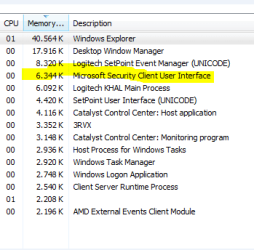
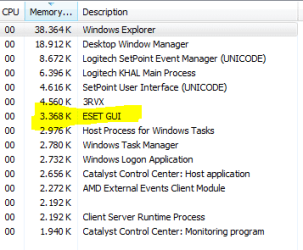
Just a tip

Eset Smart Security with firewall etc is still more lighter than MSE.
 

Attachments

  • MSE.PNG
    MSE.PNG
    18.3 KB · Views: 1
  • ESETSS.PNG
    ESETSS.PNG
    17.1 KB · Views: 1
Last edited:

My Computer

Computer Manufacturer/Model Number
Custom Built by me.
OS
Windows 7 Ultimate 64bit SP1
CPU
Intel Core 2 Quad Q6600
Motherboard
Gigabyte GA-X38-DS4
Memory
2X2GB DDR2 PC6400 800MHZ DUAL CHANNEL
Graphics Card(s)
XFX RADEON HD 6850 1GB GDDR5
Sound Card
2/4/5.1/7.1-channel Realtek High Definition
Monitor(s) Displays
Samsung LE40A656F1 1080p 100Hz LCD HD TV 50,000:1
Screen Resolution
1366x768 in Desktop,1920x1080p in gaming and video
Hard Drives
C:\WD VelociRaptor 150 GB,10,000 RPM
E:\WESTERN DIGITAL WD15EADS 1.5TB CAVIAR GREEN SATA2 F:\WESTERN DIGITAL WD15EADS 1.5TB CAVIAR GREEN SATA2
PSU
THERMALTAKE W0229 TOUGHPOWER XT 750W
Case
A-Case Twin Engine BB
Cooling
3 x thermaltake smart case fan II + 1 arctic cooling fan
Keyboard
Wireless Logitech LX710
Mouse
Logitech Wireless Gaming Mouse G700
Internet Speed
ADSL 12000 plus
Other Info
Mouse Logitech G700,with 13 buttons who needs keyboard in RPG?

D:\Sony high speed sata Dvd Rewriter
Logitech Cordless Rumblepad 2
we should put this into perspective

1) who actually PERFORMS these tests and what EXACTLY is their relationship to the magazine / vendor / other "interested 3rd parties".

2) By the time the tests are actually performed THEY ARE ALREADY MASSIVELY OUT OF DATE -- MS releases almost daily security fixes for stuff it gets info about --I'm sure the others do the same.

3) On any one day you could get totally differring results depending on when the vendors database and software was updated.

4) I think anybody using computers seriously realizes that for NON work places the days of "PAID FOR" security are coming to an end so people who supply this type of stuff are jostling for market position -- by getting their stuff loaded on to private PC's eventaully they will hope to get into the corporate market --where for reasons I can't fathom Macafee still seems to have a monopoly.

5) Many many people have never had a virus inspite of installing NO security at all. OK these days that might not be a wise move but 99.99% of infections tend to be caused by USERS not taking the most elementary precautions on their systems --such as replying to "bogus email security questions" from Banks, giving away passwords, allowing youngsters (early and sub teens) to borrow their computers and download whatever from the internet, and pirating music / other stuff via torrents and warez sites.

Even now people still fall into elementary traps like "You've won xxxx, please pay yyy to release your winnings" whereas any sensible approach would be if you actually wanted to reply would be "Great news --please deduct yyyy from my winnings and forward me the rest".

so forget all this stuff over what package is better than the other -- at the bottom line they are all probably much the same -- I would tend to go for the one that uses the least resources and overhead which currently is MSE --and I'd trust the manufacturer at least to know its own OS and make adjustments rather than relying on some 3rd party vendor having to "reverse engineer" parts of the Windows kernel or just rely on published API's.

We should all remember that this is an ever changing scenario -- there can never be (until we start using Quantum Computers) a 100% secure computer or OS - just like an escape proof jail).

Using computers SENSIBLY is the best defence -- everything else is irrelevant.

This also means keeping Online transactions secure -- ensuring and checking your Bank transactions regularly, frequently change your passwords and if testing / downloading software from an unknown source try it out on a SANDBOX or VIRTUAL machine FIRST before loading it to your Working system.

Cheers
jimbo
 

My Computer

Computer type
PC/Desktop
Computer Manufacturer/Model Number
Custom built, several laptops HP/ASUS
OS
Linux CENTOS 7 / various Windows OS'es and servers
CPU
Intel i7 Intel i5
Memory
8GB, 16GB
Graphics Card(s)
On Motherboard
Sound Card
Realtek HD audio
Monitor(s) Displays
Apple Cinema display, Samsung LCD
Screen Resolution
1920 X 1080
Hard Drives
4 X 1TB SATA
Mouse
Toshiba wireless laser
Internet Speed
> 20MB up
Back
Top