My Computer
- Computer Manufacturer/Model Number
- Compaq Desktop
- OS
- Windows 7 Ultimate x64
- CPU
- AMD Sempron Dual Core
- Memory
- 3GB
- Graphics Card(s)
- NVIDIA GeForce 6150SE nForce 430
- Screen Resolution
- 1024x768
- Hard Drives
- 150GB Sata

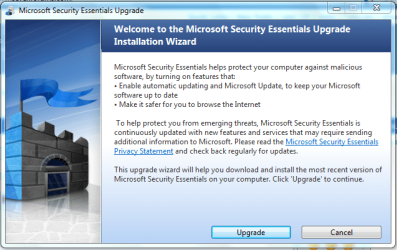
In fact, most will receive a pop-up coming out of the system tray telling them that there is a MSE update.
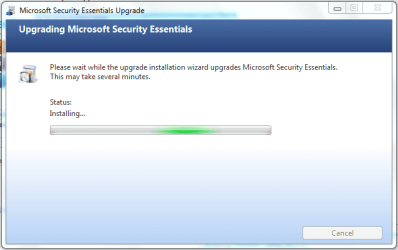
Of course, zero problems encountered and I let the update run while running other programs.

In fact, most will receive a pop-up coming out of the system tray telling them that there is a MSE update.
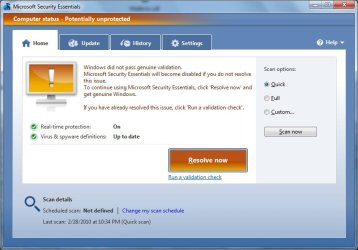
This update includes some type of genuine validation check. One of my systems did not pass (ironically its a windows ultimate rec'd directly from MS). I rolled back via System Restore Points and will deal with it later.
So its still sneaky of them to include WGA Validator in an upgrade to MSE. Its not just an enhanced checker for MSE. It then puts a "this copy of windows is not genuine" message on the desktop lower right corner.
This update includes some type of genuine validation check. One of my systems did not pass (ironically its a windows ultimate rec'd directly from MS). I rolled back via System Restore Points and will deal with it later.
So its still sneaky of them to include WGA Validator in an upgrade to MSE. Its not just an enhanced checker for MSE. It then puts a "this copy of windows is not genuine" message on the desktop lower right corner.
I saw no mention of a WGA Validator. Did you do an update or a first time install?
That was the only time I saw something about a validation check.
Weird

No issues for install, and it's scanning faster on a full scan for me![]()
This update includes some type of genuine validation check. One of my systems did not pass (ironically its a windows ultimate rec'd directly from MS). I rolled back via System Restore Points and will deal with it later.
So its still sneaky of them to include WGA Validator in an upgrade to MSE. Its not just an enhanced checker for MSE. It then puts a "this copy of windows is not genuine" message on the desktop lower right corner.
I saw no mention of a WGA Validator. Did you do an update or a first time install?
That was the only time I saw something about a validation check.
Weird
You're correct
The upgrade has no mention or use of WGA. The only time it 'Validates' is when performing a new install of MSE on the 3rd screen you click 'Validate' then seconds later you have a 'This copy of Windows passed genuine validation'.
They may have made slight changes to the way it detects 'Genuine' software as a measure to counter piracy but there's nothing sneaky about that in a fresh install
OS

Fixed!
How? I don't know - I just kept mashing buttons like Street Fighter