Microsoft Security Essentials: Upgrade

Orbital Shark

New member
Guru
Gold Member
VIP
Local time
6:40 PM
Messages
6,298
Location
Milton Keynes, United Kingdom
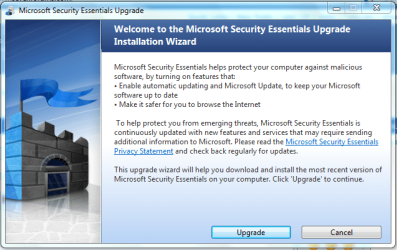
I've just had notification that a new version of MSE is availible. I'm downloading now so i'll report any issues (if any)...

Capture.PNG


OS
 

My Computer

Computer Manufacturer/Model Number
Compaq Desktop
OS
Windows 7 Ultimate x64
CPU
AMD Sempron Dual Core
Memory
3GB
Graphics Card(s)
NVIDIA GeForce 6150SE nForce 430
Screen Resolution
1024x768
Hard Drives
150GB Sata
Downloading started without issue...

MSE Downloading.PNG

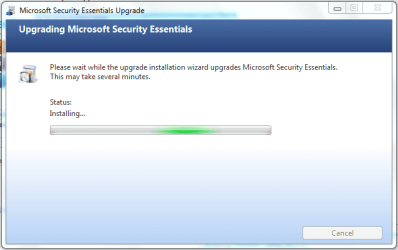
No issues with installing...

MSE Installing.PNG

Finished as expected...

MSE Finish.PNG

Will comment if any issues arise during use :)
 

My Computer

Computer Manufacturer/Model Number
Compaq Desktop
OS
Windows 7 Ultimate x64
CPU
AMD Sempron Dual Core
Memory
3GB
Graphics Card(s)
NVIDIA GeForce 6150SE nForce 430
Screen Resolution
1024x768
Hard Drives
150GB Sata
Additional: Once installed run an update, there seems to be a small 1 available ;)

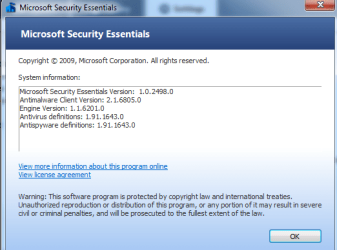
Version info:

Microsoft Security Essentials Version: 1.0.2498.0
Antimalware Client Version: 2.1.6805.0
Engine Version: 1.1.6201.0
Antivirus definitions: 1.91.1643.0
Antispyware definitions: 1.91.1643.0
 

My Computer

Computer Manufacturer/Model Number
Compaq Desktop
OS
Windows 7 Ultimate x64
CPU
AMD Sempron Dual Core
Memory
3GB
Graphics Card(s)
NVIDIA GeForce 6150SE nForce 430
Screen Resolution
1024x768
Hard Drives
150GB Sata
In fact, most will receive a pop-up coming out of the system tray telling them that there is a MSE update.

Of course, zero problems encountered and I let the update run while running other programs.
 

My Computer

Computer Manufacturer/Model Number
Toshiba Satellite S875D-S7239 laptop
OS
MS Windows 7 Ultimate SP1 64-bit
CPU
AMD A10-4600M
Motherboard
AMD Pumori (Socket FT1)
Memory
6.00 GB Dual-Channel DDR3 @ 798MHz (11-11-12-28)
Graphics Card(s)
AMD Radeon HD 7660G
Sound Card
High Definition Audio Device
Monitor(s) Displays
Generic PnP Monitor (1600x900@60Hz)
Screen Resolution
1600x900@60Hz
Hard Drives
SSD 119GB Corsair CSSD-V128GB2 ATA Device
Keyboard
Standard PS/2 Keyboard
Mouse
HP Wireless Optical Mobile Mouse Model FHA-3410
Internet Speed
What the local pub, local coffee shop offers.
Other Info
Optical Drive:MATSHITA BD-CMB UJ160B ATA Device


Also have an Asus ha1002xp netbook with Win 7 Ultimate installed.
In fact, most will receive a pop-up coming out of the system tray telling them that there is a MSE update.

Of course, zero problems encountered and I let the update run while running other programs.

That's how mine appeared but i didn't get a snip ;)
 

My Computer

Computer Manufacturer/Model Number
Compaq Desktop
OS
Windows 7 Ultimate x64
CPU
AMD Sempron Dual Core
Memory
3GB
Graphics Card(s)
NVIDIA GeForce 6150SE nForce 430
Screen Resolution
1024x768
Hard Drives
150GB Sata
In fact, most will receive a pop-up coming out of the system tray telling them that there is a MSE update.

Yeah I just got my notification. Zero issues, even after the upgrade :)
 

My Computer

Computer type
PC/Desktop
Computer Manufacturer/Model Number
Custom built by me.
OS
Windows 10 Pro
CPU
Intel Core i7-4770K (3.5Ghz)
Motherboard
Gigabyte G1 Sniper 5 (F10 Bios)
Memory
32 gig Corsair Dominator Platinum (4x8Gig)
Graphics Card(s)
Sapphire Tri-X R9 Fury
Sound Card
Soundblaster ZXR
Monitor(s) Displays
NEC PA242W 24" LCD Monitor
Screen Resolution
1920 x 1200
Hard Drives
Primary - Samsung 850 Pro (512gig), Samsung 840 Pro (256gig), 2TB WD Caviar Black.
PSU
EVGA Supernova 1000 G2
Case
Cooler Master HAF X
Cooling
Corsair H100i with Corsair Air Series SP120 Quiet Fans
Keyboard
Logitech Wireless Wave
Mouse
Logitech Performance MX
Internet Speed
High Speed Cable
Antivirus
Norton Security
Browser
IE11
Other Info
Memory Timings - 1866MHz @ 9-9-9-27-1T @ 1.5 volts
I did the upgrade as well no issues
 

My Computer

Computer type
PC/Desktop
Computer Manufacturer/Model Number
CyberPower
OS
Windows 7 Pro 64 Bit SP1
CPU
Intel I7 960 3.2 ghz
Motherboard
Asus PT6 SE X58 Crossfire Triple Channel DDR3
Memory
12 Gig DDR3 1600
Graphics Card(s)
Nvidia Geforce GTX 660 Ti 3GB
Sound Card
Creative SB Xfi Xtreme
Monitor(s) Displays
ViewSonic 27 inch wb
Screen Resolution
1400 X 1050
Hard Drives
2TB SATA III 6GB 7200 RPM 64mb Cache
2TB SATA III 6GB 7200 RPM 64 MB Cache
PSU
Xtremegear 950 Watt
Case
Coolermaster HAF 932 Advanced
Cooling
Asetek 510LC 120MM Watercooler
Keyboard
Razer Death Stalker
Mouse
Logitech Trackman Wheel
Internet Speed
Cable
Antivirus
Norton Internet Security 2014
Browser
Windows Explorer 11
Updated... thanks Microsoft.
 

Attachments

  • Capture.PNG
    Capture.PNG
    15.6 KB · Views: 24

My Computers

System One System Two

  • Computer type
    PC/Desktop
    Computer Manufacturer/Model Number
    PowerSpec G164
    OS
    WIN10
    CPU
    AMD Ryzen 5 3600 6-Core Processor 3.59 GHz
    Memory
    16.0 GB
    Internet Speed
    VERY FAST>>>!!!
  • Antivirus
    ESET Security Premium
Still using the Ongoing beta verison here, no issues here either. :p Though of course I didn't receive an update today.

Glad to see the public build hasn't had any problems though.
 

My Computer

Computer Manufacturer/Model Number
Custom | Whitebox
OS
Windows 7 Ultimate, OS X 10.7, Ubuntu 11.04
CPU
Intel E6750 @ 3.80GHz
Motherboard
Gigabyte GA-EP45-UD3L (Revision 1.1)
Memory
2x2GB & 2x1GB (6GB) OCZ Reaper 1066MHz @ 1080MHz
Graphics Card(s)
EVGA nVidia GTX 260 896mb (216 Core) FTW Edition
Sound Card
Realtek ALC888
Monitor(s) Displays
21" VIZIO TV
Screen Resolution
1680x1050 @ 60Hz
Hard Drives
Western Digital WD6401AALS - 640GB
Hitachi HDP725016GLA380 - 160GB
PSU
Corsair 750W
Case
NZXT Nemesis Elite
Cooling
Thermaltake SpinQ
Keyboard
Logitech Wireless S520
Mouse
Logitech Wireless S520 - Microsoft Wireless Arc Mouse
Internet Speed
Download: 20mbps, Upload: 3mbps
Includes some type of WGA

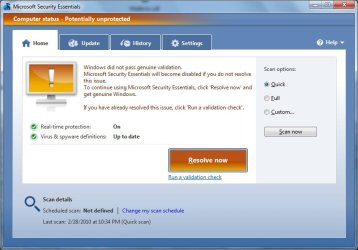
This update includes some type of genuine validation check. One of my systems did not pass (ironically its a windows ultimate rec'd directly from MS). I rolled back via System Restore Points and will deal with it later.

So its still sneaky of them to include WGA Validator in an upgrade to MSE. Its not just an enhanced checker for MSE. It then puts a "this copy of windows is not genuine" message on the desktop lower right corner.
 

My Computer

Computer Manufacturer/Model Number
Hewlett Packard dv4-1222nr
OS
Windows 7
CPU
AMD Turion X2 RM-72 2.10 GHz Dual-Core Mobile Processor
Memory
4GB
Graphics Card(s)
ATI Radeon HD 3200 Graphics RS780M
Monitor(s) Displays
14.1" LCD
Hard Drives
250GB (5400RPM)
Internet Speed
3.0 MBPS (down) / 1.0MBPS (up)
Actually not sneaky, although not well-publicized that MSE would also be used to validate.
 

My Computer

Computer Manufacturer/Model Number
Toshiba Satellite S875D-S7239 laptop
OS
MS Windows 7 Ultimate SP1 64-bit
CPU
AMD A10-4600M
Motherboard
AMD Pumori (Socket FT1)
Memory
6.00 GB Dual-Channel DDR3 @ 798MHz (11-11-12-28)
Graphics Card(s)
AMD Radeon HD 7660G
Sound Card
High Definition Audio Device
Monitor(s) Displays
Generic PnP Monitor (1600x900@60Hz)
Screen Resolution
1600x900@60Hz
Hard Drives
SSD 119GB Corsair CSSD-V128GB2 ATA Device
Keyboard
Standard PS/2 Keyboard
Mouse
HP Wireless Optical Mobile Mouse Model FHA-3410
Internet Speed
What the local pub, local coffee shop offers.
Other Info
Optical Drive:MATSHITA BD-CMB UJ160B ATA Device


Also have an Asus ha1002xp netbook with Win 7 Ultimate installed.
This update includes some type of genuine validation check. One of my systems did not pass (ironically its a windows ultimate rec'd directly from MS). I rolled back via System Restore Points and will deal with it later.

So its still sneaky of them to include WGA Validator in an upgrade to MSE. Its not just an enhanced checker for MSE. It then puts a "this copy of windows is not genuine" message on the desktop lower right corner.


I saw no mention of a WGA Validator. Did you do an update or a first time install?

That was the only time I saw something about a validation check.

Weird
 

My Computers

System One System Two

  • Computer type
    PC/Desktop
    Computer Manufacturer/Model Number
    PowerSpec G164
    OS
    WIN10
    CPU
    AMD Ryzen 5 3600 6-Core Processor 3.59 GHz
    Memory
    16.0 GB
    Internet Speed
    VERY FAST>>>!!!
  • Antivirus
    ESET Security Premium
This update includes some type of genuine validation check. One of my systems did not pass (ironically its a windows ultimate rec'd directly from MS). I rolled back via System Restore Points and will deal with it later.

So its still sneaky of them to include WGA Validator in an upgrade to MSE. Its not just an enhanced checker for MSE. It then puts a "this copy of windows is not genuine" message on the desktop lower right corner.


I saw no mention of a WGA Validator. Did you do an update or a first time install?

That was the only time I saw something about a validation check.

Weird

You're correct :)

The upgrade has no mention or use of WGA. The only time it 'Validates' is when performing a new install of MSE on the 3rd screen you click 'Validate' then seconds later you have a 'This copy of Windows passed genuine validation'.

They may have made slight changes to the way it detects 'Genuine' software as a measure to counter piracy but there's nothing sneaky about that in a fresh install ;)

OS
 

My Computer

Computer Manufacturer/Model Number
Compaq Desktop
OS
Windows 7 Ultimate x64
CPU
AMD Sempron Dual Core
Memory
3GB
Graphics Card(s)
NVIDIA GeForce 6150SE nForce 430
Screen Resolution
1024x768
Hard Drives
150GB Sata
No issues for install, and it's scanning faster on a full scan for me :)
 

My Computer

Computer Manufacturer/Model Number
Pugh Technologies
OS
W7 Professional x64
CPU
AMD Athlon II X3 445 Rana 3.10 GHz
Motherboard
MSI 870A-G54
Memory
PNY XLR DDR3 1600 4x2GB
Graphics Card(s)
NVIDIA GeForce GTS 450 (fermi) 1GB GDDR5
Sound Card
Realtek ALC892 onboard
Monitor(s) Displays
ASUS VE205t, Viewsonic VX2035WM
Screen Resolution
1600x900, 1600x1050
Hard Drives
977GB Hitachi Hitachi HDS721010CLA332
244GB Western Digital WDC WD2500AAJS-65B4A0
488GB Western Digital WDC WD5000AAJS-00A8B0
488GB Western Digital WDC WD5000AAKS-00UU3A0
PSU
Antec EarthWatts EA650 650W
Case
ThermalTake Armor A90 Mid Tower
Cooling
3x 120mm in, 1x 120mm & 200mm out, self built hydro-cooler
Keyboard
Logitec 55
Mouse
Razer Deathadder
Internet Speed
20 Mbps D/L, 9 Mbps U/L
No issues for install, and it's scanning faster on a full scan for me :)

Not complaining, but it takes me less than one minute to do a quick scan. :D
 

My Computers

System One System Two

  • Computer type
    PC/Desktop
    Computer Manufacturer/Model Number
    PowerSpec G164
    OS
    WIN10
    CPU
    AMD Ryzen 5 3600 6-Core Processor 3.59 GHz
    Memory
    16.0 GB
    Internet Speed
    VERY FAST>>>!!!
  • Antivirus
    ESET Security Premium
Lovely - I had a bad feeling I'd get an error and lo and behold. I have threatfire on my machine as well - could that be the problem?!?

wtf

Appears there are 12 critical security updates as well (as announced?)

Uninstalled - dl the file from MSE site and still no dice

why does this keep happening? And if it has anything to do with my windows installer - how do I fix that? Just poked into my registry and the install isn't prompting to update. The common user wouldn't know any better and would be completely lost. MS needs to fix this stupidity.

And the installion STOPS again. DEAD IN THE WATER
 

Attachments

  • MSE error again.jpg
    MSE error again.jpg
    57 KB · Views: 90

My Computer

OS
Windows 7
Fixed!

How? I don't know - I just kept mashing buttons like Street Fighter

actually some steps I took - uninstalled threatfire (after downloading their uninstaller...geez!)

ran some random MS fixit tool I had sitting on my HD - reran the MSE install - same error, tried again and blam! It magically installed

:sarc:

I really wish there was a rhyme or reason to that error code - it appears there are many causes and possible fixes ( been there, done that before ). There must be a secret reg key somewhere....
 

My Computer

OS
Windows 7
This update includes some type of genuine validation check. One of my systems did not pass (ironically its a windows ultimate rec'd directly from MS). I rolled back via System Restore Points and will deal with it later.

So its still sneaky of them to include WGA Validator in an upgrade to MSE. Its not just an enhanced checker for MSE. It then puts a "this copy of windows is not genuine" message on the desktop lower right corner.


I saw no mention of a WGA Validator. Did you do an update or a first time install?

That was the only time I saw something about a validation check.

Weird

You're correct :)

The upgrade has no mention or use of WGA. The only time it 'Validates' is when performing a new install of MSE on the 3rd screen you click 'Validate' then seconds later you have a 'This copy of Windows passed genuine validation'.

They may have made slight changes to the way it detects 'Genuine' software as a measure to counter piracy but there's nothing sneaky about that in a fresh install ;)

OS

I installed the update only, not a clean install. I rolled it back. I'll do it again and then take a screen shot to show you all.

EDIT: Just installed the upgrade again. Installed it through Windows Update -- didn't install any other updates, only the MSE Client Upgrade. Here's the screenshot...
 

Attachments

  • mse wga.jpg
    mse wga.jpg
    48.2 KB · Views: 119

My Computer

Computer Manufacturer/Model Number
Hewlett Packard dv4-1222nr
OS
Windows 7
CPU
AMD Turion X2 RM-72 2.10 GHz Dual-Core Mobile Processor
Memory
4GB
Graphics Card(s)
ATI Radeon HD 3200 Graphics RS780M
Monitor(s) Displays
14.1" LCD
Hard Drives
250GB (5400RPM)
Internet Speed
3.0 MBPS (down) / 1.0MBPS (up)
Fixed!

How? I don't know - I just kept mashing buttons like Street Fighter

Holy crap this cracked me up.

I'm glad you got it figured out :)
 

My Computer

Computer Manufacturer/Model Number
Pugh Technologies
OS
W7 Professional x64
CPU
AMD Athlon II X3 445 Rana 3.10 GHz
Motherboard
MSI 870A-G54
Memory
PNY XLR DDR3 1600 4x2GB
Graphics Card(s)
NVIDIA GeForce GTS 450 (fermi) 1GB GDDR5
Sound Card
Realtek ALC892 onboard
Monitor(s) Displays
ASUS VE205t, Viewsonic VX2035WM
Screen Resolution
1600x900, 1600x1050
Hard Drives
977GB Hitachi Hitachi HDS721010CLA332
244GB Western Digital WDC WD2500AAJS-65B4A0
488GB Western Digital WDC WD5000AAJS-00A8B0
488GB Western Digital WDC WD5000AAKS-00UU3A0
PSU
Antec EarthWatts EA650 650W
Case
ThermalTake Armor A90 Mid Tower
Cooling
3x 120mm in, 1x 120mm & 200mm out, self built hydro-cooler
Keyboard
Logitec 55
Mouse
Razer Deathadder
Internet Speed
20 Mbps D/L, 9 Mbps U/L
I've been running MSE 2 beta when I see they just updated version 1. Now what to do? 2 beta has been working well but now I wonder if I'm better protected with the updated v1 or the older 2 beta... :confused:
 

My Computer

Computer Manufacturer/Model Number
Dell / Studio xps
OS
Windows7 x64 7600 16385
CPU
Intel I7 920
Motherboard
Dell
Memory
6GB DDR3
Graphics Card(s)
ATI Radeon HD4350
Sound Card
Integrated 7.1 channel
Hard Drives
Hitachi HDT721064SLA360 (596 GB)
Keyboard
Logitech EX110
Mouse
Logitech LX8
Back
Top