Microsoft Virtual PC

Richardc269

New member
Member
VIP
Local time
6:21 PM
Messages
524
I have recently installed Microsoft's Virtual PC onto my Windows 7 32-bit system today. I have installed Windows 98SE and Windows XP Professional in this program.

I am wanting to install a couple of games on the Windows XP virtual system (I have already installed Civ4 and BTS on it), however, it tells me that there's no "Direct 3D" available, seeing as it's using "Virtual PC's Additions" installations. My most wanting question: How do I make Virtual PC use my hosts video card instead of the POS they install on the program?
 

My Computer

Computer Manufacturer/Model Number
Custom
OS
Windows 7 Ultimate 32-Bit
CPU
Intel(R) Core(TM) i7 CPU 920 @ 2.67GHz
Motherboard
Gigabyte Technology Co., Ltd. EX58-UD3R
Memory
Corsair DDR3 4Gb
Graphics Card(s)
Nvidia Ge-Force GTS250
Sound Card
High Definition Audio Device
Monitor(s) Displays
Envision 19 inch
Screen Resolution
1280x1024
Hard Drives
2 physical hard drives (4 letter drives) that equal up to 626.3 gigs of space all together. I think both are Maxtors, but primary is a SATA drive, secondary is a SATA, too.
Case
"Elite" style case
Cooling
"Cooler Master"
Mouse
Microsoft Optical USB Mouse.
Internet Speed
Verizon DSL Internet
Short and sweet.

Using a the host video card is not possible as far as I'm aware in any virtualisation program.

If you are interested in using Direct 3D, Virtual box has an option (still in beta) to make it work.

Oli
 

My Computer

Computer Manufacturer/Model Number
Apple MacBook 5,1
OS
Windows 7 Profesional x86, Mac OS X 10.6 Snow Leopard
CPU
Intel Core 2 Duo 2.4Ghz
Memory
4GB DDR3
Graphics Card(s)
Nvidia 9400m
Monitor(s) Displays
13.3" Internal + 22" DVI + 21.5" USB
Screen Resolution
1280x800 + 1920x1080 + 1920x1080
Hard Drives
Internal SATA 2.5" 500GB (395GB Mac HFS+, 105GB Windows NTFS)
2.48TB RAID consisting of 5 disks (HFS+)
Case
Aluminium Unibody
Keyboard
Apple Late 2009 Wireless Keyboard (US)
Mouse
Apple Magic Mouse
Internet Speed
6.33Mb/s up. 0.36Mb/s down.
Other Info
Harman Kardon Soundsticks II Speakers
Just to confirm what Oli already told you, Virtual PC uses emulated hardware and can not use / access your host's GPU. Virtual PC's emulated GPU is S3 Trio 32. Emulated virtual hardware can not be changed or replaced.

Kari
 

My Computer

Computer type
Laptop
Computer Manufacturer/Model Number
HP ENVY 17-1150eg
OS
Windows 10 Pro x64 EN-GB
CPU
1.6 GHz Intel Core i7-720QM Processor
Memory
6 GB
Graphics Card(s)
ATI Mobility Radeon HD 5850 Graphics
Sound Card
Beats sound system with integrated subwoofer
Monitor(s) Displays
17" laptop display, 22" LED and 32" Full HD TV through HDMI
Screen Resolution
1600*900 (1), 1920*1080 (2&3)
Hard Drives
Internal: 2 x 500 GB SATA Hard Disk Drive 7200 rpm
External: 2TB for backups, 3TB USB3 network drive for media
Cooling
As Envy runs a bit warm, I have it on a Cooler Master pad
Keyboard
Logitech diNovo Media Desktop Laser (bluetooth)
Mouse
Logitech Performance Mouse MX
Internet Speed
50/10 Mbps VDSL
Antivirus
Windows Defender 4.3.9431.0
Browser
Maxthon 3.5.2., IE11
What exactly is "Virtual Box"? Does this run in Virtual PC or some such?
 

My Computer

Computer Manufacturer/Model Number
Custom
OS
Windows 7 Ultimate 32-Bit
CPU
Intel(R) Core(TM) i7 CPU 920 @ 2.67GHz
Motherboard
Gigabyte Technology Co., Ltd. EX58-UD3R
Memory
Corsair DDR3 4Gb
Graphics Card(s)
Nvidia Ge-Force GTS250
Sound Card
High Definition Audio Device
Monitor(s) Displays
Envision 19 inch
Screen Resolution
1280x1024
Hard Drives
2 physical hard drives (4 letter drives) that equal up to 626.3 gigs of space all together. I think both are Maxtors, but primary is a SATA drive, secondary is a SATA, too.
Case
"Elite" style case
Cooling
"Cooler Master"
Mouse
Microsoft Optical USB Mouse.
Internet Speed
Verizon DSL Internet
Oracle VirtualBox (former Sun VirtualBox) and VMWare Player are, like Windows Virtual PC, free virtualization applications which allow you to install different operating systems to a virtual machine, and run it as a virtual computer on your Windows (or MAc, Linux) desktop.

More information and free download:
Kari
 

My Computer

Computer type
Laptop
Computer Manufacturer/Model Number
HP ENVY 17-1150eg
OS
Windows 10 Pro x64 EN-GB
CPU
1.6 GHz Intel Core i7-720QM Processor
Memory
6 GB
Graphics Card(s)
ATI Mobility Radeon HD 5850 Graphics
Sound Card
Beats sound system with integrated subwoofer
Monitor(s) Displays
17" laptop display, 22" LED and 32" Full HD TV through HDMI
Screen Resolution
1600*900 (1), 1920*1080 (2&3)
Hard Drives
Internal: 2 x 500 GB SATA Hard Disk Drive 7200 rpm
External: 2TB for backups, 3TB USB3 network drive for media
Cooling
As Envy runs a bit warm, I have it on a Cooler Master pad
Keyboard
Logitech diNovo Media Desktop Laser (bluetooth)
Mouse
Logitech Performance Mouse MX
Internet Speed
50/10 Mbps VDSL
Antivirus
Windows Defender 4.3.9431.0
Browser
Maxthon 3.5.2., IE11
Okay, thanks. I've used VMWare before, but wasn't really my cup of tea. I'll try the other one.
 

My Computer

Computer Manufacturer/Model Number
Custom
OS
Windows 7 Ultimate 32-Bit
CPU
Intel(R) Core(TM) i7 CPU 920 @ 2.67GHz
Motherboard
Gigabyte Technology Co., Ltd. EX58-UD3R
Memory
Corsair DDR3 4Gb
Graphics Card(s)
Nvidia Ge-Force GTS250
Sound Card
High Definition Audio Device
Monitor(s) Displays
Envision 19 inch
Screen Resolution
1280x1024
Hard Drives
2 physical hard drives (4 letter drives) that equal up to 626.3 gigs of space all together. I think both are Maxtors, but primary is a SATA drive, secondary is a SATA, too.
Case
"Elite" style case
Cooling
"Cooler Master"
Mouse
Microsoft Optical USB Mouse.
Internet Speed
Verizon DSL Internet
I like VirtualPC, using my Vista Ultimate and XP Mode machines daily.

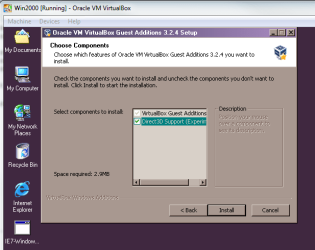
That said, in my opinion Oracle VirtualBox is a good alternative if you need more GPU power on your virtual machines. When installing Guest Additions, as VirtualBox calls the integration features, you can even choose to install Direct3D support:

VB_Guest_Additions.PNG

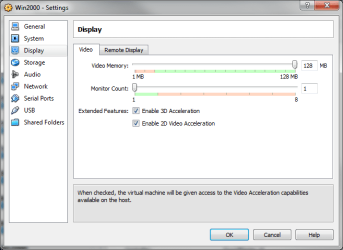
When installed, Direct3D support allows virtual machines to access host's 3D capabilities:

VB_Display_Properties.PNG

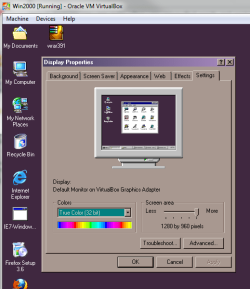
Notice that you can also use up to 128 MB RAM for emulated GPU. This allows 32-bit True Color:

VB_True_Color.PNG

(Pics from Windows 2000, I have no XP installed on VirtualBox)

Kari
 

My Computer

Computer type
Laptop
Computer Manufacturer/Model Number
HP ENVY 17-1150eg
OS
Windows 10 Pro x64 EN-GB
CPU
1.6 GHz Intel Core i7-720QM Processor
Memory
6 GB
Graphics Card(s)
ATI Mobility Radeon HD 5850 Graphics
Sound Card
Beats sound system with integrated subwoofer
Monitor(s) Displays
17" laptop display, 22" LED and 32" Full HD TV through HDMI
Screen Resolution
1600*900 (1), 1920*1080 (2&3)
Hard Drives
Internal: 2 x 500 GB SATA Hard Disk Drive 7200 rpm
External: 2TB for backups, 3TB USB3 network drive for media
Cooling
As Envy runs a bit warm, I have it on a Cooler Master pad
Keyboard
Logitech diNovo Media Desktop Laser (bluetooth)
Mouse
Logitech Performance Mouse MX
Internet Speed
50/10 Mbps VDSL
Antivirus
Windows Defender 4.3.9431.0
Browser
Maxthon 3.5.2., IE11
This question has been bugging me for a while...are Windows Virtual PC or WMWare Player x64 programs? I know VirtualBox is x86.
 

My Computer

Computer Manufacturer/Model Number
Dell Inspiron 14R N4110
OS
Windows 7 Home Premium x64
CPU
Intel Core i5-2410M Quad Core CPU @ 2.30 GHz
Memory
8 GB Shared Channel DDR3 Memory
Graphics Card(s)
Intel HD Graphics 3000, AMD Radeon HD 6470M
Sound Card
Intel Display Audio, Realtek High Definition Audio
Monitor(s) Displays
14" HD 720p LED Display
Screen Resolution
1366x768
Hard Drives
500 GB 5400 RPM SATA Hard Drive
Mouse
Microsoft USB IntelliMouse Explorer 3.0
These three virtualization platforms all run well both on x86 and x64 systems. It seems to be quite difficult to find information about if they are genuine x64 applications when installed on an x64 system.

Only indicator I can think now is that VMWare Player is installed in Program Files (x86) folder where Windows 7 x64 installs all 32-bit software and applications, whereas VirtualPC and VirtualBox are installed to Program Files where Win7 x64 installs 64-bit programs.

Kari
 

My Computer

Computer type
Laptop
Computer Manufacturer/Model Number
HP ENVY 17-1150eg
OS
Windows 10 Pro x64 EN-GB
CPU
1.6 GHz Intel Core i7-720QM Processor
Memory
6 GB
Graphics Card(s)
ATI Mobility Radeon HD 5850 Graphics
Sound Card
Beats sound system with integrated subwoofer
Monitor(s) Displays
17" laptop display, 22" LED and 32" Full HD TV through HDMI
Screen Resolution
1600*900 (1), 1920*1080 (2&3)
Hard Drives
Internal: 2 x 500 GB SATA Hard Disk Drive 7200 rpm
External: 2TB for backups, 3TB USB3 network drive for media
Cooling
As Envy runs a bit warm, I have it on a Cooler Master pad
Keyboard
Logitech diNovo Media Desktop Laser (bluetooth)
Mouse
Logitech Performance Mouse MX
Internet Speed
50/10 Mbps VDSL
Antivirus
Windows Defender 4.3.9431.0
Browser
Maxthon 3.5.2., IE11
This question has been bugging me for a while...are Windows Virtual PC or WMWare Player x64 programs? I know VirtualBox is x86.
.
What difference do you feel it would make? It's hard to imagine wanting to allocate more then 4 gigs of ram to a virtual machine :geek:
 

My Computer

Computer type
PC/Desktop
OS
Windows 7 x64
CPU
Intel Core2 Extreme Q6850 3.00GHz
Motherboard
EVGA 132-CK-NF79
Memory
8 GB
Graphics Card(s)
Radeon R7 260X
Sound Card
Xonar DS
Hard Drives
Hitachi Deskstar 1 tb
This question has been bugging me for a while...are Windows Virtual PC or WMWare Player x64 programs? I know VirtualBox is x86.
.
What difference do you feel it would make? It's hard to imagine wanting to allocate more then 4 gigs of ram to a virtual machine :geek:
I believe the question was not if the virtual machines are or can be 64-bit. Instead, the question was if the virtualization applications, platforms, are x86 or x64. As such, the question is IMO valid.

If I understood the question wrong, thus giving the wrong answer earlier, let's try again: You can not run 64-bit OS's on Virtual PC, but both VMWare and VirtualBox allow it (Can I run 64-bit VM guests on a 32-bit host? - Server Fault and http://www.sevenforums.com/virtualization/89150-creating-new-vm-cpu-not-64-bit-error.html#post769805).

I can think of several reasonable scenarios to run a 64-bit guest, which has been allocated 4GB+ RAM.

Kari
 

My Computer

Computer type
Laptop
Computer Manufacturer/Model Number
HP ENVY 17-1150eg
OS
Windows 10 Pro x64 EN-GB
CPU
1.6 GHz Intel Core i7-720QM Processor
Memory
6 GB
Graphics Card(s)
ATI Mobility Radeon HD 5850 Graphics
Sound Card
Beats sound system with integrated subwoofer
Monitor(s) Displays
17" laptop display, 22" LED and 32" Full HD TV through HDMI
Screen Resolution
1600*900 (1), 1920*1080 (2&3)
Hard Drives
Internal: 2 x 500 GB SATA Hard Disk Drive 7200 rpm
External: 2TB for backups, 3TB USB3 network drive for media
Cooling
As Envy runs a bit warm, I have it on a Cooler Master pad
Keyboard
Logitech diNovo Media Desktop Laser (bluetooth)
Mouse
Logitech Performance Mouse MX
Internet Speed
50/10 Mbps VDSL
Antivirus
Windows Defender 4.3.9431.0
Browser
Maxthon 3.5.2., IE11
This question has been bugging me for a while...are Windows Virtual PC or WMWare Player x64 programs? I know VirtualBox is x86.
.
What difference do you feel it would make? It's hard to imagine wanting to allocate more then 4 gigs of ram to a virtual machine :geek:
I believe the question was not if the virtual machines are or can be 64-bit. Instead, the question was if the virtualization applications, platforms, are x86 or x64. As such, the question is IMO valid.

If I understood the question wrong, thus giving the wrong answer earlier, let's try again: You can not run 64-bit OS's on Virtual PC, but both VMWare and VirtualBox allow it (Can I run 64-bit VM guests on a 32-bit host? - Server Fault and http://www.sevenforums.com/virtualization/89150-creating-new-vm-cpu-not-64-bit-error.html#post769805).

I can think of several reasonable scenarios to run a 64-bit guest, which has been allocated 4GB+ RAM.

Kari

Just as an observation; Virtual Box has had a few problems with 64bit OSs at the moment, mostly due to installation issues and virtual processor architecture, so it's worth checking to see if the bugs have been zapped yet.

Oli
 

My Computer

Computer Manufacturer/Model Number
Apple MacBook 5,1
OS
Windows 7 Profesional x86, Mac OS X 10.6 Snow Leopard
CPU
Intel Core 2 Duo 2.4Ghz
Memory
4GB DDR3
Graphics Card(s)
Nvidia 9400m
Monitor(s) Displays
13.3" Internal + 22" DVI + 21.5" USB
Screen Resolution
1280x800 + 1920x1080 + 1920x1080
Hard Drives
Internal SATA 2.5" 500GB (395GB Mac HFS+, 105GB Windows NTFS)
2.48TB RAID consisting of 5 disks (HFS+)
Case
Aluminium Unibody
Keyboard
Apple Late 2009 Wireless Keyboard (US)
Mouse
Apple Magic Mouse
Internet Speed
6.33Mb/s up. 0.36Mb/s down.
Other Info
Harman Kardon Soundsticks II Speakers
I believe the question was not if the virtual machines are or can be 64-bit. Instead, the question was if the virtualization applications, platforms, are x86 or x64. As such, the question is IMO valid.

If I understood the question wrong, thus giving the wrong answer earlier, let's try again: You can not run 64-bit OS's on Virtual PC, but both VMWare and VirtualBox allow it (Can I run 64-bit VM guests on a 32-bit host? - Server Fault and http://www.sevenforums.com/virtualization/89150-creating-new-vm-cpu-not-64-bit-error.html#post769805).

I can think of several reasonable scenarios to run a 64-bit guest, which has been allocated 4GB+ RAM.

Kari
.
I didn't mean to imply that the OP's question was invalid. I would be interested to hear about the scenarios where it would be desirable to run a 64bit guest VM with 4+ gigs of ram. And thanks for the link which talks about running a 64bit guest VM on a 32bit Host. I would not have thought it possible.
 

My Computer

Computer type
PC/Desktop
OS
Windows 7 x64
CPU
Intel Core2 Extreme Q6850 3.00GHz
Motherboard
EVGA 132-CK-NF79
Memory
8 GB
Graphics Card(s)
Radeon R7 260X
Sound Card
Xonar DS
Hard Drives
Hitachi Deskstar 1 tb
Back
Top