
Microsoft Word Space between List and Words

iEATu

New member
Local time
3:39 AM
Messages
11
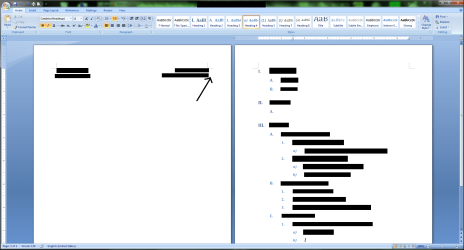
Hi, when using a list and a regular formatted text, they are separated by a page. On the left page, there is the regular text, and on the right page is a list I made.

Whenever I press delete at where the arrow is pointing, it deletes the words in the list, but not the large space.

How can I get rid of the space?
 

Attachments
  • Microsoft Word List Problem.png
    Microsoft Word List Problem.png
    70.2 KB · Views: 17

My Computer My Computer

OS
Windows 7 Ultimate x64
CPU
Intel Core 2 Quad 6600
Motherboard
ASUS Striker II Formula
Memory
OCZ Dual Channel 4GB Platinum
Graphics Card(s)
EVGA GTX 480 Superclocked
Sound Card
Supreme FX II
Monitor(s) Displays
Samsung SyncMaster BX2440
Screen Resolution
24" 1920x1080
Mouse
Saitek GM2400
I'm guessing that there is either a page break or section break immediately after the text on the left hand page. To see it, click the "Show/Hide" icon as in the screenshot below. To get rid of it, highlight it then right-click and select "Cut" (for some reason, hitting delete or backspace doesn't always do it, but cut does), and then the list should jump back to start just under your text. If not, post back and we can try plan B :)
 

Attachments

  • Picture1.jpg
    Picture1.jpg
    32.2 KB · Views: 34

My Computer My Computer

Computer Manufacturer/Model Number
Custom
OS
Windows 7 Enterprise x64
CPU
Intel i7 920
Motherboard
Asus P6T Deluxe v2
Memory
6 GB
Graphics Card(s)
nVidia GTX260 + nVidia 3D
Sound Card
Onboard
Monitor(s) Displays
Samsung SyncMaster 2233RZ
Screen Resolution
1680 x 1050
Hard Drives
1 x 64GB SSD primary
2 x 1 TB (mirrored)
PSU
700W
Other Info
Edimax 802.11n Wireless PCI Card
Netgear DG834G router
I have already fixed the problem.
First I made the words on the left page part of the list by highlighting them and clicking on one of the styles. Then I backspaced the numeral "I" or whatever symbol there was. After that I was able to change the words back to how I wanted them to be.

I tried replicating what went wrong before, but it works fine now. I can use enter to move down the list now without any problems.

Thanks for helping though. If this happens again I'll use the "show formatting" button to see what is wrong.
 

My Computer My Computer

OS
Windows 7 Ultimate x64
CPU
Intel Core 2 Quad 6600
Motherboard
ASUS Striker II Formula
Memory
OCZ Dual Channel 4GB Platinum
Graphics Card(s)
EVGA GTX 480 Superclocked
Sound Card
Supreme FX II
Monitor(s) Displays
Samsung SyncMaster BX2440
Screen Resolution
24" 1920x1080
Mouse
Saitek GM2400
Glad you got it fixed.
 

My Computer My Computer

Computer Manufacturer/Model Number
Custom
OS
Windows 7 Enterprise x64
CPU
Intel i7 920
Motherboard
Asus P6T Deluxe v2
Memory
6 GB
Graphics Card(s)
nVidia GTX260 + nVidia 3D
Sound Card
Onboard
Monitor(s) Displays
Samsung SyncMaster 2233RZ
Screen Resolution
1680 x 1050
Hard Drives
1 x 64GB SSD primary
2 x 1 TB (mirrored)
PSU
700W
Other Info
Edimax 802.11n Wireless PCI Card
Netgear DG834G router
Back
Top