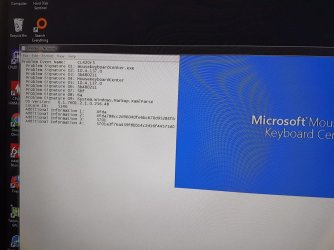
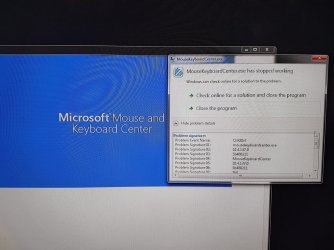
MicrosoftMouseKeyboardCenter has stopped working

paparazzo79

New member
Member
Local time
7:08 AM
Messages
95

Attachments

  • 20181014_135836_1.jpg
    20181014_135836_1.jpg
    371.5 KB · Views: 1
  • 20181014_135842_1.jpg
    20181014_135842_1.jpg
    351.4 KB · Views: 1

My Computer

OS
Windows 7 Ultimate 32bit
CPU
amd athlon 64 3600+ X2
Motherboard
Biostar NF520-TE
Graphics Card(s)
Ati Radeon 3650 HD
Monitor(s) Displays
Philips 227EL
Try uninstalling the drivers that you installed, as they may not be required. If uninstalling them fixes the problem don't reinstall them as Windows 7 comes with mouse & keyboard drivers.
 

My Computer

Computer type
PC/Desktop
Computer Manufacturer/Model Number
Self built using existing case
OS
Windows 7 Home Premium 64 bit sp1
CPU
Intel i5 3570 3.4Ghz Ivy Bridge SKT 1155 quad core
Motherboard
Gigabyte Z77-HD3 SKT 1155 2xSata 3, 4x USB 3.0
Memory
G-Skill Rip Jaws 16Gb (8x2) DDR3 -1600 PC3 12800 CL 10 red
Graphics Card(s)
Gigabyte NVIDIA GT610 1Gb DDR3 810/1200 PCI-E 2.0 Silent
Sound Card
NVIDIA High Definition & Realtech High Definition Audio
Monitor(s) Displays
2 x Philips 226V4L 16:9 aspect ratio
Screen Resolution
1920 x 1080 HD
Hard Drives
Samsung 840 Pro 256gb SSD, SATA 3.
Hitachi Touro Portable 1tb, USB 3.0 HDD used for image b/ups.
PSU
Corsair VS450
Case
Codeng
Cooling
PSU fan & CPU fan
Keyboard
Logitech
Mouse
Logitech Wireless trackball M570
Internet Speed
Wireless 3G. 3mg down & 550kb up.
Antivirus
Bitdefender Internet Security 2020
Browser
Opera (Current Version) & Firefox
Other Info
MS Office 2013 Pro. Davis weather station software. MGE Nova 600 avr UPS.
Nope it won't work.It's wireless mouse+keyboard combo so it needs it's drivers.
 

My Computer

OS
Windows 7 Ultimate 32bit
CPU
amd athlon 64 3600+ X2
Motherboard
Biostar NF520-TE
Graphics Card(s)
Ati Radeon 3650 HD
Monitor(s) Displays
Philips 227EL
In your Post #1 you say mouse & keyboard work OK. Is that with the new mouse & keyboard or another one. If you can start the computer look in Device Manager under mouse & keyboard & see if you have any yellow warnings.

Presumably you downloaded the correct Windows 7 drivers.

Have you installed all the latest Windows 7 Updates?.
 

My Computer

Computer type
PC/Desktop
Computer Manufacturer/Model Number
Self built using existing case
OS
Windows 7 Home Premium 64 bit sp1
CPU
Intel i5 3570 3.4Ghz Ivy Bridge SKT 1155 quad core
Motherboard
Gigabyte Z77-HD3 SKT 1155 2xSata 3, 4x USB 3.0
Memory
G-Skill Rip Jaws 16Gb (8x2) DDR3 -1600 PC3 12800 CL 10 red
Graphics Card(s)
Gigabyte NVIDIA GT610 1Gb DDR3 810/1200 PCI-E 2.0 Silent
Sound Card
NVIDIA High Definition & Realtech High Definition Audio
Monitor(s) Displays
2 x Philips 226V4L 16:9 aspect ratio
Screen Resolution
1920 x 1080 HD
Hard Drives
Samsung 840 Pro 256gb SSD, SATA 3.
Hitachi Touro Portable 1tb, USB 3.0 HDD used for image b/ups.
PSU
Corsair VS450
Case
Codeng
Cooling
PSU fan & CPU fan
Keyboard
Logitech
Mouse
Logitech Wireless trackball M570
Internet Speed
Wireless 3G. 3mg down & 550kb up.
Antivirus
Bitdefender Internet Security 2020
Browser
Opera (Current Version) & Firefox
Other Info
MS Office 2013 Pro. Davis weather station software. MGE Nova 600 avr UPS.
Yes they do work but application doesn't work,it crashes.
I haven't installled any windows updates.
Look at the problem signature number 9.
Looks like I'm missing something like XamlParse??
 

My Computer

OS
Windows 7 Ultimate 32bit
CPU
amd athlon 64 3600+ X2
Motherboard
Biostar NF520-TE
Graphics Card(s)
Ati Radeon 3650 HD
Monitor(s) Displays
Philips 227EL
Back
Top