Minimized Program Disappears

Mslacat

New member
Local time
2:28 PM
Messages
2
I need to see if some one can help me with a weird problem. I run a program that is an add-on to another larger program AutoCad. I usually have both running on my two screens at same time. Now the add-on program when it is being displayed on my screen also shows up on the task/program bar on the bottom of the screen like a normal program. If though I minimize the add on program, though any of a number of ways you can minimize a program screen in windows, it disappears from my screen but also from my task bar, and I can get it back on my screen. This prevents me from pulling that add-on program back up. It essentially disappears from my screen and my ability to use it. I know the program is still running because I can see it running on Task manager. The only way to get access to the add-on again is to open Task Manger pick the program then "end process" it. Then I need to go and close down Auto Cad (the add-on can not be started with any files open in auto cad) and start everything from scratch, and hope I do not accidentally minimize the damn program again.

Is there a way to maximize a program, that is minimized, if doe not appear on the task bar?
 

My Computer

Computer type
PC/Desktop
Computer Manufacturer/Model Number
HP
OS
Windows 7 pro 64 bit
Hard Drives
4
Keyboard Shortcuts

I have used some programs where Dialogue windows don't show in the Taskbar and they often disappear behind the main program window.

Perhaps these might help:

  • "Windows Logo Key + M" - Minimise all windows
  • "Windows Logo Key + Shift + M" - Restore all minimised windows

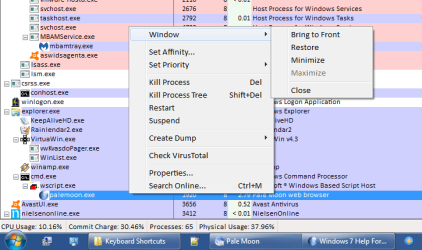
Process Explorer (an alternative to Task Manager) has a context menu option ("Window") that might help.

Let's say I couldn't find Pale Moon, I could use the option shown in the picture.
PrEX - Show Window.png
 

My Computer

Computer type
PC/Desktop
Computer Manufacturer/Model Number
n/a
OS
W7 Ultimate SP1, LM19.2 MATE, W10 Home 1703, W10 Pro 1703 VM, #All 64 bit
CPU
AMD Phenom II x6 1100T, 3.3 GHz
Motherboard
ASUS M4A88T-M/USB3 (AM3)
Memory
12GB DDR3 1333 G-Skill (4GB x 2), G-Skill (2GB x 2)
Graphics Card(s)
NVIDIA GeForce GTX 660
Sound Card
Realtek?
Monitor(s) Displays
Samsung S23B350
Screen Resolution
1920x1080
Hard Drives
WD Green 2TB (SATA), WD Green 3TB (SATA), WD Blue 4TB (SATA), WD Blue 6TB (SATA)
PSU
Cooler Master
Case
Antec GX300 Tower
Cooling
3x Antec TRICOOL 120mm Fans
Mouse
Wired Optical
Internet Speed
DSL
Antivirus
Avast
Browser
Pale Moon (64 bit)
Other Info
2018-12-27 Upgraded HDDs
2015-12-10 Upgraded case, graphics card, storage
2015-08-15 Upgraded motherboard & RAM
2015-07-15 Upgraded LM17.1 to LM17.2
sorry the

Windows Logo Key + Shift + M" - Restore all minimised windows

Does nothing on my computer (Windows 7 pro)
 

My Computer

Computer type
PC/Desktop
Computer Manufacturer/Model Number
HP
OS
Windows 7 pro 64 bit
Hard Drives
4
If you think the Application Window is still open, pressing ALT + TAB enough times cycles through all the desktop open windows. Try this before minimising the window, and try again after minimising the window.
 

My Computer

Computer type
PC/Desktop
OS
Windows 7 x64, Vista x64, 8.1 smartphone
CPU
Intel E8400 65W 64-bit
Motherboard
Gigabyte EP45-UD3LR
Memory
DDR2 2 x 2GB, 1GB x 2
Graphics Card(s)
XFX Radeon HD5750
Sound Card
AMD High Definition Audio; Realtek High Definition Audio
Monitor(s) Displays
iiyama prolite X2377HDS
Screen Resolution
1920 x 1080
Hard Drives
500GB 7200 rpm Seagate ST3500413AS 16MB, 500GB 5400 rpm Toshiba MQ02ABF050H 32MB, 200GB 7200 rpm Seagate ST3200820AS 8MB, 2TB 7200 rpm Western Digital WD20EZRX 64MB
PSU
Enermax Liberty Modular
Case
Antec P193 Midi Tower
Keyboard
Mionix ZIBAL 60
Mouse
Razer USB 2.0 Diamondback Mouse or Huion Graphics Tablet
Browser
Internet Explorer, Lunascape, Firefox, Opera, Avast Safezone
Weird

sorry the

Windows Logo Key + Shift + M" - Restore all minimised windows

Does nothing on my computer (Windows 7 pro)
Interesting.

That combo used to work on my PC (I've used it in the past) but it doesn't seem to anymore. :confused:
 

My Computer

Computer type
PC/Desktop
Computer Manufacturer/Model Number
n/a
OS
W7 Ultimate SP1, LM19.2 MATE, W10 Home 1703, W10 Pro 1703 VM, #All 64 bit
CPU
AMD Phenom II x6 1100T, 3.3 GHz
Motherboard
ASUS M4A88T-M/USB3 (AM3)
Memory
12GB DDR3 1333 G-Skill (4GB x 2), G-Skill (2GB x 2)
Graphics Card(s)
NVIDIA GeForce GTX 660
Sound Card
Realtek?
Monitor(s) Displays
Samsung S23B350
Screen Resolution
1920x1080
Hard Drives
WD Green 2TB (SATA), WD Green 3TB (SATA), WD Blue 4TB (SATA), WD Blue 6TB (SATA)
PSU
Cooler Master
Case
Antec GX300 Tower
Cooling
3x Antec TRICOOL 120mm Fans
Mouse
Wired Optical
Internet Speed
DSL
Antivirus
Avast
Browser
Pale Moon (64 bit)
Other Info
2018-12-27 Upgraded HDDs
2015-12-10 Upgraded case, graphics card, storage
2015-08-15 Upgraded motherboard & RAM
2015-07-15 Upgraded LM17.1 to LM17.2
Back
Top