I used MiniTool Partition Wizard to clone/copy my system to a newly installed hard drive.
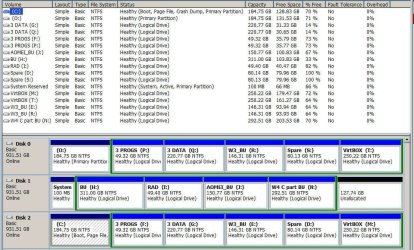
I now have three hard drives installed, all identical in all aspects regarding manufacturer, model, size, speed, etc.
The copy/clone ran fine and took about fours hours. I can view/read all on the new hard drive.
When swopping out to check if I can boot up via the new hard drive it's a no go.
Checked with MiniTool and they said "Normally, to clone a bootable OS, you need to clone all system required partitions. Since the 2 required partitions are on 2 different disks, we suggest you set the target drive as first boot device in BIOS and try using a Windows installation media to repair system."
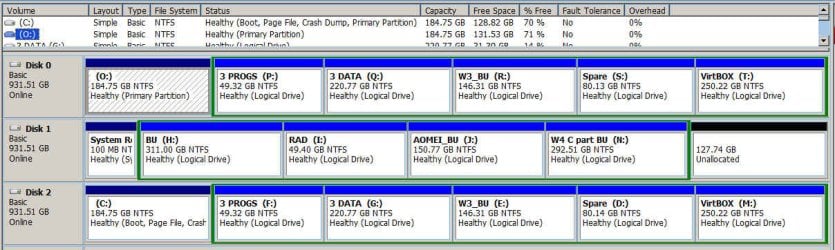
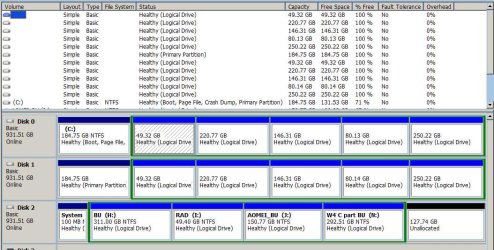
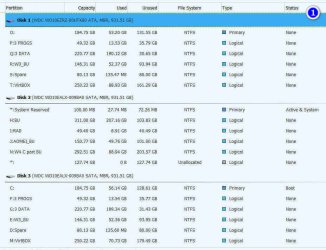
Currently I have a partition "System Reserved" (Active & Sytem) 100 GB NTFS/Primary on drive 2
and
"C:" (Boot) 185 GB NTFS/Primary on drive 3
The new clone hard drive is identified as drive 1
As I'm a niewby in this area it is too risky for me to just insert my DVD and select whatever.
Any suggestions where/how I should start will be highly appreciated.
I now have three hard drives installed, all identical in all aspects regarding manufacturer, model, size, speed, etc.
The copy/clone ran fine and took about fours hours. I can view/read all on the new hard drive.
When swopping out to check if I can boot up via the new hard drive it's a no go.
Checked with MiniTool and they said "Normally, to clone a bootable OS, you need to clone all system required partitions. Since the 2 required partitions are on 2 different disks, we suggest you set the target drive as first boot device in BIOS and try using a Windows installation media to repair system."
Currently I have a partition "System Reserved" (Active & Sytem) 100 GB NTFS/Primary on drive 2
and
"C:" (Boot) 185 GB NTFS/Primary on drive 3
The new clone hard drive is identified as drive 1
As I'm a niewby in this area it is too risky for me to just insert my DVD and select whatever.
Any suggestions where/how I should start will be highly appreciated.
My Computer
- Computer type
- PC/Desktop
- OS
- Windows 7 Pro x64 SP1
- Hard Drives
- WD10EZRZ Blue 1 TB (x3)