- Local time
- 7:33 PM
- Messages
- 16,784
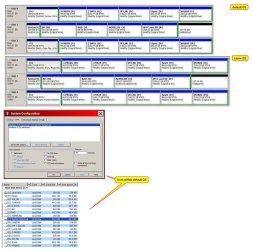
Bios will pick up the first active partition it sees.
You have an active partition on all 3 disks.
You can add both OS entries to all of them.
If you are booted into Disk1:
Find the drive letter of your windows partition on Disk3. It might be Z for example.
open admin cmd prompt and type:
bcdboot z:\windows
Then type
bcdboot c:\windows /s z:
You have an active partition on all 3 disks.
You can add both OS entries to all of them.
If you are booted into Disk1:
Find the drive letter of your windows partition on Disk3. It might be Z for example.
open admin cmd prompt and type:
bcdboot z:\windows
Then type
bcdboot c:\windows /s z:
My Computers
System One System Two
-
- Computer type
- PC/Desktop
- OS
- 7 X64
- CPU
- i5 8400
- Motherboard
- gigabyte b365m ds3h
- Memory
- 2x8gb 3200mhz
- Hard Drives
- various
- PSU
- pure power 11 400w cm
- Case
- Coolermaster
- Cooling
- cryorig m9i
-
- Computer type
- PC/Desktop
- OS
- 7x64
- CPU
- g5400
- Motherboard
- ga b365m ds3h
- Memory
- 8gb ddr4 2400
- PSU
- xfx pro 450w