
Solved mirroring drives in windows 7.

ulao

New member
Local time
4:04 AM
Messages
28
I think I just did something stupid? Can you not mirror an OS drive? I just set up a mirror drive and it converted both my source and destination to a dynamic disk.

I'm ok with the mirror disc being dynamic but I'm thinking my OS disk is now not bookable?

So now I need to break the mirror and convert it back and hope it boot, I guess. This used to work in xp... So how can one mirror the OS drive for a back up?
 

Attachments
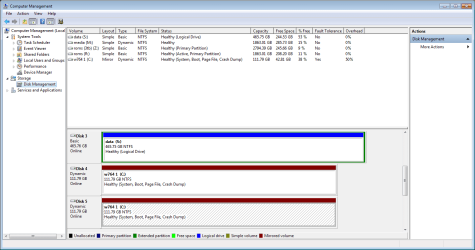
  • m.png
    m.png
    28.9 KB · Views: 3

My Computer My Computer

Computer type
PC/Desktop
OS
Windows 7 Ultimate x64,
The standard way to backup an OS drive is to use an imaging application.

Dynamic disks are generally to be avoided.

I can't recall anyone mirroring a disk like you have done. What was your motive?

You may as well download Partition Wizard bootable disk from here, you are going to need it. It's "pw422".


https://onedrive.live.com/?cid=b0a22789320e3247&id=B0A22789320E3247!215

Burn it to a disk and see if anyone else comments about your mirrors. Partition Wizard can undo dynamic disks, but you should backup whatever is on them.
 

My Computer My Computer

Computer type
PC/Desktop
Computer Manufacturer/Model Number
Ignatz Special; 4 speed manual gearbox; factory air conditioning; one of one
OS
Windows 7 Home Premium SP1, 64-bit
CPU
Intel Skylake i5-6600K, not overclocked
Motherboard
AsRock Z170M Extreme 4, micro ATX
Memory
8 GB HyperX DDR4-2666 (2 x 4 GB)
Graphics Card(s)
none; graphics are integrated on CPU
Sound Card
onboard: Realtek ALC1150; external: USB Behringer UF0-202
Monitor(s) Displays
Dell S2340M 23 inch IPS
Screen Resolution
1600 x 900
Hard Drives
System: Crucial MX100 series SSD, 128 GB;
Data: Samsung Spinpoint 103SJ, 1 TB;
Backup: WD Caviar Green WD30EZRX-00D8PB0, 3 TB
PSU
Rosewill SilentNight 500 watt fanless, semi-modular
Case
Antec Solo II
Cooling
Noctua NH-U12S; Noctua F12 intake, Noctua S12A exhaust
Keyboard
Microsoft 200 6JH-00001 USB
Mouse
Dell or Microsoft optical wired; USB
Antivirus
Microsoft Security Essentials and Malwarebytes Premium
Browser
Pale Moon
Other Info
All fans PWM; speeds at idle: CPU circa 500 rpm; intake circa 600 rpm; exhaust circa 600 rpm; CPU temps 27 idle and 47 C load in a warm room (27 C/81 F) when running Intel Extreme Tuning Utility stress test.
Well this explain it a bit but instead of mirroring data drives I'm mirroring an os drive.
RAID 1 Mirroring with Windows 7 « Buildegg Articles

This concept agreed is old but I'm not looking for back up solution as none of the data is important. This is just a quick recover config. If a drive gets wacked you just swap and your back up (regardless of my ups this occurs a lot in FL). The down fall would be it can't recover from a virus or f'd registry because it will re sync before you know you have a problem. Many call this a poor mans raid.

I dont have any interest in going raid so this is the next in line, open to here about other option but not backup option at this time.
 

My Computer My Computer

Computer type
PC/Desktop
OS
Windows 7 Ultimate x64,
I'm not looking for back up solution as none of the data is important. This is just a quick recover config. If a drive gets wacked you just swap and your back up

I'm confused.

In the first sentence above, you say you are not looking for a backup solution.

Then you say you want a "quick recover config" and "If a drive gets wacked you just swap and your back up".

What exactly would be wrong with imaging in your situation? You are back up and running within 30 minutes with no complications of RAID, mirrors, or dynamic disks. Imaging doesn't necessarily have anything to do with "data". It has to do with partitions and whatever is on them---operating systems, applications, or data.
 

My Computer My Computer

Computer type
PC/Desktop
Computer Manufacturer/Model Number
Ignatz Special; 4 speed manual gearbox; factory air conditioning; one of one
OS
Windows 7 Home Premium SP1, 64-bit
CPU
Intel Skylake i5-6600K, not overclocked
Motherboard
AsRock Z170M Extreme 4, micro ATX
Memory
8 GB HyperX DDR4-2666 (2 x 4 GB)
Graphics Card(s)
none; graphics are integrated on CPU
Sound Card
onboard: Realtek ALC1150; external: USB Behringer UF0-202
Monitor(s) Displays
Dell S2340M 23 inch IPS
Screen Resolution
1600 x 900
Hard Drives
System: Crucial MX100 series SSD, 128 GB;
Data: Samsung Spinpoint 103SJ, 1 TB;
Backup: WD Caviar Green WD30EZRX-00D8PB0, 3 TB
PSU
Rosewill SilentNight 500 watt fanless, semi-modular
Case
Antec Solo II
Cooling
Noctua NH-U12S; Noctua F12 intake, Noctua S12A exhaust
Keyboard
Microsoft 200 6JH-00001 USB
Mouse
Dell or Microsoft optical wired; USB
Antivirus
Microsoft Security Essentials and Malwarebytes Premium
Browser
Pale Moon
Other Info
All fans PWM; speeds at idle: CPU circa 500 rpm; intake circa 600 rpm; exhaust circa 600 rpm; CPU temps 27 idle and 47 C load in a warm room (27 C/81 F) when running Intel Extreme Tuning Utility stress test.
Could you provide a link to what you mean? I figured you meant making a back up image file.

Oh I see you did post a link, ill look in to that.

Edit: So this file you linked is not part of that online backup service? I can put in a disk and rebuild my os with some drive or highly compressed files? Just a bit foggy on how 120 gig can be recover ( unless it goes on my secondary drive ?). Any technical info on this?
 

My Computer My Computer

Computer type
PC/Desktop
OS
Windows 7 Ultimate x64,
Could you provide a link to what you mean? I figured you meant making a back up image file.

I do mean making a back up image file.

The standard recommendation here is Macrium Reflect Free Edition:

Macrium Reflect FREE Edition - Information and download

Windows has imaging capability built in, but it's not as flexible or as easy to understand.

Other imaging apps include Acronis, Aomei, and EaseUS. Macrium's the favorite on this forum.

The image file takes up maybe 40 or 50 percent of the space occupied by the partition imaged (image of C with 50 GB occupied would take up 20 or 25 GB). You can make images of C, D, E, whatever; all in one image or separately.

Takes about 6 minutes to make on my PC and 20 minutes or so to restore.

You make the image file daily or weekly or monthly, your choice. You store it on another partition. Preferably on another drive.

You make a "recovery disk" from within the app to boot the PC to make the restore. The recovery disk can be Linux-based or Windows-based (WinPE). If the recovery disk won't boot, you can't restore. Not absolutely foolproof, but very high probability.
 

My Computer My Computer

Computer type
PC/Desktop
Computer Manufacturer/Model Number
Ignatz Special; 4 speed manual gearbox; factory air conditioning; one of one
OS
Windows 7 Home Premium SP1, 64-bit
CPU
Intel Skylake i5-6600K, not overclocked
Motherboard
AsRock Z170M Extreme 4, micro ATX
Memory
8 GB HyperX DDR4-2666 (2 x 4 GB)
Graphics Card(s)
none; graphics are integrated on CPU
Sound Card
onboard: Realtek ALC1150; external: USB Behringer UF0-202
Monitor(s) Displays
Dell S2340M 23 inch IPS
Screen Resolution
1600 x 900
Hard Drives
System: Crucial MX100 series SSD, 128 GB;
Data: Samsung Spinpoint 103SJ, 1 TB;
Backup: WD Caviar Green WD30EZRX-00D8PB0, 3 TB
PSU
Rosewill SilentNight 500 watt fanless, semi-modular
Case
Antec Solo II
Cooling
Noctua NH-U12S; Noctua F12 intake, Noctua S12A exhaust
Keyboard
Microsoft 200 6JH-00001 USB
Mouse
Dell or Microsoft optical wired; USB
Antivirus
Microsoft Security Essentials and Malwarebytes Premium
Browser
Pale Moon
Other Info
All fans PWM; speeds at idle: CPU circa 500 rpm; intake circa 600 rpm; exhaust circa 600 rpm; CPU temps 27 idle and 47 C load in a warm room (27 C/81 F) when running Intel Extreme Tuning Utility stress test.
Sorry change my post on you, but ok ill check it out I have reflect installed.
 

My Computer My Computer

Computer type
PC/Desktop
OS
Windows 7 Ultimate x64,
Could you provide a link to what you mean? I figured you meant making a back up image file.

Oh I see you did post a link, ill look in to that.

Edit: So this file you linked is not part of that online backup service? I can put in a disk and rebuild my os with some drive or highly compressed files? Just a bit foggy on who 120 gig can be recover. Any technical info on this?

It has nothing to do with online.

You download the app and install it. From that point on, it's entirely on local drives. The image file is just one single large file that must be restored to be able to boot a drive. The image file is compressed to some degree but is not bootable as it sits. You can explore it to extract individual files if needed, but the standard usage for it is to "restore" it in its entirety. It includes EVERYTHING on the partition--data, apps, OS if there is one, licensing info, configuration details.

Can be used to move to a larger or different drive or to recover from a bad install (virus, broken partition, whatever). It would take you back to the point in time when the image file was made, so most people make images weekly or monthly, so they wouldn't have to do a lot of updating after the image was restored.
 

My Computer My Computer

Computer type
PC/Desktop
Computer Manufacturer/Model Number
Ignatz Special; 4 speed manual gearbox; factory air conditioning; one of one
OS
Windows 7 Home Premium SP1, 64-bit
CPU
Intel Skylake i5-6600K, not overclocked
Motherboard
AsRock Z170M Extreme 4, micro ATX
Memory
8 GB HyperX DDR4-2666 (2 x 4 GB)
Graphics Card(s)
none; graphics are integrated on CPU
Sound Card
onboard: Realtek ALC1150; external: USB Behringer UF0-202
Monitor(s) Displays
Dell S2340M 23 inch IPS
Screen Resolution
1600 x 900
Hard Drives
System: Crucial MX100 series SSD, 128 GB;
Data: Samsung Spinpoint 103SJ, 1 TB;
Backup: WD Caviar Green WD30EZRX-00D8PB0, 3 TB
PSU
Rosewill SilentNight 500 watt fanless, semi-modular
Case
Antec Solo II
Cooling
Noctua NH-U12S; Noctua F12 intake, Noctua S12A exhaust
Keyboard
Microsoft 200 6JH-00001 USB
Mouse
Dell or Microsoft optical wired; USB
Antivirus
Microsoft Security Essentials and Malwarebytes Premium
Browser
Pale Moon
Other Info
All fans PWM; speeds at idle: CPU circa 500 rpm; intake circa 600 rpm; exhaust circa 600 rpm; CPU temps 27 idle and 47 C load in a warm room (27 C/81 F) when running Intel Extreme Tuning Utility stress test.
I use Macrium Reflect FREE Edition and Windows 7 back up.
On a separate external SSD with two partitions.
The use of a external drive is best in my opinion because if anything from lightning or a hacker hits your computer you back up is not attached. Therefore safer.
 

My Computer My Computer

Computer type
PC/Desktop
Computer Manufacturer/Model Number
Home made Desktop
OS
Windows 10 Pro. 64/ version 1709 Windows 7 Pro/64
CPU
Intel i7-6800K @ 4.3
Motherboard
ASUS X-99 Deluxe II
Memory
Corsair Platinum 16 gig @2400
Graphics Card(s)
EVGA GTX 1070 OC
Monitor(s) Displays
Asus 27" LED LCD/VE278Q
Screen Resolution
1920-1080 or 1280-720 HDMI
Hard Drives
INTEL SSD 730-240 Gb Sata 3.0/
PSU
EVGA Platium 1200W
Case
Phanteks Luxe Tempered Glass 8 fans/ one radiator
Cooling
XSPC/ Water Cooled CPU
Keyboard
Das 4 Professional
Mouse
Logitech M705/MX Anywhere 2-S
Internet Speed
100 mbits
Antivirus
Microsoft Security Essentials/ Malwarebytes Premium 3.0/ SAS
Browser
I.E. 11 default/Firefox/ ISP Time Warner Cable/Spectrum
Other Info
LG BluRay Burner/
Sound system-KLipsch-THX/
Icy Dock ssd Hot Swap bays.
thx guys I'm liking this!
 

My Computer My Computer

Computer type
PC/Desktop
OS
Windows 7 Ultimate x64,
Back
Top