Missing Icons - NEED HELP

iRHardcore

New member
Member
VIP
Local time
5:20 PM
Messages
102
Location
Rugby, United Kingdom
This has happened on a few of my programs, infact, so many of them.

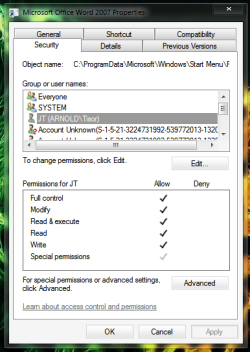
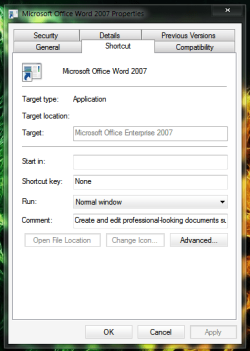
I've taken a print screen of one of them just to show you what the settings are like.
The permissions and dialouge boxes are exactley the same on every program.

Any help would be much appreciated.
 

Attachments
  • Changing Icon.png
    Changing Icon.png
    23 KB · Views: 7
  • Permissions.png
    Permissions.png
    26.3 KB · Views: 8
Last edited by a moderator:

My Computer

Computer Manufacturer/Model Number
Toshiba Satellite A210
OS
Windows 7 Ultimate 32-Bit (Build 7600)
Memory
1.87GB Ram
Monitor(s) Displays
Philips 244E1SB 23.6 inch Computer LCD Monitor
Hard Drives
Fujitsu Mobile MHY2250BH 250 GB
Did you delete the data in this location C:\Windows\Installer? This will cause Microsoft word and other programs (but no all programs) to loose their icons. Some programs will let you manually fix the icons and some wont.
 

My Computer

Computer Manufacturer/Model Number
Desktop, built by me. Laptop, built by ASUS
OS
Vista HP, Vista Ultimate, XP Pro, Seven Ultimate x2
CPU
Desktop, AMD Athlon X2 6400+. Laptop, Intel C2D T9400
Motherboard
Desktop, K9N Diamond. Laptop, Asus G50VT
Memory
Desktop, 4 GB PC2 6400. Laptop, 4 GB PC2 6400
Graphics Card(s)
Desktop, Nvidia 8800 Ultra OC. Laptop, Nvidia 9800M GS
Sound Card
Desktop, intergrated. Laptop, intergrated
Monitor(s) Displays
Sharp Aquos, In built Laptop, Dell ultra sharp
Screen Resolution
46 inch 1920x1080, 15.4 inch 1680x1050, 24 inch, 1920x1200
Hard Drives
Desktop, Veloci Raptor, Raptor X, WD 500GB. Laptop, 250 GB seagate and 320 GB Western Digital both at 7200 RPM. Plus one 320 GB external passport.
PSU
Desktop, Ultra X3 600 watt modular PSU, Laptop, a brick PSU
Case
Desktop, Ultra eXo Aluminum Chassis. Laptop, It's a laptop
Cooling
Desktop, 2 120mm ball bearing fans, ChillTec Thermo Electric
Keyboard
Desktop. Microsoft Natural Ergonomic Keyboard 4000
Mouse
Desktop, Logitech track ball wired.
Internet Speed
10 Mb I think
Other Info
There is no truth to any of our reality but what we want to believe.

LPR
I don't think I would have done that on purpose.
Although, I guess it's a possibilty.

Are you aware on how I could fix this issue?
 

My Computer

Computer Manufacturer/Model Number
Toshiba Satellite A210
OS
Windows 7 Ultimate 32-Bit (Build 7600)
Memory
1.87GB Ram
Monitor(s) Displays
Philips 244E1SB 23.6 inch Computer LCD Monitor
Hard Drives
Fujitsu Mobile MHY2250BH 250 GB
Try to "rebuild your Icon cache". You can search this forums tutorial section (I am typing from mobile device, so its a bit difficult to give you the direct link).

You will get videos in Youtube too.
 

My Computer

Computer Manufacturer/Model Number
COMPAQ Presario Laptop
OS
Windows 7 Ultimate 64 bit, Mac OS X 10.6
CPU
Intel Pentium Dual Core @2.0GHz
Motherboard
Compaq Generic
Memory
12GB
Graphics Card(s)
NVIDIA Graphics For Mobile 512MB VRAM
Sound Card
IDT High definition Audio
Monitor(s) Displays
Laptop LCD Display
Screen Resolution
1280*800 Bright View Widescreen
Hard Drives
500 GB Primary Master@7200rpm + 1 TB External HDD
Cooling
Direct ; generic fan
Keyboard
Generic Laptop Keyboard
Mouse
Touch Pad
Internet Speed
3.1 Mbps wireless Broadband
Other Info
Generic Dock

My Computer

Computer Manufacturer/Model Number
Pugh Technologies
OS
W7 Professional x64
CPU
AMD Athlon II X3 445 Rana 3.10 GHz
Motherboard
MSI 870A-G54
Memory
PNY XLR DDR3 1600 4x2GB
Graphics Card(s)
NVIDIA GeForce GTS 450 (fermi) 1GB GDDR5
Sound Card
Realtek ALC892 onboard
Monitor(s) Displays
ASUS VE205t, Viewsonic VX2035WM
Screen Resolution
1600x900, 1600x1050
Hard Drives
977GB Hitachi Hitachi HDS721010CLA332
244GB Western Digital WDC WD2500AAJS-65B4A0
488GB Western Digital WDC WD5000AAJS-00A8B0
488GB Western Digital WDC WD5000AAKS-00UU3A0
PSU
Antec EarthWatts EA650 650W
Case
ThermalTake Armor A90 Mid Tower
Cooling
3x 120mm in, 1x 120mm & 200mm out, self built hydro-cooler
Keyboard
Logitec 55
Mouse
Razer Deathadder
Internet Speed
20 Mbps D/L, 9 Mbps U/L
So, upon trying this.. I'm still missing my icons unfortunatly :(.
 

My Computer

Computer Manufacturer/Model Number
Toshiba Satellite A210
OS
Windows 7 Ultimate 32-Bit (Build 7600)
Memory
1.87GB Ram
Monitor(s) Displays
Philips 244E1SB 23.6 inch Computer LCD Monitor
Hard Drives
Fujitsu Mobile MHY2250BH 250 GB
Is this a recent issue that just occured, or has it been like this since you can remember?
 

My Computer

Computer Manufacturer/Model Number
Pugh Technologies
OS
W7 Professional x64
CPU
AMD Athlon II X3 445 Rana 3.10 GHz
Motherboard
MSI 870A-G54
Memory
PNY XLR DDR3 1600 4x2GB
Graphics Card(s)
NVIDIA GeForce GTS 450 (fermi) 1GB GDDR5
Sound Card
Realtek ALC892 onboard
Monitor(s) Displays
ASUS VE205t, Viewsonic VX2035WM
Screen Resolution
1600x900, 1600x1050
Hard Drives
977GB Hitachi Hitachi HDS721010CLA332
244GB Western Digital WDC WD2500AAJS-65B4A0
488GB Western Digital WDC WD5000AAJS-00A8B0
488GB Western Digital WDC WD5000AAKS-00UU3A0
PSU
Antec EarthWatts EA650 650W
Case
ThermalTake Armor A90 Mid Tower
Cooling
3x 120mm in, 1x 120mm & 200mm out, self built hydro-cooler
Keyboard
Logitec 55
Mouse
Razer Deathadder
Internet Speed
20 Mbps D/L, 9 Mbps U/L

My Computer

Computer type
PC/Desktop
Computer Manufacturer/Model Number
Self Assembled
OS
Microsoft Windows 10 Pro Insider Preview 64-bit
CPU
Intel(R) Core(TM) i3-4130 CPU @ 3.40GHz
Motherboard
Gigabyte Technology Co., Ltd. B85M-D3H
Memory
Corsair Vengence 4GB x2 (8.00GB Dual-Channel DDR3 @ 798MHz)
Graphics Card(s)
2047MB GeForce GTS 450 (ZOTAC International)
Sound Card
Onboard (Realtek High Definition Audio)
Monitor(s) Displays
LG Flatron E2040T
Screen Resolution
1600x900
Hard Drives
Western Digital 1 TB
Seagate 500 GB
PSU
Corsair VS550
Case
Cooler Master K380
Cooling
Cooler Master Seidon 120V Plus
Keyboard
Logitech MK260r
Mouse
Logitech MK260r
Internet Speed
PMPL Broadband
Antivirus
Windows Defender + MBAM
Browser
Firefox
Other Info
Dell Studio 15" Laptop
You may need to reboot, once again.
 

My Computer

Computer type
PC/Desktop
Computer Manufacturer/Model Number
Bruce ... somewhere in his 40's
OS
Windows 7 Ultimate 32bit SP1
CPU
Intel(R) Core(TM)2 Quad CPU @ 2.40GHz, 2400 MHz
Motherboard
INTEL/D975XBX2
Memory
4 GB
Graphics Card(s)
ATI Radeon HD 2600 Pro
Monitor(s) Displays
Samsung SyncMaster 914v
Screen Resolution
1280 x 1024
Hard Drives
2/500GB each ... ST3500630AS ATA Device.
One is not connected
PSU
Rocketfish 700 W
Case
G.Skill Gigabyte Chassis
Keyboard
Standard PS/2 Keyboard
Mouse
Microsoft PS/2 Mouse
Internet Speed
DSL
Antivirus
Avira Internet Security
Browser
IE 11
Other Info
ATI HDMI Audio
Is this a recent issue that just occured, or has it been like this since you can remember?

Well, I've had the same issue for some time now, I came here a while back seeking advice and rebuilding the icon cache was all that was recommended, so when that didn't work, I sort of gave up.
I guess I'm back haha.

You may need to reboot, once again.

I was dreading that.. Truth hurts eh?
 

My Computer

Computer Manufacturer/Model Number
Toshiba Satellite A210
OS
Windows 7 Ultimate 32-Bit (Build 7600)
Memory
1.87GB Ram
Monitor(s) Displays
Philips 244E1SB 23.6 inch Computer LCD Monitor
Hard Drives
Fujitsu Mobile MHY2250BH 250 GB
did u try refreshing the desktop if not try that or it could be errors in your registry
 

My Computer

Computer Manufacturer/Model Number
Dell Inc. Dimension e510
OS
Windows 7 Home Premium 32bit
PSU
Antec
Keyboard
Logitech MK300
Mouse
Logitech MK300
Is this a recent issue that just occured, or has it been like this since you can remember?

Well, I've had the same issue for some time now, I came here a while back seeking advice and rebuilding the icon cache was all that was recommended, so when that didn't work, I sort of gave up.
I guess I'm back haha.

You may need to reboot, once again.

I was dreading that.. Truth hurts eh?

Reboot, not reinstall. There's no reason to dread a reboot. (I know you really were thinking reinstall, just had to take a swipe at you.) :D

Have you tried Arc's suggestion in post #8?
 

My Computer

Computer type
PC/Desktop
Computer Manufacturer/Model Number
Self build
OS
Windows 10 Home
CPU
Intel Core i5 3550
Motherboard
ASUS P8Z77-V LX (LGA1155)
Memory
Corsair Vengeance DDR3 16GB
Graphics Card(s)
Nvidia GEForce GTX 970 SSC
Monitor(s) Displays
Hanns-G 23.6", Acer 17"
Screen Resolution
1920x1080, 1440x900
Hard Drives
Sandisk SSD 256 GB
WD500GB
WD640GB
Seagage Ultra + 1TB ext.
BWD 800GB
WD 1TB ext
PSU
Antec 650w
Case
Cooler Master Centurion 534
Cooling
COOLER MASTER GeminII S524, 3 120 mm case fans.
Keyboard
Logitech MK300
Mouse
Logitech MK300
Internet Speed
Cable
Antivirus
MSSE, Malwarebytes
Browser
IE 10, Chrome
Well, I've had the same issue for some time now, I came here a while back seeking advice and rebuilding the icon cache was all that was recommended, so when that didn't work, I sort of gave up.

Actually, rebuilding the icon cache is safe, proved and known way to get them back; that is the reason, why you got the answer.
Arc's also described another way.

Arc already said, I am repeating it. If you have used any third party program to "clean the registry" , "defrag the registry" or some sort of tool that have something to do with the integration of registry; chance is very less to get back without reinstall or a format.

If you have not used any such program, a full scan with Standard updated Antivirus plus antimalware is suggestible.
 

My Computer

Computer Manufacturer/Model Number
COMPAQ Presario Laptop
OS
Windows 7 Ultimate 64 bit, Mac OS X 10.6
CPU
Intel Pentium Dual Core @2.0GHz
Motherboard
Compaq Generic
Memory
12GB
Graphics Card(s)
NVIDIA Graphics For Mobile 512MB VRAM
Sound Card
IDT High definition Audio
Monitor(s) Displays
Laptop LCD Display
Screen Resolution
1280*800 Bright View Widescreen
Hard Drives
500 GB Primary Master@7200rpm + 1 TB External HDD
Cooling
Direct ; generic fan
Keyboard
Generic Laptop Keyboard
Mouse
Touch Pad
Internet Speed
3.1 Mbps wireless Broadband
Other Info
Generic Dock
Hi Abhishek ! Are you sure that rebuilding icon cache will bring back those icons , when they are not present in the disk ?

It is to bring the icons back in the system, I think . Otherwise rebuilding icon cache will find nothing there .
 

My Computer

Computer type
PC/Desktop
Computer Manufacturer/Model Number
Self Assembled
OS
Microsoft Windows 10 Pro Insider Preview 64-bit
CPU
Intel(R) Core(TM) i3-4130 CPU @ 3.40GHz
Motherboard
Gigabyte Technology Co., Ltd. B85M-D3H
Memory
Corsair Vengence 4GB x2 (8.00GB Dual-Channel DDR3 @ 798MHz)
Graphics Card(s)
2047MB GeForce GTS 450 (ZOTAC International)
Sound Card
Onboard (Realtek High Definition Audio)
Monitor(s) Displays
LG Flatron E2040T
Screen Resolution
1600x900
Hard Drives
Western Digital 1 TB
Seagate 500 GB
PSU
Corsair VS550
Case
Cooler Master K380
Cooling
Cooler Master Seidon 120V Plus
Keyboard
Logitech MK260r
Mouse
Logitech MK260r
Internet Speed
PMPL Broadband
Antivirus
Windows Defender + MBAM
Browser
Firefox
Other Info
Dell Studio 15" Laptop
Hi Abhishek ! Are you sure that rebuilding icon cache will bring back those icons , when they are not present in the disk ?

It is to bring the icons back in the system, I think . Otherwise rebuilding icon cache will find nothing there .

For MS software, sometime they get back; same is for some Adobe products, if auto update is enabled; but one may have to wait for ages :(
I do not know how they "repair" though: may be it compares the dll files or something.

(Recall, after an update, some "custom" icons are changed back to "original)

For other third party applications, no chance as you have explained in case of nothing in the disk.
 

My Computer

Computer Manufacturer/Model Number
COMPAQ Presario Laptop
OS
Windows 7 Ultimate 64 bit, Mac OS X 10.6
CPU
Intel Pentium Dual Core @2.0GHz
Motherboard
Compaq Generic
Memory
12GB
Graphics Card(s)
NVIDIA Graphics For Mobile 512MB VRAM
Sound Card
IDT High definition Audio
Monitor(s) Displays
Laptop LCD Display
Screen Resolution
1280*800 Bright View Widescreen
Hard Drives
500 GB Primary Master@7200rpm + 1 TB External HDD
Cooling
Direct ; generic fan
Keyboard
Generic Laptop Keyboard
Mouse
Touch Pad
Internet Speed
3.1 Mbps wireless Broadband
Other Info
Generic Dock
Back
Top