
Missing User Account Pictures

Apples555

New member
Local time
6:01 PM
Messages
3
When I manage user accounts in a standard account, there are no pictures for any of the accounts. This doesn't occur when managing accounts from the administrator account.

Can anyone confirm if they also have this issue? Again, this is by managing accounts through a standard account.
 

Attachments
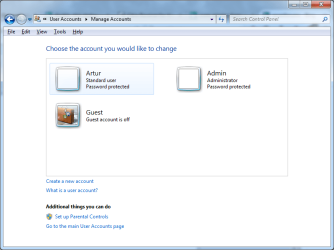
  • Missing Account Icons.png
    Missing Account Icons.png
    26.6 KB · Views: 1

My Computer

Computer type
Laptop
Computer Manufacturer/Model Number
Apple
OS
Windows 7 Ultimate X64
CPU
P8600 Core 2 Duo 2.4
Motherboard
MacBook Pro
Memory
6GB
Graphics Card(s)
Nvidia 320M
Screen Resolution
1280x800
Hard Drives
Samsung 850 PRO 256GB
Hi Apples555, Welcome to 7 forums. Could you fill out your system specs from the link below please. :D

System Info - See Your System Specs

Have you tried from Control Panel,User Accounts and Family Safety, User Accounts,
Change your account picture.
 

My Computer

Computer type
PC/Desktop
Computer Manufacturer/Model Number
ASUS A85XM-A custom build
OS
Windows 10 Pro 64 bit
CPU
AMD A4-5300 APU with Radeon(tm) HD Graphics
Motherboard
ASUSTeK COMPUTER INC. A85XM-A
Memory
8.00 GB
Graphics Card(s)
AMD Radeon HD 7480D
Sound Card
(1) High Definition Audio Device (2) Realtek High Definiti
Monitor(s) Displays
HP W2072a 20 inch Led Backlit Monitor
Screen Resolution
1600 x 900 x 32 bits (4294967296 colors) @ 60 Hz
Hard Drives
TOSHIBA DT01ACA100 SATA Disk Device
Keyboard
Acer
Mouse
Acer
Internet Speed
varies
Antivirus
Windows Defender Antivirus
Browser
Waterfox, Edge
Thanks for the welcome.

I have, and pictures work in all circumstances except accessing that control panel from a standard account. I just tested it with a fresh installation of Windows 7, so it must be part of the OS.
 

My Computer

Computer type
Laptop
Computer Manufacturer/Model Number
Apple
OS
Windows 7 Ultimate X64
CPU
P8600 Core 2 Duo 2.4
Motherboard
MacBook Pro
Memory
6GB
Graphics Card(s)
Nvidia 320M
Screen Resolution
1280x800
Hard Drives
Samsung 850 PRO 256GB
Hi again, I have read a lot that this can happen if you happen to change to make any changes, like -

if the Apply the default user logon picture to all users is set, it can cause this to happen.

Under the startorb

Type in the search box gpedit.msc

Computer Configuration

Administrative Templates

Control Panel

User Accounts

Double click apply the default User logon picture to all users

Set it to not configured, if it is set as configured. :D

Could you fill our your systems specs from the above link please.
 

My Computer

Computer type
PC/Desktop
Computer Manufacturer/Model Number
ASUS A85XM-A custom build
OS
Windows 10 Pro 64 bit
CPU
AMD A4-5300 APU with Radeon(tm) HD Graphics
Motherboard
ASUSTeK COMPUTER INC. A85XM-A
Memory
8.00 GB
Graphics Card(s)
AMD Radeon HD 7480D
Sound Card
(1) High Definition Audio Device (2) Realtek High Definiti
Monitor(s) Displays
HP W2072a 20 inch Led Backlit Monitor
Screen Resolution
1600 x 900 x 32 bits (4294967296 colors) @ 60 Hz
Hard Drives
TOSHIBA DT01ACA100 SATA Disk Device
Keyboard
Acer
Mouse
Acer
Internet Speed
varies
Antivirus
Windows Defender Antivirus
Browser
Waterfox, Edge

My Computer

Computer type
PC/Desktop
Computer Manufacturer/Model Number
ASUS A85XM-A custom build
OS
Windows 10 Pro 64 bit
CPU
AMD A4-5300 APU with Radeon(tm) HD Graphics
Motherboard
ASUSTeK COMPUTER INC. A85XM-A
Memory
8.00 GB
Graphics Card(s)
AMD Radeon HD 7480D
Sound Card
(1) High Definition Audio Device (2) Realtek High Definiti
Monitor(s) Displays
HP W2072a 20 inch Led Backlit Monitor
Screen Resolution
1600 x 900 x 32 bits (4294967296 colors) @ 60 Hz
Hard Drives
TOSHIBA DT01ACA100 SATA Disk Device
Keyboard
Acer
Mouse
Acer
Internet Speed
varies
Antivirus
Windows Defender Antivirus
Browser
Waterfox, Edge
Like I mentioned, this occurs even on a fresh installation of Windows 7, so it must be baked in to the OS.

To reiterate, user icons are visible everywhere else.
 

My Computer

Computer type
Laptop
Computer Manufacturer/Model Number
Apple
OS
Windows 7 Ultimate X64
CPU
P8600 Core 2 Duo 2.4
Motherboard
MacBook Pro
Memory
6GB
Graphics Card(s)
Nvidia 320M
Screen Resolution
1280x800
Hard Drives
Samsung 850 PRO 256GB

My Computer

Computer type
PC/Desktop
Computer Manufacturer/Model Number
ASUS A85XM-A custom build
OS
Windows 10 Pro 64 bit
CPU
AMD A4-5300 APU with Radeon(tm) HD Graphics
Motherboard
ASUSTeK COMPUTER INC. A85XM-A
Memory
8.00 GB
Graphics Card(s)
AMD Radeon HD 7480D
Sound Card
(1) High Definition Audio Device (2) Realtek High Definiti
Monitor(s) Displays
HP W2072a 20 inch Led Backlit Monitor
Screen Resolution
1600 x 900 x 32 bits (4294967296 colors) @ 60 Hz
Hard Drives
TOSHIBA DT01ACA100 SATA Disk Device
Keyboard
Acer
Mouse
Acer
Internet Speed
varies
Antivirus
Windows Defender Antivirus
Browser
Waterfox, Edge
Back
Top