ml2240 drivers

Dobroslav

New member
Local time
12:17 PM
Messages
16
I have windows 7 and i've downloaded latest drivers for Samsung ml2240 printer. When I start to install, I got error "the arguments are invalid". How to fix this?
 

My Computer

OS
Windows 7 SP1 32bit
CPU
Intel Pentium 4 2.80GHz
Motherboard
Asus P4v800d-x
Memory
1.5GB RAM ddr
Graphics Card(s)
ATi Radeon 9600 pro 256mb agp
Sound Card
integrated
Monitor(s) Displays
Asus VW193D-b
Hard Drives
WD 320GB AAJS
PSU
350W
Case
I don't know
Keyboard
Logitech PS/2
Mouse
Logitech USB
Internet Speed
4 MB/s
Control Panel>Printers and Faxes
Add Printer>Click next>Local Printer Attached to this computer
(uncheck auto detect and install)>click nex
 

My Computer

Computer Manufacturer/Model Number
HP a6720f
OS
7 Ultimate x64 RTM 7600.16385
CPU
AMD Phenom 9550 @ 2.20ghz
Motherboard
Asus M2N78-LA
Memory
4x2GB DDR2 Patriot Viper 800mhz
Graphics Card(s)
GeForce 9400 GT 512MB
Sound Card
Onboard Realtek Hi-Definition ALC 888S chipset
Monitor(s) Displays
Samsung P2370HD 23" 1080P HDTV
Screen Resolution
1920x1080
Hard Drives
Western Digital 640GB; Samsung 1 TB; WD 500GB; Seagate Portable 250gb;
Keyboard
Logitech LX310 Wireless Internet Keyboard
Mouse
Logitech LX310 Wireless Laser Mouse
Internet Speed
7Mbps/384Kbps
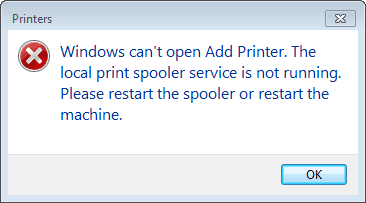
I got this:

EDIT: Spooler service started via Task Manager-Sevices, then I've added new printer (as LPT), turned it on and it works!

Myth solved xD
 

Attachments

  • Capture.PNG
    Capture.PNG
    3.6 KB · Views: 41

My Computer

OS
Windows 7 SP1 32bit
CPU
Intel Pentium 4 2.80GHz
Motherboard
Asus P4v800d-x
Memory
1.5GB RAM ddr
Graphics Card(s)
ATi Radeon 9600 pro 256mb agp
Sound Card
integrated
Monitor(s) Displays
Asus VW193D-b
Hard Drives
WD 320GB AAJS
PSU
350W
Case
I don't know
Keyboard
Logitech PS/2
Mouse
Logitech USB
Internet Speed
4 MB/s
Great to see your problem has been solved mate!!
 

My Computer

Computer Manufacturer/Model Number
HP a6720f
OS
7 Ultimate x64 RTM 7600.16385
CPU
AMD Phenom 9550 @ 2.20ghz
Motherboard
Asus M2N78-LA
Memory
4x2GB DDR2 Patriot Viper 800mhz
Graphics Card(s)
GeForce 9400 GT 512MB
Sound Card
Onboard Realtek Hi-Definition ALC 888S chipset
Monitor(s) Displays
Samsung P2370HD 23" 1080P HDTV
Screen Resolution
1920x1080
Hard Drives
Western Digital 640GB; Samsung 1 TB; WD 500GB; Seagate Portable 250gb;
Keyboard
Logitech LX310 Wireless Internet Keyboard
Mouse
Logitech LX310 Wireless Laser Mouse
Internet Speed
7Mbps/384Kbps
Hello,
I have exactly the same problem with Win7 and Samsung SCX 4100.

At first my printer worked without askind to install anything, though scanner did not, so I downloaded newest scanning and printing drives for my device. The scaner works perfectly, but the printer doesn't.
When I try to add a new printer, I got the same message about spooler service.
I go to Windows Task Manager, and start the service manually - but after 3 seconds from the status 'started' it automatically changes into 'stopped'.

What should I do now?
 

My Computer

OS
Windows 7
Back
Top