modified MSCONFIG, oh boy

junksasa

New member
Local time
12:56 PM
Messages
10
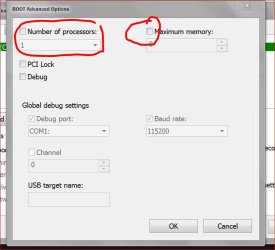
I am running WIN7 pro with 4K memory. In trying to speed up my boot time (which was 90 seconds) I went in MSCONFIG and checked the 'number of processors' entered 2 and checked the 'maximum memory' entered 4096. Rebooted PC. It booted like it was in safe mode and took over 30 minutes to boot. Yikes. Went back in MSCONFIG and saw the memory was set to 200. Don't understand how that happened. I unchecked the processors and memory that I had changed. Rebooted PC. Booted normally but now it takes 180-250 seconds to boot. This has been consistent over that last dozen boots now. I would like to figure out how to get it back to the 90 seconds boot time. Any ideas? I did do a restore to a point prior to changing the settings but I still get the 180-250 seconds to boot. I have tried to do a repair at bootup (F8 key) but it found nothing. The 90 seconds might seem high to some but I have anti-virus (Norton), anti-malware (malwarebytes), system tool (IOBIT), and other programs loading at startup.
 

My Computer

Computer type
PC/Desktop
Computer Manufacturer/Model Number
Dell
OS
Windows 7 Home Premium 32bit
Memory
4K
Antivirus
Norton 360
Browser
IE11
Uncheck those boxes "Maximum Processors" and "Maximum Memory" thoses are there for disabling hardware only! They will not improve performance at all!
 

My Computer

Computer type
PC/Desktop
Computer Manufacturer/Model Number
Alienware Aurora ALX R4
OS
Windows 10 Pro (x64)
CPU
Intel Core i7-3930K (3.2GHz - 4.5GHz)
Motherboard
Alienware Aurora-R4 x79
Memory
4x Samsung 4GB PC3-12800 DDR3 (16GB 1600MHz)
Graphics Card(s)
Nvidia Geforce GTX 690
Sound Card
SteelSeries Siberia Elite
Monitor(s) Displays
Dell UltraSharp U3011
Screen Resolution
2560x1600
Hard Drives
Samsung 850 Pro 256 GB, Seagate 1TB Desktop Hybrid HDD, 2x Western Digital 4TB Green HDD
PSU
875W Some Dell PSU <.<
Case
Alienware Aurora ALX
Cooling
Custom Liquid Cooling (EK CPU & GPU blocks) dual EK 480RAD
Keyboard
Logitech G710+ Mechanical
Mouse
Logitech G700s
Internet Speed
Verizon Fios (50 mbps average)
Other Info
Server: Intel NUC D54250WYK: i5-4250U, 16GB, 256 GB mSATA, Windows Server 2012 R2
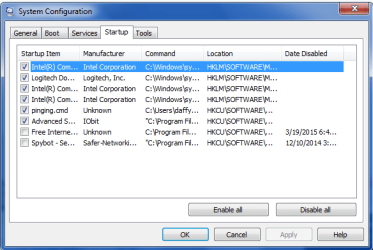
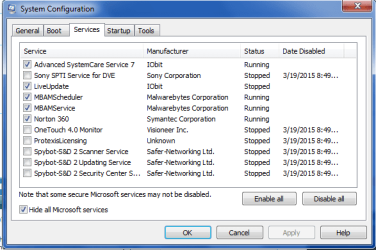
The tabs you want in msconfig are Startup and Services (after Hiding all MS Services). Uncheck everything there except your AV and any sync, gadgets or Stickies. Everything else are freeloaders that don't need to start with Windows and only sneak in there to spy on you posing as "Updaters."

Try one of the free lightweight AV's recommended in Troubleshooting Steps for Windows 7 to test the difference.

Let us know how that works.
 
This is what you should have, No check marks.

Capture.JPG
 

My Computer

Computer type
PC/Desktop
Computer Manufacturer/Model Number
Home made Desktop
OS
Windows 10 Pro. 64/ version 1709 Windows 7 Pro/64
CPU
Intel i7-6800K @ 4.3
Motherboard
ASUS X-99 Deluxe II
Memory
Corsair Platinum 16 gig @2400
Graphics Card(s)
EVGA GTX 1070 OC
Monitor(s) Displays
Asus 27" LED LCD/VE278Q
Screen Resolution
1920-1080 or 1280-720 HDMI
Hard Drives
INTEL SSD 730-240 Gb Sata 3.0/
PSU
EVGA Platium 1200W
Case
Phanteks Luxe Tempered Glass 8 fans/ one radiator
Cooling
XSPC/ Water Cooled CPU
Keyboard
Das 4 Professional
Mouse
Logitech M705/MX Anywhere 2-S
Internet Speed
100 mbits
Antivirus
Microsoft Security Essentials/ Malwarebytes Premium 3.0/ SAS
Browser
I.E. 11 default/Firefox/ ISP Time Warner Cable/Spectrum
Other Info
LG BluRay Burner/
Sound system-KLipsch-THX/
Icy Dock ssd Hot Swap bays.
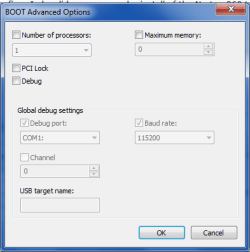
I attached 3 pics of what msconfig looks like now. I also did a remove and reinstall of the Norton 360 tool. Boot still takes around 180 seconds or more.
 

Attachments

  • startup.png
    startup.png
    14.8 KB · Views: 60
  • services.png
    services.png
    15.9 KB · Views: 60
  • boot option.png
    boot option.png
    9.5 KB · Views: 60

My Computer

Computer type
PC/Desktop
Computer Manufacturer/Model Number
Dell
OS
Windows 7 Home Premium 32bit
Memory
4K
Antivirus
Norton 360
Browser
IE11
Norton is bloatware that can cause problems.

IOBit is a tweaking tool not needed at all by a featherlight OS that runs perfectly with an install like the one compiled here: Clean Reinstall Windows 7. The tools which work best for Win7 are included.

So as I said earlier you don't need any of those starting up with Win7 except a free lightweight AV like MSE. If you've paid for MBAM then you can leave it but its Real Time Protection is really only needed by the chronically infected. The scanner is free.

Unless you use special video settings only available in the Intel software it doesn't need to start because it only provides an Updater function which is actuallly spying on your consumer habits to sell the info. Ditto Logitech. Neither of these need to start up with Windows at all.
 
Those programs were installed years ago when I use to boot up in 90 seconds or less. I still would like to be able to solve the problem of why the boot time doubled after my mistake with the msconfig changes.
 

My Computer

Computer type
PC/Desktop
Computer Manufacturer/Model Number
Dell
OS
Windows 7 Home Premium 32bit
Memory
4K
Antivirus
Norton 360
Browser
IE11
A 90 second boot is terrible. I wouldn't settle for less than 20-30 seconds with a hard drive.

Did you try booting without Norton to see if the problem went away? The reason I ask is we see these kinds of problems with Norton all the time. This is why I suggested you install MSE to compare the difference. This solution resolves problems regularly.

IOBit regularly causes problems resolved by System Restoring to before it ruined Windows, uninstalling it, or doing a Clean Reinstall Windows 7 if it is too late and it's already ruined Windows.

I have a long line of those waiting for help and no longer help those who are not fully cooperative or who want to do things their way even though we've solved literally tens of thousands of these cases.
 
You might install a free program called Startup Delayer from r2Studios (an Australia company). A wonderful program that is poorly named (!) it has a "running tasks" tab where you can select also a "Start Time" column and sort on it, where you look for long delays between tasks. If the culprit is one of those svchost things then the Process Id might lead you to what that represents.

Of course, your delay may be in advance of Windows' core components being loaded but at least this is easy to try.
 

My Computer

Computer type
Laptop
Computer Manufacturer/Model Number
Dell Latitude E6540 Laptop
OS
Windows 7 Professional 64bit
CPU
Intel Core i7 4600M @ 2.90GHz
Motherboard
Dell Inc. 0CYT5F (SOCKET 0)
Memory
16.0GB Dual-Channel DDR3 @ 797MHz (11-11-11-28)
Graphics Card(s)
Intel HD Graphics 4600 (Dell) 2048MB ATI AMD Radeon HD 8790M
Sound Card
Realtek High Definition Audio
Monitor(s) Displays
HP ZR30w (2560x1600@60Hz)
Hard Drives
256GB LITEONIT LMT-256M6M-41 mm SATA (SSD)
1TB Samsung SSD 860 EVO mSATA SATA (SSD)
2TB USB 3.0 USB Device
115GB SanDisk Ultra Fit USB
Other Info
Multiple Dell E-Port Plus II Port Replicator/Docking Stations 0Y72NH USB 3.0 + 130W AC Adapters
I removed Norton, IOBit and MBAM. The boot time went from 180 seconds to 120 seconds. I installed Startup Delayer but it only flashes on the screen when I try to run it. Working the r2Studios to figure that out.
 

My Computer

Computer type
PC/Desktop
Computer Manufacturer/Model Number
Dell
OS
Windows 7 Home Premium 32bit
Memory
4K
Antivirus
Norton 360
Browser
IE11
I installed Startup Delayer but it only flashes on the screen when I try to run it.
Hmm I've installed it to several computers and have never seen that. The shortcut to run is called "Configure Startup Delayer".

I see also that there is an autorun at this registry key:

HKLM\Software\Microsoft\Wndows\CurrentVersion\Run

which runs this:

C:\program files\startup delayer\startup launcher.exe

When you boot your PC you should see a green SD icon in your system tray towards the end of the startup process, then it disappears. Then you click on Configure Startup Delayer to see the Running Tasks tab.
 

My Computer

Computer type
Laptop
Computer Manufacturer/Model Number
Dell Latitude E6540 Laptop
OS
Windows 7 Professional 64bit
CPU
Intel Core i7 4600M @ 2.90GHz
Motherboard
Dell Inc. 0CYT5F (SOCKET 0)
Memory
16.0GB Dual-Channel DDR3 @ 797MHz (11-11-11-28)
Graphics Card(s)
Intel HD Graphics 4600 (Dell) 2048MB ATI AMD Radeon HD 8790M
Sound Card
Realtek High Definition Audio
Monitor(s) Displays
HP ZR30w (2560x1600@60Hz)
Hard Drives
256GB LITEONIT LMT-256M6M-41 mm SATA (SSD)
1TB Samsung SSD 860 EVO mSATA SATA (SSD)
2TB USB 3.0 USB Device
115GB SanDisk Ultra Fit USB
Other Info
Multiple Dell E-Port Plus II Port Replicator/Docking Stations 0Y72NH USB 3.0 + 130W AC Adapters
I finally fixed it. Thanks to those who tried to help.
 

My Computer

Computer type
PC/Desktop
Computer Manufacturer/Model Number
Dell
OS
Windows 7 Home Premium 32bit
Memory
4K
Antivirus
Norton 360
Browser
IE11
Could you explain exactly how you fixed your problem?
 

My Computer

Computer type
PC/Desktop
Computer Manufacturer/Model Number
Home made Desktop
OS
Windows 10 Pro. 64/ version 1709 Windows 7 Pro/64
CPU
Intel i7-6800K @ 4.3
Motherboard
ASUS X-99 Deluxe II
Memory
Corsair Platinum 16 gig @2400
Graphics Card(s)
EVGA GTX 1070 OC
Monitor(s) Displays
Asus 27" LED LCD/VE278Q
Screen Resolution
1920-1080 or 1280-720 HDMI
Hard Drives
INTEL SSD 730-240 Gb Sata 3.0/
PSU
EVGA Platium 1200W
Case
Phanteks Luxe Tempered Glass 8 fans/ one radiator
Cooling
XSPC/ Water Cooled CPU
Keyboard
Das 4 Professional
Mouse
Logitech M705/MX Anywhere 2-S
Internet Speed
100 mbits
Antivirus
Microsoft Security Essentials/ Malwarebytes Premium 3.0/ SAS
Browser
I.E. 11 default/Firefox/ ISP Time Warner Cable/Spectrum
Other Info
LG BluRay Burner/
Sound system-KLipsch-THX/
Icy Dock ssd Hot Swap bays.
Back
Top