Modifying the items displayed under Favorites in Windows Explorer

SiliRat

New member
Local time
11:42 PM
Messages
3
Hiya.

When I am in Windows Explorer and I select 'Desktop' under 'Favorites', it inserts all of the following items which are not on my desktop and I do not want to see displayed:

Libraries, my user folder, My Computer, Networks and the Control Panel

Is there any ways to suppress these items so that selecting Desktop only actually shows the contents of the desktop?

Thanks,
SiliRat
 

My Computer My Computer

At a glance

Windows 7 Ultimate 64-bitAMd X48 GbNVdieu something or other
Computer Manufacturer/Model Number
Homemade
OS
Windows 7 Ultimate 64-bit
CPU
AMd X4
Motherboard
Asus, I think?
Memory
8 Gb
Graphics Card(s)
NVdieu something or other
Sound Card
On board
Monitor(s) Displays
2 assu 27"
Please post screenshot of your desktop.
Post screenshot of problem as well
 

My Computer My Computer

At a glance

Microsoft Windows 7 Home Premium 64-bits 7601...Intel(R) Core(TM) i3 CPU M 370 @ 2.40GHz4,00 GBATI Mobility Radeon HD 5400 Series
Computer type
Laptop
Computer Manufacturer/Model Number
ACER ASPIRE 5742G
OS
Microsoft Windows 7 Home Premium 64-bits 7601 Multiprocessor Free Service Pack 1
CPU
Intel(R) Core(TM) i3 CPU M 370 @ 2.40GHz
Motherboard
Acer Aspire 5742G
Memory
4,00 GB
Graphics Card(s)
ATI Mobility Radeon HD 5400 Series
Sound Card
(1) AMD High Definition Audio Device (2) Realtek High Defi
Screen Resolution
1366 x 768 x 32 bits (4294967296 colors) @ 60 Hz
Hard Drives
WDC WD5000BEVT-22ZAT0
Here is my desktop. Note that it contains only two folders ('Pictures and Stuff' and 'Games') and the Recycling Bin.

desktop.jpg


And here is what I see when I select the 'Desktop' in Windows Explorer/ Favorites.

WindExplorer.jpg


What I would like to know if how to make the Desktop display *only* the two folders and recycling bin that I have on my desktop.

Thanks,
SiliRat
 

My Computer My Computer

At a glance

Windows 7 Ultimate 64-bitAMd X48 GbNVdieu something or other
Computer Manufacturer/Model Number
Homemade
OS
Windows 7 Ultimate 64-bit
CPU
AMd X4
Motherboard
Asus, I think?
Memory
8 Gb
Graphics Card(s)
NVdieu something or other
Sound Card
On board
Monitor(s) Displays
2 assu 27"
that's nornal!! Same here. But only the case with favorites->desktop
 

My Computer My Computer

At a glance

Microsoft Windows 7 Home Premium 64-bits 7601...Intel(R) Core(TM) i3 CPU M 370 @ 2.40GHz4,00 GBATI Mobility Radeon HD 5400 Series
Computer type
Laptop
Computer Manufacturer/Model Number
ACER ASPIRE 5742G
OS
Microsoft Windows 7 Home Premium 64-bits 7601 Multiprocessor Free Service Pack 1
CPU
Intel(R) Core(TM) i3 CPU M 370 @ 2.40GHz
Motherboard
Acer Aspire 5742G
Memory
4,00 GB
Graphics Card(s)
ATI Mobility Radeon HD 5400 Series
Sound Card
(1) AMD High Definition Audio Device (2) Realtek High Defi
Screen Resolution
1366 x 768 x 32 bits (4294967296 colors) @ 60 Hz
Hard Drives
WDC WD5000BEVT-22ZAT0
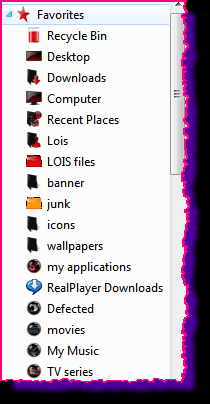
it would be easier for you to drag the two folders you have on the desktop to the favorites list , then you wouldnt need to click the desktop on the favs list.
ie open a window and then click desktop and drag the two back over, they should sit in the favs column, you can then put them where you want in the list in any order.

drag the recycle bin over also.

heres an example of mine, its a bit messy but hey.
just some of the 25 i have
favs.png
 

My Computer My Computer

At a glance

Microsoft Windows 7 Home Premium 64-bit 7600IIx4 amd athelon 635 processor2x2gbati radeon HD 5450
Computer Manufacturer/Model Number
Hewlett packard/p6512uk
OS
Microsoft Windows 7 Home Premium 64-bit 7600
CPU
IIx4 amd athelon 635 processor
Motherboard
FOXCONN 2AA9
Memory
2x2gb
Graphics Card(s)
ati radeon HD 5450
Sound Card
(1) Realtek High Definition Audio (2) AMD High Definition
Monitor(s) Displays
samsung lcd tv 32"
Screen Resolution
1360x 768
Hard Drives
(1) WDC WD10 01FAES-60Z2A0 SATA Disk Device (2) Maxtor OneTouch USB Device (3) ST310003 33AS USB Device (4) WD My Book 1111 USB Device
PSU
?
Cooling
air!
Keyboard
wireless hp
Mouse
wireless Hp,optical
Internet Speed
1.10mb/s
Antivirus
MSE
Browser
Firefox
Thanks for the suggestion, but it won't work in my case. The screenshots were from my home computer to demonstrate what I was talking about. I need it for work, where I can have 20-30 folders that constantly revolve (I have a folder for about 2 days, depending on the project, before it gets removed from there. I'd just use the desktop to access them,. but I have to sort them different ways t0o often and the desktop interface for doing that isn't very good.

*sigh* Why make a button that displays the contents of your desktop that doesn't actually display the content of your desktop? Damn you Sharktapus!
 

My Computer My Computer

At a glance

Windows 7 Ultimate 64-bitAMd X48 GbNVdieu something or other
Computer Manufacturer/Model Number
Homemade
OS
Windows 7 Ultimate 64-bit
CPU
AMd X4
Motherboard
Asus, I think?
Memory
8 Gb
Graphics Card(s)
NVdieu something or other
Sound Card
On board
Monitor(s) Displays
2 assu 27"
Back
Top