Solved Can't add to favorites in Windows Explorer

Created an account just to thanks for saving my ass. Could not for the life of me figure out why it was empty. Thanks again much appreciated
 

My Computer My Computer

At a glance

Windows 7AMD6GB
Computer type
Laptop
Computer Manufacturer/Model Number
Acer
OS
Windows 7
CPU
AMD
Memory
6GB
Hard Drives
750GB
Antivirus
Avast
Browser
Chrome
Clean install of Windows 7 Ultimate here and so far I love this new OS. However, I noticed that I cannot add any items under the favorites "star" icon that can be found on the left pane in windows explorer.

I tried drag & drop and "add current location to Favorites" but nothing works. I'm not getting any error either which is weird.:cry:

Any help? I'm new to win 7.

Thanks

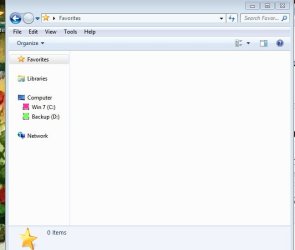
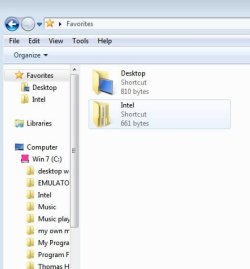
Your favorite folder has no files in it. Thus it will not expand.
The way I got files onto it is described now...In this case adding a desktop icon..
Lose your desktop icon on side panel?
Here is how to get it back.
1. Open your file explorer and click on favorites
and keep it open.
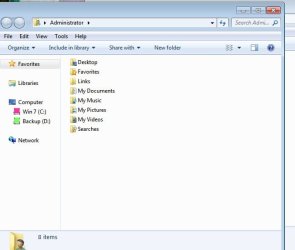
2. Cick on start button and open your Administrator link. You will now have 2 explorer file panels open.
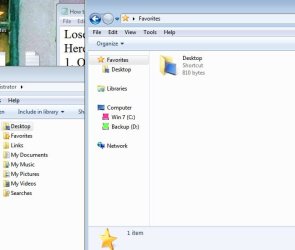
3. Drag the desktop folder on the administrator file panel over onto the open favorites file
section. the open part on the right...not onto the favorites icon on the left.
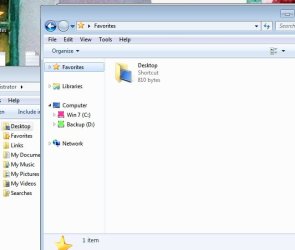
4. The desktop icon will now appear below the favorites icon in the side panel. You can check the arrow open to make sure the favorites folder is always expanded.
5. Add more files to the favorites by clicking on favorites. Have the left panel open and extend all your files in your drives. Now just drag and drop to your favorites. You can put them in existing folders there or separately..When separately..it will say create a new link under your mouse pointer...Easy to delete too..
 

Attachments

  • screenshot1.jpg
    screenshot1.jpg
    20.6 KB · Views: 8
  • screenshot2.jpg
    screenshot2.jpg
    26.1 KB · Views: 8
  • screenshot3.jpg
    screenshot3.jpg
    29.3 KB · Views: 8
  • screenshot4.jpg
    screenshot4.jpg
    27.1 KB · Views: 8
  • screenshot5.jpg
    screenshot5.jpg
    27.6 KB · Views: 9
  • screenshot6.jpg
    screenshot6.jpg
    20.3 KB · Views: 8

My Computer My Computer

At a glance

Wndows 7 32 bit Ultimate
Computer type
Laptop
OS
Wndows 7 32 bit Ultimate
Folks, please tell us that you all, if not having done already, goingf forward from now on, before deleting & cleaning registry & etc., are going to begin and maintain a process of making full images, backing up, your OS partitions and data partitions onto reliable, external media. Also, keep current DVD and USB boots of your chosen backup/restore programs. I use Macrium Reflect 7 and Image For Windows 3.x -- however, you can use whatever you choose.
 
Last edited:

My Computer My Computer

At a glance

Windows 7 Professional 64-bitDesktop i5; Acers i5 & i7desktop 16GB; 1 Acer 8GB & 1 Acer 16GB
Computer type
PC/Desktop
Computer Manufacturer/Model Number
Antec desktop; Acer Aspire laptops
OS
Windows 7 Professional 64-bit
CPU
Desktop i5; Acers i5 & i7
Memory
desktop 16GB; 1 Acer 8GB & 1 Acer 16GB
Hard Drives
1TB split into 2 equal partitions [OS and data] usable by RJS
Internet Speed
AT&T DSL
Browser
FF, GChrome, msIE
Other Info
Windows 7 Firewall, Emsisoft AM/AV, MSE [scan-only], SpywareBlaster, Ruiware/BillP combine
Thank you!

Simple way to fix this, create a folder in your document (C:\Users\*YourUsername*) called Links, then restart your computer. your problem is mostly caused by accidentally deleting the Links folder hence the system doesn't know where to save the favorites.

Hope this helps.


THANK YOU!
This helped me as well! It worked like a dream...
 

My Computers My Computers

  • At a glance

    Windows 8UnknownUnknownUnknown
    Computer type
    Laptop
    Computer Manufacturer/Model Number
    HP
    OS
    Windows 8
    CPU
    Unknown
    Motherboard
    Unknown
    Memory
    Unknown
    Graphics Card(s)
    Unknown
    Hard Drives
    Unknown
    Antivirus
    360
    Browser
    Chrome
  • Computer type
    PC/Desktop
Back
Top