Monitor IDs all wrong: 2-pc monitor and 1-tv

zYx

Member of Mayday
Member
Local time
8:22 PM
Messages
71
Location
EU
[SOLVED!] Monitor IDs all wrong: 2-pc monitor and 1-tv

Hi there,

since I got my new GeForce GTX 460 my monitor became monitor number 2 and my tv is now monitor number 1.

Now when switching between screens, by pressing WindowsKey+P on the keyboard, the "Only Computer" icon switches TV screen on and the PC monitor off. When "Only Projector" is selected, it turns my PC monitor on and my TV screen off. Obviously it meant to be vice versa.

010101k.png


Also, when booting my computer, my PC monitor remains OFF until the Win7 login screen. All info is displayed on my TV at which point is off, so I don't see nothing.

When I go to WindowsKey+P and select "Only Projector" my monitor becomes monitor number 1. When switched to the tv only (the "Only Computer" option) the tv is also number 1. When switched to the "Extended" option my PC monitor is 2 and a tv is 1.

It can be very annoying not seeing what's going on when my pc is booting up.

Certain apps display stuff on the screen 1, which usually is the main screen and in my case it is a TV.

Does anybody know what is wrong? I've searched the net and there was few people having the same issue, but I found no fix for it.

I was wondering what is responsible for displaying the booting process on the TV and not on the PC screen.

Can it be bios related? GPU specific property?
 
Last edited:

My Computer My Computer

At a glance

7 64-bit Ultimatei7-2600KCorsair 1866MHz 8GBSapphire ATI HD6990
Computer Manufacturer/Model Number
zYxMa Computers, Inc. iFixYourPC.co
OS
7 64-bit Ultimate
CPU
i7-2600K
Motherboard
ASUS Maximus IV Extreme
Memory
Corsair 1866MHz 8GB
Graphics Card(s)
Sapphire ATI HD6990
Sound Card
HD6990 + Yamaha RX-V467
Monitor(s) Displays
Dell U3011 | Panasonic P50VT20 3D
Screen Resolution
30" 2560x1600 | 50" 1920x1080 3D
Hard Drives
OCZ HybridDrive 1TB | OCZ Agility 3 - OS | Hitachi 250GB - Random | WD 1TB - Files | Seagate 1TB - Files | WD 1.5TB - Files
PSU
Cooler Master Silent Pro Gold 1200W
Case
CoolerMaster Cosmos-II
Cooling
Liquid-cooled
Keyboard
Logitech Illuminated K800 + diNovo Mini
Mouse
RAT9 + MX Revolution + MX Air + Harmony One
Internet Speed
18mbps
Other Info
iPhone 4S 64GB
If your video card came with an app for setting your video settings go to that to set things the way you want them. This may also be located in your control panel. I would assume you have gone into "Screen Resolution" and attempted to setup your screens, if not give that a go. Not sure if the following would help, but you might attempt switching your cables around on the video card. Good Luck.
 

My Computer My Computer

At a glance

Win 7 Pro x64, VM Win XP, Win7 Pro Sandbox, K...AMD Athlon(tm) II X4 640 @ 3.0 Gbz12GB 1066MHz DDR3 SDRAM - 2x4GB, 2x2GBATI Radeon HD 4350 HD Graphics/Audio with 512MB
Computer Manufacturer/Model Number
HP Pavilion a4302f
OS
Win 7 Pro x64, VM Win XP, Win7 Pro Sandbox, Kubuntu 11
CPU
AMD Athlon(tm) II X4 640 @ 3.0 Gbz
Memory
12GB 1066MHz DDR3 SDRAM - 2x4GB, 2x2GB
Graphics Card(s)
ATI Radeon HD 4350 HD Graphics/Audio with 512MB
Sound Card
Realtek High Definition Audio
Monitor(s) Displays
1. Dell 23" SP2307, 2. Mitsublishi 40" HDTV, Hannspree 25"
Screen Resolution
1. 2048x1152, 2. 1920-1080, 3. 1920x1200
Hard Drives
Int: 1 120 Gig SSD i
1 - 2.5" 500 USB External HDD
1 -1 Tb USB External HDD
Case
Mid Tower
Cooling
Standard Fans - 5 fans (very quiet)
Keyboard
Microsoft Wireless 2000
Mouse
Microsoft Wireless Mouse 5000
Internet Speed
10 Mbit (realistically 500 Kbit - 1.2 Mbit)
Other Info
Speakers - Bose Desktop (Excellent Sound)
1 external CD|DVD\Blue-ray Recorders/Players (Sony)
Try setting your monitor to "Make this my main display" by doing the following: right-click desktop, choose resolution, should show both your display and your tv. display setting (5th row): (set it to your monitor instead of your TV) you will now see the startup on your monitor.

Multiple displays (4th row): choose "extend desktop to this display" for both monitor and tv if needed.

For Nvidia cards I use "Nvidia control panel" app. found in additional software here:

NVIDIA Control Panel

Additional Driver and software - Download NVIDIA Drivers

Hope this helps.
 

My Computer My Computer

At a glance

Windows 7 Ultimate x64Q6600 @2.4ghz (G0 stepping)8 gb OCZ vista essential sli PC-6400Dual 9800gt in SLI mode
Computer Manufacturer/Model Number
Systemax N2000 Gaming PC
OS
Windows 7 Ultimate x64
CPU
Q6600 @2.4ghz (G0 stepping)
Motherboard
XFX nforce 680i LT
Memory
8 gb OCZ vista essential sli PC-6400
Graphics Card(s)
Dual 9800gt in SLI mode
Sound Card
Integrated 8.1 High Definition Audio
Monitor(s) Displays
Dual Sceptre x246w 24 inch monitors
Screen Resolution
1920 x 1200 each monitor
Hard Drives
500 GB SATA II / 7500 rpm
PSU
Cooler Master Real Power Pro 1250W
Case
N2000 server tower
Cooling
Thermaltake Bigwater 760 is
Keyboard
MS Intelitype 6000 v2.0
Mouse
MS Intelipoint 6000
Internet Speed
Wi-power 1.5GB up / 512k down
Other Info
Windows 7 Ultimate x64, Windows 7 Pro x64, Windows Home Premium X86, Windows XP pro, Windows Home Server x86, Ubuntu 10.4 x86 and x64, Ubuntu server 10.4, SQL Server 2005, MySQL 5.0
Thanks guys, but that's not the case. nVidia Control Panel does exactly the same what windows resolution panel does - nothing.

Please read my first post again.

There is no option anywhere I can think of to change ID numbers from 2 to 1 and from 1 to 2.

My PC monitor IS the main screen, whether the TV is connected or not, is on or off. As soon as I connect my tv via HDMI cable, my monitor becomes number 2 (still as main monitor).

I know what you're trying to say, but this don't work. All I want, is to change the ID numbers to their original settings.

The screenshot I provided above doesn't do what it says. The option called "Tylko pojektor" (Only Projector, which I assume means TVs etc..) switches my PC monitor on (via DVI). When "Tylko komputer" (computer only) is selected it switches my TV sreen on...

So basically the ID numbers are mocked up. The system thinks that my monitor is my tv and that my tv is my monitor.

I hope you understand what I'm trying to explain.

Thanks
 

My Computer My Computer

At a glance

7 64-bit Ultimatei7-2600KCorsair 1866MHz 8GBSapphire ATI HD6990
Computer Manufacturer/Model Number
zYxMa Computers, Inc. iFixYourPC.co
OS
7 64-bit Ultimate
CPU
i7-2600K
Motherboard
ASUS Maximus IV Extreme
Memory
Corsair 1866MHz 8GB
Graphics Card(s)
Sapphire ATI HD6990
Sound Card
HD6990 + Yamaha RX-V467
Monitor(s) Displays
Dell U3011 | Panasonic P50VT20 3D
Screen Resolution
30" 2560x1600 | 50" 1920x1080 3D
Hard Drives
OCZ HybridDrive 1TB | OCZ Agility 3 - OS | Hitachi 250GB - Random | WD 1TB - Files | Seagate 1TB - Files | WD 1.5TB - Files
PSU
Cooler Master Silent Pro Gold 1200W
Case
CoolerMaster Cosmos-II
Cooling
Liquid-cooled
Keyboard
Logitech Illuminated K800 + diNovo Mini
Mouse
RAT9 + MX Revolution + MX Air + Harmony One
Internet Speed
18mbps
Other Info
iPhone 4S 64GB
Hey guys,
I'm still having this problem ever since I installed windows 7. It has nothing to do with graphic drivers, what card you're using, because I had both Nvidia gtx 460, 580 and now ati hd6990. The problem occurs as soon as you connect you tv/amp via HDMI output.

Nvidia control panel and Catalyc Control Center are saying that my monitor is a number 1 and my tv number 2, but this is not the case in windows 7 display settings. It says vice versa. My monitor is a number 2 and my tv is a number 1. My monitor is a projector and my tv is a monitor.

It's not so much an inconvenience, but it is frustrating...

Any ideas anybody?
 

My Computer My Computer

At a glance

7 64-bit Ultimatei7-2600KCorsair 1866MHz 8GBSapphire ATI HD6990
Computer Manufacturer/Model Number
zYxMa Computers, Inc. iFixYourPC.co
OS
7 64-bit Ultimate
CPU
i7-2600K
Motherboard
ASUS Maximus IV Extreme
Memory
Corsair 1866MHz 8GB
Graphics Card(s)
Sapphire ATI HD6990
Sound Card
HD6990 + Yamaha RX-V467
Monitor(s) Displays
Dell U3011 | Panasonic P50VT20 3D
Screen Resolution
30" 2560x1600 | 50" 1920x1080 3D
Hard Drives
OCZ HybridDrive 1TB | OCZ Agility 3 - OS | Hitachi 250GB - Random | WD 1TB - Files | Seagate 1TB - Files | WD 1.5TB - Files
PSU
Cooler Master Silent Pro Gold 1200W
Case
CoolerMaster Cosmos-II
Cooling
Liquid-cooled
Keyboard
Logitech Illuminated K800 + diNovo Mini
Mouse
RAT9 + MX Revolution + MX Air + Harmony One
Internet Speed
18mbps
Other Info
iPhone 4S 64GB
Hey guys,
I'm still having this problem ever since I installed windows 7. It has nothing to do with graphic drivers, what card you're using, because I had both Nvidia gtx 460, 580 and now ati hd6990. The problem occurs as soon as you connect you tv/amp via HDMI output.

Nvidia control panel and Catalyc Control Center are saying that my monitor is a number 1 and my tv number 2, but this is not the case in windows 7 display settings. It says vice versa. My monitor is a number 2 and my tv is a number 1. My monitor is a projector and my tv is a monitor.

It's not so much an inconvenience, but it is frustrating...

Any ideas anybody?

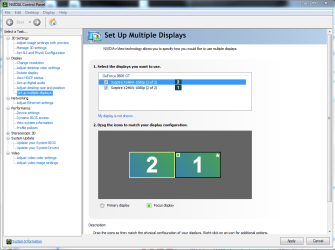
Start the nVidia Control panel -> Setup Multiple displays....now drag the monitors to the correct orientaion that you want and click "apply" in the lower right corner, the apply/cancel buttons appear after you change a setting on the screen. Hope this helps you.

Multiple monitor screen - Nvidia cntl panel.PNG
 

My Computer My Computer

At a glance

Windows 7 Ultimate x64Q6600 @2.4ghz (G0 stepping)8 gb OCZ vista essential sli PC-6400Dual 9800gt in SLI mode
Computer Manufacturer/Model Number
Systemax N2000 Gaming PC
OS
Windows 7 Ultimate x64
CPU
Q6600 @2.4ghz (G0 stepping)
Motherboard
XFX nforce 680i LT
Memory
8 gb OCZ vista essential sli PC-6400
Graphics Card(s)
Dual 9800gt in SLI mode
Sound Card
Integrated 8.1 High Definition Audio
Monitor(s) Displays
Dual Sceptre x246w 24 inch monitors
Screen Resolution
1920 x 1200 each monitor
Hard Drives
500 GB SATA II / 7500 rpm
PSU
Cooler Master Real Power Pro 1250W
Case
N2000 server tower
Cooling
Thermaltake Bigwater 760 is
Keyboard
MS Intelitype 6000 v2.0
Mouse
MS Intelipoint 6000
Internet Speed
Wi-power 1.5GB up / 512k down
Other Info
Windows 7 Ultimate x64, Windows 7 Pro x64, Windows Home Premium X86, Windows XP pro, Windows Home Server x86, Ubuntu 10.4 x86 and x64, Ubuntu server 10.4, SQL Server 2005, MySQL 5.0
What bobtran said ought to do the trick for you.

If you're like me, and the actual numbers bug you, uninstall all the monitors except the one you want to be #1 in Device Manager, then unplug them (except for #1, of course). Reboot. Once the computer is running again, plug in the monitor you want to be #2. Then do the same procedure for #3.

You might also look into a program like DisplayFusion, which gives you far more control over such things than Windows does. :)
 

My Computer My Computer

At a glance

Main - Windows 7 Pro SP1 64-Bit; 2nd - Window...Main - Core i7 2600K; 2nd - Core i7 920Main - 16GB Corsair Vengeance; 2nd - 12GB Cor...Main - XFX Radeon 6870 1GB; 2nd - XFX Radeon ...
Computer Manufacturer/Model Number
Self
OS
Main - Windows 7 Pro SP1 64-Bit; 2nd - Windows Server 2008 R2
CPU
Main - Core i7 2600K; 2nd - Core i7 920
Motherboard
Main - Asus P8Z68-V Pro/Gen3; 2nd - Gigabyte GA-EX58-UDR3
Memory
Main - 16GB Corsair Vengeance; 2nd - 12GB Corsair Vengeance
Graphics Card(s)
Main - XFX Radeon 6870 1GB; 2nd - XFX Radeon 4870 1GB
Sound Card
Both: Onboard Realtek Azalia
Monitor(s) Displays
Main - Hann 25" + I-INC 25" + Acer 23"; 2nd - Upgrading Soon
Screen Resolution
Main - 1920x1080 (All Three Monitors); 2nd - Upgrading Soon
Hard Drives
Main - (1) Crucial M4 128GB (Boot)
Main - (1) Seagate 2TB 64MB Cache (Data)
Main - (1) Seagate 2TB 64MB Cache (Data Backup)
2nd - (1) Intel X25-M SSD 80GB (Boot)
2nd - (3) Seagate 1TB 32MB Cache (Data Backup)
2nd - (1) Seagate 320GB (Because)
PSU
Main - OCZ 600W Modular; 2nd - OCZ 600W
Case
Main - Thermaltake Element G; 2nd - NZXT something or other
Cooling
Main - Corsair H80; 2nd - Prolimatech Megahalems
Keyboard
Main - Razer Reclusa; 2nd - Old MS Keyboard
Mouse
Main - Logitech MX Revolution; 2nd - Old MS Mouse
Internet Speed
20Mbps Time-Warner Cable
Right. I'm not sure whether I found a fix or is it a fix just for me, but I recently upgraded my monitor and instead of connecting it via DVI cable I connected it via DisplayPort cable. I usually had my main monitor connected to the first avalable DVI port on my graphics card. This DVI port was the closest to the motherboard. Somebody before told me that it matters. The next 4 ports are miniDP. My TV/AMP was always connected to the second port, first miniDP port, it's connected via miniDP-HDMI adapter. So when I got my new monitor, I connected it to the third port, in my case it is a second miniDP port, at which point I discovered that my TV became a number 2 monitor in display settings and it also becase a "Projector" and my monitor becase a monitor number 1 and a "Monitor".

I've left it like this. I didn't even check if connecting the monitor to the DVI port #1 will change anything, I just left it and it is ok now. Woo-Hoo!

All the above did not do anything to help, but thanks for your suggestions. My suggestion would be to check all your ports on your graphics card.
 

My Computer My Computer

At a glance

7 64-bit Ultimatei7-2600KCorsair 1866MHz 8GBSapphire ATI HD6990
Computer Manufacturer/Model Number
zYxMa Computers, Inc. iFixYourPC.co
OS
7 64-bit Ultimate
CPU
i7-2600K
Motherboard
ASUS Maximus IV Extreme
Memory
Corsair 1866MHz 8GB
Graphics Card(s)
Sapphire ATI HD6990
Sound Card
HD6990 + Yamaha RX-V467
Monitor(s) Displays
Dell U3011 | Panasonic P50VT20 3D
Screen Resolution
30" 2560x1600 | 50" 1920x1080 3D
Hard Drives
OCZ HybridDrive 1TB | OCZ Agility 3 - OS | Hitachi 250GB - Random | WD 1TB - Files | Seagate 1TB - Files | WD 1.5TB - Files
PSU
Cooler Master Silent Pro Gold 1200W
Case
CoolerMaster Cosmos-II
Cooling
Liquid-cooled
Keyboard
Logitech Illuminated K800 + diNovo Mini
Mouse
RAT9 + MX Revolution + MX Air + Harmony One
Internet Speed
18mbps
Other Info
iPhone 4S 64GB
Back
Top