

- Local time
- 10:06 AM
- Messages
- 1,363
Hi all - here's my issue. Just got a new motherboard, Z270N-WIFI, new build of win7pro x64 running on it, everything is awesome except this sleep issue. Here's what happens
1) If firefox is NOT open, sleep works just fine
2) If firefox IS open, upon entering sleep (S3) mode the monitor shuts off, the cpu fan continues to run, the ethernet activity light continues to blink, the keyboard is unresponsive, and the only option is to physically power off and reboot. Its like it hangs halfway into trying to sleep
3) If firefox IS open, but then I unplug the ethernet cable, the computer sleeps just fine.
Btw its not just firefox, it happens with any browser.
I tried deleting then reinstalling the lan drivers, to no effect. I also tried the lan drivers directly from Intel, to no effect. Current drivers are from gigabyte and are the most current for my motherboard..
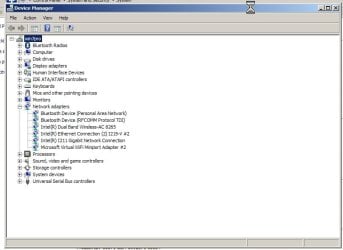
Also, not sure if this is related, I've got these annoying #2 references in device manager as you can see that would be nice to get rid of..
Attached is the network section of my device manager. I've made no changes to the system other than to install the drivers and then went in and unchecked "allow this device to wake the computer" on all items. I also tried disabling wifi and bluetooth, which had no effect. Any advice is appreciated..
1) If firefox is NOT open, sleep works just fine
2) If firefox IS open, upon entering sleep (S3) mode the monitor shuts off, the cpu fan continues to run, the ethernet activity light continues to blink, the keyboard is unresponsive, and the only option is to physically power off and reboot. Its like it hangs halfway into trying to sleep
3) If firefox IS open, but then I unplug the ethernet cable, the computer sleeps just fine.
Btw its not just firefox, it happens with any browser.
I tried deleting then reinstalling the lan drivers, to no effect. I also tried the lan drivers directly from Intel, to no effect. Current drivers are from gigabyte and are the most current for my motherboard..
Also, not sure if this is related, I've got these annoying #2 references in device manager as you can see that would be nice to get rid of..
Attached is the network section of my device manager. I've made no changes to the system other than to install the drivers and then went in and unchecked "allow this device to wake the computer" on all items. I also tried disabling wifi and bluetooth, which had no effect. Any advice is appreciated..
Attachments
Last edited:
My Computer
- Computer type
- PC/Desktop
- Computer Manufacturer/Model Number
- diy
- OS
- Win7 pro x64
- CPU
- stock i7 7700k
- Motherboard
- Gigabyte Z270N-WIFI mini-ITX
- Memory
- Corsair Vengeance LPX 16GB (2x8GB) DDR4 @ 3200MHz
- Graphics Card(s)
- integrated Intel HD 630
- Sound Card
- onboard Realtek ALC1220
- Monitor(s) Displays
- two vertically mounted samsung 55" 4k un55mu8000
- Screen Resolution
- 1920x1280
- Hard Drives
- 256GB Samsung EVO 960 M.2 pci-e NVMe SSD
- PSU
- SilverStone Nightjar ST45NF 450Watt Fanless
- Case
- No case. Motherboard is mounted directly onto power supply
- Cooling
- Evercool low profile 815EP with Panaflow 12L fan at 7v
- Keyboard
- Ortek MCK-86 mini
- Mouse
- Belkin 5-button USB
- Internet Speed
- spectrum 400mbps


