Monitor shuts off during boot up after intel hd graphics driver instal

Mogul

New member
Local time
8:51 PM
Messages
7
I just built my PC few days ago and Everything was fine until I installed VGA graphics driver update. I literally tried everything. I tried downloading from biostar, intel, and from the disc I received along with the motherboard. They all are no use. I can go into safemode and roll back the driver and the video graphics is fine. I can't find anything related to graphics chipset or anything like that and can't find sleep mode on BIO as this motherboard has UEFI. How do I fix this so that my PC functions like it is suppose to with the intel hd graphics 2000?


My PC specs:

Monitor: HP 2009m 20"
CASE: Rosewill FUTURE Gaming ATX Mid Tower Computer Case

O/S: Windows 7 Ultimate 64-bit
CPU: Intel Core i5-2400 Sandy Bridge 3.1GHz (3.4GHz Turbo Boost) LGA 1155 95W Quad-Core Desktop Processor Intel HD Graphics 2000 BX80623I52400

Motherboard: BIOSTAR TZ77B LGA 1155 Intel Z77 HDMI SATA 6Gb/s USB 3.0 ATX Intel Motherboard with UEFI BIOS

PSU: Rosewill HIVE Series HIVE-550 550W Continuous @40°C, 80 PLUS BRONZE Certified, Modular Design, Single +12V Rail, ATX12V v2.31/EPS12V v2.92, SLI Ready, CrossFire Ready, Active-PFC Power Supply

RAM: G.SKILL Ripjaws X Series 8GB (2 x 4GB) 240-Pin DDR3 SDRAM DDR3 1333 (PC3 10666) Desktop Memory Model F3-10666CL9D-8GBXL

HARD DRIVE: Seagate Barracuda ST3750525AS 750GB 7200 RPM 32MB Cache SATA 6.0Gb/s 3.5" Internal Hard Drive -Bare Drive
 

My Computer My Computer

At a glance

Windows 7 Ultimate x64
OS
Windows 7 Ultimate x64
Is this an integrated graphics card? is the monitor shutting off or going to sleep? What kind of monitor is it? What kind of connection do you have for your monitor (HDMI, VGA, DVI)?
 

My Computer My Computer

At a glance

Windows 7 x64 / Windows Server 2008 / Linux (...AMD FX 8150 Eight-Core Processor 4.23 Ghz OCG.SKILL Ripjaws X Series 32GB (4 x 8GB) DDR3 ...2X Radeon HD 4870 CrossFire X
Computer type
PC/Desktop
Computer Manufacturer/Model Number
Pandora (computer name)
OS
Windows 7 x64 / Windows Server 2008 / Linux (Redhat & Deb distros) / OS X / More
CPU
AMD FX 8150 Eight-Core Processor 4.23 Ghz OC
Motherboard
ASUS SaberTooth 990FX
Memory
G.SKILL Ripjaws X Series 32GB (4 x 8GB) DDR3 SDRAM 1333
Graphics Card(s)
2X Radeon HD 4870 CrossFire X
Sound Card
Onboard and loving it
Monitor(s) Displays
2x HP w2480 Wide LCD
Screen Resolution
1920x1200 each
Hard Drives
RAID (6x0 Seagate Barracuda 7200 rpm 32 MB cache 500Gb SATA)
PSU
Antec 850 Watt
Case
Antec 900
Cooling
Lots of fans
Keyboard
Logitech
Mouse
Rat 9
Internet Speed
40 Mbps Down 5 Mbps Up
Antivirus
AVG
Browser
Chrome, Firefox, IE
Other Info
My main desktop
Your plug and play may not be working properly and your graphics card may be not detecting its max resolution capabilities. you could try booting in "low-resolution video (640x480)" to see if it acts any different.
 

My Computer My Computer

At a glance

Windows 7 x64 / Windows Server 2008 / Linux (...AMD FX 8150 Eight-Core Processor 4.23 Ghz OCG.SKILL Ripjaws X Series 32GB (4 x 8GB) DDR3 ...2X Radeon HD 4870 CrossFire X
Computer type
PC/Desktop
Computer Manufacturer/Model Number
Pandora (computer name)
OS
Windows 7 x64 / Windows Server 2008 / Linux (Redhat & Deb distros) / OS X / More
CPU
AMD FX 8150 Eight-Core Processor 4.23 Ghz OC
Motherboard
ASUS SaberTooth 990FX
Memory
G.SKILL Ripjaws X Series 32GB (4 x 8GB) DDR3 SDRAM 1333
Graphics Card(s)
2X Radeon HD 4870 CrossFire X
Sound Card
Onboard and loving it
Monitor(s) Displays
2x HP w2480 Wide LCD
Screen Resolution
1920x1200 each
Hard Drives
RAID (6x0 Seagate Barracuda 7200 rpm 32 MB cache 500Gb SATA)
PSU
Antec 850 Watt
Case
Antec 900
Cooling
Lots of fans
Keyboard
Logitech
Mouse
Rat 9
Internet Speed
40 Mbps Down 5 Mbps Up
Antivirus
AVG
Browser
Chrome, Firefox, IE
Other Info
My main desktop
It is onboard video card. HP LCD 2009m monitor. the monitor has VGA and DVI connectors but i am using VGA one. I just saw that the motherboard details says none for onboard video chipset, does that matter? ON Low resolution, it is still not booting up.
 
Last edited:

My Computer My Computer

At a glance

Windows 7 Ultimate x64
OS
Windows 7 Ultimate x64
make sure you have on board video enable in the bios. page 23 has info on your video settings.
 

Attachments

My Computer My Computer

At a glance

Windows 7 x64 / Windows Server 2008 / Linux (...AMD FX 8150 Eight-Core Processor 4.23 Ghz OCG.SKILL Ripjaws X Series 32GB (4 x 8GB) DDR3 ...2X Radeon HD 4870 CrossFire X
Computer type
PC/Desktop
Computer Manufacturer/Model Number
Pandora (computer name)
OS
Windows 7 x64 / Windows Server 2008 / Linux (Redhat & Deb distros) / OS X / More
CPU
AMD FX 8150 Eight-Core Processor 4.23 Ghz OC
Motherboard
ASUS SaberTooth 990FX
Memory
G.SKILL Ripjaws X Series 32GB (4 x 8GB) DDR3 SDRAM 1333
Graphics Card(s)
2X Radeon HD 4870 CrossFire X
Sound Card
Onboard and loving it
Monitor(s) Displays
2x HP w2480 Wide LCD
Screen Resolution
1920x1200 each
Hard Drives
RAID (6x0 Seagate Barracuda 7200 rpm 32 MB cache 500Gb SATA)
PSU
Antec 850 Watt
Case
Antec 900
Cooling
Lots of fans
Keyboard
Logitech
Mouse
Rat 9
Internet Speed
40 Mbps Down 5 Mbps Up
Antivirus
AVG
Browser
Chrome, Firefox, IE
Other Info
My main desktop
On board video is enable and it is still going to sleep mode during boot up. i am just wondering.... Does OS have something to do with it? i have windows 7 ultimate x64.
 

My Computer My Computer

At a glance

Windows 7 Ultimate x64
OS
Windows 7 Ultimate x64
There a couple of things that you can try enabling in the Bios, if they are not enabled or set, already.

Launch Video OpROM.....set to Enabled
Primary Display....set to Auto or IGFX
 

My Computer My Computer

At a glance

Windows 7 Home Premium 64 bitIntel Core i7-4790G.SKILL 8GB (2 x 4GB) DDR3 F3-10666CL9D-8GBNTAMD Radeon R7 250
Computer type
PC/Desktop
Computer Manufacturer/Model Number
Custom Build
OS
Windows 7 Home Premium 64 bit
CPU
Intel Core i7-4790
Motherboard
GA-Z87X-D3H
Memory
G.SKILL 8GB (2 x 4GB) DDR3 F3-10666CL9D-8GBNT
Graphics Card(s)
AMD Radeon R7 250
Sound Card
Realtek ALC892
Monitor(s) Displays
Samsung UN32EH5000, Dell 1703FPT
Screen Resolution
1920 x 1080, 1280 x 1024
Hard Drives
WD5003AZEX
WD10EZEX
Samsung HD103SJ
Samsung 128 GB 840 PRO
PSU
SeaSonic M12II SS-500GM
Case
Fractal Design Define R4
Cooling
Zalman CNPS9900ALED
Keyboard
Logitech K800
Mouse
Logitech M705
Internet Speed
16 Mbps
Antivirus
Avast
Browser
Firefox
Other Info
Bose Companion 2 Multimedia Speakers
There a couple of things that you can try enabling in the Bios, if they are not enabled or set, already.

Launch Video OpROM.....set to Enabled
Primary Display....set to Auto or IGFX
They are already set to enable and IGFX but still going into sleep mode during boot up. so weird.
 

My Computer My Computer

At a glance

Windows 7 Ultimate x64
OS
Windows 7 Ultimate x64
Have you tried turning off power saving mode on your monitor to see if that helps? Im not sure if you have that setting, but you should take a look around in the menus on your monitor to see if there is a power saving mode :)
 

My Computer My Computer

At a glance

Windows 7 x64 / Windows Server 2008 / Linux (...AMD FX 8150 Eight-Core Processor 4.23 Ghz OCG.SKILL Ripjaws X Series 32GB (4 x 8GB) DDR3 ...2X Radeon HD 4870 CrossFire X
Computer type
PC/Desktop
Computer Manufacturer/Model Number
Pandora (computer name)
OS
Windows 7 x64 / Windows Server 2008 / Linux (Redhat & Deb distros) / OS X / More
CPU
AMD FX 8150 Eight-Core Processor 4.23 Ghz OC
Motherboard
ASUS SaberTooth 990FX
Memory
G.SKILL Ripjaws X Series 32GB (4 x 8GB) DDR3 SDRAM 1333
Graphics Card(s)
2X Radeon HD 4870 CrossFire X
Sound Card
Onboard and loving it
Monitor(s) Displays
2x HP w2480 Wide LCD
Screen Resolution
1920x1200 each
Hard Drives
RAID (6x0 Seagate Barracuda 7200 rpm 32 MB cache 500Gb SATA)
PSU
Antec 850 Watt
Case
Antec 900
Cooling
Lots of fans
Keyboard
Logitech
Mouse
Rat 9
Internet Speed
40 Mbps Down 5 Mbps Up
Antivirus
AVG
Browser
Chrome, Firefox, IE
Other Info
My main desktop
Another thing you could try is, boot into safe mode, go to the start menu and type msconfig and hit enter, go to start up, and disable all. Then try booting up. If that doesn't do anything, then try the same thing again but select the boot tab and check the base video to see if it helps. if any of them do, it will at least point us in the right direction.
 

My Computer My Computer

At a glance

Windows 7 x64 / Windows Server 2008 / Linux (...AMD FX 8150 Eight-Core Processor 4.23 Ghz OCG.SKILL Ripjaws X Series 32GB (4 x 8GB) DDR3 ...2X Radeon HD 4870 CrossFire X
Computer type
PC/Desktop
Computer Manufacturer/Model Number
Pandora (computer name)
OS
Windows 7 x64 / Windows Server 2008 / Linux (Redhat & Deb distros) / OS X / More
CPU
AMD FX 8150 Eight-Core Processor 4.23 Ghz OC
Motherboard
ASUS SaberTooth 990FX
Memory
G.SKILL Ripjaws X Series 32GB (4 x 8GB) DDR3 SDRAM 1333
Graphics Card(s)
2X Radeon HD 4870 CrossFire X
Sound Card
Onboard and loving it
Monitor(s) Displays
2x HP w2480 Wide LCD
Screen Resolution
1920x1200 each
Hard Drives
RAID (6x0 Seagate Barracuda 7200 rpm 32 MB cache 500Gb SATA)
PSU
Antec 850 Watt
Case
Antec 900
Cooling
Lots of fans
Keyboard
Logitech
Mouse
Rat 9
Internet Speed
40 Mbps Down 5 Mbps Up
Antivirus
AVG
Browser
Chrome, Firefox, IE
Other Info
My main desktop
After you have tried those things, could you follow the instructions from this site in safe mode and report back to us. I googled a wild guess to find out exactly how to do this again so try it and just let us know if things are good or not good based on the troubleshooting of this guide.

How to Check the Video Driver

I really hope one of these shows us something...
 

My Computer My Computer

At a glance

Windows 7 x64 / Windows Server 2008 / Linux (...AMD FX 8150 Eight-Core Processor 4.23 Ghz OCG.SKILL Ripjaws X Series 32GB (4 x 8GB) DDR3 ...2X Radeon HD 4870 CrossFire X
Computer type
PC/Desktop
Computer Manufacturer/Model Number
Pandora (computer name)
OS
Windows 7 x64 / Windows Server 2008 / Linux (Redhat & Deb distros) / OS X / More
CPU
AMD FX 8150 Eight-Core Processor 4.23 Ghz OC
Motherboard
ASUS SaberTooth 990FX
Memory
G.SKILL Ripjaws X Series 32GB (4 x 8GB) DDR3 SDRAM 1333
Graphics Card(s)
2X Radeon HD 4870 CrossFire X
Sound Card
Onboard and loving it
Monitor(s) Displays
2x HP w2480 Wide LCD
Screen Resolution
1920x1200 each
Hard Drives
RAID (6x0 Seagate Barracuda 7200 rpm 32 MB cache 500Gb SATA)
PSU
Antec 850 Watt
Case
Antec 900
Cooling
Lots of fans
Keyboard
Logitech
Mouse
Rat 9
Internet Speed
40 Mbps Down 5 Mbps Up
Antivirus
AVG
Browser
Chrome, Firefox, IE
Other Info
My main desktop
Also just for the heck of it, try this as well

Click on Programs --> Setting --> Control Panel
Choose the "Power Options"

Select Change power plan settings > change advanced power settings > Set hard disk setting to 0 | Disable everything under "Sleep" | Set PCI Express setting to OFF | Display to Never

Just another wild guess but we will see.
 

My Computer My Computer

At a glance

Windows 7 x64 / Windows Server 2008 / Linux (...AMD FX 8150 Eight-Core Processor 4.23 Ghz OCG.SKILL Ripjaws X Series 32GB (4 x 8GB) DDR3 ...2X Radeon HD 4870 CrossFire X
Computer type
PC/Desktop
Computer Manufacturer/Model Number
Pandora (computer name)
OS
Windows 7 x64 / Windows Server 2008 / Linux (Redhat & Deb distros) / OS X / More
CPU
AMD FX 8150 Eight-Core Processor 4.23 Ghz OC
Motherboard
ASUS SaberTooth 990FX
Memory
G.SKILL Ripjaws X Series 32GB (4 x 8GB) DDR3 SDRAM 1333
Graphics Card(s)
2X Radeon HD 4870 CrossFire X
Sound Card
Onboard and loving it
Monitor(s) Displays
2x HP w2480 Wide LCD
Screen Resolution
1920x1200 each
Hard Drives
RAID (6x0 Seagate Barracuda 7200 rpm 32 MB cache 500Gb SATA)
PSU
Antec 850 Watt
Case
Antec 900
Cooling
Lots of fans
Keyboard
Logitech
Mouse
Rat 9
Internet Speed
40 Mbps Down 5 Mbps Up
Antivirus
AVG
Browser
Chrome, Firefox, IE
Other Info
My main desktop
For the first one, I have tried tweaking the monitor setting and it ended up as displaying "no source signal" instead of going into sleep mode which i think it is the problem with on board video is failing to send signal to the monitor during boot up which is the purpose of drivers being there. and it is not working. for the second one, both suggestions didn't work. Third one, I tried to apply to WIndows 7 since it is on windows 2000 and i found out that Device/video0 is set to RY\Machine\System\Controlset001\Services\VgaSave\Device0 and I don't know what that means hehehehehe. I have tried to last one, but no luck there still. Omg this is tiring :(
 

My Computer My Computer

At a glance

Windows 7 Ultimate x64
OS
Windows 7 Ultimate x64
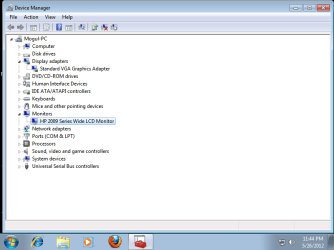
can you right click on computer > hit properties > go to device manager > drop down display adapters as well as monitors and take a snapshot? it could be that one driver is conflicting with another...
 

My Computer My Computer

At a glance

Windows 7 x64 / Windows Server 2008 / Linux (...AMD FX 8150 Eight-Core Processor 4.23 Ghz OCG.SKILL Ripjaws X Series 32GB (4 x 8GB) DDR3 ...2X Radeon HD 4870 CrossFire X
Computer type
PC/Desktop
Computer Manufacturer/Model Number
Pandora (computer name)
OS
Windows 7 x64 / Windows Server 2008 / Linux (Redhat & Deb distros) / OS X / More
CPU
AMD FX 8150 Eight-Core Processor 4.23 Ghz OC
Motherboard
ASUS SaberTooth 990FX
Memory
G.SKILL Ripjaws X Series 32GB (4 x 8GB) DDR3 SDRAM 1333
Graphics Card(s)
2X Radeon HD 4870 CrossFire X
Sound Card
Onboard and loving it
Monitor(s) Displays
2x HP w2480 Wide LCD
Screen Resolution
1920x1200 each
Hard Drives
RAID (6x0 Seagate Barracuda 7200 rpm 32 MB cache 500Gb SATA)
PSU
Antec 850 Watt
Case
Antec 900
Cooling
Lots of fans
Keyboard
Logitech
Mouse
Rat 9
Internet Speed
40 Mbps Down 5 Mbps Up
Antivirus
AVG
Browser
Chrome, Firefox, IE
Other Info
My main desktop
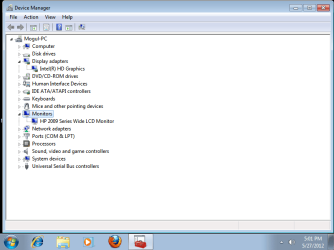
This snapshot is in safemode since I can't boot up into normal mode with the video driver that is required to use my onboard video. And in the safe mode, it doesn't show monitor driver so i took the 2nd one.
Untitled.png
Since i had to go into normal mode, I deleted the intel Hd graphics driver and installed the default video driver.
Untitledd.png
 

My Computer My Computer

At a glance

Windows 7 Ultimate x64
OS
Windows 7 Ultimate x64
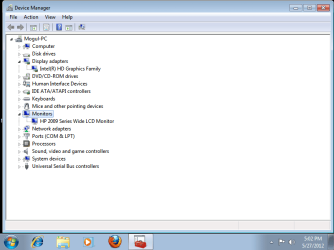
Haha I should have thought that would happen. okay. try installing the driver, when it asks you to reboot, then try taking a snap shot before rebooting. it should be there.
 

My Computer My Computer

At a glance

Windows 7 x64 / Windows Server 2008 / Linux (...AMD FX 8150 Eight-Core Processor 4.23 Ghz OCG.SKILL Ripjaws X Series 32GB (4 x 8GB) DDR3 ...2X Radeon HD 4870 CrossFire X
Computer type
PC/Desktop
Computer Manufacturer/Model Number
Pandora (computer name)
OS
Windows 7 x64 / Windows Server 2008 / Linux (Redhat & Deb distros) / OS X / More
CPU
AMD FX 8150 Eight-Core Processor 4.23 Ghz OC
Motherboard
ASUS SaberTooth 990FX
Memory
G.SKILL Ripjaws X Series 32GB (4 x 8GB) DDR3 SDRAM 1333
Graphics Card(s)
2X Radeon HD 4870 CrossFire X
Sound Card
Onboard and loving it
Monitor(s) Displays
2x HP w2480 Wide LCD
Screen Resolution
1920x1200 each
Hard Drives
RAID (6x0 Seagate Barracuda 7200 rpm 32 MB cache 500Gb SATA)
PSU
Antec 850 Watt
Case
Antec 900
Cooling
Lots of fans
Keyboard
Logitech
Mouse
Rat 9
Internet Speed
40 Mbps Down 5 Mbps Up
Antivirus
AVG
Browser
Chrome, Firefox, IE
Other Info
My main desktop
If you can, you should go get a dvi cable as well. two good reasons. 1. im still guessing that the vga output is stopping when the drivers are loaded, 2. you will have a much clearer picture. It could also be that the driver is putting out the wrong signal and your monitor isnt capable of displaying it so it goes to no signal mode. This happened to my tv with vga. So it would be a better troubleshooting mechanism to have a dvi cable for this.
 

My Computer My Computer

At a glance

Windows 7 x64 / Windows Server 2008 / Linux (...AMD FX 8150 Eight-Core Processor 4.23 Ghz OCG.SKILL Ripjaws X Series 32GB (4 x 8GB) DDR3 ...2X Radeon HD 4870 CrossFire X
Computer type
PC/Desktop
Computer Manufacturer/Model Number
Pandora (computer name)
OS
Windows 7 x64 / Windows Server 2008 / Linux (Redhat & Deb distros) / OS X / More
CPU
AMD FX 8150 Eight-Core Processor 4.23 Ghz OC
Motherboard
ASUS SaberTooth 990FX
Memory
G.SKILL Ripjaws X Series 32GB (4 x 8GB) DDR3 SDRAM 1333
Graphics Card(s)
2X Radeon HD 4870 CrossFire X
Sound Card
Onboard and loving it
Monitor(s) Displays
2x HP w2480 Wide LCD
Screen Resolution
1920x1200 each
Hard Drives
RAID (6x0 Seagate Barracuda 7200 rpm 32 MB cache 500Gb SATA)
PSU
Antec 850 Watt
Case
Antec 900
Cooling
Lots of fans
Keyboard
Logitech
Mouse
Rat 9
Internet Speed
40 Mbps Down 5 Mbps Up
Antivirus
AVG
Browser
Chrome, Firefox, IE
Other Info
My main desktop
Untitled444.png
Untitledhh.png
Here are the two scenarios.

yea I alrdy had thought about DVI-D to VGA cable and ordered it online turns out it was single link when mine was for double link. So it didn't turn out so good. I just ordered DVI-D to DVI-d Double link cable so well see if it helps.
 

My Computer My Computer

At a glance

Windows 7 Ultimate x64
OS
Windows 7 Ultimate x64
Back
Top