Monitor turn on by itself after "Turn off the display" starts

alokin87

New member
Local time
1:22 PM
Messages
4
Monitor turn on by itself after "Turn off the display" starts

Hi,

I've set Turn off the display setting in my power plan to 15 minutes and my monitor does turn off after that period (sometimes it doesn't!), but then, sometimes, it turns ON by itself after few minutes.

I've been Google-ing these days trying to find some solution and I came across suggestions which recommends that Allow this device to wake the computer option, located in the Power management tab, in the Properties window of the network adapter, in the Device manager, should be disabled. Also, there were suggestions that Wake on Magic packet property in the Advanced tab should be disabled, too. Unfortunately, all that did not work in my case.

Does somebody know what can cause this problem? Has anyone ever encountered such phenomena? :)

Thanks in advance.
 

My Computer My Computer

At a glance

Windows 7 UltimateIntel Core2Duo E8400Geil 2x1GB DDR2 800Gigabyte N220OC-1GI (GeForce GT 220)
OS
Windows 7 Ultimate
CPU
Intel Core2Duo E8400
Motherboard
Gigabyte P35C-DS3R
Memory
Geil 2x1GB DDR2 800
Graphics Card(s)
Gigabyte N220OC-1GI (GeForce GT 220)
Monitor(s) Displays
Samsung SyncMaster 2032BW
Screen Resolution
1680x1050
Hard Drives
Western Digital WD3200AAKS 320GB
PSU
Thermaltake 600W
Internet Speed
ADSL 1 Mbit
Hello alokin87 & welcome to Sevenforums,

Sometimes the computer Wake from standby because of a program's updating itself. Sometimes it does wake, sometimes it does not!

Therefore it could be the Windows Media center as explained in this Hotfix from MS. You could give a try:

http://www.sevenforums.com/windows-...t-available-hotfix-windows-7-july-2010-a.html

Look at post #1:

"-Do you find that your Windows 7 Computer wakes up from sleep unexpectedly at a particular time every day? If so then you might to check up if any scheduled tasks are waking your PC up."
 

My Computer My Computer

At a glance

Windows 7 Professional SP1 - x64 [Non-UEFI Boot]Ivy Bridge Core i5 3570K (Delidded)G.Skill "Ares" DDR3 PC3-12800 - 1600MHz (16Gb)Asus Dual-RX480-O4G
Computer type
PC/Desktop
Computer Manufacturer/Model Number
Custom Build
OS
Windows 7 Professional SP1 - x64 [Non-UEFI Boot]
CPU
Ivy Bridge Core i5 3570K (Delidded)
Motherboard
Asus P8Z77-V LE PLUS
Memory
G.Skill "Ares" DDR3 PC3-12800 - 1600MHz (16Gb)
Graphics Card(s)
Asus Dual-RX480-O4G
Sound Card
Creative Sound Blaster Z w/5.1 sound system
Monitor(s) Displays
Asus IPS 23"
Screen Resolution
16/9
Hard Drives
Internal:
500Go Sata 6Gb/s (x2)
500Go Sata 3Gb/s (x2)
SSD 60Go Sata 6Gb/s
PSU
In Win C 900W Series 80+ Platinum
Case
Thermaltake Chaser A71
Cooling
Custom Water Cooling Loop
Keyboard
Cooler Master QuickFire XTi
Mouse
Razer Imperator 2012 (4G)
Antivirus
MSE
Browser
IE 11.0.xxx Rtm
Other Info
"Raid0" with Intel Smart Response Technology (HDD/SSD)
Many thanks for the reply. I've checked whether there is some Windows Media Center-related scheduled task, but there isn't any in my case.

btw I think I've solved my problem. Solution was to disable on more property, in the Advanced tab of my network adapter Properties. That one is called Wake on pattern match. I came across that advice on this link.
 

My Computer My Computer

At a glance

Windows 7 UltimateIntel Core2Duo E8400Geil 2x1GB DDR2 800Gigabyte N220OC-1GI (GeForce GT 220)
OS
Windows 7 Ultimate
CPU
Intel Core2Duo E8400
Motherboard
Gigabyte P35C-DS3R
Memory
Geil 2x1GB DDR2 800
Graphics Card(s)
Gigabyte N220OC-1GI (GeForce GT 220)
Monitor(s) Displays
Samsung SyncMaster 2032BW
Screen Resolution
1680x1050
Hard Drives
Western Digital WD3200AAKS 320GB
PSU
Thermaltake 600W
Internet Speed
ADSL 1 Mbit
Many thanks for the reply. I've checked whether there is some Windows Media Center-related scheduled task, but there isn't any in my case.

btw I think I've solved my problem. Solution was to disable on more property, in the Advanced tab of my network adapter Properties. That one is called Wake on pattern match. I came across that advice on this link.

I've bookmark this link! Another info/fix that might get lost otherwise.

Thanks!

EDIT:
Looks for wired cable network...i've got invalid parameter on wi-fi...

PS: Don't forget to fill your Specs in the User Control Panel in the Forums, that might help for a near future.:)
 

Attachments

  • Capture.PNG
    Capture.PNG
    11 KB · Views: 136

My Computer My Computer

At a glance

Windows 7 Professional SP1 - x64 [Non-UEFI Boot]Ivy Bridge Core i5 3570K (Delidded)G.Skill "Ares" DDR3 PC3-12800 - 1600MHz (16Gb)Asus Dual-RX480-O4G
Computer type
PC/Desktop
Computer Manufacturer/Model Number
Custom Build
OS
Windows 7 Professional SP1 - x64 [Non-UEFI Boot]
CPU
Ivy Bridge Core i5 3570K (Delidded)
Motherboard
Asus P8Z77-V LE PLUS
Memory
G.Skill "Ares" DDR3 PC3-12800 - 1600MHz (16Gb)
Graphics Card(s)
Asus Dual-RX480-O4G
Sound Card
Creative Sound Blaster Z w/5.1 sound system
Monitor(s) Displays
Asus IPS 23"
Screen Resolution
16/9
Hard Drives
Internal:
500Go Sata 6Gb/s (x2)
500Go Sata 3Gb/s (x2)
SSD 60Go Sata 6Gb/s
PSU
In Win C 900W Series 80+ Platinum
Case
Thermaltake Chaser A71
Cooling
Custom Water Cooling Loop
Keyboard
Cooler Master QuickFire XTi
Mouse
Razer Imperator 2012 (4G)
Antivirus
MSE
Browser
IE 11.0.xxx Rtm
Other Info
"Raid0" with Intel Smart Response Technology (HDD/SSD)
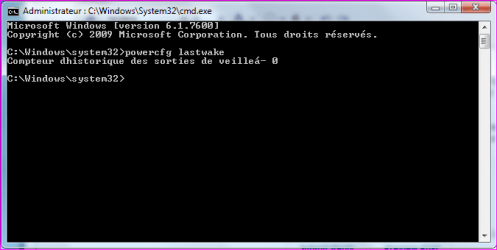
i've got invalid parameter on wi-fi...
Try powercfg \lastwake instead of powercfg –lastwake.

Power Options and Sleep Mode Problems - Vista Forums (Step Four)

btw I guess I've started celebrating too early... I'm still having that random waking up problem. One of those sessions with display turned off run smoothly, but today it just couldn't last more than one minute, before monitor was turned on again.

I'm really desperate right now, as I don't know what should I try next. I have same version of Windows 7 at my laptop and all those power saving options work fine on it. That must be some hardware-related issue.
 
Last edited:

My Computer My Computer

At a glance

Windows 7 UltimateIntel Core2Duo E8400Geil 2x1GB DDR2 800Gigabyte N220OC-1GI (GeForce GT 220)
OS
Windows 7 Ultimate
CPU
Intel Core2Duo E8400
Motherboard
Gigabyte P35C-DS3R
Memory
Geil 2x1GB DDR2 800
Graphics Card(s)
Gigabyte N220OC-1GI (GeForce GT 220)
Monitor(s) Displays
Samsung SyncMaster 2032BW
Screen Resolution
1680x1050
Hard Drives
Western Digital WD3200AAKS 320GB
PSU
Thermaltake 600W
Internet Speed
ADSL 1 Mbit
i've got invalid parameter on wi-fi...
Try powercfg lastwake instead of powercfg –lastwake.

Power Options and Sleep Mode Problems - Vista Forums (Step Four)

btw I guess I've started celebrating too early... I'm still having that random waking up problem. One of those sessions with display turned off run smoothly, but today it just couldn't last more than one minute, before monitor was turned on again.

I'm really desperate right now, as I don't know what should I try next. I have same version of Windows 7 at my laptop and all those power saving options work fine on it. That must be some hardware-related issue.

Mine says no history related yet....

Brink, thanks for that link!:)

I'm on Step Two, option 7 "Recommended Settings for Hybrid Sleep",
and Step Six but with my wi-fi network card, since a long time now, and no issue yet of random waking.

Better check twice in the task scheduler if there's no other programs waking up the computer.


Attachments

  • Capture.PNG
    Capture.PNG
    11.7 KB · Views: 40

My Computer My Computer

At a glance

Windows 7 Professional SP1 - x64 [Non-UEFI Boot]Ivy Bridge Core i5 3570K (Delidded)G.Skill "Ares" DDR3 PC3-12800 - 1600MHz (16Gb)Asus Dual-RX480-O4G
Computer type
PC/Desktop
Computer Manufacturer/Model Number
Custom Build
OS
Windows 7 Professional SP1 - x64 [Non-UEFI Boot]
CPU
Ivy Bridge Core i5 3570K (Delidded)
Motherboard
Asus P8Z77-V LE PLUS
Memory
G.Skill "Ares" DDR3 PC3-12800 - 1600MHz (16Gb)
Graphics Card(s)
Asus Dual-RX480-O4G
Sound Card
Creative Sound Blaster Z w/5.1 sound system
Monitor(s) Displays
Asus IPS 23"
Screen Resolution
16/9
Hard Drives
Internal:
500Go Sata 6Gb/s (x2)
500Go Sata 3Gb/s (x2)
SSD 60Go Sata 6Gb/s
PSU
In Win C 900W Series 80+ Platinum
Case
Thermaltake Chaser A71
Cooling
Custom Water Cooling Loop
Keyboard
Cooler Master QuickFire XTi
Mouse
Razer Imperator 2012 (4G)
Antivirus
MSE
Browser
IE 11.0.xxx Rtm
Other Info
"Raid0" with Intel Smart Response Technology (HDD/SSD)
Better check twice in the task scheduler if there's no other programs waking up the computer.
Yeah, but I think that sleep/wake up of the computer and monitor power saving mode are two different things, so I'm not sure that all those advices for random wake up from sleep will work in my case.

Anyway, thanks for your efforts.
 
Last edited:

My Computer My Computer

At a glance

Windows 7 UltimateIntel Core2Duo E8400Geil 2x1GB DDR2 800Gigabyte N220OC-1GI (GeForce GT 220)
OS
Windows 7 Ultimate
CPU
Intel Core2Duo E8400
Motherboard
Gigabyte P35C-DS3R
Memory
Geil 2x1GB DDR2 800
Graphics Card(s)
Gigabyte N220OC-1GI (GeForce GT 220)
Monitor(s) Displays
Samsung SyncMaster 2032BW
Screen Resolution
1680x1050
Hard Drives
Western Digital WD3200AAKS 320GB
PSU
Thermaltake 600W
Internet Speed
ADSL 1 Mbit
I have the same problem computer starts up once in a week. Any ideeas? I've tried all the instructions from above, hopefully I've done everything ok
 

My Computer My Computer

At a glance

Windows 7 ultimate 32
OS
Windows 7 ultimate 32
Same for me. this problem just creep up so sudden. set screen off for x min. screen would turn off in x min. Then the screen would just turn itself on again in a few min. Then it turn itself off for good til I wake it with a command. A few week ago, it won't even turn off and I had to reset the pc. Wonder if its some hardware related problem... Gonna reinstall window but don't think it will help....
 

My Computer My Computer

At a glance

Windows 7 Ultimate SP1Intel Atom z520 1.33ghz|Intel Core i7 2600K|A...1 GB DDR2|32 GB DDR3|32 GB DDR3Intel GM500|Nvidia GTX480|Nvidia 9800GT
Computer Manufacturer/Model Number
Viliv X70|Asus P8Z68 Deluxe|MSI FXA890-GD70
OS
Windows 7 Ultimate SP1
CPU
Intel Atom z520 1.33ghz|Intel Core i7 2600K|AMD Phenom II955
Memory
1 GB DDR2|32 GB DDR3|32 GB DDR3
Graphics Card(s)
Intel GM500|Nvidia GTX480|Nvidia 9800GT
Sound Card
Built in
Monitor(s) Displays
Built in Touch sensitive resistive lcd|Samsung 305T|HP 3065
Screen Resolution
1024x600|2560x1600|2506x1600
Hard Drives
16 GB SSD Siliconmotion SM2233AB|Mechanical HDD
PSU
Built in|Ultra LSP 650|Ultra LSP 650
Cooling
Passive|active|active
Internet Speed
12 mbit cable
Back
Top