More Than 3 Out of 4 Enthusiasts Reject Windows 8

Status
Not open for further replies.

My Computer My Computer

At a glance

Vista, Windows7, Mint Mate, Zorin, Windows 8from 1.6GHz Duo to i7
Computer Manufacturer/Model Number
HP, Dell, Gateway, Toshiba - 4 laptops and 2 desktops
OS
Vista, Windows7, Mint Mate, Zorin, Windows 8
CPU
from 1.6GHz Duo to i7
Monitor(s) Displays
2x HP w2207
Hard Drives
5x HDD, 7x SSD, 12x Externals
Keyboard
with trackball - no mices
Mouse
Trackball mice
Internet Speed
DSL 6000
I always think Windows 8.1 (Blue) as more of a service pack update to Windows 8.
 

My Computer My Computer

Computer type
Laptop
Xbox One: The wobbly third leg of Microsoft’s non-desktop trifecta


...From a subjective standpoint, though, each of Microsoft’s new offerings is intrinsically flawed and bogged down by crippling policy decisions no doubt handed down from Microsoft’s besuited higher echelons. Windows 8 and 8.1, despite “responding to customer feedback,” still forces users to use the Metro interface, even when a touchscreen isn’t present. Windows Phone 8 is one of Microsoft’s most polished products, but a smartphone OS is only as strong as its app ecosystem, and due to its minuscule market share WP8 still lacks the ecosystem to pull consumers away from iOS and Android — an unfortunate Catch-22 if I ever saw one. The Xbox One, depending on your point of view, is either an awesome all-in-one living room box that plays games, or an awful DRM-restricted games machine that acts as an HDMI passthrough for your cable box — the very same thing that the tried-and-failed Google TV attempted to do.
How did Microsoft manage to take three exciting, technologically advanced products and turn them into mediocre, humdrum devices that have had all of the fun and adventure sucked out of them?

Full article at:

Xbox One: The wobbly third leg of Microsoft’s non-desktop trifecta | ExtremeTech
 

My Computer My Computer

At a glance

Windows 10 (64 bit)AMD FX832016 GBAMD 7870
Computer type
PC/Desktop
Computer Manufacturer/Model Number
Custom Build
OS
Windows 10 (64 bit)
CPU
AMD FX8320
Motherboard
Asus M5A99X EVO
Memory
16 GB
Graphics Card(s)
AMD 7870
I ignore the cloud-based aspect of it, but do use some of the 'apps' (God, I hate that word).


Wenda.

Me too! Seems like all I hear and read is app this and app that, app everything! I'm sick of "apps"! LOL
 

My Computer My Computer

At a glance

Windows 7 Pro x64Intel I7 6700 3.40 GHz8GB
Computer type
PC/Desktop
Computer Manufacturer/Model Number
HP ProDesk 400 G3
OS
Windows 7 Pro x64
CPU
Intel I7 6700 3.40 GHz
Memory
8GB
Monitor(s) Displays
Samsung 21.5" LED
Hard Drives
1 TB
Keyboard
Ducky mechanical with PBT double shot keycaps.
Wait for two weeks or so for the W8.1 preview -- it might not yet be exactly what the users want but it's decidedly better than the current W8.
From all I have seen of 8.1 it is not good enough for the traditional desktop user. The 'Start button' is a joke and all the other functions are still geared to tablet users.

I don't want tiles nor a cloud nor any of those new apps on my desktop. And for my tablet I am well served with Android.......


My sentiments exactly whs! My computer has W7 and my tablet is an IPad. I did the same thing to W8
that M$ did to the desktop.....threw it under the bus. :D
 
Last edited:

My Computer My Computer

At a glance

Windows 7 Pro x64Intel I7 6700 3.40 GHz8GB
Computer type
PC/Desktop
Computer Manufacturer/Model Number
HP ProDesk 400 G3
OS
Windows 7 Pro x64
CPU
Intel I7 6700 3.40 GHz
Memory
8GB
Monitor(s) Displays
Samsung 21.5" LED
Hard Drives
1 TB
Keyboard
Ducky mechanical with PBT double shot keycaps.

My Computer My Computer

At a glance

Microsoft Windows 7 Home Premium 64-bit SP1AMD Phenom II N830 / AMD Phenom II N830 Tripl...2x 2GB DIMM Samsung 1334MHz ( total 4GB syste...AMD M880G with ATI Mobility Radeon HD 4250 (HP)
Computer Manufacturer/Model Number
HP G62 Notebook PC
OS
Microsoft Windows 7 Home Premium 64-bit SP1
CPU
AMD Phenom II N830 / AMD Phenom II N830 Triple-Core Proces
Motherboard
Hewlett-Packard 143B (Socket S1G4)
Memory
2x 2GB DIMM Samsung 1334MHz ( total 4GB system memory )
Graphics Card(s)
AMD M880G with ATI Mobility Radeon HD 4250 (HP)
Sound Card
Realtek High Definition/ ATI High Definition Audio Device
Monitor(s) Displays
39.6cm(15.6")diagonal HD LED HP BrightView Widescreen
Screen Resolution
(1366x768@60Hz)
Hard Drives
TOSHIBA MK5056GSY SATA Disk Device 450.07 GB (300.79 GB free), File System NTFS
Internet Speed
1.98MB/s<<download) 0.12MB/s <<upload) 63ms<<ping) 23/12/12
Browser
Chrome Version 25.0.1364.152 / Firefox 19.0.2
Other Info
Xbox 360 / 250GB HDD model
Microsoft is like a politician, " do what I say, don't do what I do".
 

My Computer My Computer

At a glance

Windows 10 (64 bit)AMD FX832016 GBAMD 7870
Computer type
PC/Desktop
Computer Manufacturer/Model Number
Custom Build
OS
Windows 10 (64 bit)
CPU
AMD FX8320
Motherboard
Asus M5A99X EVO
Memory
16 GB
Graphics Card(s)
AMD 7870
_1371234169.jpg


Microsoft have verified the old saying.
Talk is cheep.
Thanks Juxxize for the site.
 

My Computer My Computer

At a glance

Windows 10 Pro. 64/ version 1709 Windows 7 Pr...Intel i7-6800K @ 4.3Corsair Platinum 16 gig @2400EVGA GTX 1070 OC
Computer type
PC/Desktop
Computer Manufacturer/Model Number
Home made Desktop
OS
Windows 10 Pro. 64/ version 1709 Windows 7 Pro/64
CPU
Intel i7-6800K @ 4.3
Motherboard
ASUS X-99 Deluxe II
Memory
Corsair Platinum 16 gig @2400
Graphics Card(s)
EVGA GTX 1070 OC
Monitor(s) Displays
Asus 27" LED LCD/VE278Q
Screen Resolution
1920-1080 or 1280-720 HDMI
Hard Drives
INTEL SSD 730-240 Gb Sata 3.0/
PSU
EVGA Platium 1200W
Case
Phanteks Luxe Tempered Glass 8 fans/ one radiator
Cooling
XSPC/ Water Cooled CPU
Keyboard
Das 4 Professional
Mouse
Logitech M705/MX Anywhere 2-S
Internet Speed
100 mbits
Antivirus
Microsoft Security Essentials/ Malwarebytes Premium 3.0/ SAS
Browser
I.E. 11 default/Firefox/ ISP Time Warner Cable/Spectrum
Other Info
LG BluRay Burner/
Sound system-KLipsch-THX/
Icy Dock ssd Hot Swap bays.
Modern Business Practice

I don't know if this link has been posted on this thread but I find it interesting ( and a little amusing ) that even Microsoft doesn't want to use Windows 8 , at E3 they were using a Windows 7 system to preview the new up-coming xbox one games :D

Modern business practice dictates that you charge everyone for everything, even inside your own company.

The Xbox division would have had to buy the corporate version of W8.
They didn't want spend the cash, so they didn't use W8.
 

My Computer My Computer

At a glance

W7 Ultimate SP1, LM19.2 MATE, W10 Home 1703, ...AMD Phenom II x6 1100T, 3.3 GHz12GB DDR3 1333 G-Skill (4GB x 2), G-Skill (2G...NVIDIA GeForce GTX 660
Computer type
PC/Desktop
Computer Manufacturer/Model Number
n/a
OS
W7 Ultimate SP1, LM19.2 MATE, W10 Home 1703, W10 Pro 1703 VM, #All 64 bit
CPU
AMD Phenom II x6 1100T, 3.3 GHz
Motherboard
ASUS M4A88T-M/USB3 (AM3)
Memory
12GB DDR3 1333 G-Skill (4GB x 2), G-Skill (2GB x 2)
Graphics Card(s)
NVIDIA GeForce GTX 660
Sound Card
Realtek?
Monitor(s) Displays
Samsung S23B350
Screen Resolution
1920x1080
Hard Drives
WD Green 2TB (SATA), WD Green 3TB (SATA), WD Blue 4TB (SATA), WD Blue 6TB (SATA)
PSU
Cooler Master
Case
Antec GX300 Tower
Cooling
3x Antec TRICOOL 120mm Fans
Mouse
Wired Optical
Internet Speed
DSL
Antivirus
Avast
Browser
Pale Moon (64 bit)
Other Info
2018-12-27 Upgraded HDDs
2015-12-10 Upgraded case, graphics card, storage
2015-08-15 Upgraded motherboard & RAM
2015-07-15 Upgraded LM17.1 to LM17.2

My Computer My Computer

At a glance

Windows 7 Pro x64Intel I7 6700 3.40 GHz8GB
Computer type
PC/Desktop
Computer Manufacturer/Model Number
HP ProDesk 400 G3
OS
Windows 7 Pro x64
CPU
Intel I7 6700 3.40 GHz
Memory
8GB
Monitor(s) Displays
Samsung 21.5" LED
Hard Drives
1 TB
Keyboard
Ducky mechanical with PBT double shot keycaps.
Wait for two weeks or so for the W8.1 preview -- it might not yet be exactly what the users want but it's decidedly better than the current W8.
From all I have seen of 8.1 it is not good enough for the traditional desktop user. The 'Start button' is a joke and all the other functions are still geared to tablet users.

I don't want tiles nor a cloud nor any of those new apps on my desktop. And for my tablet I am well served with Android.......


My sentiments exactly whs! My computer has W7 and my tablet is an IPad. I did the same thing to W8
that M$ did to the desktop.....threw it under the bus. :D

Hi there

Wait and see until 8.1 is actually OUT-- the Boot directly to desktop seems like a good feature for starters and is OFICIALLY BACK in 8.1.

In any case even on the current W8 there's no need whatsoever to have ANY of those "New fangled apps" on your desktop either. They can stay on the Start screen (which in W8.1 you never have to even SEE) and in any case they can all be uninstalled / removed.

I've no problems with people riling about W8 but at least please make SALIENT points -- if you don't like Metro (And currently I HATE it too) there's no reason to even SEE it any more with Windows 8.1 -- BUT actually they've changed the interface so these apps can run in multi- window - multi-monitor mode so they can operate rather like the old gadgets did but better. I could get interested for example having a small re-sizeable window (Not full screen) showing real time Market data for example while I'm working.

I really wonder also how many current W7 users actually use the start button or even the menu once they've organised their systems - most people I know either run stuff from the Desktop or from the quick launch bar and only use the menu if they want to find something -- and even the current W8's search IMO is superior once you get used to it.

I in common with a lot of people don't like the current W8's start screen with endless tiles etc -- but 8.1 is looking good - even installing desktop applications won't spread loads of tiles randomly all over the place either too. -- I'd at least have a look at 8.1 when it comes out --you might be pleasantly surprised.

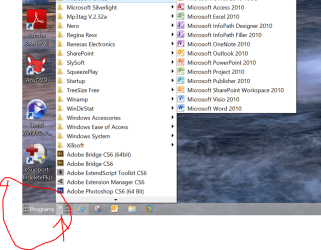
(Even with the current W8 I can run an almost identical desktop as I can with W7 -- Desktop icons still work and you've got the taskbar (aka Quick launch bar) which works exactly like W7. And for those that really can't live without a menu you can create a custom tool bar which works almost as good as the Menu anyway).

Desktop W8 screenshot enc - Desktop icons, Taskbar, and custom toolbar for pgms -- no need for any 3rd party stuff -- all basic Windows features.


Cheers
jimbo
 

Attachments

  • menu8.png
    menu8.png
    166.3 KB · Views: 14

My Computer My Computer

At a glance

Linux CENTOS 7 / various Windows OS'es and se...Intel i7 Intel i58GB, 16GBOn Motherboard
Computer type
PC/Desktop
Computer Manufacturer/Model Number
Custom built, several laptops HP/ASUS
OS
Linux CENTOS 7 / various Windows OS'es and servers
CPU
Intel i7 Intel i5
Memory
8GB, 16GB
Graphics Card(s)
On Motherboard
Sound Card
Realtek HD audio
Monitor(s) Displays
Apple Cinema display, Samsung LCD
Screen Resolution
1920 X 1080
Hard Drives
4 X 1TB SATA
Mouse
Toshiba wireless laser
Internet Speed
> 20MB up
It was a bit more then just Metro or "Modern" and the Start screen for me but how they divided everything up placing some things in a hidden right click menu whereas the older Start menu saw "Settings>Control Panel", Administrative Tools, and other things leading off of one central point. With 8 the Crawler tool bar popup annoyance on the right side is another jab for the centralized being divided up in another hidden location "comfy for tablet" but not making any sense for the desktop platform which MS wasn't even interested in for W8 to start with! 8.1 or second edition is to end up more or less a hybrid OS to satisfy to some limited extent the frustrations of actual desktop users as well as the bad rep from bloggers 8 has been getting.
 

My Computers My Computers

  • At a glance

    W7 Ultimate x64/W10 Pro x64/W11 Pro Triple Bo...AMD Phenom II X4 975 Deneb 3.6ghz - 965 2nd r...Kingston Hyper X DDR3 1600 1.5v 16gb - Hyper ...MSI HD Radeon 5750 1gb - MSI HD Radeon 6450 o...
    Computer type
    PC/Desktop
    Computer Manufacturer/Model Number
    Custom builds = 2
    OS
    W7 Ultimate x64/W10 Pro x64/W11 Pro Triple Boot - Main PC W7 Remote PC Micro ATX W7 Pro x64/W11 Pro
    CPU
    AMD Phenom II X4 975 Deneb 3.6ghz - 965 2nd remote pc
    Motherboard
    Gigabyte GA-790XTA-UD4-Gigabyte GA-880GM-D2H remote pc
    Memory
    Kingston Hyper X DDR3 1600 1.5v 16gb - Hyper X Fury 8gb 2nd
    Graphics Card(s)
    MSI HD Radeon 5750 1gb - MSI HD Radeon 6450 on mini tower
    Sound Card
    Creative Labs X-Fi Xtreme Audio P - Realtek onooard 2nd case
    Monitor(s) Displays
    ASUS VW199T-P 19" HP 2082a Main-HP 2082a 20" remote pc
    Screen Resolution
    Asus 1440x900 - HP 1600x900
    Hard Drives
    WD Black 1TB HD per OS W7, W10, and pending W11 presently on 500gb OS Drive - Pending Triple 1TB HDs for Spanned Storage/backup volume
    Single 2TB external USB enclosure, single 1TB System 7 Host/Boot drive, Pending 8TB external HD for system image b
    PSU
    Corsair 750TX - primary / Corsair CX600 - second
    Case
    Antec 900-2 - SSD compatible / NZXT Vulcan mini tower
    Cooling
    Zalman CNPS9900A
    Keyboard
    AZIO L70 Backlit Letters Gaming - ONN Cordless/USB
    Mouse
    MSI DS200 Programmable, Logitech Cordless
    Internet Speed
    30mbps upgrade - primary hard wired - mini tower usb WiFi
    Antivirus
    GFI VIPRE Internet Security 2014 on W7 2016 beta on W10,
    Browser
    Cyberfox, WaterFox 64bit FF variants, FireFox x64, Pale Moon
    Other Info
    Accomdata fan cooled usb 2.0 PIDE/Sata II, III external enclosure.
    Sambient usb/eSata PATA/Sata II, III external enclosure.
  • At a glance

    W7 Pro x64/W11 ProAMD Deneb 3.6ghz - 965Kingston Hyper X Fury 8gbMSI HD Radeon 6450 DVI Output
    Computer type
    PC/Desktop
    System Manufacturer/Model Number
    CUSTOM ASSEMBLY
    OS
    W7 Pro x64/W11 Pro
    CPU
    AMD Deneb 3.6ghz - 965
    Motherboard
    Gigabyte GA-880GM-D2H remote pc
    Memory
    Kingston Hyper X Fury 8gb
    Graphics Card(s)
    MSI HD Radeon 6450 DVI Output
    Sound Card
    Realtek onooard Creative or Other separate PENDING
    Monitor(s) Displays
    VIZIO 32" LCD TV Separate LCD Pending
    Screen Resolution
    1600x1080
    Hard Drives
    WD 500GB OS Host/Boot WD Green 1TB Storage/Backup
    PSU
    Corsair 600W - THERMALTAKE 600W spare case
    Case
    NZXT Vulcan mini tower
    Cooling
    Twin 120mm Top Fans - 240mm Side Cover
    Keyboard
    ONN Cordless/USB Logitech Cordless
    Mouse
    ONN USB/Cordless - Logitech Cordless
    Internet Speed
    DSL 5G
    Browser
    MS Edge, FireFox, WaterFox x64, FireFox Nightly
    Other Info
    OS Testing-Remote Access to Main TeamViewer
Quote: Originally Posted by jimbo45
I really wonder also how many current Windows 7 users actually use the start button or even the menu once they've organised their systems - most people I know either run stuff from the Desktop or from the quick launch bar and only use the menu if they want to find something
I use it all the time and I've got my desktop set up as I want it, so I would miss it if I was using Windows 8, I suppose a-lot of people must use it or miss it if it's been offered back ( of sorts ) to users in the new Windows 8.1 update , it's good that MS seemed to have listened to their customers on this .
 

My Computer My Computer

At a glance

Microsoft Windows 7 Home Premium 64-bit SP1AMD Phenom II N830 / AMD Phenom II N830 Tripl...2x 2GB DIMM Samsung 1334MHz ( total 4GB syste...AMD M880G with ATI Mobility Radeon HD 4250 (HP)
Computer Manufacturer/Model Number
HP G62 Notebook PC
OS
Microsoft Windows 7 Home Premium 64-bit SP1
CPU
AMD Phenom II N830 / AMD Phenom II N830 Triple-Core Proces
Motherboard
Hewlett-Packard 143B (Socket S1G4)
Memory
2x 2GB DIMM Samsung 1334MHz ( total 4GB system memory )
Graphics Card(s)
AMD M880G with ATI Mobility Radeon HD 4250 (HP)
Sound Card
Realtek High Definition/ ATI High Definition Audio Device
Monitor(s) Displays
39.6cm(15.6")diagonal HD LED HP BrightView Widescreen
Screen Resolution
(1366x768@60Hz)
Hard Drives
TOSHIBA MK5056GSY SATA Disk Device 450.07 GB (300.79 GB free), File System NTFS
Internet Speed
1.98MB/s<<download) 0.12MB/s <<upload) 63ms<<ping) 23/12/12
Browser
Chrome Version 25.0.1364.152 / Firefox 19.0.2
Other Info
Xbox 360 / 250GB HDD model
Almost Daily

I really wonder also how many current W7 users actually use the start button or even the menu once they've organised their systems - most people I know either run stuff from the Desktop or from the quick launch bar and only use the menu if they want to find something -- and even the current W8's search IMO is superior once you get used to it.

I hate having icons on my desktop.
I only drop things there temporarily (I move them to the appropriate folders later).

My friend drops everything on his desktop and he can never find anything without a lengthy search.
His full HD screen is 50% covered with program icons (he also has a couple of gadgets and a bunch of Sticky Notes on it).

I use the Start Menu regularly (especially if I've had to reboot).

On my PC:

  • My "Primary" programs are on the Taskbar (+ Customised Computer Management and Control Panel).
  • My "Secondary" programs are in the pinned area.
  • I use a combination of the Search box and "All Programs" (depending on my mood).
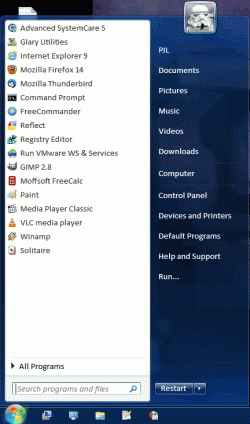
This is my Start Menu from last year (it is still basically the same).
I have my "All Programs" section categorised to eliminate sprawl.
Click picture for animation
Start Menu.gif
-- and even the current W8's search IMO is superior once you get used to it.

That's debatable.

The W7 search leaves you on the Desktop (where your work is) and doesn't require the entire screen.
I don't even have the Indexing service running and yet it always finds the programs I search for (I don't use it to search for files).

Maybe they've fixed search in the W8 release version, but when I was using the previews (DP, CP, RP and Ent) it wouldn't show any results (for the searches I tried) unless I clicked on one of the categories (at the top right).
 

My Computer My Computer

At a glance

W7 Ultimate SP1, LM19.2 MATE, W10 Home 1703, ...AMD Phenom II x6 1100T, 3.3 GHz12GB DDR3 1333 G-Skill (4GB x 2), G-Skill (2G...NVIDIA GeForce GTX 660
Computer type
PC/Desktop
Computer Manufacturer/Model Number
n/a
OS
W7 Ultimate SP1, LM19.2 MATE, W10 Home 1703, W10 Pro 1703 VM, #All 64 bit
CPU
AMD Phenom II x6 1100T, 3.3 GHz
Motherboard
ASUS M4A88T-M/USB3 (AM3)
Memory
12GB DDR3 1333 G-Skill (4GB x 2), G-Skill (2GB x 2)
Graphics Card(s)
NVIDIA GeForce GTX 660
Sound Card
Realtek?
Monitor(s) Displays
Samsung S23B350
Screen Resolution
1920x1080
Hard Drives
WD Green 2TB (SATA), WD Green 3TB (SATA), WD Blue 4TB (SATA), WD Blue 6TB (SATA)
PSU
Cooler Master
Case
Antec GX300 Tower
Cooling
3x Antec TRICOOL 120mm Fans
Mouse
Wired Optical
Internet Speed
DSL
Antivirus
Avast
Browser
Pale Moon (64 bit)
Other Info
2018-12-27 Upgraded HDDs
2015-12-10 Upgraded case, graphics card, storage
2015-08-15 Upgraded motherboard & RAM
2015-07-15 Upgraded LM17.1 to LM17.2
Bah, I'm still in the bunker waiting that this tablet craze passes and MS returns to desktops and laptops in shame. It always sucked at touchscreen portable devices since CE and that portable XP or whatever it was called.

Anyway in this case MS got shafted big way because Intel is not anywhere up to the task of providing chips that manage to be better than ARM ones for tablet-grade devices. Does not matter that they make win8 for tablets (good or bad that it might be) if x86 tablets are far far worse than even basic android tablets (battery-wise they are laptops, if not worse, while an android device can pull on nearly all day long and do the same things albeit with different programs and OS). AMD isn't in a better position either.

There is at least another generation of x86 chips to make before they start to look viable in a tablet, and let's speak frankly, it's too late now to get in the tablet market, go figure next year with still immature technology.

Before they realize this detail, the better. x86 lost the current battle on tablets, better do their best to keep alive the other market (laptops and desktops) so that it may live to fight another battle on tablets at a later time.
 

My Computer My Computer

At a glance

Win 7 Pro 64-bit 7601AMD Phenom 9650 QuadCore, revision DR-B35 GB yes I run 2x 2GB and 1x 1GB, different b...NVIDIA GeForce 9800 GT 512 Mb, unknown manufa...
Computer type
PC/Desktop
Computer Manufacturer/Model Number
custom built
OS
Win 7 Pro 64-bit 7601
CPU
AMD Phenom 9650 QuadCore, revision DR-B3
Motherboard
ASUS M4A78
Memory
5 GB yes I run 2x 2GB and 1x 1GB, different brand, spank me.
Graphics Card(s)
NVIDIA GeForce 9800 GT 512 Mb, unknown manufacturer.
Sound Card
Crappy Realtek Integrated Audio
Monitor(s) Displays
Fujitsu Siemens P19-3P
Screen Resolution
1280 x 1024 x 32 bits @ 60 Hz Oh yeah, 4:3 rocks!
Hard Drives
(1) MAXTOR S TM3320613AS SATA Disk Device (2) STM35004 18AS SATA Disk Device (3) TOSHIBA USB 2.5"-HDD
PSU
whatever, around 450w
Case
Scavenged from old company PC, 10+ years old
Cooling
CPU fan, GPU fan, case fan, nothing fancy
Keyboard
Microsoft, PS/2, white.
Mouse
Optical, logitec.
Internet Speed
effective max speeds: 70-ish kB/s down 30-ish kB/s up
Antivirus
Avira, free edition.
Browser
Firefox with FXChrome to make it look like Google Chrome :P
Other Info
Was discarded by previous owner due to "horrible performance".
Was running Win Xp from a IDE drive. Yeah. Was a pain.
SATA II drive and Win7 and it zips away! Yay!
...I really wonder also how many current W7 users actually use the start button or even the menu once they've organised their systems - most people I know either run stuff from the Desktop or from the quick launch bar and only use the menu if they want to find something -- and even the current W8's search IMO is superior once you get used to it...jimbo

That could make an interesting poll. I, for one, do use the start button; frequently. While I launch my most frequently used programs from the task bar and notification area, I have so many programs I only use occasionally (if I never use a program, I get rid of it), there is no way for me to keep track of them all or even remember what they are or that I have them (having ADHD doesn't help any). Win 8's search function alone wouldn't help me at all. I also use the start button to get to my data folders, My Computer, etc. I could put shortcuts on the task bar but there just isn't room. I don't like to keep my programs on the desktop; a list is much easier for me to read (I detest icons anyway—they eat up too much space and I can never remember what they represent—so imagine how I feel about Win 8's tiles). Hidden buttons are also problematic for me.

From the preview video I saw of Win 8.1, if M$ had offered that in then beginning, I might have considered trying it (sorry M$, too little too late). But, what was offered in the beginning was such a mess, when I built my present desktop, I decided to commit to Win 7 and bought three OSes; two retail versions of Win 7 Ultimate and one of Win 7 Home Premium. I'm still wondering why on earth I bought the last one since I'm not likely to have more than two running machines at any given time (currently, I'm running two and one has an OEM copy on it). Win 7 currently meets my needs and I'm committed to using it until it dies.

It's a pity M$ removed desirable features that were in Win 7 when it designed Win 8 and saddled it with the mobile machine UI because Win 8 did have some desirable improvements.
 

My Computer My Computer

At a glance

Win 7 Ultimate 64 bitIntel i7-3930KKingston HyperX Genesis 32GB Kit (8x4GB Modul...MSI R7850 Twin Frozr 2GD5/OC Radeon HD 7850 2...
Computer type
PC/Desktop
Computer Manufacturer/Model Number
Custom Build
OS
Win 7 Ultimate 64 bit
CPU
Intel i7-3930K
Motherboard
ASUS P9X79 WS
Memory
Kingston HyperX Genesis 32GB Kit (8x4GB Modules) 1600MHz DDR
Graphics Card(s)
MSI R7850 Twin Frozr 2GD5/OC Radeon HD 7850 2GB 256-bit GDDR
Sound Card
Asus Xonar Essence STX
Monitor(s) Displays
3x Asus VG248QE 24", Vizio 32" TV
Screen Resolution
1920 x 1080, ?
Hard Drives
Samsung 128GB 840 Pro SSD (1),
Samsung 4TB 850 EVO SSDs (4)
Samsung 4TB 850 EVO SSDs (16) external backup drives used in 2.5" hot swap bays in the computer.
PSU
Corsair HX750w
Case
Antec Two Hundred v2 (modified)
Cooling
Cooler Master GeminII S524 120mm (fan replaced with a 140mm)
Keyboard
Logitech G510s
Mouse
Logitech M525 (two in use)
Internet Speed
=< 32Mbps down, 8Mbps up
Antivirus
AVAST!, MBAM, SAS, Spybot S&D (all but MBAM free) Glary Util
Browser
IE11
Other Info
LSI 9211-8i HBA card (8 SATA III ports), 2.5" & 3.5" Hot Swap Bays, HooToo HT-CR001 PCI-E to USB 3.0 Internal Hub + 6 Slot Card Reader, and LG Model CH12LS28 BD-ROM Optical Drive. Also, ScanSnap S1500 ADF duplexing scanner, Canon 9000F flat bed scanner, Corsair SP2500 2.1 speakers, Samsung CLP 415nw laser color printer, Cyberpower PP2200SW UPS
I hate having icons on my desktop.
I only drop things there temporarily (I move them to the appropriate folders later)...

I also detest icons on my desktop. I used to use the desktop as a place to temporarily drop things but, now that I'm using an SSD, to minimize writes to it, I keep shortcuts on the desktop to folders on my E:/ drive I use for temporary folders to drop things into. I also keep temporary shortcuts on the desktop to files on the E:/ drive that are works in progress.
 

My Computer My Computer

At a glance

Win 7 Ultimate 64 bitIntel i7-3930KKingston HyperX Genesis 32GB Kit (8x4GB Modul...MSI R7850 Twin Frozr 2GD5/OC Radeon HD 7850 2...
Computer type
PC/Desktop
Computer Manufacturer/Model Number
Custom Build
OS
Win 7 Ultimate 64 bit
CPU
Intel i7-3930K
Motherboard
ASUS P9X79 WS
Memory
Kingston HyperX Genesis 32GB Kit (8x4GB Modules) 1600MHz DDR
Graphics Card(s)
MSI R7850 Twin Frozr 2GD5/OC Radeon HD 7850 2GB 256-bit GDDR
Sound Card
Asus Xonar Essence STX
Monitor(s) Displays
3x Asus VG248QE 24", Vizio 32" TV
Screen Resolution
1920 x 1080, ?
Hard Drives
Samsung 128GB 840 Pro SSD (1),
Samsung 4TB 850 EVO SSDs (4)
Samsung 4TB 850 EVO SSDs (16) external backup drives used in 2.5" hot swap bays in the computer.
PSU
Corsair HX750w
Case
Antec Two Hundred v2 (modified)
Cooling
Cooler Master GeminII S524 120mm (fan replaced with a 140mm)
Keyboard
Logitech G510s
Mouse
Logitech M525 (two in use)
Internet Speed
=< 32Mbps down, 8Mbps up
Antivirus
AVAST!, MBAM, SAS, Spybot S&D (all but MBAM free) Glary Util
Browser
IE11
Other Info
LSI 9211-8i HBA card (8 SATA III ports), 2.5" & 3.5" Hot Swap Bays, HooToo HT-CR001 PCI-E to USB 3.0 Internal Hub + 6 Slot Card Reader, and LG Model CH12LS28 BD-ROM Optical Drive. Also, ScanSnap S1500 ADF duplexing scanner, Canon 9000F flat bed scanner, Corsair SP2500 2.1 speakers, Samsung CLP 415nw laser color printer, Cyberpower PP2200SW UPS
I have two icons on my desktop: Computer and Recycle Bin. I have a few programs pinned to the Taskbar, and the rest of my programs I access from the Start Menu.
 

My Computer My Computer

Computer type
Laptop
Desktop Icons

I have zero icons on my desktop.
Try this:
Right click on taskbar and select toolbars and check desktop.
Right click on desktop select view and uncheck show desktop icons.
All icons disappear from desktop and the taskbar has a place to click to view them.
 

My Computer My Computer

At a glance

win 7 X64 Ultimate SP1I3770KG Skill F3-14900CL9-4GBXL x 4NVIDIA GeForce GTX670 + Intel 4000
Computer Manufacturer/Model Number
BGC (Bob's Garage Crew)
OS
win 7 X64 Ultimate SP1
CPU
I3770K
Motherboard
Asus P8Z77-V Deluxe
Memory
G Skill F3-14900CL9-4GBXL x 4
Graphics Card(s)
NVIDIA GeForce GTX670 + Intel 4000
Sound Card
Realtek HD 5.1 (MOB)
Monitor(s) Displays
Asus VW224T (1)
Screen Resolution
1920 x 1080
Hard Drives
SATA Corsair Force GT 2.5" 180GB (System) Sata 3
OCZ Vertex3 120GB
OCZ Vertex 2 120GB 2.5" SATA II
ST31000524AS 1000.2GB
WD15EARS (External)
PSU
CoolerMaster 1000 Watt
Case
CoolerMaster HAF X
Cooling
CPU -- CoolerMaster 520N
Keyboard
MS Wireless 3000 V2
Mouse
MS Wireless 3000 V2
Internet Speed
Cable
Antivirus
Norton Internet Security
Browser
IE9
Other Info
AMI Bios 1805
OC'd 3%
I use the desktop as I always did with XP (and Win 98 before it), has icons of favorite programs and stuff I'm working at the moment. Every week I engage in a trash collection mood and tidy up stuff.

Whenever I get a SSD I'm going to do the same, either re-locating desktop to another disk with a hack or screw the SSD and that stuff stays on it anyway.

Start menu is less-used but still I would not go without. Could seriously use a bit of redesign though.
 

My Computer My Computer

At a glance

Win 7 Pro 64-bit 7601AMD Phenom 9650 QuadCore, revision DR-B35 GB yes I run 2x 2GB and 1x 1GB, different b...NVIDIA GeForce 9800 GT 512 Mb, unknown manufa...
Computer type
PC/Desktop
Computer Manufacturer/Model Number
custom built
OS
Win 7 Pro 64-bit 7601
CPU
AMD Phenom 9650 QuadCore, revision DR-B3
Motherboard
ASUS M4A78
Memory
5 GB yes I run 2x 2GB and 1x 1GB, different brand, spank me.
Graphics Card(s)
NVIDIA GeForce 9800 GT 512 Mb, unknown manufacturer.
Sound Card
Crappy Realtek Integrated Audio
Monitor(s) Displays
Fujitsu Siemens P19-3P
Screen Resolution
1280 x 1024 x 32 bits @ 60 Hz Oh yeah, 4:3 rocks!
Hard Drives
(1) MAXTOR S TM3320613AS SATA Disk Device (2) STM35004 18AS SATA Disk Device (3) TOSHIBA USB 2.5"-HDD
PSU
whatever, around 450w
Case
Scavenged from old company PC, 10+ years old
Cooling
CPU fan, GPU fan, case fan, nothing fancy
Keyboard
Microsoft, PS/2, white.
Mouse
Optical, logitec.
Internet Speed
effective max speeds: 70-ish kB/s down 30-ish kB/s up
Antivirus
Avira, free edition.
Browser
Firefox with FXChrome to make it look like Google Chrome :P
Other Info
Was discarded by previous owner due to "horrible performance".
Was running Win Xp from a IDE drive. Yeah. Was a pain.
SATA II drive and Win7 and it zips away! Yay!
Status
Not open for further replies.
Back
Top