More Than 3 Out of 4 Enthusiasts Reject Windows 8

Status
Not open for further replies.

My Computer My Computer

At a glance

Vista, Windows7, Mint Mate, Zorin, Windows 8from 1.6GHz Duo to i7
Computer Manufacturer/Model Number
HP, Dell, Gateway, Toshiba - 4 laptops and 2 desktops
OS
Vista, Windows7, Mint Mate, Zorin, Windows 8
CPU
from 1.6GHz Duo to i7
Monitor(s) Displays
2x HP w2207
Hard Drives
5x HDD, 7x SSD, 12x Externals
Keyboard
with trackball - no mices
Mouse
Trackball mice
Internet Speed
DSL 6000

My Computer My Computer

At a glance

Win 7 Ultimate 64 bitIntel i7-3930KKingston HyperX Genesis 32GB Kit (8x4GB Modul...MSI R7850 Twin Frozr 2GD5/OC Radeon HD 7850 2...
Computer type
PC/Desktop
Computer Manufacturer/Model Number
Custom Build
OS
Win 7 Ultimate 64 bit
CPU
Intel i7-3930K
Motherboard
ASUS P9X79 WS
Memory
Kingston HyperX Genesis 32GB Kit (8x4GB Modules) 1600MHz DDR
Graphics Card(s)
MSI R7850 Twin Frozr 2GD5/OC Radeon HD 7850 2GB 256-bit GDDR
Sound Card
Asus Xonar Essence STX
Monitor(s) Displays
3x Asus VG248QE 24", Vizio 32" TV
Screen Resolution
1920 x 1080, ?
Hard Drives
Samsung 128GB 840 Pro SSD (1),
Samsung 4TB 850 EVO SSDs (4)
Samsung 4TB 850 EVO SSDs (16) external backup drives used in 2.5" hot swap bays in the computer.
PSU
Corsair HX750w
Case
Antec Two Hundred v2 (modified)
Cooling
Cooler Master GeminII S524 120mm (fan replaced with a 140mm)
Keyboard
Logitech G510s
Mouse
Logitech M525 (two in use)
Internet Speed
=< 32Mbps down, 8Mbps up
Antivirus
AVAST!, MBAM, SAS, Spybot S&D (all but MBAM free) Glary Util
Browser
IE11
Other Info
LSI 9211-8i HBA card (8 SATA III ports), 2.5" & 3.5" Hot Swap Bays, HooToo HT-CR001 PCI-E to USB 3.0 Internal Hub + 6 Slot Card Reader, and LG Model CH12LS28 BD-ROM Optical Drive. Also, ScanSnap S1500 ADF duplexing scanner, Canon 9000F flat bed scanner, Corsair SP2500 2.1 speakers, Samsung CLP 415nw laser color printer, Cyberpower PP2200SW UPS
Whenever I finish downloading that as an mp4 I'll try it out.
 

My Computer My Computer

At a glance

Win 7 Pro 64-bit 7601AMD Phenom 9650 QuadCore, revision DR-B35 GB yes I run 2x 2GB and 1x 1GB, different b...NVIDIA GeForce 9800 GT 512 Mb, unknown manufa...
Computer type
PC/Desktop
Computer Manufacturer/Model Number
custom built
OS
Win 7 Pro 64-bit 7601
CPU
AMD Phenom 9650 QuadCore, revision DR-B3
Motherboard
ASUS M4A78
Memory
5 GB yes I run 2x 2GB and 1x 1GB, different brand, spank me.
Graphics Card(s)
NVIDIA GeForce 9800 GT 512 Mb, unknown manufacturer.
Sound Card
Crappy Realtek Integrated Audio
Monitor(s) Displays
Fujitsu Siemens P19-3P
Screen Resolution
1280 x 1024 x 32 bits @ 60 Hz Oh yeah, 4:3 rocks!
Hard Drives
(1) MAXTOR S TM3320613AS SATA Disk Device (2) STM35004 18AS SATA Disk Device (3) TOSHIBA USB 2.5"-HDD
PSU
whatever, around 450w
Case
Scavenged from old company PC, 10+ years old
Cooling
CPU fan, GPU fan, case fan, nothing fancy
Keyboard
Microsoft, PS/2, white.
Mouse
Optical, logitec.
Internet Speed
effective max speeds: 70-ish kB/s down 30-ish kB/s up
Antivirus
Avira, free edition.
Browser
Firefox with FXChrome to make it look like Google Chrome :P
Other Info
Was discarded by previous owner due to "horrible performance".
Was running Win Xp from a IDE drive. Yeah. Was a pain.
SATA II drive and Win7 and it zips away! Yay!

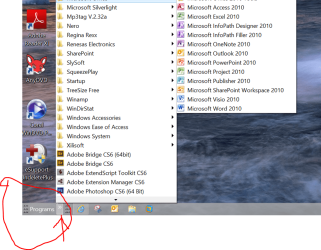
Why bother when Win 7 has a perfectly good system already? The start menu accomplishes the same thing.
Try to put 100 entries into the start menu - shortcuts for programs, websites and folders. I am waiting for your suggestions especially for the websites and folders.

Btw - Toolbars are part of the perfect Win7 system.
 

My Computer My Computer

At a glance

Vista, Windows7, Mint Mate, Zorin, Windows 8from 1.6GHz Duo to i7
Computer Manufacturer/Model Number
HP, Dell, Gateway, Toshiba - 4 laptops and 2 desktops
OS
Vista, Windows7, Mint Mate, Zorin, Windows 8
CPU
from 1.6GHz Duo to i7
Monitor(s) Displays
2x HP w2207
Hard Drives
5x HDD, 7x SSD, 12x Externals
Keyboard
with trackball - no mices
Mouse
Trackball mice
Internet Speed
DSL 6000

Why bother when Win 7 has a perfectly good system already? The start menu accomplishes the same thing.
Try to put 100 entries into the start menu - shortcuts for programs, websites and folders. I am waiting for your suggestions especially for the websites and folders.

Btw - Toolbars are part of the perfect Win7 system.

True, toolbars are part of Windows (and I never said Win 7 was perfect). I should have worded what I said a bit differently, such as Win 7 already has other perfectly good systems.

I don't need 100 entries in a single menu. Not only that, the more that are in a single list, the harder it is for me to find what I'm looking for. Digging through 100 entries all the time would be a nightmare for me. That is why I have only 26 programs pinned to my start menu and have room for 10 more (even more than that since there are a few I have already pinned that I could do without; I'll probably unpin them some day when I have nothing else to do to make going through the pinned list a bit easier). Access to All Programs is only a click away. My 18 most frequently used programs are on the taskbar. Those are duplicated by being pinned on the start menu (actually, they started there and I added them to task bar later). I could eliminate those duplications and gain room for another 18 more programs on the start menu.

The notification area has eight programs pinned to it (and several more are only a click away). Coretemp has all six core temperature readings there as well. I also put a shortcut to the Recycle Bin there so I can drag stuff there instead of right clicking to delete or reducing a window size to get to the default recycle bin icon; the icon is also bigger which helps with my aim (although most of the time, now, I just select and hit Shift/Delete to avoid unnecessary writes to my SSD; when scanning illustration rich books, such as color comics, I generate a huge number of temporary files).

The task bar is locked and is set to "Combine when the taskbar is full." It's located on the left side of my desktop so it's not in the way and is always visible for quick access. If I have enough Word docs open, for example, to overflow the task bars, they will combine into one entry. All I have to do is hover over the Word icon and Aeropeek will pop open previews of each document. To select one, all I have to do is click on its preview. Easy peasy.

Same for folders and files. I use the default libraries in the start menu as shortcuts to the associated data folder (example: Documents in the start menu takes me just to My Documents). It may require a few more clicks to get where I'm going but it's still one "heckuvalot" faster than running down a long list trying to find what I want.

Many files, such as my e-books and music files (the majority of my files, btw) are accessed from within the programs that use them. I use Media Monkey to organize, access and play my music. I rarely go directly to the folders where my music is stored. I use calibre to manage my e-books. It organizes my e-books, can do searches using more criteria than can be put into a folder/file structure (and the searches can be saved), converts them from one format to another, loads them onto an SD card to use in my e-book reader, etc. Once I add books to calibre, I never even go to the folder where my e-books get stored again (in fact, doing so is highly discouraged). While I will use a library to give me a single listing of video files spread over several HDDs once I start ripping my video collection, I will probably access them most of the time from whatever player I decide on.

Of course, if I know exactly what I am looking for, I can just hit the Windows key (or click on the orb) and start typing in the name.

Websites I access from within my browser (IE10) using either the favorites bar (I have 28 there) or the drop down Favorites menu (which is organized by folders; I'm too lazy to go through and count how many are there). I use AM Deadlink every few months to see if any sites have gone down or have new addresses. I see no need to link a website anywhere else other than within a Word doc or PDF.

 

My Computer My Computer

At a glance

Win 7 Ultimate 64 bitIntel i7-3930KKingston HyperX Genesis 32GB Kit (8x4GB Modul...MSI R7850 Twin Frozr 2GD5/OC Radeon HD 7850 2...
Computer type
PC/Desktop
Computer Manufacturer/Model Number
Custom Build
OS
Win 7 Ultimate 64 bit
CPU
Intel i7-3930K
Motherboard
ASUS P9X79 WS
Memory
Kingston HyperX Genesis 32GB Kit (8x4GB Modules) 1600MHz DDR
Graphics Card(s)
MSI R7850 Twin Frozr 2GD5/OC Radeon HD 7850 2GB 256-bit GDDR
Sound Card
Asus Xonar Essence STX
Monitor(s) Displays
3x Asus VG248QE 24", Vizio 32" TV
Screen Resolution
1920 x 1080, ?
Hard Drives
Samsung 128GB 840 Pro SSD (1),
Samsung 4TB 850 EVO SSDs (4)
Samsung 4TB 850 EVO SSDs (16) external backup drives used in 2.5" hot swap bays in the computer.
PSU
Corsair HX750w
Case
Antec Two Hundred v2 (modified)
Cooling
Cooler Master GeminII S524 120mm (fan replaced with a 140mm)
Keyboard
Logitech G510s
Mouse
Logitech M525 (two in use)
Internet Speed
=< 32Mbps down, 8Mbps up
Antivirus
AVAST!, MBAM, SAS, Spybot S&D (all but MBAM free) Glary Util
Browser
IE11
Other Info
LSI 9211-8i HBA card (8 SATA III ports), 2.5" & 3.5" Hot Swap Bays, HooToo HT-CR001 PCI-E to USB 3.0 Internal Hub + 6 Slot Card Reader, and LG Model CH12LS28 BD-ROM Optical Drive. Also, ScanSnap S1500 ADF duplexing scanner, Canon 9000F flat bed scanner, Corsair SP2500 2.1 speakers, Samsung CLP 415nw laser color printer, Cyberpower PP2200SW UPS
We have all for a long time head much about the Start Orb.

I keep scratching my head wondering how before Windows 8 came out I missed all the complaints about the Start Orb in previous operating systems.

You would think their should of been millions of complaints to convince Microsoft to do without the Start Orb in Windows 8.
Did anybody else miss all those complaints like I did.

The tool bar is built into Windows 7 just the way it should be. It's a option to use or not to use. You choose. I like things that way.
 

My Computer My Computer

At a glance

Windows 10 Pro. 64/ version 1709 Windows 7 Pr...Intel i7-6800K @ 4.3Corsair Platinum 16 gig @2400EVGA GTX 1070 OC
Computer type
PC/Desktop
Computer Manufacturer/Model Number
Home made Desktop
OS
Windows 10 Pro. 64/ version 1709 Windows 7 Pro/64
CPU
Intel i7-6800K @ 4.3
Motherboard
ASUS X-99 Deluxe II
Memory
Corsair Platinum 16 gig @2400
Graphics Card(s)
EVGA GTX 1070 OC
Monitor(s) Displays
Asus 27" LED LCD/VE278Q
Screen Resolution
1920-1080 or 1280-720 HDMI
Hard Drives
INTEL SSD 730-240 Gb Sata 3.0/
PSU
EVGA Platium 1200W
Case
Phanteks Luxe Tempered Glass 8 fans/ one radiator
Cooling
XSPC/ Water Cooled CPU
Keyboard
Das 4 Professional
Mouse
Logitech M705/MX Anywhere 2-S
Internet Speed
100 mbits
Antivirus
Microsoft Security Essentials/ Malwarebytes Premium 3.0/ SAS
Browser
I.E. 11 default/Firefox/ ISP Time Warner Cable/Spectrum
Other Info
LG BluRay Burner/
Sound system-KLipsch-THX/
Icy Dock ssd Hot Swap bays.
I really wonder also how many current W7 users actually use the start button or even the menu once they've organised their systems - most people I know either run stuff from the Desktop or from the quick launch bar and only use the menu if they want to find something -- and even the current W8's search IMO is superior once you get used to it.

I hate having icons on my desktop.
I only drop things there temporarily (I move them to the appropriate folders later).

My friend drops everything on his desktop and he can never find anything without a lengthy search.
His full HD screen is 50% covered with program icons (he also has a couple of gadgets and a bunch of Sticky Notes on it).

I use the Start Menu regularly (especially if I've had to reboot).

On my PC:

  • My "Primary" programs are on the Taskbar (+ Customised Computer Management and Control Panel).
  • My "Secondary" programs are in the pinned area.
  • I use a combination of the Search box and "All Programs" (depending on my mood).
This is my Start Menu from last year (it is still basically the same).
I have my "All Programs" section categorised to eliminate sprawl.
Click picture for animation
View attachment 272814
-- and even the current W8's search IMO is superior once you get used to it.

That's debatable.

The W7 search leaves you on the Desktop (where your work is) and doesn't require the entire screen.
I don't even have the Indexing service running and yet it always finds the programs I search for (I don't use it to search for files).

Maybe they've fixed search in the W8 release version, but when I was using the previews (DP, CP, RP and Ent) it wouldn't show any results (for the searches I tried) unless I clicked on one of the categories (at the top right).

I couldn't have the shortcuts for everything I generally have on covering the "two desktops" on the dual display set up here. That's one reason why I usually keep 5 Quick Launch type addon tool bars on the main task bar itself and simply open a folder used for one to drag the shortcut into from each new program with some going onto the Rocketdock bar set on the second display for a quick access while running something full screen on the primary.

The Start menu still has it's use for Search, Run, Admin Tools, the Control Panel when the pinned shortcut has a problem while the CP can be made available in any explorer window. At the same time the desktop remains completely free of anything eliminating the need to worry about clutter which would be all you would see with 5 tool bars of icons plastered on it!

Now as for Start orbs in versions that proceeded Vista none had orbs but Start buttons. They would be using the Classic Windows themes not Aero with or without transparency and orbs. For XP you could get some 3rd party tweakers to make XP look like Vista sometime back but as for the Aero and pinning things on the task bar that more or less was the convenient improvement over the Quick Launch area with limited amount of space. Now you can cover the entire task bar except for Start orb and System notifications.

The main beef about 8 is the fact that MS wasn't worried any about the desktop users who decided to try 8 out or were soon stuck royally with 8 on a new machine but were putting all the efforts into Surface and tabletizing things to start with. With the desktop market in a slump this apparently was their time to jump in the mobile market since they still have 7 to offer at the present moment. MS isn't worried too much about any home users who hate 8! MS is too large to begin with but would satisfy the blog writer bad mouthing MS by 8.1 seeing some form of familiarity brought into the "mess"!
 

My Computers My Computers

  • At a glance

    W7 Ultimate x64/W10 Pro x64/W11 Pro Triple Bo...AMD Phenom II X4 975 Deneb 3.6ghz - 965 2nd r...Kingston Hyper X DDR3 1600 1.5v 16gb - Hyper ...MSI HD Radeon 5750 1gb - MSI HD Radeon 6450 o...
    Computer type
    PC/Desktop
    Computer Manufacturer/Model Number
    Custom builds = 2
    OS
    W7 Ultimate x64/W10 Pro x64/W11 Pro Triple Boot - Main PC W7 Remote PC Micro ATX W7 Pro x64/W11 Pro
    CPU
    AMD Phenom II X4 975 Deneb 3.6ghz - 965 2nd remote pc
    Motherboard
    Gigabyte GA-790XTA-UD4-Gigabyte GA-880GM-D2H remote pc
    Memory
    Kingston Hyper X DDR3 1600 1.5v 16gb - Hyper X Fury 8gb 2nd
    Graphics Card(s)
    MSI HD Radeon 5750 1gb - MSI HD Radeon 6450 on mini tower
    Sound Card
    Creative Labs X-Fi Xtreme Audio P - Realtek onooard 2nd case
    Monitor(s) Displays
    ASUS VW199T-P 19" HP 2082a Main-HP 2082a 20" remote pc
    Screen Resolution
    Asus 1440x900 - HP 1600x900
    Hard Drives
    WD Black 1TB HD per OS W7, W10, and pending W11 presently on 500gb OS Drive - Pending Triple 1TB HDs for Spanned Storage/backup volume
    Single 2TB external USB enclosure, single 1TB System 7 Host/Boot drive, Pending 8TB external HD for system image b
    PSU
    Corsair 750TX - primary / Corsair CX600 - second
    Case
    Antec 900-2 - SSD compatible / NZXT Vulcan mini tower
    Cooling
    Zalman CNPS9900A
    Keyboard
    AZIO L70 Backlit Letters Gaming - ONN Cordless/USB
    Mouse
    MSI DS200 Programmable, Logitech Cordless
    Internet Speed
    30mbps upgrade - primary hard wired - mini tower usb WiFi
    Antivirus
    GFI VIPRE Internet Security 2014 on W7 2016 beta on W10,
    Browser
    Cyberfox, WaterFox 64bit FF variants, FireFox x64, Pale Moon
    Other Info
    Accomdata fan cooled usb 2.0 PIDE/Sata II, III external enclosure.
    Sambient usb/eSata PATA/Sata II, III external enclosure.
  • At a glance

    W7 Pro x64/W11 ProAMD Deneb 3.6ghz - 965Kingston Hyper X Fury 8gbMSI HD Radeon 6450 DVI Output
    Computer type
    PC/Desktop
    System Manufacturer/Model Number
    CUSTOM ASSEMBLY
    OS
    W7 Pro x64/W11 Pro
    CPU
    AMD Deneb 3.6ghz - 965
    Motherboard
    Gigabyte GA-880GM-D2H remote pc
    Memory
    Kingston Hyper X Fury 8gb
    Graphics Card(s)
    MSI HD Radeon 6450 DVI Output
    Sound Card
    Realtek onooard Creative or Other separate PENDING
    Monitor(s) Displays
    VIZIO 32" LCD TV Separate LCD Pending
    Screen Resolution
    1600x1080
    Hard Drives
    WD 500GB OS Host/Boot WD Green 1TB Storage/Backup
    PSU
    Corsair 600W - THERMALTAKE 600W spare case
    Case
    NZXT Vulcan mini tower
    Cooling
    Twin 120mm Top Fans - 240mm Side Cover
    Keyboard
    ONN Cordless/USB Logitech Cordless
    Mouse
    ONN USB/Cordless - Logitech Cordless
    Internet Speed
    DSL 5G
    Browser
    MS Edge, FireFox, WaterFox x64, FireFox Nightly
    Other Info
    OS Testing-Remote Access to Main TeamViewer
From all I have seen of 8.1 it is not good enough for the traditional desktop user. The 'Start button' is a joke and all the other functions are still geared to tablet users.

I don't want tiles nor a cloud nor any of those new apps on my desktop. And for my tablet I am well served with Android.......


My sentiments exactly whs! My computer has W7 and my tablet is an IPad. I did the same thing to W8
that M$ did to the desktop.....threw it under the bus. :D

Hi there

Wait and see until 8.1 is actually OUT-- the Boot directly to desktop seems like a good feature for starters and is OFICIALLY BACK in 8.1.

In any case even on the current W8 there's no need whatsoever to have ANY of those "New fangled apps" on your desktop either. They can stay on the Start screen (which in W8.1 you never have to even SEE) and in any case they can all be uninstalled / removed..............

Cheers
jimbo


Jimbo some of that sounds like an improvement...........
BUT; 8.1 is still unquestionably designed and optimized for a touchscreen, like having to drag or swipe the top edge of the screen all the way to the bottom of the screen to close a program, instead of simply adding an "X" at the top of the screen as an option. That's fine for a tablet, but it's just awkward on a desktop.
Like playing basketball in a pair of black leather wingtips instead of athletic shoes.

When MS stops treating the desktop like a touchscreen tablet, I'll start taking their OS seriously.
Till then, IMO 8 is out of place on a non-touchscreen desktop PC.
 
Last edited:

My Computer My Computer

At a glance

Windows 7 Pro x64Intel I7 6700 3.40 GHz8GB
Computer type
PC/Desktop
Computer Manufacturer/Model Number
HP ProDesk 400 G3
OS
Windows 7 Pro x64
CPU
Intel I7 6700 3.40 GHz
Memory
8GB
Monitor(s) Displays
Samsung 21.5" LED
Hard Drives
1 TB
Keyboard
Ducky mechanical with PBT double shot keycaps.

Why bother when Win 7 has a perfectly good system already? The start menu accomplishes the same thing.
Try to put 100 entries into the start menu - shortcuts for programs, websites and folders. I am waiting for your suggestions especially for the websites and folders.

Btw - Toolbars are part of the perfect Win7 system.

Hi there
For Windows 8 a custom toolbar makes perfect sense -- especially you can have several different ones. For Windows 7 as people have said you already have a menu. Windows 8 as we all know DOESN'T have a menu so in this case toolbars make perfect sense if you need to replicate some type of "menuing" system without using a 3rd party add on.

Enc screenshot (W8) with custom toolbar functioning as a menu

I agree if you have 100 entries in a menu with loads of sub entries etc - then a Menu system gets just as horrible as the Tiles in Win8 so the toolbar idea in W7 IMO is only worth while if you have a menu with a very large number of entries. I'd suspect that the average user wouldn't need to go to the trouble of creating custom toolbars for W7 though. For W8 it's a different ballgame.

@Dallas7 in W8 desktop applications operate just like they do in W7 -- you close them with the 'X' just like previously. Starting applications from the desktop just opens other desktop sessions too --again like W7.

The full screen horror stuff is only for the "Metro" apps - which you never have to see or use if you don't want -- especially in W 8.1 where you can boot to the desktop - and I don't find it a bother say if I want to get into the control panel just to slide my mouse to the extreme bottom right of the screen to get the charms bar --in W7 you have to go to the menu anyway so the actions are roughly similar.

(In W8.1 these Metro apps are now windowable so could be a lot more useful - I agree in W8 they are just a NIGHTMARE).

Besides for a lot of System functions simply press Windows +X key to get a lot of useful system functions. (This might be available on W7 too-- I'm on W8 at the moment so I can't check if that combination of keys works in W7).

Screenshot showing W8 custom toolbar labelled Programs.


Cheers
jimbo
 

Attachments

  • menu8.png
    menu8.png
    166.3 KB · Views: 4

My Computer My Computer

At a glance

Linux CENTOS 7 / various Windows OS'es and se...Intel i7 Intel i58GB, 16GBOn Motherboard
Computer type
PC/Desktop
Computer Manufacturer/Model Number
Custom built, several laptops HP/ASUS
OS
Linux CENTOS 7 / various Windows OS'es and servers
CPU
Intel i7 Intel i5
Memory
8GB, 16GB
Graphics Card(s)
On Motherboard
Sound Card
Realtek HD audio
Monitor(s) Displays
Apple Cinema display, Samsung LCD
Screen Resolution
1920 X 1080
Hard Drives
4 X 1TB SATA
Mouse
Toshiba wireless laser
Internet Speed
> 20MB up
I really wonder also how many current W7 users actually use the start button or even the menu........

Cheers
jimbo


I use the start button/start menu all the time.

Hi there

Some will use it just because it's there but if you have a large number of entries > 100 for example using a menu gets quite convoluted too.

When I'm on W7 I have to say I really don't use the menu a lot and I actually quite like the SEARCH on W8 which will be improved on W8.1.

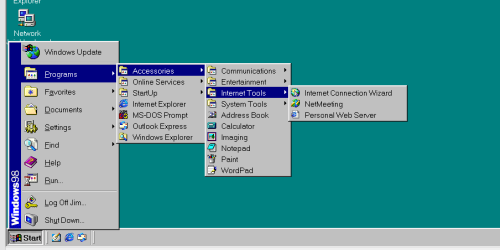
As for Menu complexity -- just look even on Windows 98 with a small number of options a menu system can start to get unwieldy. Imagine if you had say 100 main rows and 15 columns on a typical laptop screen -- I'd say also a menu was barely useable.

Screen shot W98 menu enc (Running as a VM BTW).

Cheers
jimbo
 

Attachments

  • menu98.png
    menu98.png
    12.1 KB · Views: 3

My Computer My Computer

At a glance

Linux CENTOS 7 / various Windows OS'es and se...Intel i7 Intel i58GB, 16GBOn Motherboard
Computer type
PC/Desktop
Computer Manufacturer/Model Number
Custom built, several laptops HP/ASUS
OS
Linux CENTOS 7 / various Windows OS'es and servers
CPU
Intel i7 Intel i5
Memory
8GB, 16GB
Graphics Card(s)
On Motherboard
Sound Card
Realtek HD audio
Monitor(s) Displays
Apple Cinema display, Samsung LCD
Screen Resolution
1920 X 1080
Hard Drives
4 X 1TB SATA
Mouse
Toshiba wireless laser
Internet Speed
> 20MB up
Jump List

I also use the start button to get to my data folders, My Computer, etc. I could put shortcuts on the task bar but there just isn't room.

I have my partitions (and a few folders) pinned in the Windows Explorer Jump List (on the Taskbar).
Jump List (2013-06-17).png
 

My Computer My Computer

At a glance

W7 Ultimate SP1, LM19.2 MATE, W10 Home 1703, ...AMD Phenom II x6 1100T, 3.3 GHz12GB DDR3 1333 G-Skill (4GB x 2), G-Skill (2G...NVIDIA GeForce GTX 660
Computer type
PC/Desktop
Computer Manufacturer/Model Number
n/a
OS
W7 Ultimate SP1, LM19.2 MATE, W10 Home 1703, W10 Pro 1703 VM, #All 64 bit
CPU
AMD Phenom II x6 1100T, 3.3 GHz
Motherboard
ASUS M4A88T-M/USB3 (AM3)
Memory
12GB DDR3 1333 G-Skill (4GB x 2), G-Skill (2GB x 2)
Graphics Card(s)
NVIDIA GeForce GTX 660
Sound Card
Realtek?
Monitor(s) Displays
Samsung S23B350
Screen Resolution
1920x1080
Hard Drives
WD Green 2TB (SATA), WD Green 3TB (SATA), WD Blue 4TB (SATA), WD Blue 6TB (SATA)
PSU
Cooler Master
Case
Antec GX300 Tower
Cooling
3x Antec TRICOOL 120mm Fans
Mouse
Wired Optical
Internet Speed
DSL
Antivirus
Avast
Browser
Pale Moon (64 bit)
Other Info
2018-12-27 Upgraded HDDs
2015-12-10 Upgraded case, graphics card, storage
2015-08-15 Upgraded motherboard & RAM
2015-07-15 Upgraded LM17.1 to LM17.2
I also use the start button to get to my data folders, My Computer, etc. I could put shortcuts on the task bar but there just isn't room.

I have my partitions (and a few folders) pinned in the Windows Explorer Jump List (on the Taskbar).

I tried to use jump lists like that and found them to be more of a pain than a help. Not everyone will find any one solution to be ideal. That is one of the advantages of Win 7 over Win 8 and 8.1: one has more choices.
 

My Computer My Computer

At a glance

Win 7 Ultimate 64 bitIntel i7-3930KKingston HyperX Genesis 32GB Kit (8x4GB Modul...MSI R7850 Twin Frozr 2GD5/OC Radeon HD 7850 2...
Computer type
PC/Desktop
Computer Manufacturer/Model Number
Custom Build
OS
Win 7 Ultimate 64 bit
CPU
Intel i7-3930K
Motherboard
ASUS P9X79 WS
Memory
Kingston HyperX Genesis 32GB Kit (8x4GB Modules) 1600MHz DDR
Graphics Card(s)
MSI R7850 Twin Frozr 2GD5/OC Radeon HD 7850 2GB 256-bit GDDR
Sound Card
Asus Xonar Essence STX
Monitor(s) Displays
3x Asus VG248QE 24", Vizio 32" TV
Screen Resolution
1920 x 1080, ?
Hard Drives
Samsung 128GB 840 Pro SSD (1),
Samsung 4TB 850 EVO SSDs (4)
Samsung 4TB 850 EVO SSDs (16) external backup drives used in 2.5" hot swap bays in the computer.
PSU
Corsair HX750w
Case
Antec Two Hundred v2 (modified)
Cooling
Cooler Master GeminII S524 120mm (fan replaced with a 140mm)
Keyboard
Logitech G510s
Mouse
Logitech M525 (two in use)
Internet Speed
=< 32Mbps down, 8Mbps up
Antivirus
AVAST!, MBAM, SAS, Spybot S&D (all but MBAM free) Glary Util
Browser
IE11
Other Info
LSI 9211-8i HBA card (8 SATA III ports), 2.5" & 3.5" Hot Swap Bays, HooToo HT-CR001 PCI-E to USB 3.0 Internal Hub + 6 Slot Card Reader, and LG Model CH12LS28 BD-ROM Optical Drive. Also, ScanSnap S1500 ADF duplexing scanner, Canon 9000F flat bed scanner, Corsair SP2500 2.1 speakers, Samsung CLP 415nw laser color printer, Cyberpower PP2200SW UPS
Only in Windows Explorer

I tried to use jump lists like that and found them to be more of a pain than a help. Not everyone will find any one solution to be ideal.

I only use Jump Lists with Windows Explorer and Control Panel.
They don't seem to be of much use (to me) for other programs.

If FreeCommander supported Jump Lists, I wouldn't use Windows Explorer at all.
As it is, I probably could do all of my file management in FreeCommander (even without Jump Lists).

That is one of the advantages of Win 7 over Win 8 and 8.1: one has more choices.

Agreed. :)
 

My Computer My Computer

At a glance

W7 Ultimate SP1, LM19.2 MATE, W10 Home 1703, ...AMD Phenom II x6 1100T, 3.3 GHz12GB DDR3 1333 G-Skill (4GB x 2), G-Skill (2G...NVIDIA GeForce GTX 660
Computer type
PC/Desktop
Computer Manufacturer/Model Number
n/a
OS
W7 Ultimate SP1, LM19.2 MATE, W10 Home 1703, W10 Pro 1703 VM, #All 64 bit
CPU
AMD Phenom II x6 1100T, 3.3 GHz
Motherboard
ASUS M4A88T-M/USB3 (AM3)
Memory
12GB DDR3 1333 G-Skill (4GB x 2), G-Skill (2GB x 2)
Graphics Card(s)
NVIDIA GeForce GTX 660
Sound Card
Realtek?
Monitor(s) Displays
Samsung S23B350
Screen Resolution
1920x1080
Hard Drives
WD Green 2TB (SATA), WD Green 3TB (SATA), WD Blue 4TB (SATA), WD Blue 6TB (SATA)
PSU
Cooler Master
Case
Antec GX300 Tower
Cooling
3x Antec TRICOOL 120mm Fans
Mouse
Wired Optical
Internet Speed
DSL
Antivirus
Avast
Browser
Pale Moon (64 bit)
Other Info
2018-12-27 Upgraded HDDs
2015-12-10 Upgraded case, graphics card, storage
2015-08-15 Upgraded motherboard & RAM
2015-07-15 Upgraded LM17.1 to LM17.2
I really wonder also how many current W7 users actually use the start button or even the menu........

Cheers
jimbo


I use the start button/start menu all the time.

Hi there

Some will use it just because it's there but if you have a large number of entries > 100 for example using a menu gets quite convoluted too.

When I'm on W7 I have to say I really don't use the menu a lot and I actually quite like the SEARCH on W8 which will be improved on W8.1.

As for Menu complexity -- just look even on Windows 98 with a small number of options a menu system can start to get unwieldy. Imagine if you had say 100 main rows and 15 columns on a typical laptop screen -- I'd say also a menu was barely useable.

Screen shot W98 menu enc (Running as a VM BTW).

Cheers
jimbo

There's one thing I can say from having close to if not 100 shortcuts about addon tool bars soaking up otherwise on the desktop items. You can perform some organization of your own or live with clutter.

i40dv5.jpg


So the next thing is cutting out a good number of items from the desktop itself while the All Program menu continues to expand and the continual branching out when going to start one thing or look for another? :confused: Naaaa.... a bit too awkward when you have numerous small as well as a good number of large programs with all those extras if you have the Start set for "menu" where each program's exe, doc, etc. are sound in a folder rather then being links.
Now the advantage of tool bars to soak all those shortcuts up is obvious from one look at the next image here.

11s2et5.jpg


But! Still having that All Programs menu allows you to right click to copy and paste a new shortcut on the desktop to drag into an addon tool bar's folder off of the desktop as well as pin to the main task until that gets filled up fast without trying to expand to rows of icons.

The 3rd party tool bars can be interesting at times as well especially when working with multiple displays. But as you can also see even those can get cluttered fast and are actually used best when set for the secondary display for access to a select list of things while the primary is occupied with some full screen program media or other.
 

My Computers My Computers

  • At a glance

    W7 Ultimate x64/W10 Pro x64/W11 Pro Triple Bo...AMD Phenom II X4 975 Deneb 3.6ghz - 965 2nd r...Kingston Hyper X DDR3 1600 1.5v 16gb - Hyper ...MSI HD Radeon 5750 1gb - MSI HD Radeon 6450 o...
    Computer type
    PC/Desktop
    Computer Manufacturer/Model Number
    Custom builds = 2
    OS
    W7 Ultimate x64/W10 Pro x64/W11 Pro Triple Boot - Main PC W7 Remote PC Micro ATX W7 Pro x64/W11 Pro
    CPU
    AMD Phenom II X4 975 Deneb 3.6ghz - 965 2nd remote pc
    Motherboard
    Gigabyte GA-790XTA-UD4-Gigabyte GA-880GM-D2H remote pc
    Memory
    Kingston Hyper X DDR3 1600 1.5v 16gb - Hyper X Fury 8gb 2nd
    Graphics Card(s)
    MSI HD Radeon 5750 1gb - MSI HD Radeon 6450 on mini tower
    Sound Card
    Creative Labs X-Fi Xtreme Audio P - Realtek onooard 2nd case
    Monitor(s) Displays
    ASUS VW199T-P 19" HP 2082a Main-HP 2082a 20" remote pc
    Screen Resolution
    Asus 1440x900 - HP 1600x900
    Hard Drives
    WD Black 1TB HD per OS W7, W10, and pending W11 presently on 500gb OS Drive - Pending Triple 1TB HDs for Spanned Storage/backup volume
    Single 2TB external USB enclosure, single 1TB System 7 Host/Boot drive, Pending 8TB external HD for system image b
    PSU
    Corsair 750TX - primary / Corsair CX600 - second
    Case
    Antec 900-2 - SSD compatible / NZXT Vulcan mini tower
    Cooling
    Zalman CNPS9900A
    Keyboard
    AZIO L70 Backlit Letters Gaming - ONN Cordless/USB
    Mouse
    MSI DS200 Programmable, Logitech Cordless
    Internet Speed
    30mbps upgrade - primary hard wired - mini tower usb WiFi
    Antivirus
    GFI VIPRE Internet Security 2014 on W7 2016 beta on W10,
    Browser
    Cyberfox, WaterFox 64bit FF variants, FireFox x64, Pale Moon
    Other Info
    Accomdata fan cooled usb 2.0 PIDE/Sata II, III external enclosure.
    Sambient usb/eSata PATA/Sata II, III external enclosure.
  • At a glance

    W7 Pro x64/W11 ProAMD Deneb 3.6ghz - 965Kingston Hyper X Fury 8gbMSI HD Radeon 6450 DVI Output
    Computer type
    PC/Desktop
    System Manufacturer/Model Number
    CUSTOM ASSEMBLY
    OS
    W7 Pro x64/W11 Pro
    CPU
    AMD Deneb 3.6ghz - 965
    Motherboard
    Gigabyte GA-880GM-D2H remote pc
    Memory
    Kingston Hyper X Fury 8gb
    Graphics Card(s)
    MSI HD Radeon 6450 DVI Output
    Sound Card
    Realtek onooard Creative or Other separate PENDING
    Monitor(s) Displays
    VIZIO 32" LCD TV Separate LCD Pending
    Screen Resolution
    1600x1080
    Hard Drives
    WD 500GB OS Host/Boot WD Green 1TB Storage/Backup
    PSU
    Corsair 600W - THERMALTAKE 600W spare case
    Case
    NZXT Vulcan mini tower
    Cooling
    Twin 120mm Top Fans - 240mm Side Cover
    Keyboard
    ONN Cordless/USB Logitech Cordless
    Mouse
    ONN USB/Cordless - Logitech Cordless
    Internet Speed
    DSL 5G
    Browser
    MS Edge, FireFox, WaterFox x64, FireFox Nightly
    Other Info
    OS Testing-Remote Access to Main TeamViewer
Categorise

Now the advantage of tool bars to soak all those shortcuts up is obvious from one look at the next image here.

11s2et5.jpg

That's why I categorise my Start Menu (see animation in post #1194).

I only have ~60 programs installed though.
 
Last edited:

My Computer My Computer

At a glance

W7 Ultimate SP1, LM19.2 MATE, W10 Home 1703, ...AMD Phenom II x6 1100T, 3.3 GHz12GB DDR3 1333 G-Skill (4GB x 2), G-Skill (2G...NVIDIA GeForce GTX 660
Computer type
PC/Desktop
Computer Manufacturer/Model Number
n/a
OS
W7 Ultimate SP1, LM19.2 MATE, W10 Home 1703, W10 Pro 1703 VM, #All 64 bit
CPU
AMD Phenom II x6 1100T, 3.3 GHz
Motherboard
ASUS M4A88T-M/USB3 (AM3)
Memory
12GB DDR3 1333 G-Skill (4GB x 2), G-Skill (2GB x 2)
Graphics Card(s)
NVIDIA GeForce GTX 660
Sound Card
Realtek?
Monitor(s) Displays
Samsung S23B350
Screen Resolution
1920x1080
Hard Drives
WD Green 2TB (SATA), WD Green 3TB (SATA), WD Blue 4TB (SATA), WD Blue 6TB (SATA)
PSU
Cooler Master
Case
Antec GX300 Tower
Cooling
3x Antec TRICOOL 120mm Fans
Mouse
Wired Optical
Internet Speed
DSL
Antivirus
Avast
Browser
Pale Moon (64 bit)
Other Info
2018-12-27 Upgraded HDDs
2015-12-10 Upgraded case, graphics card, storage
2015-08-15 Upgraded motherboard & RAM
2015-07-15 Upgraded LM17.1 to LM17.2
I did that one back in 2010 when getting into the dual display setup and wanting to illustrate how to somewhat organize a mountain of things! The addon tool bars are each a separate catagory by themselves. The Recycle Bin is an icon on the task bar as well since you won't see that on the desktop at all.

The tool bar to the far left is the Quick Bar for browsers(had 8 or 9 at one time!) and a few other things like the XP Mode, VBox, VM Player, NotePad, etc you don't want to have to dig for all the time but are right there as you would have at one time seen the Quick Launch on the task bar.

The addons can grow too by the way! They can easily extend below the bottom of the screen where you then have to scroll up or down. Those won't see pop out side menus as you would see from the Start>Alll Programs or 3rd party app like Classic Shell.
 

My Computers My Computers

  • At a glance

    W7 Ultimate x64/W10 Pro x64/W11 Pro Triple Bo...AMD Phenom II X4 975 Deneb 3.6ghz - 965 2nd r...Kingston Hyper X DDR3 1600 1.5v 16gb - Hyper ...MSI HD Radeon 5750 1gb - MSI HD Radeon 6450 o...
    Computer type
    PC/Desktop
    Computer Manufacturer/Model Number
    Custom builds = 2
    OS
    W7 Ultimate x64/W10 Pro x64/W11 Pro Triple Boot - Main PC W7 Remote PC Micro ATX W7 Pro x64/W11 Pro
    CPU
    AMD Phenom II X4 975 Deneb 3.6ghz - 965 2nd remote pc
    Motherboard
    Gigabyte GA-790XTA-UD4-Gigabyte GA-880GM-D2H remote pc
    Memory
    Kingston Hyper X DDR3 1600 1.5v 16gb - Hyper X Fury 8gb 2nd
    Graphics Card(s)
    MSI HD Radeon 5750 1gb - MSI HD Radeon 6450 on mini tower
    Sound Card
    Creative Labs X-Fi Xtreme Audio P - Realtek onooard 2nd case
    Monitor(s) Displays
    ASUS VW199T-P 19" HP 2082a Main-HP 2082a 20" remote pc
    Screen Resolution
    Asus 1440x900 - HP 1600x900
    Hard Drives
    WD Black 1TB HD per OS W7, W10, and pending W11 presently on 500gb OS Drive - Pending Triple 1TB HDs for Spanned Storage/backup volume
    Single 2TB external USB enclosure, single 1TB System 7 Host/Boot drive, Pending 8TB external HD for system image b
    PSU
    Corsair 750TX - primary / Corsair CX600 - second
    Case
    Antec 900-2 - SSD compatible / NZXT Vulcan mini tower
    Cooling
    Zalman CNPS9900A
    Keyboard
    AZIO L70 Backlit Letters Gaming - ONN Cordless/USB
    Mouse
    MSI DS200 Programmable, Logitech Cordless
    Internet Speed
    30mbps upgrade - primary hard wired - mini tower usb WiFi
    Antivirus
    GFI VIPRE Internet Security 2014 on W7 2016 beta on W10,
    Browser
    Cyberfox, WaterFox 64bit FF variants, FireFox x64, Pale Moon
    Other Info
    Accomdata fan cooled usb 2.0 PIDE/Sata II, III external enclosure.
    Sambient usb/eSata PATA/Sata II, III external enclosure.
  • At a glance

    W7 Pro x64/W11 ProAMD Deneb 3.6ghz - 965Kingston Hyper X Fury 8gbMSI HD Radeon 6450 DVI Output
    Computer type
    PC/Desktop
    System Manufacturer/Model Number
    CUSTOM ASSEMBLY
    OS
    W7 Pro x64/W11 Pro
    CPU
    AMD Deneb 3.6ghz - 965
    Motherboard
    Gigabyte GA-880GM-D2H remote pc
    Memory
    Kingston Hyper X Fury 8gb
    Graphics Card(s)
    MSI HD Radeon 6450 DVI Output
    Sound Card
    Realtek onooard Creative or Other separate PENDING
    Monitor(s) Displays
    VIZIO 32" LCD TV Separate LCD Pending
    Screen Resolution
    1600x1080
    Hard Drives
    WD 500GB OS Host/Boot WD Green 1TB Storage/Backup
    PSU
    Corsair 600W - THERMALTAKE 600W spare case
    Case
    NZXT Vulcan mini tower
    Cooling
    Twin 120mm Top Fans - 240mm Side Cover
    Keyboard
    ONN Cordless/USB Logitech Cordless
    Mouse
    ONN USB/Cordless - Logitech Cordless
    Internet Speed
    DSL 5G
    Browser
    MS Edge, FireFox, WaterFox x64, FireFox Nightly
    Other Info
    OS Testing-Remote Access to Main TeamViewer
Hi there

@Night Hawk

I think when you have that many applications it really doesn't matter what method you use as they ALL become a bit of a horror to use.

If you had a standard menu with that many applications they would also require an in ordinate amount of scrolling and certainly FILL an entire typical laptop size screen still with scrolling

Actually funnily enough I think in the case shown above W8 would really be the BETTER option as you could simply go to the desktop and simply start typing the name of the application you want to run (maybe even the First letter is enough - you'd be taken straight to the application and in W 8.1 the applications are much better arranged -- you wouldn't need to scroll at all

E.g say I want to start VISIO using the start screen

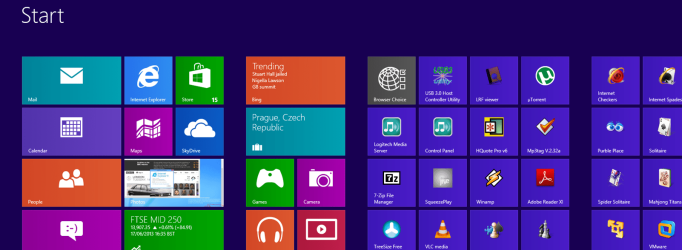
Ok go to start screen -- in this case it's W8 so not organized nicely like W8.1 As you can see it's a HORRIBLE mess - but just type anywhere on the screen VIS and immediately you see the application VISIO which you start by clicking and it works as a normal windowed desktop application.

I don't have to endlessly scroll the tiles to find and start the VISIO program (Ms Office business process drawing type program).

I agree the current W8 has a really HORRIBLE interface for large numbers of applications but the quick access search is quite good.

(screen shots enc).

For smaller numbers of applications using custom toolbars as previously shown is fine. These are standard Windows - you don't need any 3rd party addons.

W8.1 will have an INFINITELY better start screen and the search facility will be improved too. We'll see in about a week or so.

It just requires a slightly different approach to running applications - but it really is quite OK once you get used to it. You barely have to see the Start screen though in normal operation and if you DO get a touch screen - and actually on a LAPTOP they aren't bad to use then the tiles are OK.

But Touch on a large monitor -- If you even THINK of putting fingers near my large quality LCD screen I think your head would be on the receiving end of a Baseball bat. !!!

Cheers
jimbo
 

Attachments

  • desk1.png
    desk1.png
    99.9 KB · Views: 1
  • desk2.png
    desk2.png
    6.6 KB · Views: 2

My Computer My Computer

At a glance

Linux CENTOS 7 / various Windows OS'es and se...Intel i7 Intel i58GB, 16GBOn Motherboard
Computer type
PC/Desktop
Computer Manufacturer/Model Number
Custom built, several laptops HP/ASUS
OS
Linux CENTOS 7 / various Windows OS'es and servers
CPU
Intel i7 Intel i5
Memory
8GB, 16GB
Graphics Card(s)
On Motherboard
Sound Card
Realtek HD audio
Monitor(s) Displays
Apple Cinema display, Samsung LCD
Screen Resolution
1920 X 1080
Hard Drives
4 X 1TB SATA
Mouse
Toshiba wireless laser
Internet Speed
> 20MB up
With the Start screen in 8 you can type in something while most would be inclined to scroll to the right. 8.1 will be the small effort there by MS to put a few familiar things back in while still not being the same as you would see in 7 simply due to the entire gui design being intent for one thing only namely tablet!

What makes it a real shame for 8 is most will lose out on any actual core improvements as well as Hyper X support not available for 7 to keep a normal desktop platform going while the entire Metro "Modern" concept is wrapped around the mobile world as far as touch + swipe small lcd displays. That typically only can work out best for a portable if not hand held over trying it out on a 20" or larger lcd used for a desktop to begin with.

Now just think for a moment how sore that arm would be after 7 or 8hrs. of office work "Reaching Out" to touch the monitor constantly over simply running an older version on a non touch + swipe based OS? I think too many would get frustrated only too fast! It still has a place for connecting a projection screen to a laptop for a sales meeting or some other presentation where the effort is short term and on the go. But for your main desktop? NADA!

And speaking of base ball bats some who got too frustrated might be temped to use one but not at a living thing. That touch + swipe might have a problem however. Some would think to themselves "I simply would love to take a swing at this 8 thingy and ....." :mad: GGrrrrr... The rest of us will simply say "Hey where's that other OS you were talking about?"!

Does MS really care? ha... ha... ha... They have their agenda and are simply trying to "pacify" things a bit with 8.1 after all the negative publicity 8 has been getting. That's their interest for the most part.
 

My Computers My Computers

  • At a glance

    W7 Ultimate x64/W10 Pro x64/W11 Pro Triple Bo...AMD Phenom II X4 975 Deneb 3.6ghz - 965 2nd r...Kingston Hyper X DDR3 1600 1.5v 16gb - Hyper ...MSI HD Radeon 5750 1gb - MSI HD Radeon 6450 o...
    Computer type
    PC/Desktop
    Computer Manufacturer/Model Number
    Custom builds = 2
    OS
    W7 Ultimate x64/W10 Pro x64/W11 Pro Triple Boot - Main PC W7 Remote PC Micro ATX W7 Pro x64/W11 Pro
    CPU
    AMD Phenom II X4 975 Deneb 3.6ghz - 965 2nd remote pc
    Motherboard
    Gigabyte GA-790XTA-UD4-Gigabyte GA-880GM-D2H remote pc
    Memory
    Kingston Hyper X DDR3 1600 1.5v 16gb - Hyper X Fury 8gb 2nd
    Graphics Card(s)
    MSI HD Radeon 5750 1gb - MSI HD Radeon 6450 on mini tower
    Sound Card
    Creative Labs X-Fi Xtreme Audio P - Realtek onooard 2nd case
    Monitor(s) Displays
    ASUS VW199T-P 19" HP 2082a Main-HP 2082a 20" remote pc
    Screen Resolution
    Asus 1440x900 - HP 1600x900
    Hard Drives
    WD Black 1TB HD per OS W7, W10, and pending W11 presently on 500gb OS Drive - Pending Triple 1TB HDs for Spanned Storage/backup volume
    Single 2TB external USB enclosure, single 1TB System 7 Host/Boot drive, Pending 8TB external HD for system image b
    PSU
    Corsair 750TX - primary / Corsair CX600 - second
    Case
    Antec 900-2 - SSD compatible / NZXT Vulcan mini tower
    Cooling
    Zalman CNPS9900A
    Keyboard
    AZIO L70 Backlit Letters Gaming - ONN Cordless/USB
    Mouse
    MSI DS200 Programmable, Logitech Cordless
    Internet Speed
    30mbps upgrade - primary hard wired - mini tower usb WiFi
    Antivirus
    GFI VIPRE Internet Security 2014 on W7 2016 beta on W10,
    Browser
    Cyberfox, WaterFox 64bit FF variants, FireFox x64, Pale Moon
    Other Info
    Accomdata fan cooled usb 2.0 PIDE/Sata II, III external enclosure.
    Sambient usb/eSata PATA/Sata II, III external enclosure.
  • At a glance

    W7 Pro x64/W11 ProAMD Deneb 3.6ghz - 965Kingston Hyper X Fury 8gbMSI HD Radeon 6450 DVI Output
    Computer type
    PC/Desktop
    System Manufacturer/Model Number
    CUSTOM ASSEMBLY
    OS
    W7 Pro x64/W11 Pro
    CPU
    AMD Deneb 3.6ghz - 965
    Motherboard
    Gigabyte GA-880GM-D2H remote pc
    Memory
    Kingston Hyper X Fury 8gb
    Graphics Card(s)
    MSI HD Radeon 6450 DVI Output
    Sound Card
    Realtek onooard Creative or Other separate PENDING
    Monitor(s) Displays
    VIZIO 32" LCD TV Separate LCD Pending
    Screen Resolution
    1600x1080
    Hard Drives
    WD 500GB OS Host/Boot WD Green 1TB Storage/Backup
    PSU
    Corsair 600W - THERMALTAKE 600W spare case
    Case
    NZXT Vulcan mini tower
    Cooling
    Twin 120mm Top Fans - 240mm Side Cover
    Keyboard
    ONN Cordless/USB Logitech Cordless
    Mouse
    ONN USB/Cordless - Logitech Cordless
    Internet Speed
    DSL 5G
    Browser
    MS Edge, FireFox, WaterFox x64, FireFox Nightly
    Other Info
    OS Testing-Remote Access to Main TeamViewer

My Computer My Computer

At a glance

Windows 7 Pro x64Intel I7 6700 3.40 GHz8GB
Computer type
PC/Desktop
Computer Manufacturer/Model Number
HP ProDesk 400 G3
OS
Windows 7 Pro x64
CPU
Intel I7 6700 3.40 GHz
Memory
8GB
Monitor(s) Displays
Samsung 21.5" LED
Hard Drives
1 TB
Keyboard
Ducky mechanical with PBT double shot keycaps.
What I do in Windows 7 is in the start menu I create folders such as "Multimedia" and "Utilities" and i put all the related applications and application folders into these general folders. By doing this I can find things quickly and my desktop is not cluttered.
 

My Computer My Computer

At a glance

Windows 10 (64 bit)AMD FX832016 GBAMD 7870
Computer type
PC/Desktop
Computer Manufacturer/Model Number
Custom Build
OS
Windows 10 (64 bit)
CPU
AMD FX8320
Motherboard
Asus M5A99X EVO
Memory
16 GB
Graphics Card(s)
AMD 7870
Status
Not open for further replies.
Back
Top