Solved More than 4 primary partitions?

koec12

New member
Local time
8:41 AM
Messages
13
Hey, I am sorry if this is in the wrong category, But I didn't know where to place it.

I was wondering if there is any way to have more than the default 4 primary partitions. It's not me having 4 partitions up running, but it is my HP computer. What I have on my partitions:

C: My main drive.
HP_TOOLS: Eh.. I don't know
RECOVERY (D) : My recovery partition. I am not allowed to access it or delete it.
SYSTEM: I think that this is the partition windows stores the files needed to launch.

So, All my 4 primary partitions are used up by my PC.

What I need another primary partition for? Well, I want to have windows 8 AND windows 7 running on the same machine. I will buy Windows 8 if I like it. And/or have Linux running on it.

Please help me, If it even is possible. If it isn't possible, It will be time for me to buy a new PC with Win8 pre-installed, and use this PC as testing PC.
2wdx7hf.png


Windows 7
HP DV6
500 GB harddrive
4 GB RAM
 

My Computer My Computer

At a glance

windows 7 home premium 64bit.
OS
windows 7 home premium 64bit.
Hard Drives
NTFS 500gig.
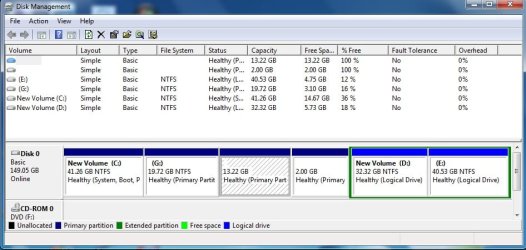
Please post a screenshot of disk management window, like this:

dm.jpg
 

My Computers My Computers

  • At a glance

    7 X64i5 84002x8gb 3200mhz
    Computer type
    PC/Desktop
    OS
    7 X64
    CPU
    i5 8400
    Motherboard
    gigabyte b365m ds3h
    Memory
    2x8gb 3200mhz
    Hard Drives
    various
    PSU
    pure power 11 400w cm
    Case
    Coolermaster
    Cooling
    cryorig m9i
  • At a glance

    7x64g54008gb ddr4 2400
    Computer type
    PC/Desktop
    OS
    7x64
    CPU
    g5400
    Motherboard
    ga b365m ds3h
    Memory
    8gb ddr4 2400
    PSU
    xfx pro 450w
I just turned my PC off. I will send you a screen shot tomorow. Only one thing. I'm from Norway, and my PC language is Norwegian too, so you won't be able to understand that much.

I can tell you that it looks mostly the same as your screenshot, but only with the 4 partitions showed in the main post.
 

My Computer My Computer

At a glance

windows 7 home premium 64bit.
OS
windows 7 home premium 64bit.
Hard Drives
NTFS 500gig.
When I tried to make a new partition (yes, I freed memory from the main drive) it gave me a creepy warning at the end. It was something about "making partitions dynamic" and it said I would not be able to boot from them.

If there isn't any other way to bypass the max 4 primary partitions, which of those 4 would you recommend deleting, if that would be a good option.
 

My Computer My Computer

At a glance

windows 7 home premium 64bit.
OS
windows 7 home premium 64bit.
Hard Drives
NTFS 500gig.

My Computer My Computer

At a glance

Windows 10 Pro. 64/ version 1709 Windows 7 Pr...Intel i7-6800K @ 4.3Corsair Platinum 16 gig @2400EVGA GTX 1070 OC
Computer type
PC/Desktop
Computer Manufacturer/Model Number
Home made Desktop
OS
Windows 10 Pro. 64/ version 1709 Windows 7 Pro/64
CPU
Intel i7-6800K @ 4.3
Motherboard
ASUS X-99 Deluxe II
Memory
Corsair Platinum 16 gig @2400
Graphics Card(s)
EVGA GTX 1070 OC
Monitor(s) Displays
Asus 27" LED LCD/VE278Q
Screen Resolution
1920-1080 or 1280-720 HDMI
Hard Drives
INTEL SSD 730-240 Gb Sata 3.0/
PSU
EVGA Platium 1200W
Case
Phanteks Luxe Tempered Glass 8 fans/ one radiator
Cooling
XSPC/ Water Cooled CPU
Keyboard
Das 4 Professional
Mouse
Logitech M705/MX Anywhere 2-S
Internet Speed
100 mbits
Antivirus
Microsoft Security Essentials/ Malwarebytes Premium 3.0/ SAS
Browser
I.E. 11 default/Firefox/ ISP Time Warner Cable/Spectrum
Other Info
LG BluRay Burner/
Sound system-KLipsch-THX/
Icy Dock ssd Hot Swap bays.
You have 2 options:

1. make the C partition a logical partition. You can do that with the bootable CD of Partition Wizard. Download the .iso from the last box on the website, burn it to CD and boot with that CD.

2. Move the bootmgr from the system partition to C and then delete the system partition. Here is how: http://www.sevenforums.com/tutorials/209885-bootmgr-move-c-easybcd.html

In both cases you end up with only 3 primary partitions and can then create an extended partition under which you can define many logical partitions (up to 120).

But creating more than 4 primary partitions (or 4 primary partitions plus an extended partition) is not possible in the NTFS file system. For that you have to go to EFI.
 

My Computer My Computer

At a glance

Vista, Windows7, Mint Mate, Zorin, Windows 8from 1.6GHz Duo to i7
Computer Manufacturer/Model Number
HP, Dell, Gateway, Toshiba - 4 laptops and 2 desktops
OS
Vista, Windows7, Mint Mate, Zorin, Windows 8
CPU
from 1.6GHz Duo to i7
Monitor(s) Displays
2x HP w2207
Hard Drives
5x HDD, 7x SSD, 12x Externals
Keyboard
with trackball - no mices
Mouse
Trackball mice
Internet Speed
DSL 6000
Both options sound dangerous, but I want to go for option 2. But before I do that, I want to know if it is safe. I don't want to follow those steps and end up losing everyting, and that I can't boot anymore. So please tell me more about option 2, and if you have time, make a step by step/video on how to do that. Another question I have is if the SYSTEM partition only has the bootmgr on it, and nothing else. And how do we check, because I can't access the SYSTEM partition. Thanks
 

My Computer My Computer

At a glance

windows 7 home premium 64bit.
OS
windows 7 home premium 64bit.
Hard Drives
NTFS 500gig.
Neither of these options is dangerous if you follow the instructions. Actually option 1 is the least dangerous because you can always undo it. But there is no problem. Since you have the system partition which is active, the C partition need not be a primary.

But in order to double check all that, we are still waiting for a picture of your Disk Management.
 

My Computer My Computer

At a glance

Vista, Windows7, Mint Mate, Zorin, Windows 8from 1.6GHz Duo to i7
Computer Manufacturer/Model Number
HP, Dell, Gateway, Toshiba - 4 laptops and 2 desktops
OS
Vista, Windows7, Mint Mate, Zorin, Windows 8
CPU
from 1.6GHz Duo to i7
Monitor(s) Displays
2x HP w2207
Hard Drives
5x HDD, 7x SSD, 12x Externals
Keyboard
with trackball - no mices
Mouse
Trackball mice
Internet Speed
DSL 6000
But before I do that, I want to know if it is safe. I don't want to follow those steps and end up losing everyting, and that I can't boot anymore.
Before doing something like that (and especially if you intend to experiment with multibooting), it's always best to have a Windows 7 installation DVD or thumbdrive handy. This tutorial explains how to make your own, and provides official Windows 7 download links. Just remeber that your activation code (in the sticker) works only for Home Premium installations.
Once you have that burned to DVD or on a thumbdrive, you simply boot from that and fix the issue with the startup repair option, as explained in this tutorial.

For the sake of history, the older way to do that before EasyBCD was simply deleting the tiny system partition (this tutorial) and then do a startup repair as described in the tutorial above.

Another question I have is if the SYSTEM partition only has the bootmgr on it, and nothing else.
According to MS, it has boot code and some files needed for Bitlocker drive encryption. Since your version of Windows does not have Bitlocker (it is a feature reserved for the Ultimate and Enterprise versions), you aren't losing anything.
 

My Computer My Computer

At a glance

Win 7 Pro 64-bit 7601AMD Phenom 9650 QuadCore, revision DR-B35 GB yes I run 2x 2GB and 1x 1GB, different b...NVIDIA GeForce 9800 GT 512 Mb, unknown manufa...
Computer type
PC/Desktop
Computer Manufacturer/Model Number
custom built
OS
Win 7 Pro 64-bit 7601
CPU
AMD Phenom 9650 QuadCore, revision DR-B3
Motherboard
ASUS M4A78
Memory
5 GB yes I run 2x 2GB and 1x 1GB, different brand, spank me.
Graphics Card(s)
NVIDIA GeForce 9800 GT 512 Mb, unknown manufacturer.
Sound Card
Crappy Realtek Integrated Audio
Monitor(s) Displays
Fujitsu Siemens P19-3P
Screen Resolution
1280 x 1024 x 32 bits @ 60 Hz Oh yeah, 4:3 rocks!
Hard Drives
(1) MAXTOR S TM3320613AS SATA Disk Device (2) STM35004 18AS SATA Disk Device (3) TOSHIBA USB 2.5"-HDD
PSU
whatever, around 450w
Case
Scavenged from old company PC, 10+ years old
Cooling
CPU fan, GPU fan, case fan, nothing fancy
Keyboard
Microsoft, PS/2, white.
Mouse
Optical, logitec.
Internet Speed
effective max speeds: 70-ish kB/s down 30-ish kB/s up
Antivirus
Avira, free edition.
Browser
Firefox with FXChrome to make it look like Google Chrome :P
Other Info
Was discarded by previous owner due to "horrible performance".
Was running Win Xp from a IDE drive. Yeah. Was a pain.
SATA II drive and Win7 and it zips away! Yay!
Hey, Here is the screenshot we all have been waiting for:
14xosau.jpg


1. make the C partition a logical partition. You can do that with the bootable CD of Partition Wizard. Download the .iso from the last box on the website, burn it to CD and boot with that CD.

I don't get what you mean with this. Will I need to boot from a Windows Dvd if I do this?

..Windows 7 installation DVD or thumbdrive handy. This tutorial explains how to make your own, and provides official Windows 7 download links. Just remeber that your activation code (in the sticker) works only for Home Premium installations.

I Downloaded the Windows 7 USB tool, But could not find an ISO file that suits my PC. And what is the difference of SP1 and SP1 U?
 

My Computer My Computer

At a glance

windows 7 home premium 64bit.
OS
windows 7 home premium 64bit.
Hard Drives
NTFS 500gig.
Hey, Here is the screenshot we all have been waiting for:
14xosau.jpg


1. make the C partition a logical partition. You can do that with the bootable CD of Partition Wizard. Download the .iso from the last box on the website, burn it to CD and boot with that CD.

I don't get what you mean with this. Will I need to boot from a Windows Dvd if I do this?

..Windows 7 installation DVD or thumbdrive handy. This tutorial explains how to make your own, and provides official Windows 7 download links. Just remeber that your activation code (in the sticker) works only for Home Premium installations.

I Downloaded the Windows7 USB tools, But couldn't find any ISO file that suits my PC.
 

My Computer My Computer

At a glance

windows 7 home premium 64bit.
OS
windows 7 home premium 64bit.
Hard Drives
NTFS 500gig.
There is a nasty bug on my pc/The site. It doesn't show your last post until you post a new one : /
 

My Computer My Computer

At a glance

windows 7 home premium 64bit.
OS
windows 7 home premium 64bit.
Hard Drives
NTFS 500gig.

My Computer My Computer

At a glance

Windows 10 Pro. 64/ version 1709 Windows 7 Pr...Intel i7-6800K @ 4.3Corsair Platinum 16 gig @2400EVGA GTX 1070 OC
Computer type
PC/Desktop
Computer Manufacturer/Model Number
Home made Desktop
OS
Windows 10 Pro. 64/ version 1709 Windows 7 Pro/64
CPU
Intel i7-6800K @ 4.3
Motherboard
ASUS X-99 Deluxe II
Memory
Corsair Platinum 16 gig @2400
Graphics Card(s)
EVGA GTX 1070 OC
Monitor(s) Displays
Asus 27" LED LCD/VE278Q
Screen Resolution
1920-1080 or 1280-720 HDMI
Hard Drives
INTEL SSD 730-240 Gb Sata 3.0/
PSU
EVGA Platium 1200W
Case
Phanteks Luxe Tempered Glass 8 fans/ one radiator
Cooling
XSPC/ Water Cooled CPU
Keyboard
Das 4 Professional
Mouse
Logitech M705/MX Anywhere 2-S
Internet Speed
100 mbits
Antivirus
Microsoft Security Essentials/ Malwarebytes Premium 3.0/ SAS
Browser
I.E. 11 default/Firefox/ ISP Time Warner Cable/Spectrum
Other Info
LG BluRay Burner/
Sound system-KLipsch-THX/
Icy Dock ssd Hot Swap bays.
I would still opt for the option #1 of my post Nr. 7. That is easy to do and does not change anything in your configuration.
 

My Computer My Computer

At a glance

Vista, Windows7, Mint Mate, Zorin, Windows 8from 1.6GHz Duo to i7
Computer Manufacturer/Model Number
HP, Dell, Gateway, Toshiba - 4 laptops and 2 desktops
OS
Vista, Windows7, Mint Mate, Zorin, Windows 8
CPU
from 1.6GHz Duo to i7
Monitor(s) Displays
2x HP w2207
Hard Drives
5x HDD, 7x SSD, 12x Externals
Keyboard
with trackball - no mices
Mouse
Trackball mice
Internet Speed
DSL 6000
Yes, but I don't understand what you mean by that. Please explain more. I am downloading the ISO now.
 

My Computer My Computer

At a glance

windows 7 home premium 64bit.
OS
windows 7 home premium 64bit.
Hard Drives
NTFS 500gig.
Once you have the .iso, burn it to CD - e.g. with ImgBurn. Then boot your PC with that CD - you may have to change the BIOS boot order if your CD/DVD reader is not #1 in the boot sequence.

Then highlight the C partition and click on the partition tab above. From there click on 'Modify' where you can change the partition from primary to logical. When all this is done you have to click 'Apply' on the top left.

Here is a picture that shows you how Partition Wizard will look like. For this demo I chose a little test partition that is already logical. That's why 'Set partition as logical' is greyed out.

201305202158.png
 

My Computer My Computer

At a glance

Vista, Windows7, Mint Mate, Zorin, Windows 8from 1.6GHz Duo to i7
Computer Manufacturer/Model Number
HP, Dell, Gateway, Toshiba - 4 laptops and 2 desktops
OS
Vista, Windows7, Mint Mate, Zorin, Windows 8
CPU
from 1.6GHz Duo to i7
Monitor(s) Displays
2x HP w2207
Hard Drives
5x HDD, 7x SSD, 12x Externals
Keyboard
with trackball - no mices
Mouse
Trackball mice
Internet Speed
DSL 6000
You are doing a lot of work for nothing. You will hate Windows 8 :sick:

Windows 7 is the best OS ever made, you should just stick with it.
 

My Computer My Computer

At a glance

Windows 10 Pro x64Intel Core i7 6700KGSkill TridentZ RGB 16GB 3600 16-16-16-36EVGA GTX 980 Ti SC x2
Computer type
PC/Desktop
Computer Manufacturer/Model Number
Skylake Special #666
OS
Windows 10 Pro x64
CPU
Intel Core i7 6700K
Motherboard
Asus Sabertooth Z170 Mark 1
Memory
GSkill TridentZ RGB 16GB 3600 16-16-16-36
Graphics Card(s)
EVGA GTX 980 Ti SC x2
Sound Card
Realtek High Definition
Monitor(s) Displays
AOC G2460PG
Screen Resolution
1920 x 1080 144Hz
Hard Drives
Samsung 860 Pro 256GB, Seagate Barracuda 4TB x2
PSU
EVGA 1000 P2, EVGA White Custom Braided Cables
Case
Corsair Vengeance C70 Gunmetal Black
Cooling
Corsair H100i v2, Corsair ML120 x2, Thermal Grizzly Kryonaut
Keyboard
Logitech G910 Orion Spectrum
Mouse
Logitech G700s
Internet Speed
Verizon Fios Quantum Gateway 75/75
Antivirus
Windows Defender, Malwarebytes Free 3.8.3
Browser
Chrome
Other Info
Corsair SP120 x4, LG Blu-ray Drive, Durabrand HT-395 100 Watt Dolby Digital Amp, Corsair H2100 Wireless 7.1 Headset
Once you have the .iso, burn it to CD - e.g. with ImgBurn. Then boot your PC with that CD - you may have to change the BIOS boot order if your CD/DVD reader is not #1 in the boot sequence.

Then highlight the C partition and click on the partition tab above. From there click on 'Modify' where you can change the partition from primary to logical. When all this is done you have to click 'Apply' on the top left.

Here is a picture that shows you how Partition Wizard will look like. For this demo I chose a little test partition that is already logical. That's why 'Set partition as logical' is greyed out.

201305202158.png

Okay, I will try this out. And if something happens, you want me too boot with that DVD, right?

Oh, AddRAM? I believe you, but I want to check how bad it is myself ;) I like windows 7 a lot myself, But I have had it for allmost 3 years, So I want to check how it is like having Windows 8. If I don't like it, I might install Linux on it instead. Do some linux action.
 

My Computer My Computer

At a glance

windows 7 home premium 64bit.
OS
windows 7 home premium 64bit.
Hard Drives
NTFS 500gig.
Just a thought - for checking Windows 8 (or Linux) out, VMware Player is a much better option and you don't need any additional partition. VMware Player - Install Windows 8 This is how I run Windows 8 and 6 different Linux distros.
 

My Computer My Computer

At a glance

Vista, Windows7, Mint Mate, Zorin, Windows 8from 1.6GHz Duo to i7
Computer Manufacturer/Model Number
HP, Dell, Gateway, Toshiba - 4 laptops and 2 desktops
OS
Vista, Windows7, Mint Mate, Zorin, Windows 8
CPU
from 1.6GHz Duo to i7
Monitor(s) Displays
2x HP w2207
Hard Drives
5x HDD, 7x SSD, 12x Externals
Keyboard
with trackball - no mices
Mouse
Trackball mice
Internet Speed
DSL 6000
Back
Top