Most of my programs stop working, unknown error

My Computer My Computer

Computer type
PC/Desktop
Computer Manufacturer/Model Number
medionl/Aspire 6930G/acer x55a
OS
W7 home premium 32bit/W7HP 64bit/w10 tp insider ring
CPU
E5300 dual core
Motherboard
medion MS7366
Memory
3gb
Graphics Card(s)
Nvidia Geforce 7100 Nforce 630i
Monitor(s) Displays
avixc
Internet Speed
n (isp resticted to 72)
Antivirus
mse/pands
Browser
palemoon
Other Info
Belkin Fd7050 n USB using Railink RT2870 drivers, more upto date
hi

please read this artical
https://www.google.com/url?sa=t&rct...dicated-GPU/&usg=AOvVaw3Srjd1H8kPStTITHCIKXU4

i've not used dual graphics but this should point you in the right direction.
YOUR BIOS MUST BE SET UP CORRECTLY

Suspect the failing programs are referencing the support graphics driver, Nvidea.


windows update is also not current please update, might sort out your driver issue (HD Audio)

I've tried what you suggested but the graphic GPU is not the problem, as it's using the right GPU
Screenshot by Lightshot

EDIT: now I have switched to the integrated Radeon that this PC has besides the Nvidia one and the problem is still unfixed. I don't know if that helps.

Also I don't know what driver issue I have, my audio works well?

EDIT 2: I don't know if this was what you wanted me to upload, Iko?
 
Last edited:

My Computer My Computer

Computer type
PC/Desktop
OS
Win 7 64
Hi,

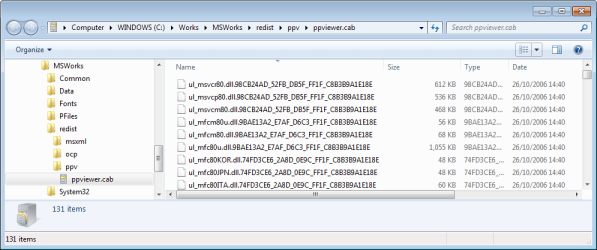
that is a .cab Cabinet File, I cannot open that on my computer. I was merely looking for txt text file reports. Any?

Also I don't know what driver issue I have, my audio works well?

You have been looking for graphics driver issues.

Also, torchwood has suggested that you're computer is missing Updates (Post #22). Perhaps then, you could check for more recent updates. Could solve the issue.
 

My Computer My Computer

Computer type
PC/Desktop
OS
Windows 7 x64, Vista x64, 8.1 smartphone
CPU
Intel E8400 65W 64-bit
Motherboard
Gigabyte EP45-UD3LR
Memory
DDR2 2 x 2GB, 1GB x 2
Graphics Card(s)
XFX Radeon HD5750
Sound Card
AMD High Definition Audio; Realtek High Definition Audio
Monitor(s) Displays
iiyama prolite X2377HDS
Screen Resolution
1920 x 1080
Hard Drives
500GB 7200 rpm Seagate ST3500413AS 16MB, 500GB 5400 rpm Toshiba MQ02ABF050H 32MB, 200GB 7200 rpm Seagate ST3200820AS 8MB, 2TB 7200 rpm Western Digital WD20EZRX 64MB
PSU
Enermax Liberty Modular
Case
Antec P193 Midi Tower
Keyboard
Mionix ZIBAL 60
Mouse
Razer USB 2.0 Diamondback Mouse or Huion Graphics Tablet
Browser
Internet Explorer, Lunascape, Firefox, Opera, Avast Safezone
Hi,

that is a .cab Cabinet File, I cannot open that on my computer. I was merely looking for txt text file reports. Any?

Just for Info, if you ever need to access the contents of CAB files both WinRar, Winzip, and my personal choice 7Zip will open them

I'll shut up now and let you get on with helping Puppet Strings
 

My Computers My Computers

System One System Two

  • Computer type
    PC/Desktop
    Computer Manufacturer/Model Number
    ChillBlast - Custom to my design
    OS
    Windows 11 Pro x64 [Latest Release and Release Preview]
    CPU
    Ryzen 9 5950X, 3.8 - 5.2 MHz
    Motherboard
    Asus Prime X570-Pro
    Memory
    64GB [2 x 32GB] DDR4 3200MHz
    Graphics Card(s)
    4GB NVIDIA GEFORCE GTX 1650 Ti
    Sound Card
    On-board SPDIF to 5.1 System + HDMI [5.1 system]
    Monitor(s) Displays
    32" UHD 32 Bit HDR Monitor + 43" UHD 4K 32Bit HDR TV
    Screen Resolution
    2 x 3840 x 2160 @60Hz
    Hard Drives
    1TB M2 SSD OS, 500GB Fast Access SSD, 2 x 8TB Data + Various Externals from 1TB to 4TB, 10TB NAS
    PSU
    NZXT C750 80 PLUS Gold 750W Modular PSU
    Case
    Workstation Case [Matt Black]
    Cooling
    NZXT Kraken X63 280mm CPU Cooler +2x Quiet Case fans
    Keyboard
    Logitech Wireless MX Keys & K400 + others
    Mouse
    Logitech Wireless MX Master 3S
    Internet Speed
    920 MB Down 50 MB Up
    Antivirus
    BitDefender Total Security Pro
    Browser
    Chrome (always run latest Non-Beta)
    Other Info
    Also run ...
    Laptop - Quad 8GB - Windows 10 Pro x64
    Nexus 7 Android tablet x2
    Samsung 10.2" tablet
    Blackview TAB 8 4G Android Tablet c/w Keyboard
    Wacom Intuos Pro Medium Pen Pad
    Wacom Intuos Pro Small Pen Pad
    Wacom Expresskeys Remote
    Loopdeck+ Graphics Controller
    Shuttle Pro v2 Control
  • Computer type
    Laptop
    System Manufacturer/Model Number
    Dell XPS 17 10750H
    OS
    Windows 11 Pro x64 Latest RP
    CPU
    Intel I7 10750H 5.0GHz
    Motherboard
    Dell XPS
    Memory
    32GB [2x16GB] DDR4 2933 MHz
    Graphics Card(s)
    nVidia GTX1650Ti 4 GB GDDR6
    Sound Card
    Stock [Realtek] 4 Speaker
    Monitor(s) Displays
    17" IPS UHD+ Infinity Edge Touchscreen
    Screen Resolution
    3840 x 2400
    Hard Drives
    2TB M2 NVMe, 4TB External + various 500GB & 1TB External NVMe (also have access to spinner HDD from
    PSU
    Stock
    Case
    Stock XPS Aluminium & Carbon Fibre
    Cooling
    Stock - Active Fan Control
    Keyboard
    Backlit + Various Logitech
    Mouse
    Stock Track Pad + Logitech MX Trackball
    Internet Speed
    72 MB Down 18MB Up
    Browser
    Chrome
    Other Info
    Also run ...
    Laptop - Quad 8GB - Windows 10 Pro x64
    Nexus 7 Android tablet x2
    10.2" tablet
    Sony Z3 Android Smartphone
    Wacom Intuos Pro Medium Pen Pad
    Wacom Intuos Pro Small Pen Pad
    Wacom Expresskeys Remote
    Loopdeck+ Graphics Controller
    Shuttle Pro v2 Control Pad
    10TB NAS
.cab are zipped/compressed cbs.logs (text files) archived by Windows
WinRAR
7-Zip
Open cbs.log with notepad++ cbs.log is 50MB or if WU is broken 150MB or larger
C:\Windows\WindowsUpdate.log
All the .log are text files, right click open with set default, notepad++
C:\Windows\Logs\CBS
cbs.log
Then if you run SURT
CheckSUR.log
CheckSUR.persist.log
 

My Computer My Computer

Computer type
PC/Desktop
Computer Manufacturer/Model Number
HP Desktop & Compaq Laptop
OS
Win 10 x64, Linux Lite, Win 7 x64, BlackArch, & Kali
Hard Drives
Samsung 850 Pro 256Gb,
Hitachi HDD 1Tb,
Crucial MX SSD 250Gb
Segate 3Tb USB 3.0 Ext. Backup HDD
Internet Speed
150Mbps dn, 20Mbps up
Antivirus
Avast Free, Malwarebytes Anti-Exploit & Anti-Ransomware
Browser
Firefox, Chrome, Opera, & VPN
Thanks Guys! I have previously only assumed that .cab files could be opened by trustedinstaller. So thanks for the tip.

I have manually examined all the logs produced by .NET framework repair tool.

Windowsupdate.txt has numerous warnings of this:
Code:
2019-08-14	21:21:05:236	1020	3ac	Agent	** START **  Agent: Finding updates [CallerId = Windows Defender]
2019-08-14	21:21:05:236	1020	3ac	Agent	*********
2019-08-14	21:21:05:236	1020	3ac	Agent	  * Online = Yes; Ignore download priority = No
2019-08-14	21:21:05:236	1020	3ac	Agent	  * Criteria = "(IsInstalled = 0 and IsHidden = 0 and CategoryIDs contains '8c3fcc84-7410-4a95-8b89-a166a0190486' and CategoryIDs contains 'e0789628-ce08-4437-be74-2495b842f43b')"
2019-08-14	21:21:05:236	1020	3ac	Agent	  * ServiceID = {00000000-0000-0000-0000-000000000000} Third party service
2019-08-14	21:21:05:236	1020	3ac	Agent	  * Search Scope = {Machine}
2019-08-14	21:21:05:267	1020	3ac	Agent	  * WARNING: Exit code = 0x8024001F

Checking this error 0x8024001F, suggests that Windows Update could not go online to check for updates.

And

Microsoft .NET Framework Repair Tool_20191203_164646942-MSI_netfx_FullA_x64.msi.txt had numerous errors of this type:
Code:
Action start 16:48:05: CA_ReserveNativeImageCost_x86.3643236F_FC70_11D3_A536_0090278A1BB8.
12/03/19 16:48:05 DDSet_Status: LANGID: 3082
12/03/19 16:48:05 DDSet_Entry: ReserveNativeImageCost started
12/03/19 16:48:05 DDSet_Status: component: mscorlib_dll_x86
12/03/19 16:48:05 DDSet_Status: Size: 5678568
MSI (s) (4C!44) [16:48:05:575]: Note: 1: 2259 2:  3:  4:  
12/03/19 16:48:05 DDSet_Status: Reserving disk space by 17035704 in %windir%
12/03/19 16:48:05 DDSet_Warning: MsiViewExecute failed
12/03/19 16:48:05 DDSet_Warning: Could not reserve disk space for mscorlib_dll_x86
12/03/19 16:48:05 DDSet_Status: component: system_enterpriseservices_dll_x86
12/03/19 16:48:05 DDSet_Status: Size: 241712

Suggests that the Tool ran out of disk space in %windir%
 

My Computer My Computer

Computer type
PC/Desktop
OS
Windows 7 x64, Vista x64, 8.1 smartphone
CPU
Intel E8400 65W 64-bit
Motherboard
Gigabyte EP45-UD3LR
Memory
DDR2 2 x 2GB, 1GB x 2
Graphics Card(s)
XFX Radeon HD5750
Sound Card
AMD High Definition Audio; Realtek High Definition Audio
Monitor(s) Displays
iiyama prolite X2377HDS
Screen Resolution
1920 x 1080
Hard Drives
500GB 7200 rpm Seagate ST3500413AS 16MB, 500GB 5400 rpm Toshiba MQ02ABF050H 32MB, 200GB 7200 rpm Seagate ST3200820AS 8MB, 2TB 7200 rpm Western Digital WD20EZRX 64MB
PSU
Enermax Liberty Modular
Case
Antec P193 Midi Tower
Keyboard
Mionix ZIBAL 60
Mouse
Razer USB 2.0 Diamondback Mouse or Huion Graphics Tablet
Browser
Internet Explorer, Lunascape, Firefox, Opera, Avast Safezone

Attachments

  • cab file in Explorer.PNG
    cab file in Explorer.PNG
    18.5 KB · Views: 0

My Computers My Computers

System One System Two

  • Computer type
    Laptop
    Computer Manufacturer/Model Number
    Toshiba satellite C650D
    OS
    Windows 7 Home Premium x64
    CPU
    AMD V120
    Memory
    4GB
    Internet Speed
    150 Mbps
    Antivirus
    MSE
    Browser
    IE11, Edge, Firefox
    Other Info
    I also have W7 Pro on my System Two, and several W7 Hyper-V VMs. My other machines run Windows 10/11. Their specs are in my Ten Forums & Eleven Forum profiles.
  • Computer type
    Laptop
    System Manufacturer/Model Number
    Lenovo Thinkpad T430
    OS
    Windows 7 Pro x64
    CPU
    Intel i5-3320M
    Memory
    8 GB
    Hard Drives
    250GB Samsung SSD 860 EVO
    Antivirus
    MSE
Back
Top