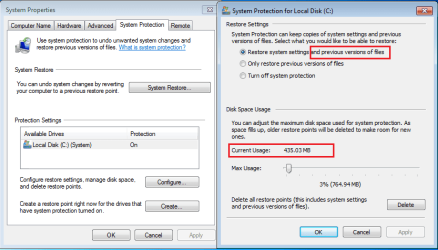
Can you post a snip of that? IT doesn't work for me.after searching around i found this and it worked for me:
Hey, I figured out how to get my all programs folders restored to where they were no longer empty.
1)Go to the startup icon
2)then put cursor over "All Programs" and right click and click on "open"
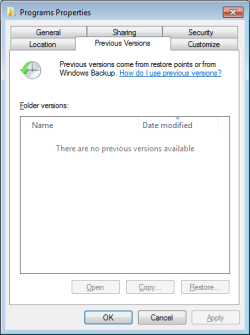
3) then select the "programs" folder and right click and select "properties"
4) then select the "previous version" tab, await the previous versions to show up and select the folder that existed prior to your problems and hit restore and follow through with prompts.
This is the preferred, best way to upload an image to a post.
http://www.sevenforums.com/tutorials/9733-screenshots-files-upload-post-seven-forums.html#post93869
You may also upload a photo or image as you would a file, without using the Snipping tool.
My Computer
At a glance
Windows 7 Ultimate X64 SP1Intel i5-2550K, Differing ~4.4-4.8GHz No buil...16GB G.Skill Sniper 1866MHz @ 2133MHz 2x8GBASUS GTX650TIB-DC2OC-2GD5, (650TI Boost)
- Computer type
- PC/Desktop
- Computer Manufacturer/Model Number
- Home Built Desktop By DataTech
- OS
- Windows 7 Ultimate X64 SP1
- CPU
- Intel i5-2550K, Differing ~4.4-4.8GHz No built in GPU
- Motherboard
- ASUS P8Z68-V PRO/GEN3
- Memory
- 16GB G.Skill Sniper 1866MHz @ 2133MHz 2x8GB
- Graphics Card(s)
- ASUS GTX650TIB-DC2OC-2GD5, (650TI Boost)
- Sound Card
- Onboard Realtek 5-1
- Monitor(s) Displays
- Samsung P2570HD
- Screen Resolution
- 1920x1080
- Hard Drives
- Samsung 840 Pro 256GB SSD for OS, 500GB Seagate Constellation (Enterprise drive) for Data
- PSU
- Corsair HX650W
- Case
- Inwin Dragon Rider
- Cooling
- Hyper 212 EVO w/two Noctua fans, push-pull, @1300 RPM
- Keyboard
- E-Z Eyes, bright yellow keys with large characters
- Mouse
- steelseries SENSEI Laser Pro Gaming
- Internet Speed
- 48-51Mbs Mbs down, 11 Mbs up Xfinity Cable
- Antivirus
- Norton Internet Security 2013
- Browser
- IE 10, Opera, Pale Moon if needed
- Other Info
- 4 case fans, LG BluRay-RE, ASUS DVD-RW, Mr. Fusion power supply, 1.21 gigawatts.