motherboard battery???

SeanHellen

New member
Local time
7:08 AM
Messages
48
Hi again

I have an asus crosshair iv formula mobo and if I switch pc on, do what Im gonna do and switch off...then come back to it that night, its fine. :)

However, if I leave it overnight and all next day, I come back to it and it comes up with the bad checksum error. :(

Reading up on this, I have worked my way through any possabilities it could be (bad windows shutdown, battery, etc) and nothing has worked.

The only thing I can think of:- is there a "recharging" circuit on the mobo to recharge the battery that could be not working properly and therefore the battery is just going flat?

I have changed the battery for a new one, but same goes :cry:
 

My Computer

OS
Windows 7 Ultimate 64Bit
CPU
Phenom II X4 965
Motherboard
Crosshair IV Formula
Memory
6GB DDR3
Graphics Card(s)
Ati Radeon HD 4300/4500 Series
Sound Card
Onboard
Monitor(s) Displays
Old Dell LCD Display
Hard Drives
Samsung 1TB (Primary, With OS)
2 x Maxtor 160GB
PSU
ATX-500 500W
Case
KD-51
Cooling
Standard
Most motherboard batteries(at least all I have seen )are lithium, any attempt to recharge can result in fire, or explosion...so no recharging circuit....Have you done a BIOS update?
 

My Computer

Computer type
PC/Desktop
Computer Manufacturer/Model Number
Custom
OS
windows 10 pro 64 bit
CPU
i5 4690K@4500 COOLER MASTER Seidon 120M water cooler
Motherboard
ASUS SABERTOOTH Z87 LGA 1150 Intel
Memory
16gb Kingston HyperX DDR3 1600
Graphics Card(s)
EVGA GTX 1070 sc
Monitor(s) Displays
BenQ GL2760H Black 27" 2ms HDMI Widescreen LED 1920X1080
Screen Resolution
DSR 2103X1183
Hard Drives
ADATA 256 gig SSD + 4 junk
PSU
EVGA supernova 750
Case
coolermaster
Cooling
many...
Keyboard
z merc
Mouse
Logitech wireless G602
Internet Speed
2.5mbs cable
I havent tried that yet...will give it a go when i get home...ill bugger i up somehow though, i guarantee it lol :D
 

My Computer

OS
Windows 7 Ultimate 64Bit
CPU
Phenom II X4 965
Motherboard
Crosshair IV Formula
Memory
6GB DDR3
Graphics Card(s)
Ati Radeon HD 4300/4500 Series
Sound Card
Onboard
Monitor(s) Displays
Old Dell LCD Display
Hard Drives
Samsung 1TB (Primary, With OS)
2 x Maxtor 160GB
PSU
ATX-500 500W
Case
KD-51
Cooling
Standard
I havent tried that yet...will give it a go when i get home...ill bugger i up somehow though, i guarantee it lol :D

If you do were here to help
 

My Computer

Computer Manufacturer/Model Number
Dell Optiplex 980
OS
Win7 x64 Ultimate SP1
CPU
Intel i7-2600
Memory
8 Gig
Graphics Card(s)
Geforce gt 520
Monitor(s) Displays
LG & Acer
Screen Resolution
1920x1080
Internet Speed
Fios 45/35
Other Info
Windows Home Server
I'd use the ASUS Easy Flash software. You use a USB Flash. The software just makes it easier. Read up on it in your manual or get the manual on line in same section as the downloads and bios.

Mike
 

My Computer

Computer Manufacturer/Model Number
Hopalong/ Godzilla
OS
Windows7 Pro 64bit SP-1; Windows XP Pro 32bit
CPU
Intel Core i7-870 Lynnfield 2.93GHz LGA 1156 95W Quad-Core
Motherboard
ASUS P7P55D-E PRO
Memory
8GB@1400MHz Crucial Ballistix DDR3-1600 4x2GB
Graphics Card(s)
ASUS ENGTX460 DirectCU/2DI/1GD5 1GB 256-bit GDDR5
Sound Card
VIA Onboard
Monitor(s) Displays
Asus VS248H-P 24"; Samsung SyncMaster 941BW 19"ws
Screen Resolution
1920x1080; 1440x900
Hard Drives
Samsung 830 120GB SSD
Intel 320 120GB SSD
Western Digital Caviar Black WD7501AALS 750GB 7200 RPM SATA 3.0Gb/s
Western Digital Caviar Black WD6401AALS 640GB 7200 RPM SATA 3.0Gb/s
PSU
COOLER MASTER Silent Pro RS850-AMBAJ3-US 850W Modular
Case
COOLER MASTER HAF 932 RC-932-KKN5-GP Black
Cooling
Scythe "Mugen-2 Rev.B" (2 ScytheKaze-Jyuni PWM fans)
Keyboard
Logitech K-320
Mouse
Kensington
Antivirus
Avast Inernet Suite
Browser
IE 9 ; Chrome
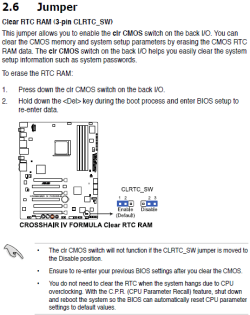
It is possible that the data in the CMOS has become corrupt. Have you tried this (you will, of course, need to re-enter any settings that are different to the default)?

Capture.PNG
 

My Computer

Computer type
PC/Desktop
Computer Manufacturer/Model Number
Dwarf Dwf/11/2012 r09/2013
OS
Windows 8.1 Pro RTM x64
CPU
Intel Core-i5-3570K 4-core @ 3.4GHz (Ivy Bridge) (OC 4.4GHz)
Motherboard
ASRock Z77 Extreme4-M
Memory
4 x 4GB DDR3-1600 Corsair Vengeance CMZ8GX3M2A1600C9B (16GB)
Graphics Card(s)
MSI GeForce GTX770 Gaming OC 2GB
Sound Card
Realtek High Definition on board solution (ALC 898)
Monitor(s) Displays
ViewSonic VA1912w Widescreen (VGA)
Screen Resolution
1440x900
Hard Drives
OCZ Agility 3 SSD 120GB SATA III x2 (RAID 0)
Samsung HD501LJ 500GB SATA II x2
Hitachi HDS721010CLA332 1TB SATA II
Iomega 1.5TB Ext USB 2.0
WD 2.0TB Ext USB 3.0
PSU
XFX Pro Series 850W Semi-Modular
Case
Gigabyte IF233
Cooling
1 x 120mm Front Inlet 1 x 120mm Rear Exhaust
Keyboard
Microsoft Comfort Curve Keyboard 3000 (USB)
Mouse
Microsoft Comfort Mouse 3000 for Business (USB)
Internet Speed
NetGear DG834Gv3 ADSL Modem/Router (Ethernet) ~4.0 Mb/s (O2)
Antivirus
Avast! 8.0.1497
Browser
IE 11
Other Info
Optical Drive: HL-DT-ST BD-RE BH10LS30 SATA Bluray
Lexmark S305 Printer/Scanner/Copier (USB)
WEI Score: 8.1/8.1/8.5/8.5/8.25
Asus Eee PC 1011PX Netbook (Windows 7 x86 Starter)
Ta guys. Ill have a look when i get back. The only way to get it going again is press the clear cmos button and reset the boot sequence back again

***EDIT***

Ok, Im back and flashed new BIOS file so fingers crossed will let you know tomorrow..fingers crossed :)
 
Last edited:

My Computer

OS
Windows 7 Ultimate 64Bit
CPU
Phenom II X4 965
Motherboard
Crosshair IV Formula
Memory
6GB DDR3
Graphics Card(s)
Ati Radeon HD 4300/4500 Series
Sound Card
Onboard
Monitor(s) Displays
Old Dell LCD Display
Hard Drives
Samsung 1TB (Primary, With OS)
2 x Maxtor 160GB
PSU
ATX-500 500W
Case
KD-51
Cooling
Standard
ok guys, bios flashed. Good news is that I left it overnight and next day and it started and didnt say bad checksum, etc.

Bad news is that it said something else that I didnt have time to read, then it said turn your system off then back on to get your system (or settings, cant remember) back...so I did, then had to go to bios and put settings in again...so bios telling me exact same as before, just in a different way, lol. will try again tonight and see what happens..maybe its because it was the first time I had turned off sincce ios flash and it didnt like it lol :D
 

My Computer

OS
Windows 7 Ultimate 64Bit
CPU
Phenom II X4 965
Motherboard
Crosshair IV Formula
Memory
6GB DDR3
Graphics Card(s)
Ati Radeon HD 4300/4500 Series
Sound Card
Onboard
Monitor(s) Displays
Old Dell LCD Display
Hard Drives
Samsung 1TB (Primary, With OS)
2 x Maxtor 160GB
PSU
ATX-500 500W
Case
KD-51
Cooling
Standard
Contrary to what was said above, the CMOS battery is recharged by the system. I can't say that this is true with all CMOS batteries, but I think that it is. If you have SpeedFan installed, the value Vbat is the voltage of the recharging circuit, not that of the battery. Even with a known good new battery, and with a sufficient Vbat voltage, the battery can become low due to poor contact in it's socket. If you have never removed the battery, it is not too likely that the problem is with the contacts, but if you have, it is possible that one of them was bent slightly, causing the issue.
 

My Computer

Computer Manufacturer/Model Number
DIY
OS
W7x64 Pro, SuSe 12.1/** W7 x64 Pro, XP MCE
CPU
Phenom II 1090T w/Noctua NH-D14 /**4400+ X2 w/CM Hyper TX 3
Motherboard
ASRock 890FX Deluxe 4/**A8N-SLI
Memory
2 x 2GB Patriot PGS34g1600LLKA/**4x1GB Corsair VS
Graphics Card(s)
EVGA GTX460 SC/**EVGA 8800GTS
Sound Card
Asus Xonar D2X/**Xonar D1
Monitor(s) Displays
Acer X233H, Dell E152FPc /**LG M237-WD
Screen Resolution
1920x1080 & 1024x768/**1980x1080
Hard Drives
WDC 2TB, 1.5TB, 1TB, 500GB,Seagate 500GB , Maxtor 80GB /**500GB Seagate & WDC 1TB Black
PSU
CM RS600 w/ APC BX1000G/**Antec 500 TP w/ APC BX1000
Case
HAF922/**Antec 1040IIB
Cooling
3x200mm, 1x140 and 1x120mm/**5x80mm fans
Keyboard
Logitech Media USB/**Saitek Eclipse
Mouse
Cordless Trackman Wheel/**Ditto
Internet Speed
3.3Mbps
Other Info
SB 560 5.1 w/ Sennheiser RS140/**Creative T20 speakers, Dvico FusionHDTV7 Gold RT, Cisco E3000, HP 5510V AIO, Linksys E3000, Belkin F5U237 hub and **F5D8055 adapter
(** = 2nd rig)
Hi - I havent got speedfan installed..to my limited knowledge :D

I thought batts may get recharged as my last pc had one for its entire life (well over a decade) without having having a change.

It was out of this pc, however that I got the battery from for this one - thinking this problem was related to the old battery, I just took it out and replaced with the new one that came with the mobo, but still the same thing :)
 

My Computer

OS
Windows 7 Ultimate 64Bit
CPU
Phenom II X4 965
Motherboard
Crosshair IV Formula
Memory
6GB DDR3
Graphics Card(s)
Ati Radeon HD 4300/4500 Series
Sound Card
Onboard
Monitor(s) Displays
Old Dell LCD Display
Hard Drives
Samsung 1TB (Primary, With OS)
2 x Maxtor 160GB
PSU
ATX-500 500W
Case
KD-51
Cooling
Standard
You don't have to have SpeedFan installed, but it is a handy monitor to have. The fact that the problem wasn't effected by changing batteries suggests that the problem may be with the contacts instead. It is not always easy to determine by a visual inspection, but that is where I would start.
Get a strong light, and if necessary a magnifying glass (for weak eyes like mine), and make certain that there is NO gap between the contact and the battery. It may be possible to use some kind of non-conductive shim to force the contact toward the battery, if there is any doubt. The contact that I'm talking about is the upper one that locks the battery in place.
 

My Computer

Computer Manufacturer/Model Number
DIY
OS
W7x64 Pro, SuSe 12.1/** W7 x64 Pro, XP MCE
CPU
Phenom II 1090T w/Noctua NH-D14 /**4400+ X2 w/CM Hyper TX 3
Motherboard
ASRock 890FX Deluxe 4/**A8N-SLI
Memory
2 x 2GB Patriot PGS34g1600LLKA/**4x1GB Corsair VS
Graphics Card(s)
EVGA GTX460 SC/**EVGA 8800GTS
Sound Card
Asus Xonar D2X/**Xonar D1
Monitor(s) Displays
Acer X233H, Dell E152FPc /**LG M237-WD
Screen Resolution
1920x1080 & 1024x768/**1980x1080
Hard Drives
WDC 2TB, 1.5TB, 1TB, 500GB,Seagate 500GB , Maxtor 80GB /**500GB Seagate & WDC 1TB Black
PSU
CM RS600 w/ APC BX1000G/**Antec 500 TP w/ APC BX1000
Case
HAF922/**Antec 1040IIB
Cooling
3x200mm, 1x140 and 1x120mm/**5x80mm fans
Keyboard
Logitech Media USB/**Saitek Eclipse
Mouse
Cordless Trackman Wheel/**Ditto
Internet Speed
3.3Mbps
Other Info
SB 560 5.1 w/ Sennheiser RS140/**Creative T20 speakers, Dvico FusionHDTV7 Gold RT, Cisco E3000, HP 5510V AIO, Linksys E3000, Belkin F5U237 hub and **F5D8055 adapter
(** = 2nd rig)
That was going to be my next question...which contact, lol. Do you mean the one that sort of makes its way round the outside of the battery? The battery has nothing on top of it, other than a small clip thing attached to a metal ring that goes round the outside - i assume this clip is to keep the battery in.
 

My Computer

OS
Windows 7 Ultimate 64Bit
CPU
Phenom II X4 965
Motherboard
Crosshair IV Formula
Memory
6GB DDR3
Graphics Card(s)
Ati Radeon HD 4300/4500 Series
Sound Card
Onboard
Monitor(s) Displays
Old Dell LCD Display
Hard Drives
Samsung 1TB (Primary, With OS)
2 x Maxtor 160GB
PSU
ATX-500 500W
Case
KD-51
Cooling
Standard
Yes, that clip is also a contact. Take something like a match, or something else (non-conductive) that is stiff enough to move that contact toward the battery. If there is any movement, then the contact may not be sufficient. You may need to remove the battery to be able to bend that contact toward the battery, but that bending would need to be done very carefully to prevent damage to the contact, or bending it so much that it interferes with placing the battery back into the socket.
 

My Computer

Computer Manufacturer/Model Number
DIY
OS
W7x64 Pro, SuSe 12.1/** W7 x64 Pro, XP MCE
CPU
Phenom II 1090T w/Noctua NH-D14 /**4400+ X2 w/CM Hyper TX 3
Motherboard
ASRock 890FX Deluxe 4/**A8N-SLI
Memory
2 x 2GB Patriot PGS34g1600LLKA/**4x1GB Corsair VS
Graphics Card(s)
EVGA GTX460 SC/**EVGA 8800GTS
Sound Card
Asus Xonar D2X/**Xonar D1
Monitor(s) Displays
Acer X233H, Dell E152FPc /**LG M237-WD
Screen Resolution
1920x1080 & 1024x768/**1980x1080
Hard Drives
WDC 2TB, 1.5TB, 1TB, 500GB,Seagate 500GB , Maxtor 80GB /**500GB Seagate & WDC 1TB Black
PSU
CM RS600 w/ APC BX1000G/**Antec 500 TP w/ APC BX1000
Case
HAF922/**Antec 1040IIB
Cooling
3x200mm, 1x140 and 1x120mm/**5x80mm fans
Keyboard
Logitech Media USB/**Saitek Eclipse
Mouse
Cordless Trackman Wheel/**Ditto
Internet Speed
3.3Mbps
Other Info
SB 560 5.1 w/ Sennheiser RS140/**Creative T20 speakers, Dvico FusionHDTV7 Gold RT, Cisco E3000, HP 5510V AIO, Linksys E3000, Belkin F5U237 hub and **F5D8055 adapter
(** = 2nd rig)
Sorry, but the CMOS battery (the CR2032 lithium button cell) is NOT rechargeable. Some motherboards include a diode in series with the battery to prevent both damage to the battery (which can be caused by it being charged when it is not intended to be) and to the CMOS chip should the battery be inadverently inserted the wrong way round.

This video shows how to change a typical motherboard battery.


My Computer

Computer type
PC/Desktop
Computer Manufacturer/Model Number
Dwarf Dwf/11/2012 r09/2013
OS
Windows 8.1 Pro RTM x64
CPU
Intel Core-i5-3570K 4-core @ 3.4GHz (Ivy Bridge) (OC 4.4GHz)
Motherboard
ASRock Z77 Extreme4-M
Memory
4 x 4GB DDR3-1600 Corsair Vengeance CMZ8GX3M2A1600C9B (16GB)
Graphics Card(s)
MSI GeForce GTX770 Gaming OC 2GB
Sound Card
Realtek High Definition on board solution (ALC 898)
Monitor(s) Displays
ViewSonic VA1912w Widescreen (VGA)
Screen Resolution
1440x900
Hard Drives
OCZ Agility 3 SSD 120GB SATA III x2 (RAID 0)
Samsung HD501LJ 500GB SATA II x2
Hitachi HDS721010CLA332 1TB SATA II
Iomega 1.5TB Ext USB 2.0
WD 2.0TB Ext USB 3.0
PSU
XFX Pro Series 850W Semi-Modular
Case
Gigabyte IF233
Cooling
1 x 120mm Front Inlet 1 x 120mm Rear Exhaust
Keyboard
Microsoft Comfort Curve Keyboard 3000 (USB)
Mouse
Microsoft Comfort Mouse 3000 for Business (USB)
Internet Speed
NetGear DG834Gv3 ADSL Modem/Router (Ethernet) ~4.0 Mb/s (O2)
Antivirus
Avast! 8.0.1497
Browser
IE 11
Other Info
Optical Drive: HL-DT-ST BD-RE BH10LS30 SATA Bluray
Lexmark S305 Printer/Scanner/Copier (USB)
WEI Score: 8.1/8.1/8.5/8.5/8.25
Asus Eee PC 1011PX Netbook (Windows 7 x86 Starter)
Standard 2032 button-cell batteries tend to explode if one if you attempt to charge it. The motherboard has a diode to prevent the battery from charging.
 

My Computer

Computer type
PC/Desktop
Computer Manufacturer/Model Number
Custom
OS
windows 10 pro 64 bit
CPU
i5 4690K@4500 COOLER MASTER Seidon 120M water cooler
Motherboard
ASUS SABERTOOTH Z87 LGA 1150 Intel
Memory
16gb Kingston HyperX DDR3 1600
Graphics Card(s)
EVGA GTX 1070 sc
Monitor(s) Displays
BenQ GL2760H Black 27" 2ms HDMI Widescreen LED 1920X1080
Screen Resolution
DSR 2103X1183
Hard Drives
ADATA 256 gig SSD + 4 junk
PSU
EVGA supernova 750
Case
coolermaster
Cooling
many...
Keyboard
z merc
Mouse
Logitech wireless G602
Internet Speed
2.5mbs cable
Dwarf is correct the CR2032's are not rechargeable in any fashion. They last for quite some time but as most can lay around on the mobo's for months before we get them it's always a good idea to have some new cells available for when they go. I would say they normally go in and around 3-4 years when fresh.
 

My Computer

Computer type
PC/Desktop
Computer Manufacturer/Model Number
A blend of brains, brawn and dumb luck.
OS
Windows 7 Ultimate 64
CPU
i7 3770k OC'd 4.6 @ 1.17v, also FX 8120 & i5 miniITX
Motherboard
MSI P67A-GD80 b3
Memory
32 gb G.Skill Sniper DDR3 10-12-12-31 @ 2133
Graphics Card(s)
XFX Radeon 7870 2GB DDR5
Sound Card
Sound Blaster Z Series Card
Monitor(s) Displays
(2) LG LED 23" 1920 x 1080 2ms Monitors via mini d-port
Screen Resolution
1680 X 1050 p
Hard Drives
Samsung 256 gb 830 SSD sata III
(1) 1 tb WD Black
(2) 1 tb Hitachi deskmates/sata II
(2) 1 tb WD green/sata II
(2) 3 tb Seagate Barracuda
(1) 120 gb OCZ Vertex SS
(1) Drobo 5N w/5 Seagate 3tb
PSU
EVGA modular 1000G2 80% gold rating & APC 1200 RS
Case
CoolerMaster Storm Styker
Cooling
7 case fans 140mm & 120mm, NZXT Kraken X60
Keyboard
(2) Logitech Illuminated Keyboards (1) usb (1) wireless
Mouse
Logitech G700 & T-BC21 - nano nx for the laptop
Internet Speed
Basic 120mbps down
Antivirus
Trend Micro Titanium Max Security & Malwarebytes Premium
Browser
Chrome and IE 10
Other Info
5 Noctua case fans + 3 Noctua in p/p on NZXT cooler
Integrated hot swap drive bays for 2.5" Drives
(2) Lite-on dvd/cd/Blu Ray optical 22X
Integrated fan controller and led on/off
HP Officejet Pro 8630 all-n-one
Hot-swappable 3.5" hard drive bay
Netgear Nighthawk router
Asus USB 3 & sata 6 PCIe card
Vantec IDE to sata adptr./Ultra sata adptr
Lenovo L420 i5 lappy with m sata
Drobo 5N advanced NAS
Ok, so theyre not rechargeable lol. Ill see what happens when i get back tonight
 

My Computer

OS
Windows 7 Ultimate 64Bit
CPU
Phenom II X4 965
Motherboard
Crosshair IV Formula
Memory
6GB DDR3
Graphics Card(s)
Ati Radeon HD 4300/4500 Series
Sound Card
Onboard
Monitor(s) Displays
Old Dell LCD Display
Hard Drives
Samsung 1TB (Primary, With OS)
2 x Maxtor 160GB
PSU
ATX-500 500W
Case
KD-51
Cooling
Standard
I guess I'm missing something why not just break down and spend a coupe bucks and get a new one? I have several on hand all the time some from other boards that were fried but just the same it's not like their expensive.
Maybe it's just me but.....
Fabe
 

My Computer

Computer Manufacturer/Model Number
Self Built
OS
Windows 7 ultimate 64 bit / XP Home sp3
CPU
intel Core 2 Duo E8400 3.0ghz
Motherboard
Asus P5ND bios 1401
Memory
8 gigs 1066 OCZ Fata1ty
Graphics Card(s)
EVGA GTX 580 Call of Duty Black Ops Edition
Sound Card
Creative Soundblaster Audigy 2zs
Monitor(s) Displays
Asus 24in LCD's 2MS X2
Screen Resolution
1920x1080p @60Hz
Hard Drives
WD Caviar 500 Black/ WD Caviar 200 Blue
PSU
OCZ 700W GameXtreme
Case
NZXT Apollo
Cooling
Corsair H50 CPU/120mm x3 /60mm x2 /Corsair Dominator Ram
Keyboard
Logitech Bluetooth Wireless MX5000
Mouse
Logitech Bluetooth Wireless MX1000
Internet Speed
Download 19.83 Upload 0.97
Other Info
Logitech Z2300 Speakers/ Bose Noise Cancelling Headphones/Avermedia PCI-e Hybrid TV Bravo/Epson NX415 all in one/ 4 Port Powered USB Hub/ LG 10x Bluray Burner /TSST Corp DVDRW External
Theres a new one in at the moment. Came with the board. Did have an old 1 from another board, i blamed the problem on that battery...i was wrong
 

My Computer

OS
Windows 7 Ultimate 64Bit
CPU
Phenom II X4 965
Motherboard
Crosshair IV Formula
Memory
6GB DDR3
Graphics Card(s)
Ati Radeon HD 4300/4500 Series
Sound Card
Onboard
Monitor(s) Displays
Old Dell LCD Display
Hard Drives
Samsung 1TB (Primary, With OS)
2 x Maxtor 160GB
PSU
ATX-500 500W
Case
KD-51
Cooling
Standard
Most motherboard batteries(at least all I have seen )are lithium, any attempt to recharge can result in fire, or explosion...so no recharging circuit....Have you done a BIOS update?

We got kinda derailed here....a bad BIOS flash or a corrupted one can make a checksum error.....a new Bios can also make the error since it's a different size from the old one......

I just asked if you done a BIOS update YES/NO....I wasn't going to suggest a BIOS update, why?...if the power blips, or something goes wrong it can(maybe) brick your motherboard:shock:...updating the BIOS can also void the warranty....

Next step clear the CMOS as suggested by Dwarf....look in the paperwork for the exact procedure.....Next try a different(new)battery, or test with a multi-meter....if all that comes out good.....bad CMOS chip on the motherboard....:cry:if it was a virus the problem would show up on reboot instead of being time dependent....

See the problem....The BIOS has been updated, now they have the perfect out to deny warranty replacement:rolleyes:.

What is done is done...no need crying over spilt milk....check on the warranty, play dumb (BIOS what?)....maybe you can get a board without too much trouble;)
 

My Computer

Computer type
PC/Desktop
Computer Manufacturer/Model Number
Custom
OS
windows 10 pro 64 bit
CPU
i5 4690K@4500 COOLER MASTER Seidon 120M water cooler
Motherboard
ASUS SABERTOOTH Z87 LGA 1150 Intel
Memory
16gb Kingston HyperX DDR3 1600
Graphics Card(s)
EVGA GTX 1070 sc
Monitor(s) Displays
BenQ GL2760H Black 27" 2ms HDMI Widescreen LED 1920X1080
Screen Resolution
DSR 2103X1183
Hard Drives
ADATA 256 gig SSD + 4 junk
PSU
EVGA supernova 750
Case
coolermaster
Cooling
many...
Keyboard
z merc
Mouse
Logitech wireless G602
Internet Speed
2.5mbs cable
Back
Top