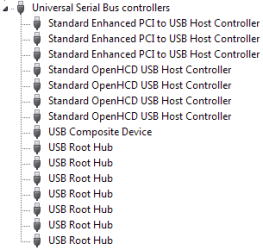
I posted a thread a while ago, and I thought something was preventing my computer from sleeping (Mouse or keyboard), but I have tried the lastwake command and it will say my keyboard at first, but keeps coming up with something else that awakened it my computer from sleep (As I disable all the things preventing sleep from device manager).
I was talking to my mouse' manufacturer support and apparently it's a setting in allot of motherboards that do not turn off USB devices after the system is shut down.
The thing I don't understand is, I have my computer set to sleep whenever it's left idle for something like 30-60 minutes, and it sleeps without waking straight after. It's just if I click 'Sleep' from the start menu, it won't do it .
.
I have looked around in my Asus M4A89GTD PRO BIOS but can't find it, I tried disabling some things but didn't do as I wanted. At this point I don't know if it's my motherboard or if it is indeed a USB device.
I was talking to my mouse' manufacturer support and apparently it's a setting in allot of motherboards that do not turn off USB devices after the system is shut down.
The thing I don't understand is, I have my computer set to sleep whenever it's left idle for something like 30-60 minutes, and it sleeps without waking straight after. It's just if I click 'Sleep' from the start menu, it won't do it
.I have looked around in my Asus M4A89GTD PRO BIOS but can't find it, I tried disabling some things but didn't do as I wanted. At this point I don't know if it's my motherboard or if it is indeed a USB device.
My Computer
At a glance
10 Home x64Intel Core i5 4670KCorsair XMS3 8GB DDr3 1600MHzSapphire NITRO Radeon R9 Fury
- Computer type
- PC/Desktop
- OS
- 10 Home x64
- CPU
- Intel Core i5 4670K
- Motherboard
- Gigabyte GA-Z87-D3HP
- Memory
- Corsair XMS3 8GB DDr3 1600MHz
- Graphics Card(s)
- Sapphire NITRO Radeon R9 Fury
- Sound Card
- Asus Xonar DX
- Monitor(s) Displays
- Acer H236HLbmjd
- Screen Resolution
- 1920x1080
- Hard Drives
- Force GS 128GB - Seagate 320GB - WD Caviar Black 1TB - WD Caviar Blue 500GB
- PSU
- EVGA SuperNOVA 650 P2
- Case
- Silverstone Raven 3 RV03B-W
- Keyboard
- Topre Realforce 104UG-HiPro
- Mouse
- Mionix Naos 7000
- Internet Speed
- 76/4 On a good day
- Antivirus
- SmartScreen
- Browser
- Internet Explorer 11