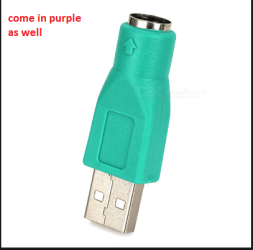
Hey now they are right and if you can get into safe mode (tap F8 when powering up) load the drivers for the machine from a stick. Now safe mode itself may need a login password but if you know it then you should be able to type it in and login.
Once in although you have no mouse or touch pad control you should be able to move from Start (Windows button) and using the arrows keys to get to where you want to, find the stick and click enter and arrow key to the driver you want.
Another way might be to do this
BOOTABLE UBUNTU
Make a bootable Ubuntu disk http://www.ubuntu.com/download
Set the BIOS to boot from theoptical when the machine boots it will show you a screen with TRY or INSTALL> select TRYnot INSTALL
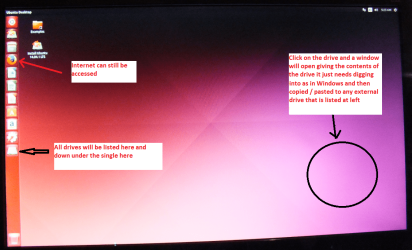
When it is finished - it takes verylittle time you will get a screen like in the pic .
Open the drive you want > Userand dig down until you get to the data / settings you may be able to copy /paste the material you want to an external source or other installed drive doingthis.
I am not sure if it will but I haverecovered tons of data etc using this method both on "dead" or justplain drives that you cannot get data from using Windows.
You will be able to move around inside this OS and install drivers from the stick that will be listed in drives to the C: drive and the Ubuntu works completely independently of Windows. But make sure you only use TRY not INSTALL
Once in although you have no mouse or touch pad control you should be able to move from Start (Windows button) and using the arrows keys to get to where you want to, find the stick and click enter and arrow key to the driver you want.
Another way might be to do this
BOOTABLE UBUNTU
Make a bootable Ubuntu disk http://www.ubuntu.com/download
Set the BIOS to boot from theoptical when the machine boots it will show you a screen with TRY or INSTALL> select TRYnot INSTALL
When it is finished - it takes verylittle time you will get a screen like in the pic .
Open the drive you want > Userand dig down until you get to the data / settings you may be able to copy /paste the material you want to an external source or other installed drive doingthis.
I am not sure if it will but I haverecovered tons of data etc using this method both on "dead" or justplain drives that you cannot get data from using Windows.
You will be able to move around inside this OS and install drivers from the stick that will be listed in drives to the C: drive and the Ubuntu works completely independently of Windows. But make sure you only use TRY not INSTALL
Attachments
My Computer
At a glance
Desk1 7 Home Prem / Desk2 10 Pro / Main lap A...Desk1 i5 3750K / Laptop i7 GTX 860M / Desk2 i...Desk1 8GB (1866) / Desk2 16GB (1333) / Laptop...Desk 1& 2NVidia GTX 650 & Laptops on board Intel
- Computer type
- PC/Desktop
- Computer Manufacturer/Model Number
- Own build (new) Desk1 / Asus ROG Win 7 / Desk2 1st build
- OS
- Desk1 7 Home Prem / Desk2 10 Pro / Main lap Asus ROG 10 Pro 2 laptop Toshiba 7 Pro Asus P2520 7 & 10
- CPU
- Desk1 i5 3750K / Laptop i7 GTX 860M / Desk2 i5 2500
- Motherboard
- Desk1 Asus P877-V / Desk2 Gigabyte H67 UD3H / Laptop ?
- Memory
- Desk1 8GB (1866) / Desk2 16GB (1333) / Laptop 8Gb DDR3
- Graphics Card(s)
- Desk 1& 2NVidia GTX 650 & Laptops on board Intel
- Sound Card
- Desk 1 & 2 -XONAR DG Realtek High Def audio Laptop
- Monitor(s) Displays
- Desk 1 Benq HD 2450 / Desk2 Philips 24" / Laptop 17.5"
- Screen Resolution
- 1920x1080 D1 & D2 & Laptop 1
- Hard Drives
- Desk1 Samsung 120GB 830 SSD
Asus ROG 256GB 850 Pro SSD
Desk2 Samsung 840 256 SSD
Toshiba 120GB EVO
- PSU
- Desk 1 Corsair HX 1050/ Laptop ? / Desk 2 Corsair HX 650
- Case
- Desk 1 Cooler HAF XM ? Toshiba laptop / Desk2 Coolermaster
- Cooling
- Fans on all Desk1 -2 Desk2 - all Coolermasters 5 Laptop ?
- Keyboard
- Desk 1 MS Sidewinder X6 Desk 2 MS Sidewinder X 4
- Mouse
- Desk 1&2 - Gigabyte MS 900 gamer - laptop - Logitec wireless
- Internet Speed
- ADSL2+
- Other Info
- One other Desktop (tester) and spare Toshba laptop both with SSD's
Running Kaspersky 2016 ISS on all machines config'd identically
Logitec audio stereo systems on each machine (x3)
Canon MG5250MFC
Router/modem TP-Link running WPA2SK